LLM WikiLLM Wiki: A Second Brain the AI Writes and Keeps Tidy.
An LLM wiki is a personal knowledge base that an AI agent writes and maintains for you. You drop sources into a folder; the model compiles them into interlinked markdown pages, answers your questions from those pages and checks them for errors. Andrej Karpathy described the pattern in April 2026, and it started the wave of AI second brains built with Claude Code and Obsidian. Here is what he proposed, how it differs from RAG, and an honest guide to building one.
Created by Andrej Karpathy, described the pattern in April 2026.
An LLM wiki is a personal knowledge base that a large language model builds and maintains, instead of one you write yourself. You collect sources such as articles, papers, transcripts and notes in a folder. An AI agent reads each one and folds what it learned into a set of interlinked markdown pages: a summary of the source, pages for the people, ideas and terms it mentions, and edits to every existing page those touch. The idea comes from Andrej Karpathy, an AI researcher and educator who was a founding member of OpenAI and later Director of AI at Tesla. He described his own setup in an X post titled "LLM Knowledge Bases" on 2 April 2026, and two days later published the pattern as a GitHub gist called "LLM Wiki". Those two posts are what people mean when they talk about the Karpathy second brain, or an AI second brain with Claude.
The gist describes three layers. Raw sources are your curated documents, and they are treated as immutable: the model reads them and never edits them, so they remain the source of truth. The wiki is a directory of model-written markdown files: summaries, entity pages, concept pages, comparisons, an overview and a running synthesis. Karpathy is explicit that the model owns this layer. You read it; the model writes it. The third layer is the schema, a document such as CLAUDE.md for Claude Code or AGENTS.md for OpenAI's Codex, which tells the agent how the wiki is organized and which routine to follow for each job. He calls it the key configuration file, the thing that turns a general chatbot into a disciplined maintainer, and expects you and the model to refine it together as you learn what your topic needs.
Three operations run on top of the layers. Ingest: you drop a new source into the raw folder and ask the agent to process it. It reads the source, talks through the main points with you, writes a summary page, updates the index and the relevant entity and concept pages, and adds a line to a log. Karpathy estimates that one source might touch 10 to 15 wiki pages, and says he prefers to ingest one at a time and stay involved. Query: you ask questions, and the agent finds the relevant pages, reads them and answers with citations, as a page, a table, a slide deck or a chart. Lint: every so often you ask it to health-check the wiki for contradictions between pages, claims that newer sources have overtaken, orphan pages that nothing links to, concepts that deserve a page of their own, and gaps a web search could fill.
What makes it different is when the work happens. Most tools that answer from your documents, and Karpathy names NotebookLM and ChatGPT file uploads among them, retrieve fragments when you ask and assemble an answer from scratch every time. Nothing accumulates. In an LLM wiki the synthesis is written down once and then kept current, so the cross-references and the flagged contradictions already exist when you ask. At the time of his post, his wiki on one research topic was about 100 articles and 400,000 words. He wrote that he had expected to need "fancy RAG", but the model's own index files and short summaries were enough at that size. Good answers go back into the wiki as new pages, so his questions, as he put it, "add up" in the knowledge base.
It spread quickly. The X post had passed 22 million views by November 2026, and within days there were video tutorials, starter templates and tools built on it. Part of the appeal is the framing in the gist: Obsidian as the editor you browse in, the model as the programmer, the wiki as the codebase it maintains. But the gist is deliberately abstract. It describes a pattern, not a product, and Karpathy closed his post by saying there was room for a real product in place of his "hacky collection of scripts". The rest of this guide is one practical way to build the pattern, with what tends to go wrong. If you are new to the wider idea, our explainer on the AI second brain covers the background.
From the source
Watch It Explained
A beginner setup from vault to first lint, with Obsidian and Claude Code. Teacher's Tech, April 2026.
Who it is for
Who an LLM wiki is for
Researchers going deep on one topic
This is the case Karpathy built it for: weeks or months of reading papers, articles and reports on one question, with a thesis that evolves as you go. The wiki gives you a page for every paper, a page for every method, dataset or person that keeps coming up, and a synthesis page that changes when the evidence does. The most valuable habit here is flagging contradictions: when source 23 disagrees with source 4, the model notes it on both pages instead of leaving you to remember. The worked example further down follows a month of this kind of reading.
Readers of long books and courses
The gist suggests filing each chapter of a book as you read and letting the model build pages for characters, places, themes and plot threads, so that by the last page you own a companion wiki, a personal version of the fan wikis that volunteers build over years. A course works the same way: a page per lecture, a page per concept and a glossary that keeps itself current. If you already keep a commonplace book, this is the same instinct with a clerk attached who does the indexing.
People tracking their own life over time
Karpathy lists personal uses too: goals, health, psychology and self-improvement, built from journal entries, articles and podcast notes into a structured picture of yourself. This is where the pattern is most tempting and most delicate. A wiki about your health or your relationships is a wiki you are sending, page by page, to a model provider. Read the risks section of this guide before you put anything in it you would not want stored on someone else's servers, and keep that vault out of shared or synced folders.
Small teams whose knowledge nobody maintains
The gist also imagines an internal wiki fed by chat threads, meeting transcripts, project documents and customer calls, with people reviewing the model's edits. VentureBeat's coverage quoted a reply arguing that every business has a raw folder nobody has ever compiled, which Karpathy agreed pointed to a new kind of product, alongside a founder's warning that conflicting tribal knowledge across thousands of employees makes the jump much harder. For five people with one shared drive, the pattern is realistic. For a company, it is a project with owners, permissions and review, not a weekend script.
The core principles
Why the pattern works
Compile once, keep it current
The central claim of the gist is that the wiki is a persistent artifact that compounds. Reading and connecting a source is done once, at ingest, and the result is stored as pages rather than thrown away after one answer. Later questions start from work that is already done. That is the reverse of a chat window, where every new conversation starts from nothing, a limit we look at in why ChatGPT is not a second brain.
Sources stay untouched
The raw folder is read-only for the model. That one rule makes the whole system auditable: any page in the wiki can be checked against the document it came from, and if the wiki goes wrong you can rebuild it from the sources. It is also why the pattern works with plain files. Obsidian keeps notes as Markdown files in a folder on your own disk and refreshes when another program changes them, so the agent and you can work in the same folder at once.
The schema is the discipline
A model left to itself will name pages inconsistently, forget the index and summarize differently every time. The schema file fixes the conventions in writing, and the agent reads it at the start of every session. Claude Code loads a project's CLAUDE.md automatically, but Anthropic's memory documentation is careful to say the file is treated as context, not enforced configuration: specific, concise rules are followed more reliably than long ones. Consistency comes from the written rules, not from the model.
Bookkeeping is the real bottleneck
Karpathy's explanation of why it works is that the tedious part of a knowledge base is not reading or thinking but bookkeeping: updating cross-references, keeping summaries current, noting contradictions across dozens of pages. People abandon wikis because that burden grows faster than the value. A model does not get bored of it. He links the idea to Vannevar Bush's Memex of 1945, a private store of documents joined by associative trails, and says the part Bush could not solve was who would do the maintenance.
Common mistakes
Where LLM wikis go wrong (and the fix)
Batch-ingesting a hundred files on day one
It is tempting to point the agent at a folder of PDFs and come back in an hour. The result is a wiki you have never read, built on conventions you never checked, with every early mistake copied a hundred times. Karpathy says batch ingesting is possible with less supervision but that he prefers one source at a time, reading the summaries and steering what to emphasize. The fix: ingest the first ten sources one by one, adjust the schema after each, and only batch once the pages look the way you want.
Pages without provenance
A sentence in the wiki with no link to a source page is a sentence you cannot check, and if it is wrong, the next ingest may build on it. Model-written summaries can contain claims the source never made. The fix is a schema rule that every factual sentence ends with a link to the source page it came from, plus a lint check that lists uncited sentences.
A schema that grows into a manual
Every annoyance becomes a new rule, and six weeks later CLAUDE.md is 600 lines long. Anthropic's guidance is to target under 200 lines per CLAUDE.md file, because longer files use more context and reduce adherence. The fix: keep the schema to layout, page format and hard rules, and move long routines such as ingest and lint into skills, which load only when you call them.
Giving the agent the run of the folder
An agent that can edit anything can also overwrite a source, delete a page or rename half the vault. The fix is three small habits: start sessions in a permission mode that asks before edits until you trust the routine, write "never edit raw/" into the schema, and keep the vault in git so every change can be reviewed with a diff and undone.
Building tooling instead of reading
The pattern rewards tinkering: custom search, dashboards, scripts, plugins. It is easy to spend a month improving the machine and never read the pages it produced. The one-month report in R&D World put the time spent maintaining the wiki against the time saved as roughly a wash. The fix is to add tools only when a real question fails, as Karpathy did with the small search engine he wrote so the agent could handle larger queries.
The full guide
Building an LLM Wiki With Claude Code and Obsidian
How the loop works
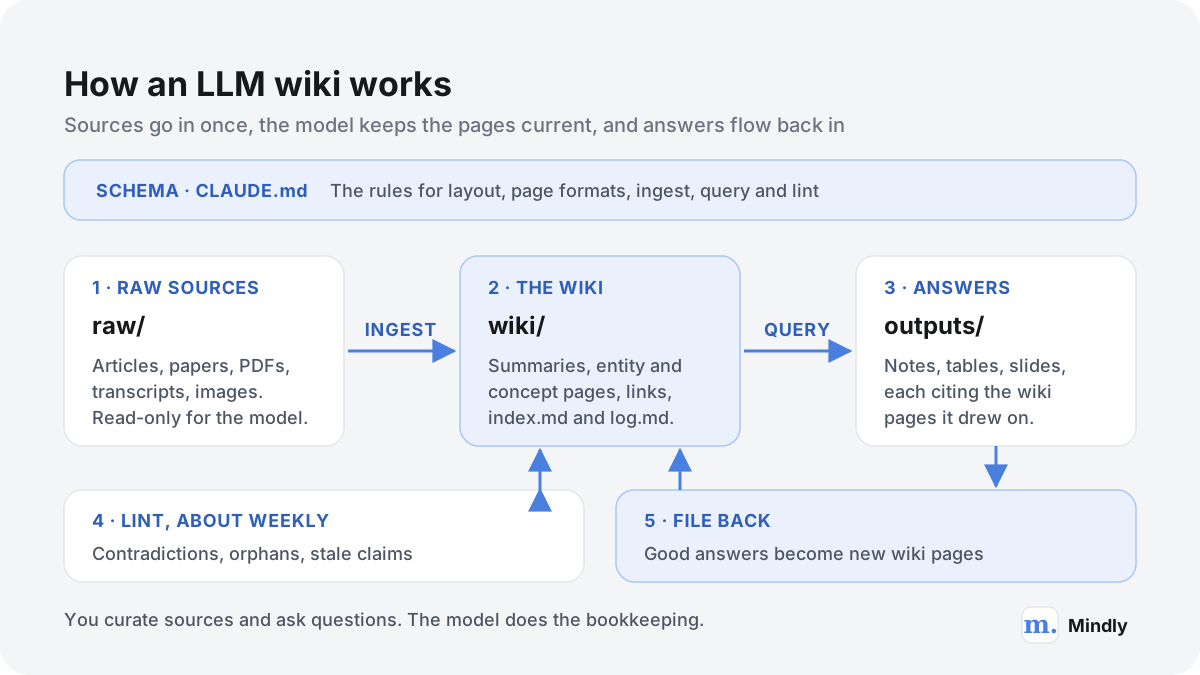
Every LLM wiki runs the same loop: a source goes in, pages are updated, questions are answered, good answers are filed back, and the whole thing is checked from time to time.
Sources go in once. The model keeps the pages current, and your questions feed back into them.
Take a single ingest. You clip an article about a new study into the raw folder and ask the agent to process it. It writes a summary page for the article. It notices the study uses a method that already has a concept page, so it adds a paragraph there with a link back. It mentions two researchers, one of whom has an entity page, so that page gets a line too, and the other gets a new one. The article contradicts a claim on the synthesis page, so both pages get a note about the disagreement. Then the index gains one line and the log gains one entry. That is seven files changed for one short article. Karpathy's estimate for a typical source is 10 to 15 pages, and it is exactly the kind of work nobody keeps doing by hand.
The two files that hold it together
The gist names two special files. index.md is the catalog: every page in the wiki listed with a link, a one-line summary and, if you like, metadata such as a date or the number of sources behind it, grouped by category. The agent updates it on every ingest and reads it first on every question, then opens only the pages it needs. Karpathy reports that this works well at moderate scale, around 100 sources and a few hundred pages, without any embedding search at all.
log.md is the history: an append-only list of what happened and when, covering ingests, questions and lint passes. His tip is to start every entry with the same prefix, such as "## [2026-04-02] ingest | Article Title", so ordinary command-line tools can read it. Running grep "^## \[" log.md | tail -5 prints the last five entries. The log also tells the agent, at the start of a new session, what it did recently, which matters because each session otherwise begins with an empty memory.
LLM wiki vs RAG
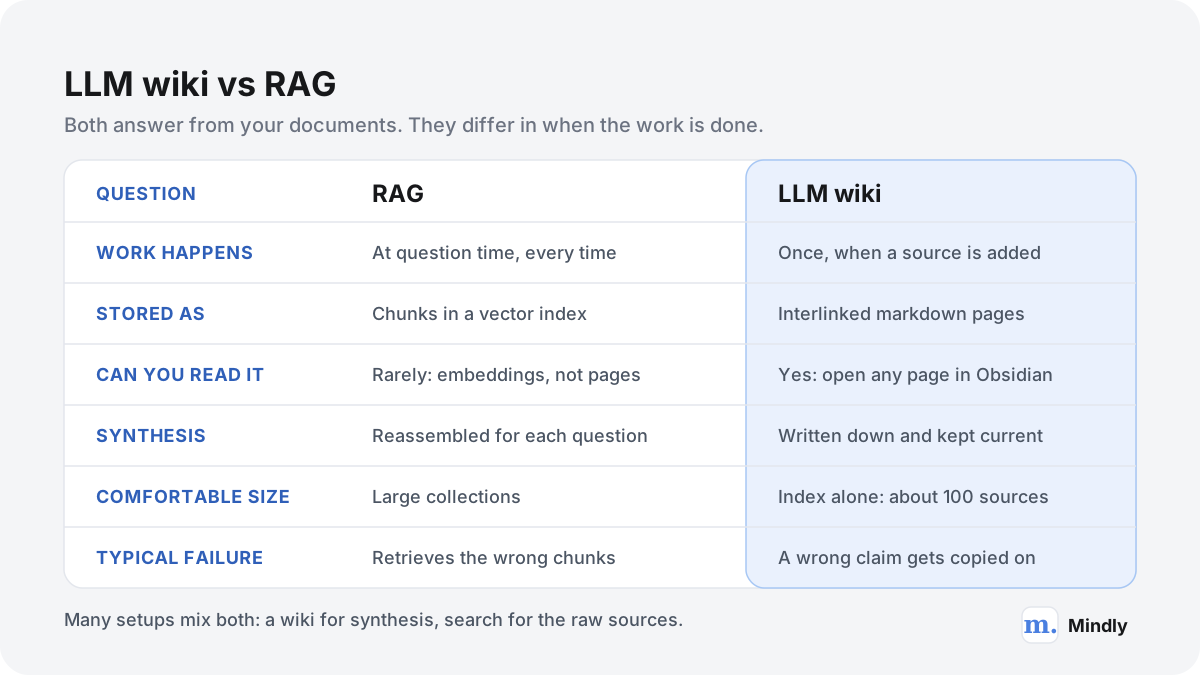
The two approaches try to solve the same problem, getting good answers out of your own documents, and they differ mainly in when the model does the work.
Retrieval-augmented generation was named in a 2020 paper by Patrick Lewis and colleagues, which paired a language model's built-in knowledge with a retriever searching an external store, in their case a dense vector index of Wikipedia. In everyday use, RAG now means this: split your documents into chunks, turn each chunk into an embedding, store the embeddings in a vector index, and when a question arrives, fetch the closest chunks and hand them to the model to write an answer. Tools such as NotebookLM work this way, which is why they are fast to start and why each question is answered more or less from scratch. Our look at NotebookLM as a second brain goes into what that means in practice.
An LLM wiki moves the work to the moment a source arrives. The model reads the whole document, decides what matters and writes it into pages that persist. At question time it reads its own pages, which are already summarized, linked and reconciled. RAG pays for understanding on every question; a wiki pays once per source and keeps the receipt.
Same goal, different timing. Many real setups use both.
Question
RAG
LLM wiki
When does the model do the work?
At every question
Once per source, at ingest, plus periodic lint passes
What persists between questions?
Chunks and their embeddings
Summaries, concept and entity pages, links, an index and a log
Can you read and correct it?
Not easily; the store is vectors
Yes; every page is a markdown file you can open and edit
Questions that span many sources
Depend on retrieving every relevant chunk at once
Start from synthesis pages that already connect the sources
Cost profile
Cheap to add documents; each question pays to retrieve and read
Each source costs an ingest pass touching many pages; questions read fewer, denser pages
Comfortable size
Large and fast-changing collections
About 100 sources and hundreds of pages on the index alone; beyond that, add search
Typical failure
The right passage is never retrieved
A wrong claim is written into a page and copied onward
Compared from Karpathy's gist and the original RAG paper. The wiki's scale figure is his estimate, not a hard limit.
When each one is better
RAG for big, changing piles. Thousands of documents, support tickets, a company drive that changes daily: pre-writing pages for all of it would cost far more than it returns. Retrieval scales; careful compilation does not.
RAG for lookups. "What does clause 7 of the lease say" wants the exact original text, not a summary of a summary. Retrieval points straight at the source passage.
The wiki for one topic you will live with. A thesis, a long investigation, a book you are writing: months of reading on a bounded subject is where compiled synthesis pays for itself.
The wiki when contradictions matter. RAG will happily answer from whichever chunk it finds first. A wiki that flags disagreements at ingest tells you the field is split before you quote either side.
The wiki when you want to read the knowledge, not just query it. Pages you can browse, link and correct are a different thing from an index you can only ask.
The two combine well. Karpathy's own addition was a small search engine over the wiki that the agent could call from the command line for larger queries, and the gist recommends qmd, an MIT-licensed local search engine for markdown files with keyword, vector and hybrid search plus model re-ranking, all running on your machine, with both a command-line tool and an MCP server. That is RAG over a wiki: retrieval finds the pages, and the pages carry the synthesis. A third option, pasting everything into a very long context window, is covered in our piece on million-token context windows; it works for a while and then gets expensive and slow.
What you need before you start
Piece
What it does
Cost as of November 2026
Obsidian
The editor where you read and browse the wiki: links, backlinks, graph view
Free for personal and work use, no account required. Optional Sync is $4 a month billed annually or $5 monthly (USD), per the Obsidian pricing page.
Obsidian Web Clipper
A browser extension that saves web pages into your vault
Free; the Web Clipper page says the code is open source and that it collects no data or usage metrics.
Claude Code
The agent that reads sources and writes the pages
Needs a paid plan. Pro is $20 a month, or $17 a month billed annually ($200 up front); Max is $100 a month; Ultra is $200 a month (USD), per Claude pricing. The free Claude plan does not include Claude Code. API billing per token is the other option.
git
Version history, so every agent edit can be reviewed and undone
Free and optional, but strongly recommended.
qmd or another search tool
Search once the wiki outgrows its index
Free and optional; you will not need it for the first hundred sources or so.
Prices from each official pricing page, fetched in November 2026. Taxes may apply.
Anthropic's setup page lists macOS 13 or later, Windows 10 or later and recent Ubuntu and Debian releases, at least 4 GB of RAM and an internet connection. The connection matters: the agent runs on your computer, but the model it talks to runs in Anthropic's cloud, so nothing here works offline.
Claude Code is not the only choice. Karpathy's gist names OpenAI Codex and OpenCode as well, and everything below translates to them with an AGENTS.md file in place of CLAUDE.md.
On usage, be realistic. Subscription plans include Claude Code usage up to a limit, and API use is billed by tokens. Anthropic's cost documentation says token use scales with context size, gives an enterprise average of about $13 per developer per active day for coding work, and suggests clearing the session between unrelated tasks. A wiki is not a codebase, so treat that figure as a sign that long agent sessions add up, not as a forecast. The /usage command inside Claude Code shows how much of your plan a session is using.
Setting it up, step by step
This is a complete, minimal Claude second brain setup with Obsidian. It takes an evening, most of which is writing the schema and reading the first pages the agent produces.
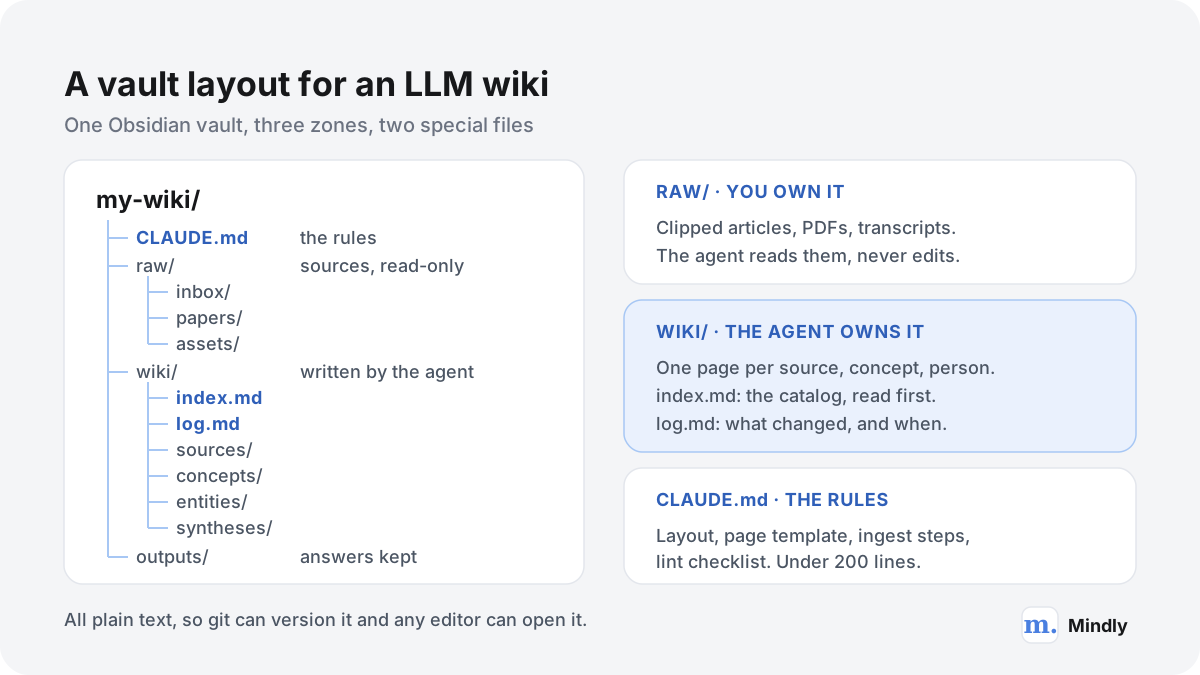
Create the folder. Make a folder called my-wiki with four subfolders: raw (with inbox, papers and assets inside), wiki and outputs. Keep it outside iCloud Drive, Dropbox or any shared folder until you have decided what goes in it.
Open it as a vault. In Obsidian, choose to open a folder as a vault and pick my-wiki. Obsidian adds its own hidden .obsidian settings folder and otherwise leaves your files as they are.
Keep images local. Karpathy's tip: in Obsidian's Settings > Files and links, set the attachment folder path to raw/assets, then in Settings > Hotkeys find "Download attachments for current file" and give it a shortcut. After clipping an article, press it, and the images are saved to disk so the agent can look at them instead of at links that may break.
Install the Web Clipper. Add the Obsidian Web Clipper to your browser and set the folder it saves to as raw/inbox. From then on, any article becomes a markdown file in your inbox with two clicks.
Install Claude Code. On a Mac, open Terminal and run the installer from Anthropic's setup page: curl -fsSL https://claude.ai/install.sh | bash. Open a new terminal window and run claude --version to check it worked.
Put the vault under version control. In the terminal, move into the folder (cd followed by its path) and run git init, then make a first commit. The gist points out that the wiki is just a git repository of markdown files, which gives you history and undo for free.
Start the agent in the vault. Run claude from inside the folder and log in when asked. Stay in the default mode, which asks before every edit and command, until the routines have earned your trust. Press Shift+Tab to move into plan mode when you want the agent to propose before it touches anything.
Write the schema. Paste Karpathy's gist into the session, describe your topic in two or three sentences, and ask the agent to draft a CLAUDE.md for this vault. Then edit the draft yourself, using the template below as a checklist. Keep it short.
Ingest one source and read everything it touched. Clip one article you know well, ask the agent to ingest it, and open every page it created or changed. You are checking the conventions as much as the content: page names, link style, citations, the index line.
Fix the schema, commit, repeat. Every correction you make by hand should become a rule. After five to ten sources, the routine usually settles down.
One vault, three zones. Everything is plain text, so any editor and git can read it.
A CLAUDE.md you can start from
Here is a starting schema, written section by section as it would appear in the file. Replace the topic, cut what you do not need, and keep the whole thing well under the 200 lines Anthropic recommends for a CLAUDE.md.
Purpose. This vault is a research wiki on [your topic]. I curate sources in raw/. You write and maintain everything in wiki/. Your job is bookkeeping: summarizing, linking, filing and flagging, not deciding what is true.
Layout. raw/ is read-only: never edit, rename or delete anything in it. wiki/sources/ has one page per source, named after it. wiki/concepts/ holds ideas and methods, wiki/entities/ people, organizations and datasets, wiki/syntheses/ answers and comparisons I ask you to keep. wiki/index.md and wiki/log.md are described below. outputs/ holds slides and charts.
Page format. Every page starts with properties: type, sources (a count), updated (a date). Use [[wikilinks]] for every mention of an existing page. Every factual sentence ends with a link to the source page it came from. Pages have a section called Disagreements when sources conflict.
Index and log. index.md lists every page by category with a link and one line of summary; update it on every change. log.md is append-only; each entry starts with ## [YYYY-MM-DD] followed by ingest, query or lint, a vertical bar and a title.
Answering questions. Read index.md first, then the pages you need. Answer only from the wiki and cite the pages used. If the wiki does not contain the answer, say so and suggest which source to ingest. Offer to save useful answers in wiki/syntheses/.
Never. Never invent a citation or a source. Never delete a page; mark it superseded and link its replacement. Never run a web search or fetch a page without asking first. Never touch files outside this folder.
Notice what is not there: the step-by-step ingest and lint routines. They are long and only needed when you run them, so they belong in skills, covered next. The habit of writing for a model is its own small skill; our guide to notes an AI can actually read covers the writing side.
The ingest routine
Ingest is where the wiki is made or ruined. A good routine is slow on purpose for the first few weeks.
Drop the source in raw/inbox. A clipped article, a PDF, a transcript, a page of your own notes. One file per source.
Call the routine. Type /ingest followed by the file name. The agent reads the schema, the index and the source.
Discuss before writing. The agent lists the five most important points and the existing pages it plans to change, and asks what to emphasize. This is Karpathy's step of talking through the takeaways, and it is where you catch a misreading before it spreads.
Write the source page. A summary in wiki/sources/, with the key claims, the methods, the limits the authors themselves admit, and a link to the raw file.
Update concepts and entities. New paragraphs on existing pages, new pages where a concept appears for the second time, every sentence linked to the source page.
Flag conflicts. Where the source disagrees with a page, a short entry goes in the Disagreements section of both pages, naming the two sources.
Update the index and the log. One line per new page in index.md, one entry in log.md listing every page touched.
Review and commit. The agent reports the list of changed files. You read them, check the git diff, and commit with the source title as the message. Then move the file from raw/inbox to its permanent folder yourself.
Turn it into a command
In Claude Code, a routine you run often becomes a skill: a folder in .claude/skills inside the vault containing a SKILL.md file. The file starts with a short description, which Claude uses to decide when the skill applies, followed by the steps above written as instructions. A skill in a folder called ingest is run by typing /ingest, and it loads only when called, which keeps the always-loaded CLAUDE.md small. Make a second one for lint. Older custom command files in .claude/commands still work too, but skills are the format Anthropic recommends for new work.
A sample source page (illustrative)
sources/2026-03 City canopy field study
Type: source. Raw file: raw/papers/canopy-field-study.pdf. Summary: a summer field study comparing street temperatures under tree canopy with nearby unshaded streets in one city. Key claims: shaded streets measured cooler at street level in the afternoon; the effect was largest on the hottest days. Method: surface temperature readings, not air temperature, which matters for comparing it with other sources. Authors' own limits: one city, one summer. Disagreements: reports a larger effect than [[sources/2025-11 Regional air temperature model]]; likely explained by the measurement difference, see [[concepts/Surface vs air temperature]].
Touched on ingest: concepts/Street trees and heat · concepts/Surface vs air temperature · entities/City parks department · index.md · log.md
Asking questions, filing answers and the weekly lint
Once a few dozen sources are in, the wiki starts paying back: questions get answered from pages that already connect your reading, and a regular check keeps those pages honest.
Asking is ordinary conversation with the agent in the vault. It reads the index, opens the relevant pages and writes an answer that cites them. The questions that work best are the ones a search box cannot answer: what do my sources agree on, where do they split and why, which claim rests on a single source, what changed in my understanding since March. Karpathy likes answers as files rather than terminal text, as markdown pages, slide decks in the Marp format, or charts drawn with matplotlib, all of which open in Obsidian. If your pages carry properties such as dates and source counts, the Dataview plugin, which the gist also mentions, can turn them into live tables.
The step that makes the system compound is filing good answers back. A comparison you will want again goes into wiki/syntheses with links to every page it drew on, gets a line in the index and an entry in the log. One rule matters more than any other here: the agent must say when the wiki does not contain the answer. Otherwise it fills the gap with the model's general knowledge, and an unsourced answer gets filed back as if it came from your reading.
A synthesis page filed back (illustrative)
syntheses/Do street trees cool cities enough to matter
Question asked 2026-04-21. Short answer: across 14 sources, shade lowers street-level surface temperatures consistently; effects on air temperature are smaller and vary by city layout. Strongest evidence: [[sources/2026-03 City canopy field study]], [[sources/2025-08 Multi-city satellite comparison]]. Weakest link: the cost-benefit figures rest on one report, [[sources/2024 Council budget review]]. Open question: no source covers night-time effects. Suggested next source: a study measuring air temperature at night.
Built from: 9 source pages · 3 concept pages
The weekly lint
Lint is a health check you run with a second skill, roughly once a week or after any batch ingest. Ask the agent to report first and change nothing, then decide which fixes to accept.
Contradictions. Pages that state incompatible things, especially where no Disagreements entry exists yet.
Stale claims. Statements a newer source has overtaken, still sitting on concept or synthesis pages.
Orphans. Pages no other page links to. Obsidian's graph view draws notes as circles and links as lines, and has a toggle for orphans, which makes them easy to see.
Missing pages. Concepts mentioned on several pages that have no page of their own.
Missing links. Mentions of existing pages written as plain text rather than as links.
Uncited sentences. Factual sentences with no link to a source page. These are the most important item on the list.
Broken bookkeeping. Index entries pointing at pages that no longer exist, and pages missing from the index.
Gaps. Open questions that a new source could answer. Karpathy uses web search here to fill missing data; keep that behind an explicit yes.
A lint report (illustrative)
## [2026-04-26] lint | Week 4 health check
2 contradictions: concepts/Street trees and heat says effects are "largest at midday", sources/2026-03 says "afternoon"; synthesis cites both. 1 stale claim: overview still gives the 2024 planting figure, superseded by the 2026 council report. 3 orphans: entities/Survey contractor, concepts/Albedo, sources/2025 Podcast episode 41. 4 uncited sentences on concepts/Urban heat island. 1 missing page: "tree pit size" mentioned on 4 pages. No changes made. Reply with the numbers to fix.
Next: fix uncited sentences first · re-run lint after
The signs of drift are easy to spot once you look: the index and the folder disagree on how many pages exist, the same concept has two pages with slightly different names, synthesis pages stop being updated after new ingests, or you find yourself searching the raw folder because you no longer trust the wiki. Any one of these is a reason for a lint pass and a schema edit, not a reason to start over.
A worked example: 30 sources in a month
An illustrative case, with invented sources: an analyst has four weeks to brief a city council on whether planting street trees is worth the money as a response to summer heat.
The reading list is 30 sources: 20 papers, 6 city and agency reports, and 4 recorded talks saved as transcripts. The analyst sets up the vault on a Monday evening, writes the schema, and ingests the first source on Tuesday. The figures in the table are what a careful routine in this example might produce, not measurements.
Week
What happens
Wiki at the end of the week
1
Setup, schema, 6 sources ingested one at a time. The schema is edited after almost every ingest: page names, the citation format, a new rule for separating surface and air temperature.
6 source pages, 9 concept pages, 4 entity pages, index and log
2
10 more sources, still one at a time, about 20 minutes each including reading the changed pages. First Disagreements entries appear.
16 source pages, 17 concepts, 8 entities
3
The 4 transcripts are batch-ingested, then 10 more papers one at a time. First lint pass finds 3 orphans and 6 uncited sentences.
30 source pages, 24 concepts, 11 entities
4
Questions instead of ingests: 5 answers filed back as synthesis pages, one Marp slide deck for the council, a second lint pass.
About 75 pages, 5 syntheses, 1 deck in outputs/
Illustrative numbers. Real counts depend entirely on the topic and the schema.
A concept page after week 3 (illustrative)
concepts/Surface vs air temperature
Many sources measure how hot the ground and walls get (surface temperature); fewer measure the air people breathe (air temperature). Surface differences under shade are consistently larger than air differences [[sources/2026-03 City canopy field study]] [[sources/2025-08 Multi-city satellite comparison]]. Disagreements: the regional model in [[sources/2025-11 Regional air temperature model]] finds small air-temperature effects and is often quoted as contradicting the field study; the two measure different things. Why it matters for the briefing: claims about comfort and health need air or felt temperature, not surface readings.
Linked from: 11 pages · Sources: 7
The last lines of the log (illustrative)
wiki/log.md
## [2026-04-24] ingest | Council budget review 2024 (touched 6 pages). ## [2026-04-25] query | Which costs rest on a single source? (filed as syntheses/Cost evidence map). ## [2026-04-26] lint | Week 4 health check (14 issues, 11 fixed). ## [2026-04-27] query | Draft council slides (outputs/council-briefing.md).
What made it work in this example is not the model's cleverness but three habits: reading every changed page in the first two weeks, the citation rule, and writing the surface-versus-air distinction into the schema the first time it caused confusion. The cost is time, mostly reading, and a month of agent sessions on a paid plan. The payoff is a briefing in which every claim can be traced to a page and every page to a source, and a wiki the analyst can return to next summer.
A lighter variant suits a reading year rather than a research project. Ingest each book's highlights and your own notes when you finish it, one source per book, and let the model maintain pages for recurring ideas, authors and arguments. After 20 books you have a map of what you read and how it connects, which is what our guide on how to remember what you read is trying to get at by hand.
Risks and limits
The pattern is useful and it is new. Most of its problems come from the same place as its strength: a model is writing your knowledge base.
Errors that compound
In a RAG system a wrong answer is usually a one-off. In a wiki, a wrong summary becomes a page, the next ingest links to it, a synthesis cites it, and a year later it reads like settled fact. Hallucinated links are the visible version: a link to a page or source that does not exist. Invented or distorted claims are the dangerous version. The defences are the ones in this guide: sources that are never edited, a citation on every factual sentence, a lint pass that lists uncited sentences, and git history to see when a claim appeared. None of these removes the need to read. The R&D World writer, after a month with a wiki of about 760 pages, still described manual fact-checking as necessary and the risk of hallucination as reduced, not eliminated.
Privacy: your files go to a model provider
Claude Code runs on your computer, but to do anything it sends your prompts and the model's outputs, including the contents of the files it reads to do the work, to Anthropic over an encrypted connection. Anthropic's data usage page says that on consumer plans (Free, Pro, Max and Ultra) you choose whether your data may be used to improve future models, with a 5-year retention period if you allow it and 30 days if you do not, and that commercial plans and the API are not used for training by default. Claude Code also keeps session transcripts in plain text on your own machine for 30 days by default. Check the setting before you ingest anything personal, and think twice about health, legal or client material. Connecting more tools to the same agent raises the stakes; we explain why in MCP data leaks: when agents connect everything, and the wider question of who holds your context in the AI memory wars.
Cost and usage limits
Every ingest reads a source and rewrites several pages, and every question reads the index and a handful of pages, so a growing wiki uses more tokens per operation. On a subscription that shows up as hitting usage limits sooner; on the API it shows up on the bill. Clearing the session between ingests, keeping the schema short and using a cheaper model for routine passes all help, per Anthropic's cost guidance. A local model avoids both the bill and the privacy question, at the price of weaker results today; our piece on local AI on your laptop covers what runs well.
Maintenance and drift
The gist's promise is that maintenance becomes nearly free. In practice it becomes cheap but not automatic. The wiki only changes when you run an ingest or a lint, and the schema needs editing as the topic grows. The R&D World report found the wiki did not update itself by default, that automated monitoring was only partly wired, and that for well-covered topics on the open web the effort might not be worth it. Its verdict was moderately helpful and promising for narrow cases, which matches the pattern's own design: one topic, curated sources, a person in the loop.
Scale and lock-in
The index-only approach is comfortable at roughly a hundred sources and a few hundred pages, by Karpathy's estimate. Beyond that the agent needs search, and eventually you are running a RAG system over your wiki, which is fine but no longer simple. Lock-in, on the other hand, is low: everything is markdown in a folder, readable by any editor, which is the kind of format that outlives the apps around it. If you stop using the agent, you keep the pages.
How it relates to the classic methods
The LLM wiki borrows its shape from older note-taking methods and changes one thing: who does the writing.
The closest ancestor is the Zettelkasten, the slip box of the sociologist Niklas Luhmann, who wrote about 90,000 notes between 1951 and 1996, according to Bielefeld University's Luhmann archive. Short notes, each linked to others, with an index into the whole: that is very nearly the wiki's structure. The difference is the point of the method. Luhmann wrote every note himself, in his own words, and the writing was where the thinking happened. In an LLM wiki the model writes the notes, so you get the structure without the thinking unless you do the thinking somewhere else, in the questions you ask and the syntheses you push back on.
Folders by actionability; a capture-to-express workflow
The wiki is a single research Resource; Express becomes filed-back answers
The structure is familiar. What is new is that a model does the filing and linking.
Evergreen notes, in particular, are the best model for what good concept pages look like: titled as a claim or a concept, written to be read without the source open, updated rather than duplicated. Telling the agent to write concept pages that way is one of the most useful lines a schema can have. A wiki you publish, as the R&D World writer did with part of his, becomes a digital garden with a gardener who never sleeps, which raises the citation bar further because strangers will read it.
Plenty of people want the result, a second brain that organizes itself, without supervising an agent in a command line. There are honest options, each with a trade-off.
Route
What you get
What you give up
Claude Code in Anthropic's desktop app
The same agent and the same pattern, driven through a window instead of a terminal
Only the terminal: it is still an agent editing your files under your supervision, on a paid plan
A RAG tool such as NotebookLM
Upload sources and chat with them within minutes
Nothing accumulates between questions; no pages you own or edit
An app that organizes automatically, such as Mindly
Tags, summaries, connections and plain-language search on everything you save, with no setup
No compiled wiki pages, and no agent access to the library
A chat assistant plus Obsidian by hand
Paste a source, ask for a summary page, paste it into a vault
You become the bookkeeper the pattern was meant to replace
A summary of the trade-offs described in this guide, as of November 2026.
The desktop route is the one that keeps the pattern intact, and Anthropic's setup page points people who prefer a graphical interface to the desktop app. The RAG route is the quickest start and the weakest at synthesis, as the comparison above shows; we cover the alternatives in NotebookLM alternatives and the general approach in how to chat with your documents. The automatic-organizing route is the furthest from Karpathy's idea and the closest to what many people mean by a second brain or a personal knowledge base: you keep saving, and something else keeps it findable.
How Mindly fits
Where Mindly fits, and where it does not
Mindly is not an LLM wiki, and it would be misleading to present it as one. It does not compile your saves into interlinked wiki pages, and it does not let Claude Code or any other agent read or write its library: there is no MCP server and no API. If you want Karpathy's pattern itself, the Claude Code and Obsidian setup above is the way to build it, and our Obsidian comparison is upfront about what Obsidian does better. What Mindly covers is a smaller part of the same wish: a place on your Mac where saving takes one keyboard shortcut and the organizing happens without a schema. Links, PDFs, notes, screenshots, voice memos and YouTube clips are tagged by topic and summarized as you save them, related or forgotten saves come back as smart suggestions, search works in plain language across every format, and you can chat with any item and get answers grounded in your own material. The library is stored locally in a Mindly folder, and AI requests run over encrypted channels without the content being kept on Mindly's servers afterwards. It is a Mac app only, for macOS 14 or later, with no iPhone app yet. Some people may want both: Mindly as the low-effort place for everything they come across, and a hand-run LLM wiki for the one topic they are researching in depth. Moving material between the two is manual, since Mindly has no agent access. The free tier holds 25 items, enough to see whether automatic organizing is all you needed before you build a wiki.
Common questions
LLM wiki questions, answered
What is an LLM wiki?
A personal knowledge base that an AI agent writes and maintains as a folder of interlinked markdown pages. You add sources to a read-only folder; the agent summarizes each one, updates pages for the concepts and people involved, keeps an index and a log, answers questions from the pages, and periodically checks them for contradictions and gaps. Andrej Karpathy described the pattern in April 2026.
What exactly did Karpathy publish, and when?
Two things. On 2 April 2026 he posted "LLM Knowledge Bases" on X, describing his own setup: sources in a raw folder, a wiki compiled by an LLM, Obsidian as the viewer, and a research wiki of about 100 articles and 400,000 words. On 4 April he published an "idea file" as a GitHub gist titled "LLM Wiki", written to be pasted into an agent such as Claude Code or Codex so it can build a version for you. Neither is software; both describe a pattern.
LLM wiki vs RAG: which is better?
Neither in general. RAG retrieves chunks of your documents at question time and suits large, changing collections and exact lookups. An LLM wiki does the reading once, at ingest, and stores the synthesis as pages, which suits one topic you will study for months and questions that span many sources. Karpathy found an index file enough at about 100 sources; beyond that, most setups add search over the wiki, combining the two.
How do I set up a Claude second brain with Obsidian?
Create a folder with raw, wiki and outputs subfolders and open it as an Obsidian vault. Install the Obsidian Web Clipper to save articles into raw, install Claude Code, put the folder under git, run claude inside it, and write a CLAUDE.md that sets the layout, page format and rules. Then ingest one source, read every page it touched, fix the rules, and repeat. Claude Code needs a paid Claude plan; Obsidian is free.
Do I need Claude Code, or will another agent work?
Any capable agent that can read and write files works. Karpathy's gist names OpenAI Codex and OpenCode alongside Claude Code. The schema file changes name (AGENTS.md is the common one), and Claude Code itself reads an AGENTS.md when a folder has no CLAUDE.md. Plain chat assistants without file access can only imitate the pattern, with you copying pages in and out.
How much does an LLM wiki cost to run?
Obsidian is free for personal and work use. Claude Code needs a paid plan: as of November 2026, Pro costs $20 a month, or $17 a month billed annually, and Max and Ultra cost $100 and $200 a month, all in USD; the free Claude plan does not include it. Pay-per-token API billing is the alternative. Heavy ingest sessions use more of a plan's limits, because each source rewrites several pages.
Is an LLM wiki private?
The files live on your computer, but the agent sends what it reads to the model provider to do its work. On Claude's consumer plans you choose whether your data can be used to improve models; Anthropic retains it for 5 years if you allow that and 30 days if not. Commercial and API plans are not used for training by default. Check that setting before ingesting personal, health, legal or client material.
How big can an LLM wiki get?
Karpathy reports that letting the agent navigate through index.md works at moderate scale, around 100 sources and a few hundred pages. Beyond that the agent needs real search over the pages, such as qmd, a local markdown search engine the gist recommends. The practical limit is usually your time to review ingests and lint reports rather than the software.
Can I build an LLM wiki without coding?
You do not need to program, but the usual setup needs a terminal and comfort supervising an agent. Claude Code also runs in Anthropic's desktop app, which removes the terminal but not the supervision. If what you want is automatic organizing rather than a compiled wiki, apps like Mindly tag, summarize, connect and search what you save with no setup, though Mindly does not build wiki pages or give agents access to its library.
Sources
What This Page Draws On
LLM Knowledge Bases (post on X)Andrej Karpathy · 2026The original description: raw/ folder, compiled wiki, Obsidian as front end, about 100 articles and 400,000 words, outputs filed back, health checks, finetuning idea. Posted 2 April 2026.
LLM Wiki (GitHub gist)Andrej Karpathy · 2026The idea file: three layers, ingest, query and lint, index.md and log.md, tips, and the Memex comparison. Created 4 April 2026.
Is Karpathy's viral LLM wiki helpful? Mostly yesBrian Buntz, R&D World · 2026A one-month account of running a wiki of about 760 pages: benefits, maintenance time and remaining hallucination risk.
Build the vault, ingest one article you know well and read every page the agent touched. If you want your saves organized without running an agent, download Mindly and see what it does with your next 25.