mymind alternatives The best mymind alternatives in 2026, compared honestly
The best mymind alternatives depend on what you save. For a free bookmark manager with folders, choose Raindrop.io; for an open-source, self-hosted version of the same idea, choose Karakeep; for a visual reference library on your own disk, choose Eagle; and for AI that summarizes and answers questions about your saves, look at Recall, Fabric or, on a Mac, Mindly. This guide covers what mymind does well first, so you know exactly what you would be giving up.
By the Mindly Team · Updated November 11, 2026
The short answer
The short answer: which mymind alternative, by need
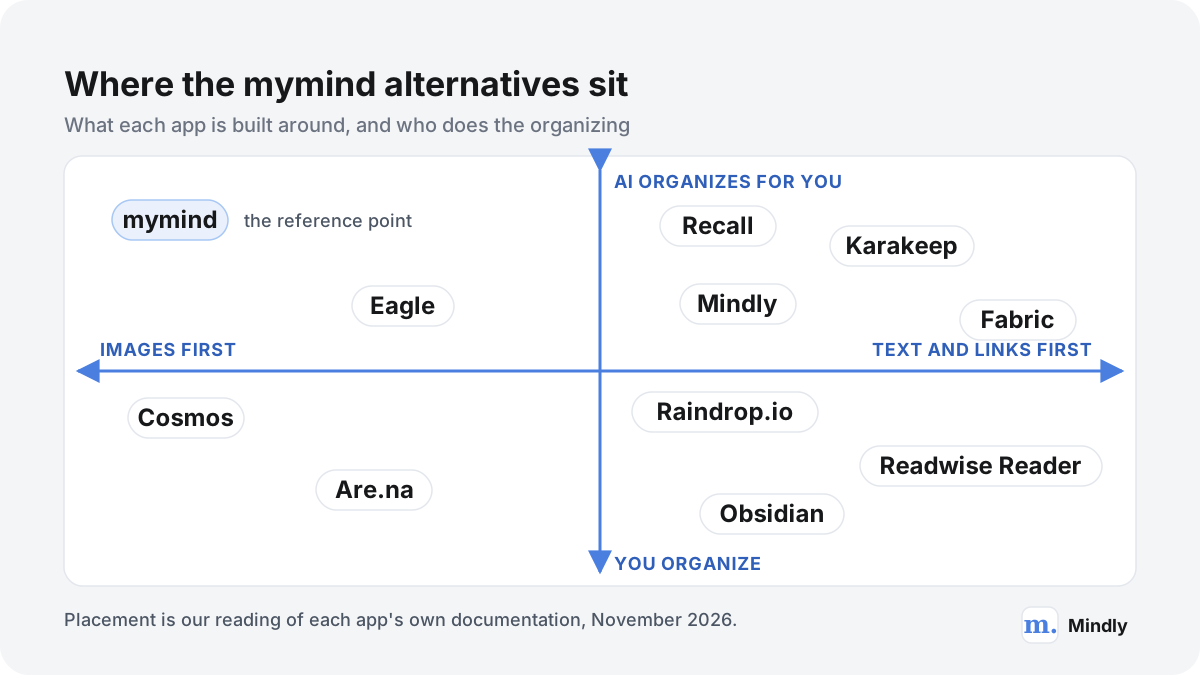
If you like mymind's idea (save anything, never file it, find it by search) and mainly want it cheaper, Raindrop.io is the obvious first stop: its free plan has no limit on bookmarks, collections or devices, against the 100 cards of mymind's free guest plan. The catch is that Raindrop expects you to organize. Its AI suggestions and assistant are Pro features, and the core of the app is collections you build yourself. If you want the "AI tags it for me" part without paying a subscription, Karakeep (formerly Hoarder) is the open-source mymind alternative: free and unlimited when you host it yourself, with AI tagging that can run on a local model. You need a server, or at least a computer that stays on, to make that work.
If what you love about mymind is the visual grid of images, products and screenshots, the fit depends on whether your collection is private or shared. Eagle is a desktop library for designers that keeps everything on your own disk for a one-time licence of US$34.95. Are.na and Cosmos are built around collections you can keep private, share with collaborators or open to everyone. None of the three organizes as aggressively as mymind; Eagle comes closest with AI search and rules you set once.
If you mostly save articles you mean to read, a reading app beats a "save everything" app. Readwise Reader handles articles, PDFs, EPUBs, newsletters, RSS and YouTube transcripts, with highlighting as the main feature. If you want AI to do more than tag, meaning summarize, connect and answer questions about what you saved, Recall and Fabric go furthest across devices. Obsidian with its free Web Clipper is the choice if you want plain Markdown files you will still be able to open in twenty years.
Mindly, the app this site is about, is one option among these, not the answer for everyone. It is a Mac app that captures anything with one shortcut, tags and summarizes it with AI, and lets you chat with any saved document, with the library stored in a folder on your Mac. It has no iPhone app, no Windows or web version and no sync between Macs yet, so if you save mostly from your phone, it is the wrong pick today. The comparison below was written from each app's documentation, pricing page and changelog as of November 2026, not from hands-on tests.
At a glance
mymind alternatives at a glance
| App | Best for | Platforms | Free plan | Paid from | Organizes for you? |
|---|---|---|---|---|---|
| mymind (reference) | Private, visual "save everything" with no folders | Web, iOS, iPadOS, Android, macOS, extensions for Chrome, Safari and Edge | Guest plan, up to 100 cards | $4.99/mo Bookmarker (no AI); $7.99/mo or $79/yr with AI | Yes: AI tags, Smart Spaces, image text recognition |
| Raindrop.io | A large, free, well-organized bookmark library | Web, Mac, iOS, Android, extensions for Chrome, Safari, Firefox and Edge | Unlimited bookmarks; 100 MB uploads a month | Localized price; see the pricing page | Partly: AI suggestions and an assistant on Pro |
| Karakeep | Open source and self-hosting | Web, iOS, Android, extensions for Chrome, Firefox and Safari | Self-hosted: unlimited. Cloud: 50 bookmarks | $4/mo or $40/yr (cloud) | Yes: AI tags and summaries, rules |
| Eagle | Designers with big image libraries | Mac and Windows desktop, browser extension | Trial before purchase | US$34.95 one time, 2 devices | Partly: AI search and AI Action rules |
| Are.na | Research boards, shared or public | Web, iOS, Android, extensions for Chrome, Firefox and Safari | Up to 200 blocks | $7/mo or $70/yr | No: you arrange channels |
| Cosmos | Mood boards and visual discovery | Web, iOS, Android, extensions for Chrome and Safari | Yes, core features | $8/mo Premium | Partly: AI captions, color and similarity search |
| Readwise Reader | Reading and highlighting | Web, iOS, Android, Mac and Windows desktop, extensions | 30-day trial | $7.99/mo billed yearly | No: tags and filtered views you set |
| Recall | Summaries and a knowledge graph | Web, iPhone, Android, extensions for Chrome, Safari, Firefox and Edge | Yes, 10 AI summaries a month | $10/mo billed yearly | Yes on Plus: smart tags, automatic links |
| Fabric | An AI workspace for files, notes and links | Web, mobile, desktop | "Try for $0" offer; no free tier listed on the pricing page | $8/mo billed yearly ($96/yr) | Yes: AI search, memory, suggestions |
| Obsidian + Web Clipper | Long-form notes in plain Markdown files | Mac, Windows, Linux, iOS, Android; clipper for Chrome, Safari, Firefox, Edge and more | The app is free without limits | Sync from $4/mo billed yearly (optional) | No: folders, links and tags are yours |
| Mindly | A private library and AI chat on one Mac | macOS 14 or later only | Up to 25 items | €7.99/mo or €44.99/yr | Yes: AI tags, summaries, connections |
Watch
See It in Action
The full comparison
Choosing a mymind Alternative, Step by Step
What mymind is, and what it does well
Before choosing a mymind alternative, it helps to be precise about what mymind is, because several of its strengths are rare and you may not find all of them anywhere else.
mymind describes itself, in its help article on how mymind works, as a private bookmarking tool powered by AI. You save products, notes, highlights, quotes, websites, articles, images and videos, and it sorts them by type and tags them automatically, so that later you search for a word, a colour, an object or a topic and the card turns up. The founding idea is in the homepage headline, "Remember everything. Organize nothing.", and in the help centre's own summary: no folders, no collections, no time spent organizing. Every card type has its own look. A link from a shop becomes a product card with its price showing, a book link gets its cover and description, a hex code saved as a note turns into a colour palette, and a text highlight is styled as a quote.
The organizing is done by AI on every save. According to the pricing page, images are tagged automatically, text inside screenshots and memes is recognized so you can search for any word in them, and Smart Spaces group related saves without you managing anything. A Smart Space is, in the words of the help article on how to use Spaces, essentially a saved search that updates itself: a Space for "object:watch" collects every image in which the AI found a watch, including ones you save next month. Regular Spaces, which you fill by hand, exist too. Serendipity shows you old cards one at a time so you can keep or forget them. The higher Mastermind plan adds Reading Mode, full copies of saved articles that survive the original being deleted, video uploads, AI summaries of articles and PDFs, and Same Vibe, which finds saved images with a similar look.
Privacy is the other half of the pitch. The pricing page promises that nobody can see what you save and that mymind will never sell your data or run ads. Its AI usage policy says private content is analyzed through Amazon Bedrock, discarded after processing, never shared with the model provider and not used for training, while public URLs may go through other providers listed as sub-processors. There are no social features by design: the essay on social features argues that being watched changes how you think. You can share a single card through a temporary link, and that is all. mymind runs on the web, iOS and iPadOS, Android and macOS, with browser extensions, and it has added a beta API and MCP that lets Claude, ChatGPT and other agents search, read or (with full access) add to your cards.
| mymind plan | Price (USD, November 2026) | What you get |
|---|---|---|
| Guest (free) | $0 | Up to 100 cards, with nearly all Mastermind features except Reading Mode, Same Vibe, custom thumbnails, custom icons and advanced AI for notes |
| The Bookmarker | $4.99 a month | No card limit; a basic visual bookmark tool with no AI features |
| Student of Life | $7.99 a month or $79 a year | Unlimited cards, AI tagging, image text recognition, Smart Spaces, Serendipity; 15 MB per file and 100 GB in total |
| Mastermind | $12.99 a month or $129 a year | Everything in Student of Life plus Reading Mode, article backup, video, AI summaries, PDF analysis, Same Vibe; 64 MB per file and 200 GB in total |
So the honest baseline is high. mymind is calm, private, genuinely automatic, and good at visual material, which most AI tools treat as an afterthought. If you are happy with it and the price is fine, you may not need an alternative at all. The rest of this guide is for people who have a specific reason to look.
Why people look for a mymind alternative
The reasons people give for leaving mymind are fairly consistent, and almost every one traces back to a deliberate design choice rather than a bug.
- The free plan ends at 100 cards. The guest plan is free forever, but only up to 100 cards, which a habit of saving five things a day uses up in under three weeks. The cheapest paid plan, The Bookmarker at $4.99 a month, removes the AI entirely, and the AI is the reason most people choose mymind. Realistically, mymind costs $79 to $129 a year. That is why "mymind free alternative" is a common search.
- Leaving is harder once you are past the limit. The help article on closing an account says that if you cancel a subscription with more cards than the guest limit, the account is suspended until you subscribe again. The downgrade article adds that with more than 100 cards you cannot return to the free plan. Your data is not deleted, but you cannot keep using the app for free. Export first.
- Some people want folders after all. No folders is the product's identity. Spaces cover a lot of what folders do, but a card does not live in one place, and there is no nesting. People who think in projects, clients or courses, or who enjoy sorting, often find a structured app such as Raindrop.io calmer than a single stream. If that sounds like you, our piece on why folders fail makes the opposite case fairly, so you can decide which camp you are in.
- Offline is limited. mymind is a cloud service. Its offline sync page describes an opt-in beta on iOS that is read-only while offline: you can view cards but not add or edit them. The same page says this is being replaced by a fully offline-first iOS app, starting with version 4.0.0. If you want your library on your own disk, look at Eagle, Obsidian, a self-hosted Karakeep or Mindly.
- Notes are intentionally short. The notes feature is inspired by the sticky note. There is a Focus Mode for longer drafts and Markdown shortcuts, and Mind Links connect notes, but they link only to other note cards and Mind Notes work on desktop and the Mac app only. Writers who want long, linked documents usually end up in Obsidian or another notes app.
- No collaboration, on purpose. mymind has no shared Spaces. Designers who build mood boards with a client or a team need Are.na, Cosmos or Raindrop.io, all of which let you invite collaborators.
- Platform and sign-in gaps. There is no Windows app; the help centre suggests a Chrome shortcut to the web app instead. Firefox has no official extension. And you can sign up only with Google or Apple, not with an email and password, which one Hacker News commenter gave as the reason they had never been able to use it.
- Moving in and out takes effort. mymind has no bulk import by choice: it argues that importing old libraries brings the old mess with it. The only route is its beta API. Export exists but works only on desktop in Chrome or Edge, and gives you files plus one CSV of text cards. People with years of bookmarks elsewhere often choose an app that imports them.
- Search is mostly keyword and visual. mymind's search covers words, colours, objects, dates and tags. Search by meaning is still a beta you trigger with two vertical bars, and the AI summaries are on Mastermind only. People who want to ask questions about their saves, rather than find them, look at Recall, Fabric, Raindrop's Stella assistant or an app that lets you chat with your documents.
How we compared the alternatives
This is a comparison from documentation, not a lab test, and you should read it that way.
Every app here was compared from its own documentation, pricing page and changelog as of November 2026. We did not run hands-on tests of the apps, we did not count how fast anything loads, and we did not invent ratings. Where an app states a number (a price, a storage limit, a free-plan cap) we link the page that states it. Where an app shows a localized price, as Raindrop.io does, we send you to the pricing page instead of guessing a dollar figure. Prices change, so check them on the day you decide.
We judged each app against the jobs mymind does: capturing many kinds of things quickly, organizing them without effort, finding them again, keeping them private, and letting you leave. A mymind alternative does not need to do all five. Most good choices do two or three of them better than mymind and the rest worse, and the right one depends on which you care about.
- Capture. What can it save (links, images, PDFs, notes, video, highlights), and from where: browser, phone, desktop?
- Organizing. Does the app organize for you with AI, or do you build the structure? Both are valid; they suit different people.
- Finding. Keyword, full-text, visual or semantic search, and whether you can ask questions about what you saved.
- Privacy and location. Where the library lives (cloud, your disk, your server), and what the app says about AI processing and training.
- Price and free plan. What the free plan really covers, and what a year costs at the level most people need.
- Leaving. How you get your data in and, just as important, how you get it out again.
One disclosure: Mindly is our own product. It is included because it is a reasonable choice for some readers, it is ordered by use case like everything else, and its limits are stated as plainly as everyone else's. One app is missing on purpose. Kosmik, a visual canvas app that once marketed itself as a mymind alternative, announced on its homepage that it would shut down on 31 May 2026 and published export instructions. We left it out. It is also a useful reminder of why the last criterion matters, which we come back to in the guide to apps that disappear.
Visual alternatives: Eagle, Are.na and Cosmos
If your mymind is mostly images, screenshots, products and colour palettes, start here. These three treat visual material as the main event, though none organizes it quite as automatically.
Eagle: a visual library on your own disk
Eagle is a desktop asset manager built for designers: you collect inspiration, screenshots, design files, fonts, audio and video into a library and browse it at speed. Version 4.0.0, released on 1 April 2026, runs on macOS 10.15 or later and Windows 10 or later, with a browser extension for collecting. The 2026 version adds AI search by image, by meaning and across sources, and "AI Action", where you set naming, tagging and folder rules once and let the AI apply them to new assets. It also supports MCP for connecting AI agents.
Where it beats mymind: the library is yours, on your disk, and Eagle's help centre documents moving or syncing it with your own sync tools. It handles far more file types and far larger collections of design files, and you pay once: the store sells a lifetime licence for US$34.95, usable on two devices, with future updates included. Where it falls short: its homepage offers Mac and Windows downloads only, with no phone app, organizing is folders and tags you design (with AI applying your rules rather than inventing its own), and it is a working tool for files rather than a calm place for articles and notes. Best for designers, illustrators and anyone whose mymind is really a reference library. Our guides to building a mood board and to organizing screenshots on a Mac cover the habits that make a library like this useful.
Are.na: research boards you can share
Are.na calls itself a place to save content, create collections over time and connect ideas, privately or with other people. You save images, links, text and files as "blocks" into "channels", and the same block can sit in many channels, which is how ideas get connected. Channels can be open to anyone, closed to collaborators or private. It is independent and member-funded, with no ads and no personalized recommendations, and it has been running for more than 15 years.
Where it beats mymind: collaboration and context. You can invite people into a channel, follow other people's research and reuse their blocks, and every plan can export channel contents and use the public API. Its free Guest plan holds 200 blocks, twice mymind's free limit. Premium costs $7 a month or $70 a year for unlimited blocks, advanced search filters, table view, presentation mode and full-text extraction for links; the $120-a-year Supporter plan adds importing from other services and bulk editing. Where it falls short: nothing is organized for you, and the documentation does not describe AI tagging. Its strength is that you arrange things by hand, slowly and on purpose. It runs on the web, iOS and Android, with extensions for Chrome, Firefox and Safari. Best for students, artists and researchers who build collections over months and want to share some of them.
Cosmos: mood boards with discovery built in
Cosmos describes itself, in its own summary for AI crawlers, as a visual inspiration platform for creatives and an ad-free Pinterest alternative. You save "elements" (images, links, videos, articles, text) into collections that can be private, public or collaborative. Its AI captions try to identify the artist, photographer or source behind an image, search works by keyword, hex colour or visual similarity, and you can show, blur or hide images flagged as AI-generated. It can import Pinterest boards, Are.na channels and Tumblr blogs.
Where it beats mymind: discovery and sharing. Cosmos has an Explore feed and public profiles, collaboration is free for everyone, and the core of the app (saving, organizing, searching, collaborating) is free; Premium is listed at $8 a month. It runs on the web, iOS and Android, with Chrome and Safari extensions. Where it falls short: it is social at heart, which is exactly what mymind refuses to be. If the reason you chose mymind was a private place with nobody watching, Cosmos's private collections work, but the product around them is built for showing taste. It is also images first, and less useful for notes, PDFs or articles. Best for designers, stylists and art directors who want inspiration from others as well as a place to keep their own.
Link and reading alternatives: Raindrop.io and Readwise Reader
If most of your cards are links and articles, a specialist bookmark manager or reading app will probably serve you better than any "save everything" app, mymind included.
Raindrop.io: the free, structured bookmark manager
Raindrop.io is the most common answer to "mymind vs raindrop", and the two really are opposites. Raindrop gives you collections, tags and filters, and expects you to decide where things go. Its free plan, per the limits page, has unlimited bookmarks, collections, tags, collaborators per collection and sync devices, plus 100 MB of file uploads a month. Apps cover Mac, iOS, Android and a web app, with extensions for Chrome, Safari, Firefox and Edge, and its pricing page lists more than 2,600 integrations.
Pro adds the parts that overlap most with mymind: full-text search inside saved pages, PDFs, EPUBs and YouTube transcripts; a permanent web archive of saved pages; AI suggestions; reminders; annotations; duplicate and broken-link finders; daily backups; MCP; and the Stella assistant, a beta that lets you chat with your library, find things by meaning, summarize articles and ask it to reorganize collections, with changes needing your confirmation. Raindrop says Stella keeps your data on its own servers and does not share it with third parties or use it for training. Pro is billed monthly or yearly with about 20% off yearly; the price is shown in your local currency on the pricing page, so check it there.
Where it beats mymind: the free plan is genuinely usable for life, collaboration is free, it imports from browsers and a long list of apps (mymind's CSV export included), and its export produces HTML, CSV or TXT any time. Where it falls short: it is not automatic on the free plan, and it is built around links rather than images. Screenshots and other files you upload count against the monthly quota, 100 MB on the free plan. Best for anyone whose mymind is 80% links. We go into the trade-offs in detail in mymind vs Raindrop, and our bookmark manager guide covers how to keep any link library usable.
Readwise Reader: for the things you mean to read
If your mymind is full of articles saved "for later", Reader is the honest alternative: an app built for reading them. It brings articles, newsletters, RSS feeds, PDFs, EPUBs, YouTube videos and X threads into one place, with highlighting as the central feature. Ghostreader, its AI, summarizes, explains and translates documents; there is text to speech and full-text search. The Reader page lists a local-first web app, iOS and Android apps, desktop apps for Mac and Windows, and browser extensions for Chrome, Firefox and Safari.
On the pricing page, Reader on its own costs $7.99 a month billed yearly, and the full Readwise bundle, which adds highlight syncing from Kindle, Apple, Kobo and more than 40 sources plus Daily Review, costs $9.99 a month billed yearly, after a 30-day free trial. Both include an MCP server, CLI, API and a ChatGPT connector. Where it beats mymind: reading, highlighting and remembering what you read, which mymind's Reading Mode covers only lightly. Where it falls short: it is a reading queue, not a visual library, and it does not organize on its own; you use tags and filtered views. Best for heavy readers and researchers. If you already use Readwise, Mindly's Readwise integration can bring selected highlights into a Mindly library, and our guide on remembering what you read works with any reading app.
AI-first alternatives: Recall, Fabric and Mindly
These three keep mymind's promise that you will not have to organize, and add something mymind mostly does not: summaries, connections and answers built from what you saved.
Recall: summaries, a knowledge graph and chat
Recall saves YouTube videos, podcasts, PDFs, articles and notes, then summarizes, tags and links them. The free plan keeps unlimited saves and notes, a knowledge graph you link by hand, API and MCP access, and 10 AI summaries a month. Plus, at $10 a month billed yearly, adds unlimited summaries, automatic smart tags, chat with your library or the web or both, a listen mode with text to speech, an automatic knowledge graph, "augmented browsing" that resurfaces related saves while you browse, quizzes with spaced repetition, and bulk import of up to 1,000 bookmarks or 10,000 Markdown notes. Max, at $38 a month billed yearly, lets you choose the AI model and run bulk AI actions. It has extensions for Chrome, Safari, Firefox and Edge and apps for iPhone and Android.
Where it beats mymind: understanding long content. A two-hour video or a 40-page PDF becomes a summary with timestamps that you can question, and new saves are linked to related old ones automatically. Where it falls short: it is text and media first, not a visual moodboard, and its free plan is a taste of the AI rather than the full product. Recall competes with both mymind and Mindly, so read its own comparison pages with that in mind. Best for learners and researchers who save more long content than they can watch or read.
Fabric: an AI workspace for everything you keep
Fabric aims wider than mymind: a home for files, photos, videos, notes, links and meeting recordings, with an AI that knows all of it. It mounts as a drive on your computer, streams files on demand, works offline, and runs on web, mobile and desktop, with more than 50 integrations, sharing and team features, and AI "agents" that can act on your behalf. On the individual pricing page, Plus costs $8 a month billed yearly ($96 a year) with unlimited items, 50 GB of storage, an AI notetaker, voice notes and transcription; Pro costs $18 a month billed yearly ($216) with 250 GB, web search for the assistant and more AI usage; Max costs $54 a month billed yearly ($648). The homepage invites you to "Try for $0", but the pricing page lists no permanent free tier, so check the terms when you sign up.
Where it beats mymind: breadth. Real files of any size, collaboration, meeting notes and an assistant that can search, summarize and draft from your own material. That answers most "mymind vs fabric" questions: Fabric does far more. Where it falls short: it is a workspace, and a workspace asks more of you than mymind's single calm stream, and its AI usage is metered by plan with paid top-ups. If mymind appealed because it was small and quiet, Fabric is the opposite trade. Best for people who want one place for files and saves and would use an assistant daily.
Mindly: a private AI library on your Mac
Mindly is our product, so weigh this with that in mind. It is a native Mac app (macOS 14 or later) built around one global shortcut that captures anything: text notes, links and articles from any browser, PDFs, Word documents, tables and datasets, screenshots and images, voice memos and YouTube clips. Every save is organized by AI: tagged by topic, summarized if it is long, read with OCR if it is a scanned PDF or an image, transcribed if it is audio, and connected to related items through smart suggestions that also bring back forgotten saves. Search works in plain language across every format, and you can open any document or note and chat with it, with answers drawn from your own material. A mind map view shows the connections, and Spaces group work by project.
Where it differs from mymind: the library is stored in a Mindly folder on your Mac, not in a cloud account, and AI processing runs over encrypted channels with content not retained on Mindly's servers after each request. It also takes Word documents, tables and datasets, which mymind's list of supported files does not include, and the chat goes further than tags. Where it falls short, plainly: it is Mac only, with no iPhone, iPad, Windows or web app yet; there is no built-in sync between Macs (the workaround is putting the Mindly folder in iCloud Drive); there is no mymind importer and no MCP or agent access; and it is a personal library, not a team workspace or a social board. The free plan holds 25 items, a quarter of mymind's; Pro is €7.99 a month or €44.99 a year, as shown on the pricing page. Best for people who save mostly on a Mac, want files to stay local, and want to ask questions of their saves rather than just find them. (It is also unrelated to the older mind-mapping app called Mindly by another developer.)
Open-source and file-based alternatives: Karakeep and Obsidian
If what worries you about mymind is depending on one company's cloud, these two put the data where you can see it: on your own server, or in plain files.
Karakeep: the open-source mymind alternative
Karakeep, which was called Hoarder until a rename, is a self-hostable "bookmark everything" app whose GitHub page reads almost like a mymind feature list: save links, notes, images and PDFs; AI-based automatic tagging and summaries, with support for local models through Ollama; full-text and semantic search; OCR on images; full-page archives against link rot; automatic video archiving; RSS feeds that save new posts; a rule engine; shared lists; highlights; and iOS and Android apps with extensions for Chrome, Firefox and Safari. It also offers a REST API, a CLI, agent skills and an MCP server.
Its pricing page has three routes. Self-hosted is free forever with unlimited bookmarks and storage and every feature. The hosted cloud has a free tier of 50 bookmarks and 100 MB, and a Pro plan at $4 a month or $40 a year with 50,000 bookmarks, 50 GB, AI tagging and full-text search. Where it beats mymind: price, openness and control. If you self-host with a local model, nothing leaves your machine at all. Where it falls short: self-hosting means running Docker on a server or a home machine, keeping it updated and backing it up yourself; and its feature list centres on links, archives and automation rather than mymind's special cards for products, books and films. Best for technical users and anyone who wants the "AI organizes my bookmarks" idea without a subscription.
Obsidian and its Web Clipper: plain files that last
"mymind vs obsidian" compares two very different things. Obsidian is a notes app that stores everything as Markdown files in a folder on your device, with links between notes, a graph view, canvases and community plugins. It is free without limits, needs no account, collects no telemetry and stores data locally; optional Sync costs $4 a month billed yearly with end-to-end encryption. The free Web Clipper saves pages, highlights and metadata from the browser into your vault as durable files, with templates for articles, recipes, references and academic papers, and works in Chrome, Safari, Firefox, Edge, Brave, Arc and others. Apps exist for Mac, Windows, Linux, iOS and Android.
Where it beats mymind: ownership, long-form writing and longevity. Your saves are files you can open with any text editor, which is the "file over app" idea Obsidian's clipper page argues for. Where it falls short: almost everything mymind does automatically you do by hand, or assemble from plugins. There is no built-in AI tagging, images are files in a folder rather than a searchable visual grid, and a vault rewards people who enjoy building a system. Best for writers and thinkers who want their library and their notes in the same place. If you are weighing this route against an AI app, our comparison of Mindly and Obsidian sets out what each does well.
The decision guide: which mymind alternative should you choose?
Start from the one thing you most want to change about mymind. The rest of the choice usually follows.
| If your main reason is | Look first at | Why | What you give up |
|---|---|---|---|
| Price, or a real free plan | Raindrop.io, or a self-hosted Karakeep | Unlimited bookmarks free; Karakeep is free and unlimited if you host it | Raindrop: automatic organizing (Pro only). Karakeep: you run the server |
| Wanting folders and structure | Raindrop.io, Are.na, Obsidian | Collections, channels or folders you control | The "save and forget" feeling |
| Offline, or files on your own disk | Eagle, Obsidian, Mindly | Each keeps the library on your device | Eagle and Mindly: no phone app. Obsidian: no automatic tags |
| Long-form notes | Obsidian | Linked Markdown documents of any length | The visual grid and the AI |
| Sharing with a team or client | Are.na, Cosmos, Raindrop.io | Collaborators on channels, collections or boards | A space nobody else can see |
| Asking questions of your saves | Recall, Fabric, Mindly | Summaries and chat grounded in what you saved | mymind's visual focus |
| Open source or self-hosting | Karakeep, or Obsidian for files | Code and data under your control | Polish and zero maintenance |
| A Windows PC | Raindrop.io, Eagle, Obsidian, Readwise Reader | Native Windows apps or a full web app | mymind's iOS-first polish |
If you are a designer collecting visual references
Eagle if the references are for your own work and you want them on your disk, organized by rules you write once, for a one-time price. Cosmos if you want discovery and attribution as part of collecting, and Are.na if your boards are slower research you might share. Keep in mind that mymind's AI tagging of images, its text recognition in screenshots and Same Vibe are rare. Eagle's AI search is the closest match among these, but you will do more of the organizing yourself. The screenshot organizer page covers a workflow for the screenshot half of a designer's library.
If you are a researcher or student
Recall if your sources are long videos, podcasts and papers and you want summaries and connections made for you. Readwise Reader if your work is reading and highlighting, especially PDFs and EPUBs. Mindly if you work on a Mac with many document types (Word files, datasets, scanned PDFs) and want to chat with them one at a time. Obsidian if you write up your research yourself and want notes and sources side by side. All four handle text better than mymind; none is as visual.
If you are mainly a reader
Readwise Reader, without much doubt, if you will pay for it. Raindrop.io if you want a free list of links with full-text search on Pro. Our read-it-later guide compares the reading options in more depth, including what happens to your queue when an app closes.
If you save everything and hate sorting (including with ADHD)
This is the group mymind serves best, and it is worth admitting that before you switch. An app that asks you to choose a folder at the moment of saving tends to fail people who save impulsively. Stay in the automatic half of the map: Recall, Fabric, Karakeep or, on a Mac, Mindly, where saving is one action and the tagging happens afterwards. Avoid choosing an alternative only because it is cheaper if it brings back the decisions you joined mymind to escape. Our piece on ADHD note-taking systems that work explains why capture friction matters more than features, and the guide to organizing social media bookmarks deals with the saves that pile up fastest.
If privacy comes first
mymind is already one of the more private cloud apps, so compare carefully. A self-hosted Karakeep with a local model keeps everything on hardware you own. Obsidian stores files locally and encrypts its optional Sync end to end. Eagle's library sits on your disk. Mindly keeps the library in a folder on your Mac and does not retain content on its servers after AI requests. The cloud apps (Raindrop.io, Recall, Fabric, Readwise, Are.na, Cosmos) each publish their own policies, and you should read the one for the app you pick. For a wider view of the trade-off, see local AI on your laptop.
If you want open source
Karakeep is the direct mymind open source alternative: the same core idea, AI tagging included, under your control. Obsidian's file format is open even though the app itself is not, which is often what people really want from open source: a library that outlives the company.
How to move your library out of mymind
Export first, decide second, and cancel last. A mymind export takes a few minutes; recovering a suspended account takes a new subscription.
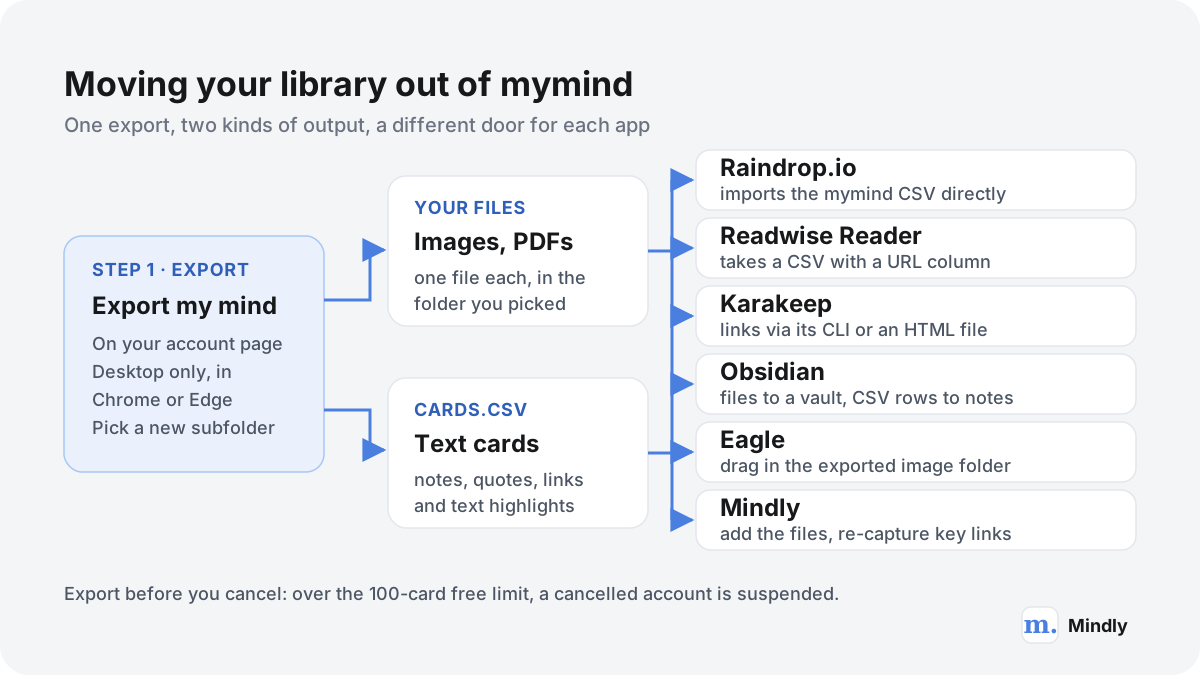
According to mymind's export article, you can export your whole mind from the account page, but only on desktop and only in recent versions of Chrome or Microsoft Edge, because the export writes files straight to your computer. You must create a new subfolder for it first; it will not save directly into Documents or Desktop. The export saves every file you stored (images, PDFs) as an individual file, plus one file called cards.csv containing your notes, quotes, bookmark links and text highlights. AI tags, Spaces and the visual card layouts are not listed among the contents, so expect to rebuild those, or let the new app's AI rebuild them.
- Open mymind in Chrome or Edge on a computer. Not Safari, not the phone app. If you pay through Apple, the export still works; billing is a separate question.
- Make an empty folder for the export. For example "mymind export 2026-11" inside Downloads. The export refuses to write straight into Documents or Desktop.
- Go to the account page and choose "Export my mind". The cog in the left corner opens the account page; the export button is in the bottom right. Pick your folder and leave the tab open until it finishes.
- Check the result before you do anything else. Open cards.csv in a spreadsheet and count the rows; open a few image files. If you have videos or a very large mind, check those too.
- Keep a copy that belongs to no app. Zip the folder and store it in your backup. Whatever you pick next, this is your safety net.
- Import into the new app (see below), then cancel mymind. If you cancel first while over 100 cards, the account is suspended, and you would need to subscribe again to get back in.
Into each kind of app
- Raindrop.io. The easiest path. Raindrop's import guide lists mymind among its verified apps: export and upload the CSV. It also accepts HTML, JSON, TXT and ENEX. Upload your image files separately if you want them, remembering the free plan's 100 MB a month.
- Readwise Reader. Reader's import FAQ accepts a CSV with a column titled URL, plus an optional Title column. Open cards.csv, keep the rows that are links, rename the link column to URL, save, and upload it on the import page. Notes and quotes are better pasted into Reader as documents or kept in a notes app.
- Karakeep. Karakeep's import docs accept a browser-style HTML bookmarks file, Pocket's CSV or Omnivore's JSON, and its CLI can add links from a text file with one URL per line. The simplest route is to copy the link column from cards.csv into a plain text file and run the CLI command the docs give. Image files can be uploaded as image bookmarks.
- Obsidian. Copy the exported folder of files into your vault. For the text cards, each CSV row can become one Markdown note; a community plugin, a short script, or an AI assistant you trust with the file can do the conversion. Plan a tag or folder for "from mymind" so you can review them later.
- Eagle, Are.na and Cosmos. Eagle takes the exported image folder by dragging it into a library, after which you set tags and AI Action rules. Are.na's import from other services is a Supporter-plan feature; otherwise, add images to channels yourself. Cosmos imports Pinterest, Are.na and Tumblr, not mymind, so upload images directly.
- Recall and Fabric. Recall's Plus plan includes bulk import of up to 1,000 bookmarks or 10,000 Markdown notes, so turning cards.csv into Markdown notes or a bookmarks list gets most of a mind across. Fabric works like a drive, so the exported files can go in as files; check its import options for the CSV.
- Mindly. There is no mymind importer. Drag the exported images and PDFs into Mindly, where each is tagged, summarized and made searchable, and re-capture the links you still care about with the shortcut. That is slower for thousands of links, and it works best as a fresh start with the 20% that matters, which, oddly, is the argument mymind itself makes against bulk import. If part of your archive also lives in Evernote, Mindly imports .enex files directly, and our ENEX converter turns them into Markdown for any app. The switching guide covers the rest.
A worked example
A designer's mind of 2,400 cards
Say your export holds 1,700 images and screenshots, 520 links, 150 notes and 30 quotes. A sensible split: the 1,700 images go into Eagle, where one AI Action rule tags new imports and another renames and files the screenshots. The 520 links go to Raindrop.io through its mymind CSV import, into one collection called "From mymind" that you sort over a month (or never, using search). The 150 notes and 30 quotes become Markdown notes in a folder you keep in your backup. Total cost after the switch: US$34.95 once for Eagle and nothing for Raindrop's free plan, compared with $79 to $129 a year for mymind, in exchange for doing more of the organizing yourself.
When to stay with mymind, and what to check before any switch
Switching costs a weekend and some habits. For some people it is not worth it, and the honest version of this guide says so.
- You save mostly visual things on an iPhone. mymind's mobile apps, image tagging, text recognition and visual card types are hard to match in one app. Cosmos is the nearest visual match on mobile, but it is built around sharing.
- The price is the only problem. Compare a year, not a month. If you would end up paying for Raindrop Pro plus a reading app to replace what mymind gives you, the saving may be small. A self-hosted Karakeep is the real budget option, if you can run it.
- You value calm over capability. mymind refuses features on principle: no social layer, no bulk import, no clutter. Several alternatives here are more powerful precisely because they accept more complexity. If the calm is what keeps you saving, keep it.
- You chose it because you will never organize. Then a structured app will slowly become the cluttered folder tree you left. Stay in the automatic half of the map, or stay put.
Five questions to ask any app before you move in
- Can I get everything out, today, in a format another app can read? Try the export on day one, with ten items, before you depend on it.
- Where does my library live? On the company's servers, my server, or my disk? Each is a defensible choice with different risks.
- What is free, and what happens when I stop paying? mymind's suspension rule is clearly documented; plenty of apps leave this vague.
- Is the AI doing work I would otherwise skip? Automatic tags are worth paying for only if you would not tag by hand.
- Will this company be here in five years? Nobody can promise that. Kosmik's shutdown in 2026 is the recent example; a regular export to a folder you control is the only insurance that works.
A last practical point. Whichever app you choose, give it a month with real saves before you move years of material. Most people discover within two weeks whether the capture habit sticks, and that matters more than any feature table, including this one. If you want to think about the bigger picture first, our guide to building a second brain explains where a "save everything" library fits next to notes and tasks.
Where Mindly fits
Where Mindly fits among the mymind alternatives
Mindly is the right mymind alternative for a fairly specific person: someone who saves mostly on a Mac, wants the library kept in a folder on that Mac rather than in a cloud account, and wants to do more than find things, such as asking a PDF a question or getting a summary of a long article. One shortcut captures links, files, screenshots and voice memos, and the AI tags, summarizes and connects them without folders, much as mymind does. It is the wrong choice if you save mainly from your phone, use Windows, need to share boards with a team, or want your saves available to an AI agent through MCP, because Mindly has none of those today. The free plan holds 25 items, enough to test the habit for a week or two; Pro is €7.99 a month or €44.99 a year.
Common questions
mymind alternatives, answered
What is the best mymind alternative?
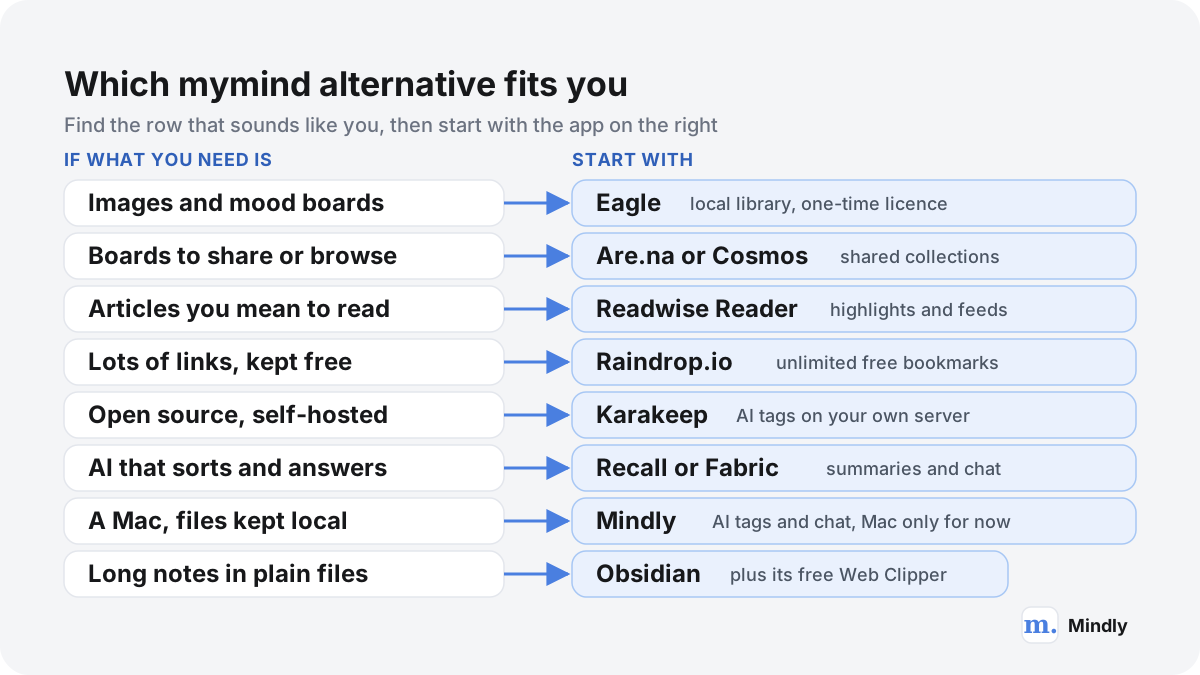
There is no single best mymind alternative, because people leave for different reasons. For a free plan with unlimited bookmarks, Raindrop.io. For an open-source, self-hosted version with AI tagging, Karakeep. For a visual library on your disk, Eagle. For shared boards, Are.na or Cosmos. For reading, Readwise Reader. For AI summaries and chat, Recall or Fabric, or Mindly on a Mac.
Is there a free mymind alternative?
Yes. Raindrop.io's free plan has unlimited bookmarks and collections, though AI features are on Pro. Karakeep is free and unlimited if you self-host it. Obsidian is free, and its Web Clipper is free. Are.na's free plan holds 200 blocks, and Cosmos's core features are free. Recall's free plan includes 10 AI summaries a month. mymind itself is free only up to 100 cards.
How much does mymind cost in 2026?
As of November 2026, mymind's pricing page lists The Bookmarker at $4.99 a month (no AI), Student of Life at $7.99 a month or $79 a year, and Mastermind at $12.99 a month or $129 a year. The free guest plan covers up to 100 cards. A higher Newton plan is listed as not yet available. Prices through Apple can differ.
Is there an open-source mymind alternative?
Karakeep (formerly Hoarder) is the closest: an open-source, self-hostable app for saving links, notes, images and PDFs, with AI tagging and summaries that can run on a local model through Ollama, full-text and semantic search, OCR, and iOS and Android apps. It is free to self-host with no limits; the hosted version costs $4 a month for Pro.
mymind vs Raindrop: what is the difference?
mymind organizes for you with AI and has no folders; Raindrop.io gives you collections, tags and filters and expects you to organize. Raindrop's free plan is unlimited and supports collaboration, while mymind's free plan stops at 100 cards and has no sharing. mymind is stronger on images and visual cards. See our full mymind vs Raindrop comparison.
mymind vs Obsidian: which should I use?
They solve different problems. mymind is a cloud app that saves and tags things automatically, so you never organize. Obsidian is a free notes app that stores Markdown files on your device, where you write, link and organize by hand. Choose mymind for low-effort visual saving, Obsidian for long-form notes and files you fully own. Obsidian's free Web Clipper covers the saving part.
Does mymind have an MCP server or an API?
Yes, in beta. mymind's help centre documents "Mind Extensions", an API and MCP that let AI agents such as Claude and ChatGPT search, read or, with a full-access key, add to your cards. It is also the only bulk-import route mymind offers. Use read-only keys where you can.
Can I export my data from mymind?
Yes. From the account page, "Export my mind" saves every stored file (images, PDFs) individually, plus a cards.csv file with your notes, quotes, bookmark links and text highlights. It works only on desktop in recent Chrome or Edge, and you must choose a new subfolder rather than Documents or Desktop. Export before you cancel, because accounts above 100 cards are suspended after cancellation.
Which browsers does the mymind extension support?
mymind supports the latest two stable releases of Safari, Edge and Chrome. It does not officially support Firefox or offer a Firefox extension, though its help centre links a manual install. If you need Firefox, Raindrop.io, Karakeep, Are.na, Recall, Readwise Reader and Obsidian's Web Clipper all list Firefox extensions.
Sources
What This Page Draws On
- Pricingmymind · 2026Plan names and prices, unlimited cards on paid plans, features per plan, supported apps.
- How does the free trial work?mymind help centreThe guest plan: free forever up to 100 cards, and the features it leaves out.
- Can I export?mymind help centreExport from the account page, Chrome or Edge on desktop only, files plus cards.csv.
- State of the Offline Syncmymind help centreRead-only offline beta on iOS, being replaced by an offline-first iOS app from v4.0.0.
- Using the API and MCPmymind help centreMind Extensions: API keys with read-only or full access, MCP support for Claude, ChatGPT and others.
- AI Usage Policymymind · 2024Private content processed through Amazon Bedrock, not used for training; public content may use other providers.
- LimitsRaindrop.io HelpFree versus Pro comparison: unlimited bookmarks and collections, upload quotas, Pro-only features.
- ImportRaindrop.io HelpSupported import formats and verified apps, including mymind's CSV export.
- PricingKarakeep · 2026Self-hosted free and unlimited; cloud free tier of 50 bookmarks; Pro at $4 a month or $40 a year.
- About Are.naAre.naWhat Are.na is, the Guest, Premium and Supporter plans, and features included in all plans.
- Buy Eagle AppEagleOne-time licence at US$34.95 for two devices, Mac and Windows, lifetime updates.
- PricingReadwise · 2026Reader and full Readwise plans billed yearly, the 30-day trial, MCP, CLI and API access.
- Recall PricingRecall · 2026Free, Plus and Max plans and the features in each.
- Pricing and plans for individualsFabric · 2026Plus, Pro and Max prices billed yearly, storage and AI usage per plan.
- Kosmik is winding downKosmik · 2026The shutdown notice for 31 May 2026 and export instructions, the reason Kosmik is not in this list.
Keep reading
Related Guides
Try the Mac-only alternative with 25 free items.
Download Mindly, press the shortcut on the next thing you would have saved to mymind, and see whether the AI tags and chat earn a place in your week. No sync and no iPhone app yet, so test it where you actually save.