Getting Things DoneGetting Things Done: Empty Your Head, Then Decide.
Getting Things Done, or GTD, is David Allen's method for handling everything you have committed to: capture whatever has your attention, decide what each item means, and keep the reminders on a few lists you review every week. Allen published it in 2001 and rewrote the book in 2015.
Created by David Allen, who set it out in a 2001 book and rewrote it in 2015.
Getting Things Done, usually shortened to GTD, is a method for managing everything you have committed to, from a phone call you owe someone to a product launch. Its premise is that your head is a poor place to keep commitments. Anything you have agreed to do but not yet defined keeps pulling at your attention, so the method moves every commitment into an outside system you trust, decides what each one means, and keeps the resulting reminders on a few lists you review regularly. The David Allen Company describes it as five steps: capture, clarify, organize, reflect and engage.
The method comes from David Allen, who founded the David Allen Company in 1996, according to the company's own timeline. He set GTD out in Getting Things Done: The Art of Stress-Free Productivity, first published in 2001, and published a second edition in 2015 that the timeline describes as completely rewritten. Penguin Books' page for that edition gives a publication date of March 17, 2015 and says Allen rewrote the book from start to finish. His later book, Making It All Work (2008), takes the method wider.
The mechanics are a handful of lists and one weekly habit. Everything that has your attention goes into an inbox. Each item is then clarified with a short sequence of questions: is it actionable, what is the very next physical action, does it need more than one step, will it take two minutes or less. The answers send each item to one of a few places: a Projects list, Next Actions lists sorted by context, a Waiting For list, the calendar, a Someday/Maybe list, reference files, or the trash. Once a week, you go through all of it. A 2008 paper by Francis Heylighen and Clément Vidal quotes the 2001 edition, which named the steps collect, process, organize, review and do.
The book's subtitle promises stress-free productivity, and the argument for it is about memory. A commitment that has not been written down and defined stays on your mind; one with a clear outcome, a decided next step and a reminder in a trusted place can be set aside until it is time to act. Heylighen and Vidal, researchers at the Free University of Brussels, argued in that paper, published in the journal Long Range Planning, that research on situated and distributed cognition supports the design, because the brain leans on its environment as an external memory and a trigger for action. They were also candid that no empirical study had yet confirmed GTD's claims, and that their case was theoretical.
It helps to be clear about what GTD is not. It is not an app: it is a method, and every part of it works on paper. It is not a way of deciding what matters most; Allen's horizons of focus address that, but the daily mechanics assume you have already chosen your commitments. And it is not a knowledge system. Reference is one of the places an item can go, and GTD mainly asks that reference be easy to retrieve, which is where a method such as PARA takes over. One note on names: GTD and Getting Things Done are registered trademarks of the David Allen Company. This page is an independent explainer by the Mindly Team and is not affiliated with or endorsed by the company.
From the source
Watch It Explained by the Creator
David Allen, who created GTD, speaking at TEDxClaremontColleges. From the official TEDx Talks channel, 2012; about 22 minutes.
Who it is for
Who Getting Things Done is for
People with more inputs than attention
Email, chat, meetings, requests in the corridor: for many knowledge workers the problem is not one big project but a steady stream of small commitments arriving through a dozen channels. GTD was built for that stream. Every input lands in an inbox, every inbox gets emptied by deciding what each item means, and nothing is left sitting as an unread reminder of something you meant to do. The email inbox stops being a to-do list, because the to-do list now lives somewhere else.
People who lie awake remembering things
The method's core argument is about the things that occupy your mind without moving forward: the call you owe, the form you have not filed, the vague sense that a project is slipping. The David Allen Company calls these open loops and argues that they persist because nobody has decided what they mean or what to do about them. GTD's answer is to define the outcome, decide the next action, and park both in a system you trust. If your problem is less "too much work" than "too much to keep track of", this is the part of the method that speaks to you.
Freelancers and people with several clients
Anyone juggling commitments to several people at once has two lists that usually live only in their head: what they are waiting on from others, and which projects are quietly stalled. GTD makes both explicit. The Waiting For list records every delegated or promised item, ideally with the date you asked, and the weekly review checks that each project still has a next action, something on the calendar, or an item you are waiting for. For a freelancer, that is where a forgotten invoice turns up while it can still be fixed.
People whose to-do list has stopped working
A to-do list that mixes "call the bank" with "sort out the house move" and "think about a career change" fails in a predictable way: the vague items sit at the top for weeks while the easy ones get done. GTD separates them. Outcomes that take more than one step go on a Projects list; only concrete, physical next actions go on the action lists; ideas you have not committed to go on Someday/Maybe. If your list makes you feel worse every time you open it, borrow the clarify step, even if you skip the rest.
The core principles
Why the method works when it works
An outside memory you can trust
GTD starts from the observation that memory is a poor place to store commitments. Heylighen and Vidal connect this to distributed cognition: the brain works best when it can offload information into a stable external memory and let that memory trigger action later. The practical consequence is strict. Capture has to be complete, because a system that holds most of your commitments still leaves you remembering the rest. The relief the method promises arrives only when you trust that nothing important lives solely in your head.
Outcomes and next actions
Most items on a typical to-do list are neither outcomes nor actions; they are topics. "Car" or "Mom's birthday" tells you something needs attention but not what. GTD asks two questions of each one: what does done look like, and what is the very next physical thing to do? "Car" becomes the outcome "car serviced before the trip" and the next action "call the garage to book a slot". The GTD site's short guide to closing a loop makes the point plainly: you do not need to finish something to get it off your mind, you need to define it. Defining is quick, and it is the step most people skip.
Lists sorted by where you can act
GTD sorts actions by context rather than by priority. In a 2010 piece Allen explains why: most actions need a particular tool or place, so context is the first thing that limits what you can do at any moment. Calls go on one list, errands on another, things that need a computer on a third. When you have ten minutes and only a phone, you read one short list instead of scanning everything. Priority still matters, but it comes last: Heylighen and Vidal summarize the book's model for choosing an action as context first, then time available, then energy, then priority.
A weekly review that keeps the trust
Lists decay. A list that is a week out of date stops being trusted, and your head takes the job back. The weekly review is the maintenance step that prevents this: you empty every inbox, read every list and check every project. David Allen calls the review the "critical success factor" of GTD, and his own checklist says the system lives or dies on it. It is also the easiest habit to drop, which is why the company's podcast keeps returning to it.
Common mistakes
Where GTD goes wrong (and the fix)
Letting the inbox turn into the list
Capture is the easy half, and many people stop there: everything goes into an inbox, nothing comes out, and the inbox becomes a longer to-do list. A 2024 article on the GTD site nominates an inbox holding items older than 48 hours as the second-worst task list there is, after your own head. The fix: schedule clarifying, not just capturing. Empty each inbox every day or two, which means deciding what each item is, not doing all of them.
Putting projects where actions should be
"Plan the team offsite" on an action list looks like a task and behaves like a wall: there is no first move, so it is skipped every time the list is read. The fix: if an outcome needs more than one step, it goes on the Projects list, and only its next physical action ("email the office manager for three possible dates") goes on an action list. A quick test is whether you could do the item in one sitting without first deciding anything else.
Skipping the weekly review
Without the review, the system drifts out of date within weeks: finished projects linger, new ones are never added, and Waiting For items go unchased. Once the lists stop matching reality you stop trusting them, and your head goes back to doing the remembering. The fix: put the review in your calendar as a fixed appointment, and shorten it rather than skip it. Allen's own checklist suggests early Friday afternoon, with the next four Fridays booked while the habit forms.
Building the system instead of using it
GTD has attracted a large ecosystem of apps and templates, and it is easy to spend more time configuring contexts than clarifying the inbox. The categories matter; the software much less. The fix: start with the simplest version that covers the lists (a notebook, or one task app plus a calendar) and change tools only when a specific problem shows up during a weekly review, not because a new one looks better.
The full guide
Setting Up and Running GTD
The five steps, with examples
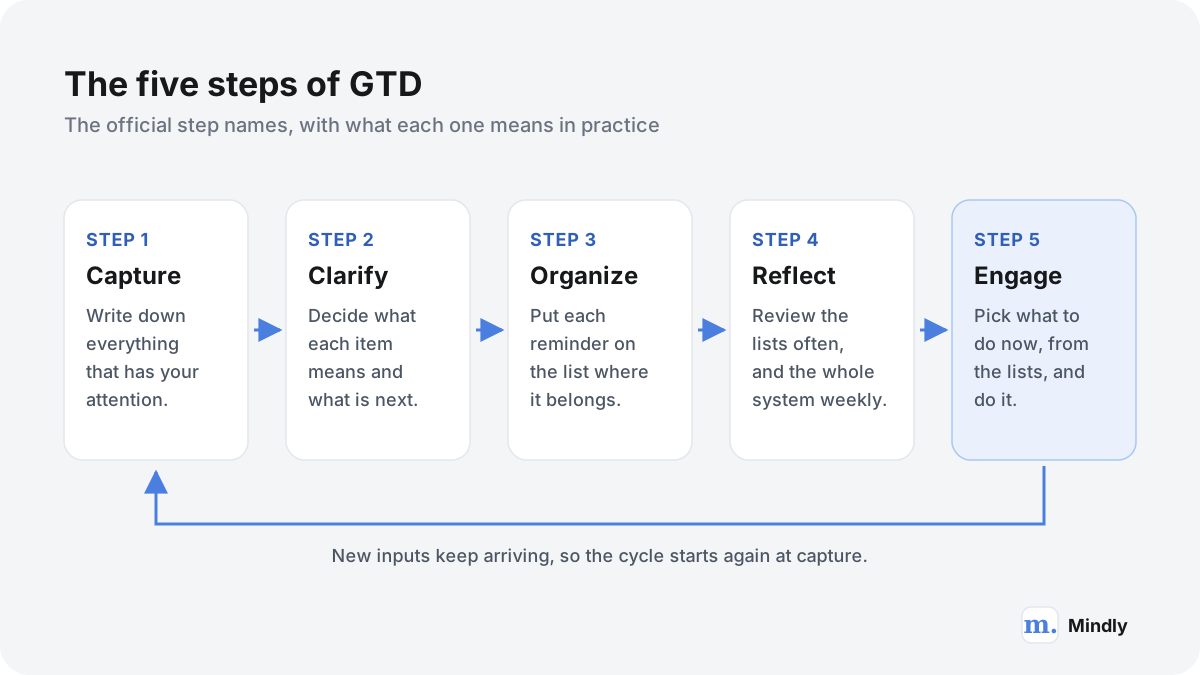
The David Allen Company names the five steps capture, clarify, organize, reflect and engage. Together they describe one cycle: inputs come in, get decided, get parked in the right place, get reviewed, and get done.
The five steps as a loop. Step names are the official ones; the short descriptions are ours.
Capture. The official summary is to collect what has your attention: write, record or gather it into a collection tool. In practice that means a few inboxes and no more, such as a paper tray, an email inbox and one notes app or notebook. Example: in a meeting you hear that the budget is due on the 15th, and you write "budget due 15th" instead of trusting yourself to remember. GTD usually starts with a mind sweep, one sitting in which you write down every commitment and loose end you can think of.
Clarify. Process what each item means. The official site puts it as a question: is it actionable? If so, decide the next action, and the project if more than one action is needed. If not, decide whether it is trash, reference, or something to hold for later. Example: "budget due 15th" is actionable and takes several steps, so it becomes a project ("Q3 budget submitted by the 15th") with a next action ("ask finance for last quarter's actuals").
Organize. Put each reminder where it belongs: the Projects list, a Next Actions list for the right context, Waiting For, the calendar, Someday/Maybe, or reference. Example: "ask finance for last quarter's actuals" goes on the Email list, and the project, with its date in the name, goes on the Projects list.
Reflect. Review frequently. Day to day, that means looking at the calendar and the action lists; once a week, it means the full weekly review described below. Example: on Friday you notice the budget project has had no next action since finance replied, and you write one.
Engage. Simply do. With the lists current, you choose an action based on where you are, how much time and energy you have, and what matters most. Example: ten minutes before a meeting with only your phone, you open the Calls list and make the one call on it.
Clarify: the decision flow
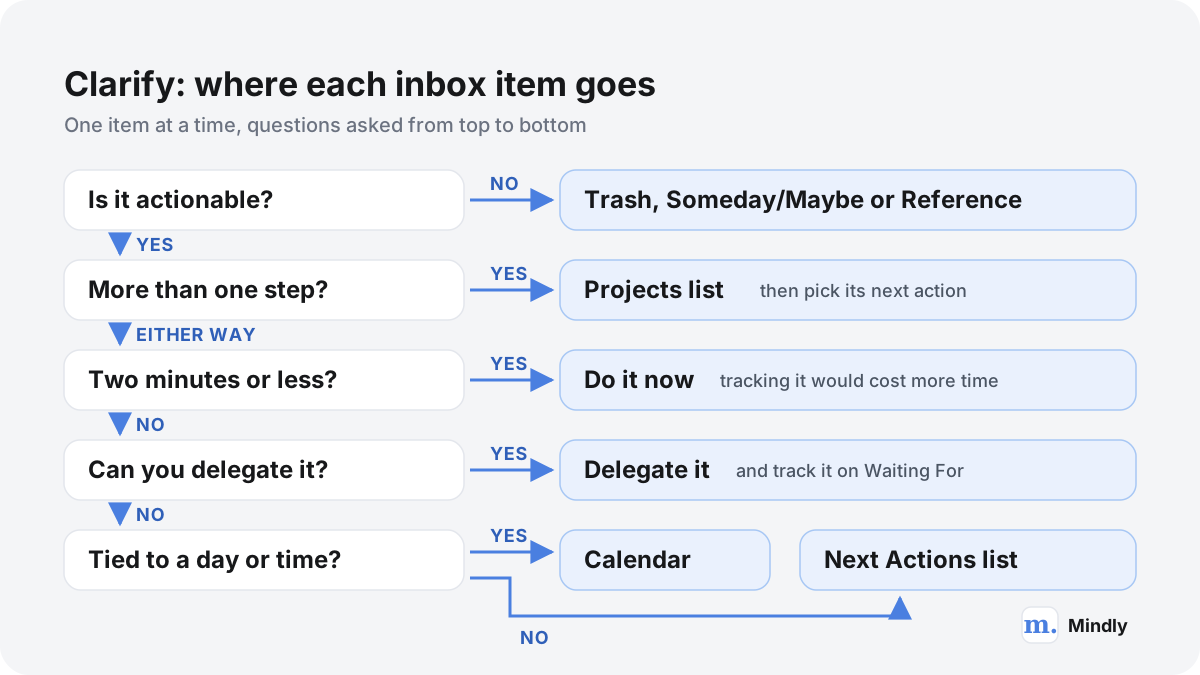
Clarify is the step that makes GTD different from keeping a list. Each inbox item gets the same short sequence of questions, one item at a time, and leaves the inbox with a decision attached.
Question
If yes
If no
Is it actionable?
Keep going: decide the very next physical action.
Trash it, keep it as reference, or incubate it on Someday/Maybe.
Does it need more than one step?
Add the outcome to the Projects list, then continue with its next action.
It is a single action. Continue.
Will the next action take two minutes or less?
Do it now.
Continue.
Is someone else better placed to do it?
Delegate it, and add it to the Waiting For list.
It is yours. Continue.
Must it happen on a specific day or at a specific time?
Put it on the calendar.
Put it on the Next Actions list for its context.
The rule behind the table: nothing goes back into the inbox undecided. Based on the GTD site and Heylighen and Vidal's summary of the book.
The clarify questions as a flow. Our drawing, from the questions the method asks.
The two-minute rule
If the next action takes two minutes or less, do it the moment you clarify it. In a short episode of the GTD podcast Allen gives the reason: looking at the item again, reviewing it and thinking about it later would take longer than two minutes, so finishing it now is the cheaper option. The rule belongs to clarifying; it is not a reason to spend the afternoon on small tasks while the inbox waits.
Projects and next actions
In GTD a project is any outcome that needs more than one action step and that you can mark finished within the next twelve months, according to the GTD site's guide to managing projects. The definition is deliberately broad, so "get the bike repaired" counts as a project alongside a product launch. The same guide sets the standard for a healthy list: every current project has at least one next action, an item on Waiting For, or something on the calendar. A project with none of these is either stuck or not really current, and the guide suggests moving it to Someday/Maybe.
Delegate or defer
When an action takes longer than two minutes, the GTD site's own clarifying questions offer three choices: do it, delegate it, or defer it. Delegating means handing it to the right person and adding a line to Waiting For, so the commitment stays visible even though someone else holds it. Deferring means putting it where you will see it at the right moment: the calendar if it has to happen on a particular day or at a particular time, otherwise a Next Actions list. Keep the calendar for what is genuinely fixed; a calendar full of hopeful entries soon stops being believed.
Lists and contexts
Organize sounds like filing, but in GTD it mostly means keeping a small number of lists, each with one job.
Projects. Every outcome you have committed to that takes more than one step. The GTD site describes it as a current table of contents of what is on your plate.
Next Actions, by context. Single, concrete actions you could do as soon as you are in the right place with the right tool.
Waiting For. Things someone else is doing that you care about, reviewed at least weekly.
Calendar. Actions and information tied to a specific day or time.
Someday/Maybe. Things you might commit to later but not now: the course you might take, the trip you might plan.
Reference. Information with no action attached that you may need to look up, kept so it is easy to find again.
Project support material. Notes, plans and documents you need when you work on a particular project. They are not reminders, so they live apart from the lists.
Checklists. Things to consider during recurring activities, such as a packing list or the weekly review itself.
Allen offers a blunt test of whether all this is working: you are disorganized if something you need is not where you need it, or something you do not need is. His 2024 piece on what "organized" means runs through categories like those above and notes that some of them, such as the Projects and Waiting For lists, are reviewed weekly, while goals and visions are reviewed at longer intervals.
Contexts
Next actions are grouped by context: the place, tool or person an action needs. In his 2010 explanation, Allen lists the common contexts from the book: Agendas, Anywhere, Calls, Computer, Errands, Home, Office and Waiting For. An agenda list collects what you need to discuss with one person or at one meeting, which turns "remember to mention the budget to Sam" into an entry you see when Sam is in front of you.
If almost everything you do happens on one laptop, a Computer list can swallow most of your actions and stop working as a filter. One adjustment is to split it by the kind of attention an action needs, such as focused work versus quick admin. The principle stays Allen's: group actions by what limits your options at the moment you choose.
The weekly review, as a checklist
The weekly review is where the whole system is brought back up to date. The David Allen Company publishes the checklist Allen follows, and he writes that it is literally what he does at least once a week.
The checklist has eleven items. Here they are in our words, in the original order:
Gather loose papers, receipts, business cards and notes into the inbox.
Process every inbox to zero: paper, notes from meetings, voicemail and email.
Empty your head: write down any new projects, actions, waiting-fors and someday ideas not yet captured.
Go through the Next Actions lists, ticking off what is done and noting further steps.
Look back over the past calendar for anything left over: actions, follow-ups, reference notes.
Look ahead at the upcoming calendar, short and long term, and capture what it triggers.
Read the Waiting For list, chase what needs chasing, and tick off what has arrived.
Review each project and larger outcome, one by one, making sure each has at least one current action, and skim its plans and support material for anything new.
Run through any checklists you keep, as prompts for new actions.
Read Someday/Maybe: move anything that has become active onto the right list, and delete what no longer interests you.
Finish with a creative pass: any new, bold or slightly wild ideas worth adding to the system.
Allen suggests early Friday afternoon, because the review tends to surface small actions you can still finish while colleagues are at work, and he recommends putting "weekly review" in your calendar for the next four Fridays while the habit forms. He also encourages turning it into your own checklist, with reminders specific to your life.
The horizons of focus
The weekly review keeps projects and actions current, but it does not ask whether they are the right ones. For that, Allen describes six horizons of focus, each a different altitude of perspective on your work, and says that priorities are determined from the top down.
Horizon
Name
Example for one team lead
5
Purpose and Principles
Building software that helps small clinics run well; never cutting corners on patient data.
4
Vision
In a few years, leading a product team of my own.
3
Goals and Objectives
Ship the scheduling feature by the end of the year.
2
Areas of Focus and Accountability
The team, product quality, health, finances, family.
1
Projects
June team offsite held; passport renewed.
Ground
Calendar and Actions
Email the office manager for three possible dates.
Horizon names from David Allen (2018). The examples are ours.
The higher horizons are not reviewed every week; in Allen's description, goals, objectives and visions get attention at longer intervals than the weekly lists. A personal quarterly review is one practical rhythm for the middle horizons: the weekly review keeps the lists honest, and the quarterly one asks whether they point anywhere.
A worked example: ten items, one inbox
Here is one Monday-morning inbox for a team lead at a small software company, processed with the clarify questions. Every item is the kind of thing that turns up in an ordinary week.
Inbox item
Actionable?
Decision
Where it ends up
Email: "Please approve the agency invoice"
Yes
One step, under two minutes
Done now: approved and archived.
Note from a one-to-one: "Team offsite in June?"
Yes
More than one step; yours
Projects: "June team offsite held". Next action on the Email list: "Ask the office manager for three possible dates".
Voice memo: "Dentist, crown feels loose"
Yes
One step, more than two minutes
Calls list: "Call the dentist to book a check-up".
Colleague: "Can you comment on the Q3 hiring plan by Thursday?"
Yes
One step, about an hour, yours
Computer list: "Comment on Q3 hiring plan (due Thu)".
Laptop battery lasts two hours
Yes
Someone else is better placed
A two-minute email to IT, then Waiting For: "IT: laptop battery (asked Mon)".
Friend's birthday dinner, Friday at 7:30 pm
Yes
Tied to a day and time
Calendar: Friday, 7:30 pm.
Passport expires in five months
Yes
More than one step; yours
Projects: "Passport renewed". Next action on the Errands list: "Get passport photos taken".
Contractor's quote for a bathroom renovation
Not now
Not committing this year
Someday/Maybe, with the quote attached.
The new expense policy (PDF)
No
Might need it later
Reference, kept with other finance documents.
Flyer for a gym that has closed
No
No future value
Trash.
Ten items, eight kinds of destination. Nothing went back into the inbox undecided.
Three things stand out. First, the two projects were the slowest decisions, because writing the outcome ("June team offsite held") forces a choice the vague note had postponed: is this actually happening? Second, the hiring plan has a deadline but is not a calendar item: the comments can be written any time before Thursday, so they go on a list with the due day written in, while the dinner has to happen at a set time. Third, three of the ten items needed no action at all. Clarifying is partly a filter.
Notice too where the documents went. The expense policy and the contractor's quote are not reminders; they are things you will need to find again. GTD asks only that they be easy to retrieve, and how you organize them is a separate question.
GTD in common tools
GTD is tool-agnostic. Every list can live on paper and every list can live in software, and most setups end up as a mix. Here is how the usual tools fit.
Tool
Good GTD job
Where it struggles
Paper notebook
Capture anywhere, plus short Next Actions lists you carry with you. No setup, nothing to sync.
Searching old pages, moving items between lists, and keeping reference findable.
Task manager app
Projects, Next Actions by context (as tags or lists), Waiting For and Someday/Maybe, with due dates and repeating items.
Easy to over-configure. Reference material and long project notes rarely fit well inside it.
Calendar
Only what is tied to a day or time: meetings, appointments, and actions that must happen on a given day.
Stops being reliable once it fills with tasks you merely hope to do that day.
Notes app
A capture inbox, project support material, meeting notes, checklists and reference.
Weak at action lists: contexts, waiting-fors and repeating reviews are rarely built in.
One common split: a task manager and a calendar for actions, a notes app or library for everything you need to look up.
The split matters more than the brand. Actions want a tool that is fast to scan; reference wants a tool that is fast to search. Few tools do both well, so it often makes sense to run two. Meeting notes show the overlap: the action items belong on your lists, the notes themselves are reference. Our guide to taking meeting notes you will actually use covers that hand-off.
GTD and PARA: actions versus reference
GTD and the PARA method fit together well because they answer different questions. GTD decides what to do next. PARA decides where information lives.
Question
GTD
PARA
What it organizes
Commitments and actions
Files, notes and other information
What a project is
An outcome needing more than one step, finishable within twelve months
A short-term effort taken on with a goal in mind
Ongoing responsibilities
Areas of Focus and Accountability (Horizon 2)
Areas: parts of work and life that need ongoing attention
Material with no action
Reference, kept easy to retrieve
Resources, then Archives once inactive
What it tells you
The next physical action, by context
Where the material for current work lives
PARA definitions from Tiago Forte; GTD definitions from the David Allen Company.
The overlap is real. Both put projects at the center, both separate projects from ongoing responsibilities, and both depend on regular review. Tiago Forte's description of PARA organizes information by actionability, which is close in spirit to GTD's first question, "is it actionable?".
The difference is what each one leaves out. GTD says a great deal about actions and relatively little about how reference should be arranged beyond being easy to retrieve. PARA, as our PARA guide puts it, organizes information, not tasks: a project folder holds the research and drafts, not the next action. Run together, the Projects list is the bridge. Every active project in GTD gets a folder of the same name in PARA's Projects, and when the project is done, the action list loses an entry and the folder moves to the Archives.
Forte's CODE method describes the wider cycle around PARA, and its first step, capture, is the habit GTD starts with. For a lighter practice that names the next action in the gaps between tasks, see interstitial journaling.
Limitations and criticisms
GTD solves a specific problem well and leaves others alone. Some of its limits are conceded on the method's own website.
It does not supply discipline.A 2008 piece by a community contributor on the GTD site lists five things the method will not fix: self-discipline, attention deficit disorder, addictions, overload from taking on too much, and deciding what you value.
It assumes your lists are worth doing. Heylighen and Vidal point out that GTD implicitly treats every task in the system as worth performing. The daily mechanics choose by context, time and energy, and leave the question of whether something deserves a place on the list to the review and the higher horizons.
The evidence is mostly theoretical. The 2008 paper argued that cognitive science supports the method, but its authors wrote that no empirical studies had yet confirmed GTD's claims. We did not find a controlled study of GTD in the sources for this page, so treat confident claims about measured results with care.
It has a real start-up cost. The first full capture and clarify of everything you are carrying is a substantial job, and the weekly review is a standing appointment. If you need something working in ten minutes, borrow one part, usually clarify, before adopting the whole.
Its contexts show their age. Location contexts made more sense when calls and email were tied to a desk. With a phone and a laptop that do almost everything, the filter weakens.
It is built around one person. The core method manages one person's commitments; Heylighen and Vidal's proposed extension, from individual to collaborative work, shows where the original stops. Shared projects still need a shared place for status and decisions.
On attention difficulties specifically: the capture habit asks little of attention, while the full weekly review asks a lot, so if the review keeps lapsing, keep capture and simplify the rest. Our guide to ADHD-friendly note-taking systems looks at lighter setups that survive a bad week.
Can AI do this?
Software can now transcribe, summarize, tag and search almost anything you capture. How much of GTD can it take over? The clerical parts, not the decisions.
Step
What software can do
What stays with you
Capture
Make it nearly free: a shortcut from anywhere, voice turned into text, links and files saved in one place.
Noticing what has your attention in the first place.
Clarify
Flag that an email contains a request, or draft a candidate next action.
Deciding whether you are committed, what done looks like, and whether the suggested action is right.
Organize
Tag, summarize and file reference material automatically; propose a context for an action.
Accepting the commitment the list now holds.
Reflect
Gather what changed this week and find related material by meaning.
Judging what is stuck, what to drop and what matters.
Engage
Show the right list at the right time.
Choosing what to do, with your energy and priorities in mind.
The clerical work of GTD can be automated. The decisions it exists to force cannot.
The risk is specific. Clarify exists to make you decide, and a tool that decides for you can quietly undo the method. An AI that turns a meeting transcript into a tidy list of action items may list commitments nobody actually made; we looked at that failure in meeting summaries that manufacture certainty. Treat any machine-made next action as a suggestion to accept or reject during clarify, never as a commitment that arrived pre-approved.
Where software clearly helps is at the edges of the method: making capture cheap enough that you do it everywhere, and making reference findable without filing it by hand. Those are the two jobs GTD says least about, and the two that quietly undermine it when they fail.
How Mindly fits
How Mindly fits a GTD setup
Mindly is not a GTD app, and it is worth being exact about which parts of the method it covers. It is a capture-and-reference tool. It does not give you a Projects list, Next Actions lists by context, a Waiting For list or a weekly review checklist; for those, a task manager, a paper notebook and a calendar remain the right tools. Where it fits is the two jobs on either side of those lists. For capture, ⌘M opens capture from anywhere on your Mac, so notes, links, files and voice notes go into one place in a few seconds, which is what a complete capture habit needs. You still clarify them yourself. For reference, Mindly's AI tags and summarizes each item automatically, and semantic search finds things by meaning in plain language, so project support material, meeting notes and the expense policy you saved months ago turn up during a weekly review without a filing scheme. A mind map view shows how saved items connect, which can help when you look over everything around one project. You can also attach a due date and a reminder to an item, which covers a one-off nudge but is not a substitute for GTD's action lists. In short, Mindly helps with capture and with reference, and leaves clarify, the action lists and engage to you and your task manager. The free tier covers 25 items with no account needed, enough to try it as your capture inbox for a few days and see whether the weekly review gets easier.
Common questions
Getting Things Done, answered
What is Getting Things Done (GTD)?
A method for managing everything you have committed to, created by David Allen and first published in his 2001 book. You capture whatever has your attention, clarify what each item means, organize the results into a few lists (projects, next actions by context, waiting for, calendar, someday/maybe, reference), review them weekly, and choose what to do from them. GTD and Getting Things Done are registered trademarks of the David Allen Company.
What are the five steps of GTD?
Capture, clarify, organize, reflect and engage. Capture collects what has your attention; clarify decides what each item means and what to do about it; organize puts the reminders on the right lists; reflect is frequent review, including the weekly review; engage is choosing what to do and doing it. Older descriptions, including the 2001 edition, used the words collect, process, organize, review and do for the same cycle.
What is the two-minute rule in GTD?
If an action you have just clarified would take two minutes or less, do it immediately instead of tracking it. David Allen's reasoning is that looking at it again, reviewing it and thinking about it later would take longer than simply doing it. The rule applies while you are processing your inbox; it is not a reason to spend the day on small tasks.
What counts as a project in GTD?
Any outcome that needs more than one action step and that you can finish within the next twelve months, as the GTD site defines it. By that standard, "get the bike repaired" is a project as much as a product launch. Every current project should have at least one next action, something on the calendar, or an item you are waiting for; a project with none of these belongs on Someday/Maybe.
How does the GTD weekly review work?
Once a week you bring the whole system up to date. David Allen's checklist has eleven steps: gather loose material, process every inbox to zero, write down anything still in your head, then review the action lists, the past and upcoming calendar, Waiting For, each project, any checklists and Someday/Maybe, and finish with a pass for new ideas. He suggests early Friday afternoon, and calls the review the critical success factor of the method.
What are the GTD horizons of focus?
Six levels of perspective on your work, from the ground up: calendar and actions, projects, areas of focus and accountability, goals and objectives, vision, and purpose and principles. David Allen describes them as different altitudes and says priorities are determined from the top down. The higher horizons are reviewed less often than the weekly lists.
Is GTD the same as PARA?
No. They overlap, since both center on projects and areas and both rely on regular review, but GTD manages commitments and actions while PARA organizes information such as files and notes. They combine well: GTD for the action lists, PARA for the folders, with the same project names in both. Our PARA guide covers the information side.
What app do I need for GTD?
None in particular; the method works on paper. Most setups need somewhere to capture quickly, a list tool for projects and next actions, and a calendar, plus a place for reference. Mindly covers capture (⌘M from anywhere on a Mac) and reference (AI tags, summaries and semantic search), but it is not a task manager, so your action lists live elsewhere.
Sources
What This Page Draws On
What Is GTD?David Allen CompanyThe official names and one-line descriptions of the five steps, and the trademark notice.
AboutDavid Allen CompanyCompany timeline: founded 1996, first edition 2001, rewritten second edition 2015.
Download Mindly, and the next time something grabs your attention, press ⌘M and get it out of your head. Your action lists stay wherever you keep them; your reference material becomes searchable.