mymind vs Raindrop is a choice between two opposite answers to the same problem: you save more than you can ever sort. Raindrop.io answers it with structure. Every bookmark goes into a collection, collections nest like folders, tags cut across them, and the Pro plan keeps a permanent copy of each page so its full text stays searchable. mymind answers it by removing the sorting altogether. There are no folders, AI tags everything on save, and you find things again by searching for a word, a colour or an object you remember.
So the honest short answer depends on what you save and who else needs to see it. Raindrop fits people whose saves are mostly links and documents, who like knowing where something lives, who work on Windows or Linux, or who need to share a reading list with a team. Its free plan has no limit on bookmarks, and its paid plan costs less than $30 a year in the US. mymind fits people whose saves are visual, such as screenshots, product photos, moodboard images and quotes, and who will not keep up a filing habit. It is private by design, has no sharing or social features beyond temporary links to single cards, and costs noticeably more.
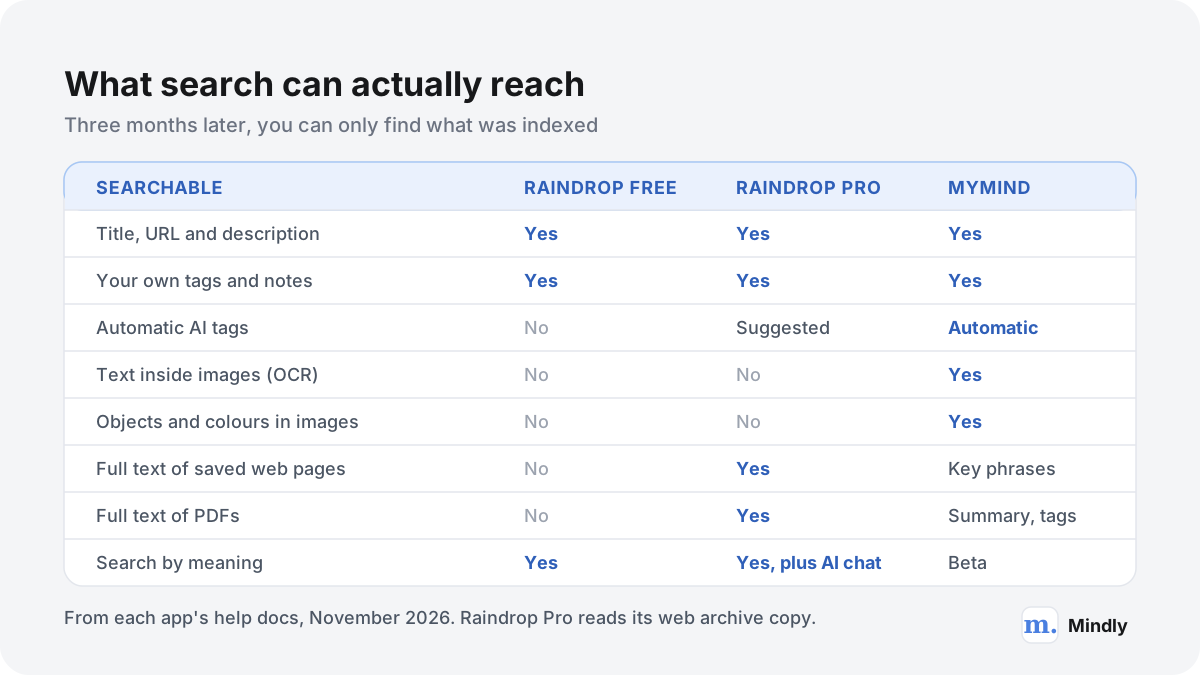
The gap that matters most three months later is search. Raindrop Pro reads the full text of saved pages, PDFs, EPUBs and YouTube transcripts, but it cannot read text inside images. mymind reads text inside images and recognises objects and colours, but according to its own help centre it does not index the full text of articles or PDFs, only key phrases, a summary and tags. Each app finds the things the other misses.
This page compares the two from each app's documentation, pricing page and changelog as of November 2026. Neither is the winner by default. The table and the deep dive below show where each one is stronger, and the long guide walks through a real week of saves, the three-year cost, and how to move your library from one to the other in either direction.
Side by side
mymind vs Raindrop at a Glance
mymind compared with Raindrop
Aspect
mymind
Raindrop
Organizing model
No folders. One stream of cards; AI adds tags on save. Smart Spaces are saved searches that fill themselves
Collections that nest like folders, an Unsorted inbox, and tags. Each bookmark lives in exactly one collection
Free plan
Guest plan, free forever up to 100 cards, with most features
Unlimited bookmarks, collections, tags, highlights and devices; 100 MB of file uploads a month
Paid plans (USD, as of November 2026)
Student of Life $7.99/month or $79/year; Mastermind $12.99/month or $129/year; The Bookmarker $4.99/month with no AI
Pro $2.99/month or $27.99/year on the US App Store; the web checkout shows a local price with VAT
AI features
Automatic AI tags, OCR, object and colour search, summaries; Same Vibe and Reading Mode on Mastermind
Stella assistant (Pro, beta) to find, summarize and reorganize; AI suggestions for tags and collections
What search covers
Titles, tags, notes, key phrases, AI summaries, text in images. Not full article or PDF text
Title, URL, description, tags, notes, highlights. Pro adds full text of pages, PDFs, EPUBs and YouTube transcripts. No OCR
Highlights
Highlighted text becomes its own highlight or quote card
Unlimited colour highlights (up to 100 per bookmark), shown again on the page; notes on highlights need Pro
Page archive
Article Backup and Reading Mode on Mastermind keep a clean copy of articles
Web archive on Pro keeps a copy of every page; deleted about a month after Pro lapses
Sharing and collaboration
None by design. Single cards can be shared through a temporary link
Free: invite members to any collection with edit or read-only roles, or publish a public page
Platforms
Web app, macOS, iOS and iPadOS, Android. No Windows app
Web app, macOS, Windows, iOS and iPadOS, Android. Linux through the web app
Browser extensions
Chrome, Safari and Edge; Firefox not officially supported
Chrome, Safari, Edge and Firefox; the Chrome version also runs in Arc, Brave, Opera and Vivaldi
Offline
iOS app moving to offline-first from version 4.0; earlier offline mode was read-only
The mobile app needs a connection to sync and save
Import
No bulk import. The beta API and MCP are the only route
HTML, CSV, TXT, JSON and ENEX files; mymind's CSV export is on its list of verified sources
Export
Desktop only, in Chrome or Edge: every file plus a cards.csv of notes, links, quotes and highlights
HTML, CSV or TXT for the whole account or one collection; uploaded files as a ZIP; daily backups on Pro
API and AI agents
Beta API with read-only or full-access keys; MCP for Claude, ChatGPT and others
Public API; MCP server for Claude, ChatGPT, Gemini, Cursor and others, limited on Free
Privacy stance
Private by design: no social feeds, no ads; private content processed via Amazon Bedrock and not used for training
Private by default, paid by subscriptions only; data on AWS in Frankfurt; apps open source on GitHub
Watch
See Them in Action
mymind's official introduction to saving without folders and finding by search. From the mymind channel, August 2025.An independent mymind review covering AI tagging, plans and a verdict. From Tooltester, March 2026.A beginner walkthrough of Raindrop collections, tags and filters. Recorded in 2023, before the Stella AI assistant, so newer features are not shown.
Beyond the table
What Actually Separates Them
Filing up front versus finding later
Raindrop asks one question at save time: which collection? You can skip it, and the bookmark waits in Unsorted, but the app is built around the answer. That pays off when your saves map onto projects or subjects that last. mymind skips the question entirely. Its founders' 2022 letter argues that folders were a physical necessity carried into software, and the app replaces them with AI tags and search. That suits people whose saves do not fall into neat projects, and it removes the work that makes most filing systems collapse, the problem covered in why folders fail. The price is control: you trust the AI's tags instead of your own structure.
Words versus pictures
The two apps index different things, which is the most practical difference between them. Raindrop's search page says Pro searches the full text of archived pages, every page of PDFs and EPUBs, and spoken words in YouTube transcripts, and it lists "no OCR" as a limitation. mymind's help centre says it reads text in images and handwriting and can search for objects such as a chair or a watch, but it does not index the full text of websites, only key phrases it extracts. If your memory of a save is a sentence, Raindrop Pro is stronger. If it is a picture, mymind is.
Private by design versus private by default
Both keep your library private unless you act. The difference is what acting can do. In Raindrop, any collection can get members with edit or read-only roles, free and with no member limit, or a public page at a username.raindrop.page address. mymind made a deliberate choice not to build any of that: its help centre says it has no shared Spaces because the product is focused on privacy, and offers only temporary links to single cards. If you never share, mymind's limit costs you nothing. If you sometimes do, it is a hard wall.
Two very different price ladders
Raindrop's free plan has no cap on bookmarks, and Pro costs $27.99 a year on the US App Store as of November 2026. mymind's free guest plan stops at 100 cards, and the plans that keep its AI start at $79 a year for Student of Life and $129 a year for Mastermind, which is the tier that adds Reading Mode, Article Backup and AI summaries. The nearest like-for-like pair, a saved copy of every article, is Raindrop Pro against mymind Mastermind, and over three years that is roughly $84 against $387. Part 6 of the guide below works through the arithmetic.
Getting your data back out
Raindrop exports HTML, CSV or TXT for the whole account, a collection or a selection, and the HTML is a standard Netscape bookmarks file any browser can read. Pro adds daily backups, with copies sent to Dropbox, Google Drive or OneDrive if you want. mymind exports every file you saved plus a cards.csv holding notes, quotes, links and highlights, but only from a desktop browser, Chrome or Edge, and it has no import if you ever come back. Both let you leave. Raindrop makes leaving and returning routine.
Where each one falls short
Raindrop cannot read text in screenshots, its AI assistant and full-text search need Pro, and if Pro lapses its web archive copies are deleted after about a month, so the searchable layer is rented rather than owned. Its look is tidy rather than inspiring. mymind is weaker at long text, has no bulk import, no team features, no Windows app and no official Firefox extension, and its AI tags and summaries are generated in English only, per its language note. Its free plan is a trial in practice: past 100 cards you have to pay or stop saving.
The full comparison
mymind vs Raindrop in Practice: A Week of Saves, Three Years of Costs
Two philosophies of saving
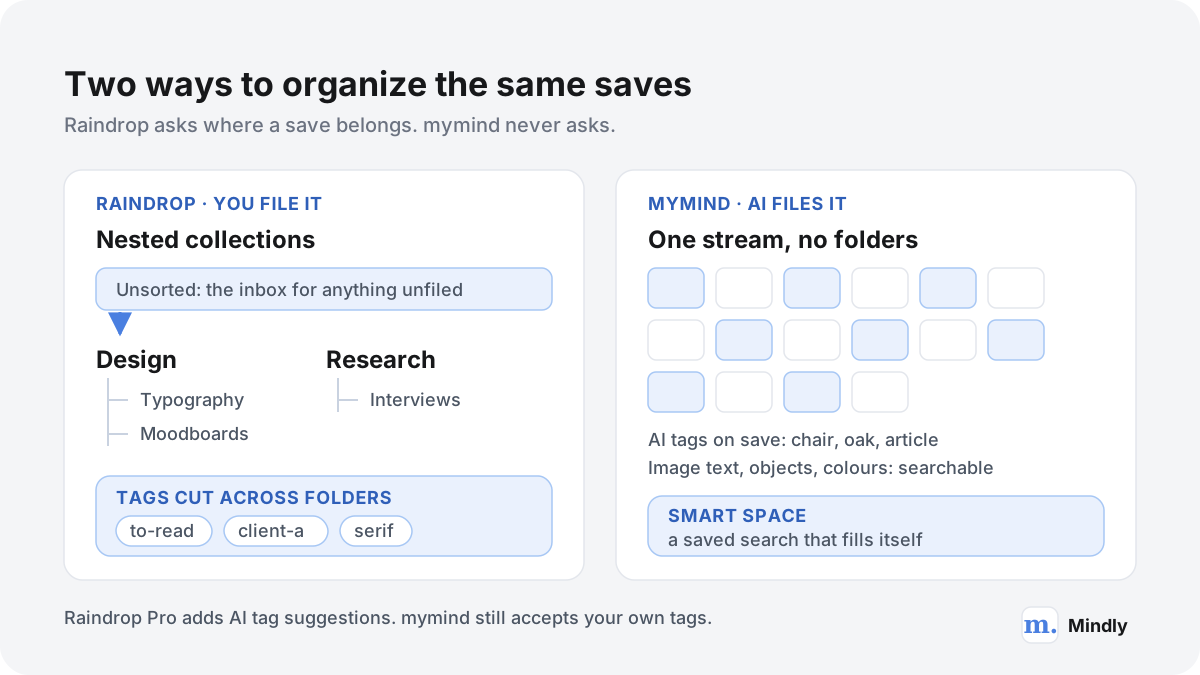
Raindrop treats your saves as a library to be arranged. mymind treats them as a memory to be searched. Almost every difference in the mymind vs Raindrop comparison follows from that one split.
Raindrop.io has been around since 2013; its security page describes it as an independent, bootstrapped product with more than 13 years on the market, funded only by Pro subscriptions. The core unit is the bookmark, and every bookmark belongs to exactly one collection. Collections nest by dragging one onto another, can be reordered, collapsed, merged and given icons, and each one remembers its own layout: list, grid, headlines or moodboard. Anything you save without choosing a collection goes to Unsorted, an inbox you clear later. Tags cut across the tree, so one bookmark can live in "Research" and carry "to-read" and "client-a" at the same time. The help centre is explicit that a bookmark cannot sit in two collections; to have it in two places you save a second copy.
Around that core Raindrop has built the features a serious collector asks for: highlights in any colour on web pages, PDFs and EPUBs; uploaded files from images to audio; a web archive that saves a copy of each page on Pro; shared collections and public pages; reminders; a duplicate and broken-link finder; and since February 2026 an AI assistant called Stella. It runs on Mac, Windows, iPhone, iPad and Android, in a web app, and as an extension for Chrome, Safari, Edge and Firefox, according to its download page.
mymind starts from the opposite premise. Its help centre describes it as a private bookmarking tool powered by AI that works "like your real mind": one stream, no folders, no collections. When you save something, mymind decides what kind of thing it is, whether an article, a product with a price, a book, a recipe, a tweet, a colour palette or a quote, and shows it as a card designed for that type. The AI then adds tags, reads any text inside images, and for images notes the objects it sees. You find things by searching for anything you remember: a word, a colour, an object, a site or a date.
Raindrop asks where a save belongs; mymind tags it and lets search do the rest. Drawn from each app's help documentation, November 2026.
mymind does have a form of grouping, and it is worth understanding because it is not a folder. A Space can be a plain manual collection, or a Smart Space, which is a saved search that updates itself whenever a new card matches. A Smart Space for "object:chair" collects every image in which the AI found a chair, including ones you save next year. A Smart Space for a tag such as #bikeapp collects everything you tagged for a project. The structure exists, but it is computed from your saves rather than built by you.
Privacy is part of the philosophy rather than a setting. mymind says its product has no social feeds, no ads and no distracting features, and it has chosen not to build shared Spaces at all. Raindrop is private by default too, with no ads and no data selling according to its security page, but it treats sharing as a feature: collaboration on collections is free, and public pages turn a collection into a website.
Same week, two apps: 40 saves from a design project
Feature lists hide how an app behaves in a real week. So here is one week of saves for a single project, followed through capture, organization and a search three months later, in each app, based on what each app's documentation says it does.
The person is a product designer who also runs user research. This week she is starting a redesign of the onboarding flow for a bike-sharing app. Over five days she saves 40 things. The mix below is typical of design and research work: lots of images, a fair amount of reading, a few documents, and some of her own words.
What she saved
How many
Examples
Screenshots and inspiration images
12
Onboarding screens from other apps, a progress bar she liked, a map pin style, two typography specimens
Articles
9
Research on permission prompts, a piece on progressive disclosure, two case studies, a type foundry blog post
PDFs
4
The client brief, a transport accessibility report, a usability study, a brand guideline
YouTube talks
3
A conference talk on onboarding, a talk on trust in sharing apps, a short tutorial on motion
Highlights and quotes
5
Sentences from the articles and the accessibility report
Product and tool links
4
A typeface licence page, an icon set, a prototyping plugin, a hardware lock for the bike
Her own notes
3
Notes from two user interviews and a list of open questions
Forty saves in one week. Images and reading make up three quarters of the total.
Capture
In Raindrop she saves from the browser extension, which shows the page title and a collection picker. On Pro the extension also offers AI suggestions for a collection and tags, which the September 2026 changelog says now appear in under a second. Screenshots from her desktop are uploaded as files; 12 screenshots of a few megabytes each fit easily inside the free plan's 100 MB monthly upload allowance listed on the limits page. Highlights are free and unlimited, so she saves her five passages as highlights on the pages and PDFs themselves. Her interview notes are the awkward part: Raindrop is a bookmark manager, so a note either goes in the note field of a related bookmark or is uploaded as a Markdown or text file.
In mymind she clicks the extension's + button and does nothing else. Articles become article cards, the icon set's store page becomes a product card with its price, the YouTube talks become video cards. Screenshots are dragged in or shared from her phone. A highlighted sentence saved with a right-click becomes a highlight card, or a quote card if it was wrapped in quotation marks. Notes are native: she types the interview notes straight into mymind as note cards and can link between them with Mind Links. The only decision she might make is to add a #bikeapp tag while saving.
Organization
In Raindrop, organization is a short weekly job. She creates a collection called "Bike app onboarding" with three nested collections: Screens, Reading and Research. The screens collection gets the moodboard layout so it looks like a wall of images. The four product links get a "tools" tag. Clearing Unsorted takes a few minutes on Friday, or, on Pro, she can ask Stella to do it: the Stella docs list "Organize my Unsorted bookmarks into collections" as an example request, and say Stella proposes changes for her to approve first.
In mymind there is nothing to organize. If she tagged #bikeapp while saving, she searches the tag once and saves it as a Smart Space, and every later save with that tag flows in. If she did not tag, the cards are still in the stream, tagged by the AI with things like "onboarding", "map" or "typography", and she relies on search.
Retrieval, three months later
This is where the two philosophies pay out differently. Here are six things she needs in month four, and what each app's documentation says would happen.
What she needs
Raindrop
mymind
The onboarding screen with a green progress bar
No OCR or colour search, so she browses the Screens collection in moodboard view, or finds it only if she named or tagged it
Search "green", press Enter, add "images": mymind supports colour and object searches, and OCR reads any words on the screen
The article that explained "progressive disclosure" halfway down
On Pro, full-text search finds the phrase in the archived copy. On Free, only if it is in the title, description, tags or notes
Found only if the AI picked it as a key phrase or it is in the summary; mymind does not index full article text
The quote about trust from the accessibility report
Highlights are searchable on every plan, so the quote turns up directly
The quote was saved as its own card, so searching any word in it finds it
What the conference talk said about permission prompts
On Pro, transcript search finds the spoken words, and Stella can summarize the video
The video card is there; its help centre does not say spoken words are indexed
Everything for the bike app project
Open the parent collection; nested collections come with it
Open the Smart Space, if she tagged #bikeapp; otherwise search and hope the AI tags agree
Send the client all the reference screens
Share the Screens collection read-only, or turn on a public page
Share cards one at a time through temporary links; there are no shared Spaces
Six retrieval tasks three months on, from each app's help documentation as of November 2026.
The pattern is clear. Raindrop finds words and keeps project structure, but anything she only remembers visually depends on how well she filed it. mymind finds pictures and quotes with no filing at all, but long text she half-remembers can slip through. For this designer the honest result is a split: the 12 screenshots and 5 quotes are mymind's strength, the 9 articles, 4 PDFs and 3 talks are Raindrop Pro's, and the client hand-off only works in Raindrop.
Search and retrieval in depth
A save is only useful if you can find it again, and what you can find depends entirely on what each app indexed when you saved it.
What Raindrop indexes
On every plan, Raindrop's search matches bookmarks by title, description, URL, tags and notes, and also searches collections, tags, highlights and annotations from the same field. Results are grouped by type. Filters narrow things further: by tag, by "without tags", by favourites, notes or highlights, by detected content type (article, image, video, audio, document, book) and by creation month. Operators work as you would expect: quotes for an exact phrase, a minus sign to exclude a word, and "info:" to search only titles and descriptions. With the extension installed, typing "rd" and Tab in the address bar of Chrome, Firefox or Edge searches your library without opening the app.
Pro adds the layer that matters most for text: searching inside content. The web archive keeps a copy of each page, and search reads its full text; PDFs and EPUBs are searched page by page; YouTube videos are searched by their transcripts, which the June 2026 changelog says are now extracted automatically. The docs also say search matches by meaning, so "morning routine" can surface a bookmark titled "how I start my day", and that the Stella assistant can take vaguer descriptions such as "the Italian recipe with the weird ingredient". Two limits are documented: new bookmarks take a few minutes before page content is indexed, and text inside images is not searchable because there is no OCR.
What mymind indexes
mymind's search guide describes it as a personal search engine in which you type anything you remember. It covers titles, your notes and tags, the AI tags, AI summaries, and text read from images through OCR, including handwriting. It adds searches no bookmark manager offers: "object: car" finds images in which the AI saw a car, colours narrow results, and dates such as "last week" or "May 19th" work as plain words. Pressing Enter after a term starts a Deep Search that narrows the results, so "shoes", Enter, "blue" shows only blue shoes. The advanced search page documents && for AND, || for OR, a minus sign for exclusion, and type keywords for more than 30 kinds of card, from type:recipe to type:substack-note.
What it does not cover is long text. mymind's help centre says it does not index the entire text of websites and articles, for performance and accuracy reasons, and instead extracts key phrases such as names, locations and core concepts. PDFs get the same treatment: title, AI tags and summary are searchable, the full contents are not. There is a beta semantic search, triggered by typing two vertical bars before your words, and mymind has also tested a desktop Vibe Search for describing a visual mood in your own words through its Research Lab, a set of beta features for Mastermind members that may change or disappear. One more limit matters for non-English speakers: AI tags and summaries are generated in English only, so searching the AI's metadata means searching in English.
What each app's search reaches, by plan, from the help documentation as of November 2026.
What needs a paid plan
Search feature
Raindrop
mymind
Basic search of titles, tags and notes
Free
Free guest plan, up to 100 cards
Full text of pages, PDFs, EPUBs, YouTube transcripts
Pro
Not offered
AI chat over your library
Pro (Stella, beta)
Not offered
OCR and object search in images
Not offered
Every plan except The Bookmarker, which has no AI
AI summaries
Through Stella on Pro
Listed on the Mastermind plan
Search your library from an AI assistant
MCP on Free, with text and semantic search on Pro
Beta API and MCP
Plan requirements as stated on each app's pricing page and help centre, November 2026.
If you rely on search more than on structure, the pattern from the week above holds. For text-heavy libraries, Raindrop Pro gives you a search engine over everything you saved. For image-heavy libraries, mymind gives you one that understands pictures. Neither covers both. For a longer look at building retrieval that works across formats, see how to build a personal search engine, and for why saving alone rarely leads to recall, how to remember what you read.
Highlights, reading and AI help
Both apps go beyond saving the link. They differ in what they do with the reading itself.
Raindrop's highlights work on web pages through the extension, and on PDFs and EPUBs inside the app. You pick a colour, and the highlight is saved immediately; with the extension installed, highlights reappear on the original page when you revisit it. Highlights are free and unlimited in number of pages, with a cap of 100 per bookmark, while annotations, the notes you attach to a highlight, need Pro. A highlights filter shows every bookmark you have marked up, and highlights from a single bookmark can be exported as text or CSV from the web app. That makes Raindrop a reasonable base for a progressive summarization habit, where you bold and re-bold the passages that matter.
mymind turns highlights into separate cards. Select text, right-click, "Add to my mind", and the passage becomes a highlight card, or a quote card if it was in quotation marks. The card stands on its own in the stream, searchable by any word in it, which suits people who collect lines rather than annotate documents, the old practice of a commonplace book. The trade-off is context: the highlight is not shown back on the page, and you do not see all highlights from one article together unless you search for them.
For reading itself, Raindrop opens bookmarks in a preview and, on Pro, uses the archived copy as the source, which the May 2025 changelog notes also improves speed and privacy. mymind's Reading Mode strips ads and clutter from an article and keeps the full text inside your mind even if the original disappears; it is a Mastermind feature. Neither is built around a reading queue the way dedicated read-it-later apps are.
The AI layers compared
Raindrop's AI is an assistant you call. Stella arrived in February 2026 and is in beta for Pro users. You open a chat and ask it to find, summarize, organize or rediscover: "Summarize this article in 3 bullet points", "Clean up my tags, merge duplicates like recipe and recipes", "What topics do I save the most?". Every answer links to its source, and bigger changes need your approval. Raindrop says Stella runs on an open-source model hosted on its own infrastructure, that data is never used for training, and its September 2026 changelog names the model as DeepSeek 4.1 Flash. Stella only runs when you open a chat, and you can hide it in settings. Separately, Pro adds AI suggestions for tags and collections when you save.
mymind's AI is ambient. It runs on every save without being asked: it classifies the card, writes tags, reads text in images, recognises objects and, on Mastermind, writes a short summary shown in the card's TLDR section. Serendipity resurfaces old cards in a two-minute session where you keep or discard each one, which doubles as a gentle clean-up. Same Vibe, on Mastermind, finds cards that resemble the one you are looking at. You cannot chat with your library inside mymind, but its beta API and MCP let assistants such as Claude or ChatGPT search and read your cards.
Both apps now speak MCP, the protocol AI assistants use to reach outside data. Raindrop's MCP server works with Claude, ChatGPT, Gemini, VS Code, Cursor and others; on Free it is limited, without text and semantic search. mymind lets you create read-only or full-access keys and warns that a full-access key given to a misbehaving agent could modify or delete cards. Before you connect either, it is worth reading about what agents can leak when they are wired into everything.
Privacy, data ownership, export and longevity
A bookmark library is years of attention in one place. Where it lives, who processes it and how you get it out matter more than any single feature.
Where the data lives and who sees it
Raindrop's security page says all data is stored on Amazon Web Services in Frankfurt, Germany, with three copies across data centres, connections encrypted over HTTPS, and continuous backups that can restore to any point in the past year. Uploaded files need authentication, and direct file links expire after 10 minutes. Two-factor sign-in is available. Raindrop says it has no investors, no advertising and no data selling, and that every app, from web to mobile to extension, is open source on GitHub, so the data each one collects can be checked.
mymind's data security page also names AWS as its infrastructure, says uploaded files and the database are encrypted at rest, and says payments go through Stripe. Its AI usage policy is the more interesting document: private content is processed through Amazon Bedrock, data is "never shared with the original model provider", it is discarded after processing, and it is not used for training. Public content, such as a public URL you save, may also go to other third-party AI services and proxies that can log requests for security reasons, without those requests being tied to your account. mymind's help centre describes the product as having no social feeds and no ads, and the company has chosen not to build sharing.
Neither app stores your library on your own device as files you control. Both are cloud services, and both depend on you trusting their company. Raindrop earns some of that trust through open-source apps and a 13-year record; mymind through a narrow, privacy-first product and a published AI policy. The wider question of who holds your context, and why it matters more as AI assistants read it, is covered in the AI memory wars.
Export, verified format by format
Export
Raindrop
mymind
Whole library
Backup from Settings, emailed when ready: bookmarks, collections, tags, highlights and notes
"Export my mind" from the account page
Formats
HTML (Netscape bookmarks file), CSV, TXT
Original files plus one cards.csv
Uploaded files
Separate ZIP of all original files
Each image and PDF saved into the folder you choose
Partial export
One collection, or selected bookmarks
Not documented
Highlights
Included in backups; per bookmark as text or CSV
Included in cards.csv
Where it works
Web app, including on a phone browser; iOS for collections
Desktop only, latest Chrome or Edge
Automatic backups
Pro: daily, 30 kept, optional copy to Dropbox, Google Drive or OneDrive
Not offered
From Raindrop's export documentation and mymind's export article, November 2026.
The detail in mymind's export article is worth reading before you need it. The export uses browser file-system access that only current Chrome and Edge support, you must pick a subfolder rather than Documents or Desktop directly, and mymind has no import, so a closed account cannot be restored from the export. Raindrop's export page is more routine: pick a format, download, and if you ever return, the same file imports back in.
Longevity: what happens when you stop paying
Apps disappear. Mozilla shut Pocket down after eight years of owning it, and every reading list in it had to move somewhere else. Our app graveyard rules boil the lesson down to a few habits: know your export path, run it before you need it, and keep the export in a format another app can read. By that test, Raindrop's HTML export is the safest file in this comparison, because every browser imports it.
Lapsing is a smaller version of the same risk. On Raindrop, your bookmarks stay forever on Free, but the premium features page says that when Pro lapses, full-text search stops, automatic backups stop and archived copies become inaccessible and are deleted after about a month. If those archives are why you pay, export the pages you care about before you cancel. On mymind, the downgrade article says you can only return to the free plan with fewer than 100 cards. With a bigger mind, the cheapest way to keep it is The Bookmarker at $4.99 a month, which drops every AI feature, including OCR search and AI image tagging.
mymind pricing vs Raindrop pricing over one and three years
The two apps sit at very different points on the price scale, so the useful question is what each extra dollar buys.
mymind's pricing page lists four plans in US dollars as of November 2026, matching the in-app prices on its US App Store listing. The Bookmarker is $4.99 a month with no card limit and no AI. Student of Life is $7.99 a month or $79 a year, with unlimited cards, AI image tagging, OCR, Smart Spaces and Serendipity. Mastermind is $12.99 a month or $129 a year and adds Advanced AI, Reading Mode, Article Backup, video uploads up to 500 MB, AI summaries and Same Vibe. A $299 a year plan called Newton is shown but not yet available. The free guest plan, per the free plan article, is free forever up to 100 cards.
Raindrop's pricing page shows prices through its payment provider, Paddle, in the visitor's local currency with VAT, so the number you see depends on where you are, and the page says yearly billing is usually about 20% cheaper. The fixed US dollar figures we could verify are on its US App Store listing: Pro Monthly $2.99 and Pro Yearly $27.99, as of November 2026. The free plan has no bookmark limit.
Plan
Billing
1 year
3 years
Raindrop Free
None
$0
$0
Raindrop Pro
Yearly
$27.99
$83.97
Raindrop Pro
Monthly
$35.88
$107.64
mymind guest plan
None (100 cards)
$0
$0
mymind The Bookmarker
Monthly
$59.88
$179.64
mymind Student of Life
Yearly
$79.00
$237.00
mymind Student of Life
Monthly
$95.88
$287.64
mymind Mastermind
Yearly
$129.00
$387.00
mymind Mastermind
Monthly
$155.88
$467.64
US dollar prices as of November 2026 from mymind's pricing page and each app's US App Store listing, multiplied out, before any tax. Prices can change at renewal.
Like-for-like comparisons are fairer than headline prices. The feature both apps charge for is a saved copy of what you read: Raindrop puts its web archive and full-text search in Pro, mymind puts Article Backup and Reading Mode in Mastermind. On yearly billing that is $27.99 against $129 a year, or $83.97 against $387 over three years, a difference of a little over $300. If what you want from mymind is the AI organization and OCR without the reading features, Student of Life at $79 a year is the fair comparison, and the three-year gap narrows to about $153.
Some people run both, Raindrop for links and team lists, mymind for visual inspiration. Raindrop Pro yearly plus mymind Student of Life yearly comes to $106.99 a year, or $320.97 over three years. If that is your plan, consider whether Raindrop Free is enough for the link side, since collaboration, highlights and unlimited bookmarks are all free; then the pair costs the same as mymind alone.
mymind's higher price is a deliberate choice: its student plan article also notes that, as a small independently funded company, it usually cannot discount. Raindrop pairs a low price with a free tier and says Pro subscriptions are its only revenue. Neither model is a red flag. Both are worth weighing against how long you expect to keep the library.
Migrating between mymind and Raindrop
Moving is lopsided. Raindrop imports almost anything, mymind's export included. mymind imports nothing in bulk by design.
From mymind to Raindrop
Export from mymind. On a computer, open mymind in the latest Chrome or Edge, go to the account page through the cog in the corner, and choose "Export my mind". Create a new subfolder first; the export will not save straight into Documents or Desktop. You get each image and PDF as a file plus cards.csv with your notes, quotes, links and highlights.
Import the CSV into Raindrop. Raindrop's import page lists mymind among its verified sources. Open Settings, then Import, upload cards.csv, review the summary of bookmarks, folders, tags and highlights found, and start the import. Duplicate URLs are skipped and nothing existing is overwritten.
Upload the files. Images and PDFs from the export folder are not in the CSV. Drag them into a Raindrop collection. Watch the limits: 100 MB of uploads a month and 100 MB per file on Free, 10 GB a month and 300 MB per file on Pro. A large visual mind may take Pro or several months on Free.
Sort Unsorted. mymind has no folders, so everything without one lands in Unsorted. Build your collections, or on Pro ask Stella to propose a structure and approve it.
Check what did not travel. Smart Spaces are saved searches and have no equivalent file. Check a sample of cards to see whether your tags came across, since mymind does not document the columns in cards.csv. OCR text and object recognition will not exist in Raindrop at all.
From Raindrop to mymind
mymind's import article explains why there is no bulk import: in its research, people barely knew what was in their old libraries, and only about 20% of it was still valuable, so a mass import would recreate the mess. As of August 2026 the article points to the beta API and MCP as the only route, and the API article confirms that importing bookmarks from another tool is the only kind of bulk import mymind has.
Export from Raindrop. Create a backup in Settings, Backups, or export a single collection. CSV is the most useful format for scripting; HTML is the most portable. Export highlights you want to keep per bookmark as text or CSV.
Decide what is worth moving. Take mymind's point seriously. Sort the export by date or collection and keep the active projects and the things you still return to. Thousands of old bookmarks rarely earn their place.
Choose a route. For a few hundred items, re-saving with the mymind extension lets the AI build proper cards with screenshots and tags. For more, create a mymind API key in the extensions area (adding cards needs a full-access key, so keep it inside the script and delete it afterwards), and use a small script or an AI assistant connected to mymind's MCP to add links from the CSV. Mind the rate limits mymind mentions.
Rebuild structure as Smart Spaces. If your Raindrop collections mattered, add a tag per collection as you import and save each tag search as a Smart Space. That keeps the old grouping without folders.
Keep Raindrop Free for a while. Your bookmarks stay on Raindrop's free plan indefinitely, so there is no rush to delete anything until you trust the new setup.
Who should pick which
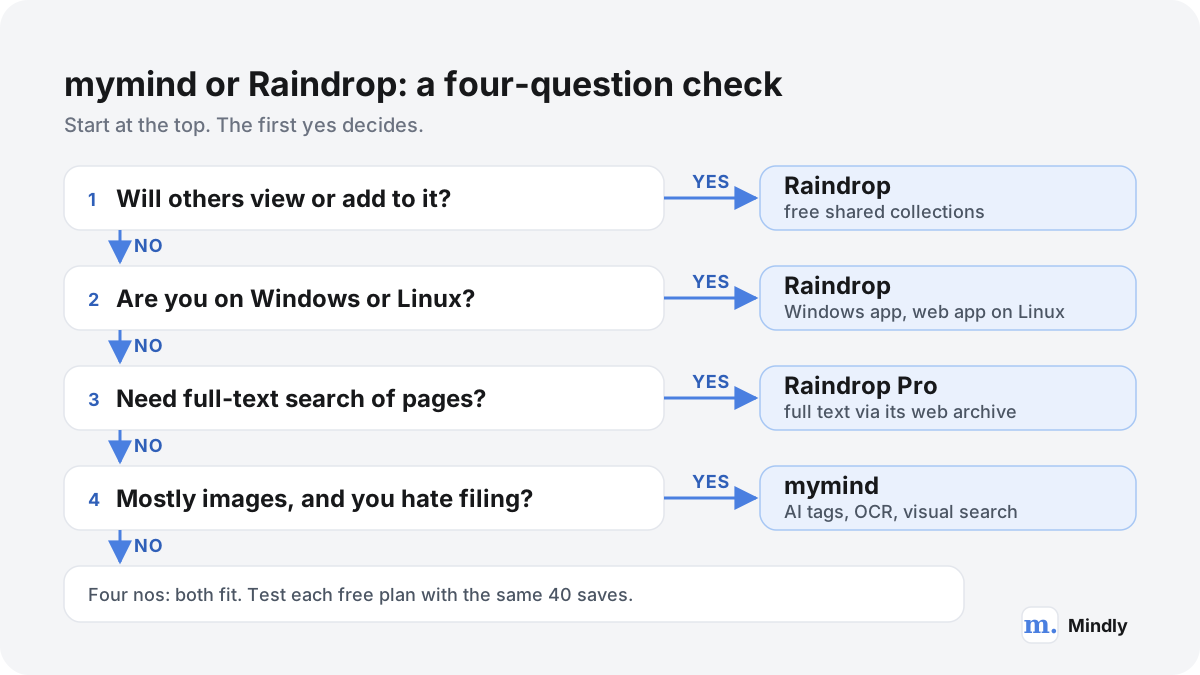
Most people can decide with four questions, asked in order.
A four-question check. Sharing and platform needs come first because they are hard limits; search style and filing habits come after.
The order matters because the first two questions are hard limits rather than preferences. mymind has no shared Spaces and no Windows app, so if you need either, the comparison ends there. The third and fourth questions are about how you remember things, by words or by pictures, and how much you are willing to file.
Profiles that fit Raindrop
Researchers, students and writers who save articles and PDFs and later need a sentence from inside them. Raindrop Pro's full-text search over the archive is the deciding feature.
Teams and teachers who curate reading lists for others. Shared collections with read-only roles and public pages are free.
People leaving another bookmark app with thousands of links in HTML, CSV or JSON. Raindrop imports them all in one go, folders included.
Windows and Linux users and anyone who switches between several browsers, including Firefox.
Tab hoarders who want to save every open tab at once and close the window, a habit we cover in how to organize browser tabs.
Profiles that fit mymind
Designers, architects and art directors whose saves are mostly images and who remember a reference by its colour or the objects in it.
People who have given up on folders more than once. mymind removes the step where most systems fail, a pattern described in why your second brain is not working.
Screenshot collectors who need text in screenshots to be searchable. OCR is built in, which is the core of organizing screenshots on a Mac.
Quote and idea collectors who want highlights, quotes, notes and to-dos as equal cards in one place.
Anyone who wants a private space with no sharing, no feeds and no audience, ever.
When not to use either
Neither app is a notes system for long writing, a task manager or a team wiki. If your notes are drafts, essays or linked thinking, a dedicated notes app fits better; our Notion vs Obsidian and Obsidian vs Logseq comparisons cover that ground. If what you save is mostly social posts, the specific problems of organizing social media bookmarks are worth reading first, since both apps save X and Reddit links but treat them differently. And if you want a folder system you can carry from app to app, a method such as PARA works in either tool and outlives both.
If neither fits: the alternatives
mymind and Raindrop cover the two ends of the bookmark spectrum. Plenty of people need something in between, or something else entirely.
If you want mymind's no-folders approach with something you can run yourself, Karakeep is open source, tags saves with AI and can be self-hosted with Docker or used in its cloud version. If you want Raindrop's structure in a native Apple app, Anybox is a bookmark and read-later app sold through the App Store. If you mostly want to read what you save rather than keep it, a reading-queue app such as Readwise Reader or Instapaper fits better, and both export CSV files that Raindrop can import later. Our guides to choosing a bookmark manager and a read-it-later app set out the criteria, and the full list of head-to-heads lives on the compare hub, including Notion vs Mem for people weighing AI note apps.
For a wider look at mymind's rivals, including tools that keep the library on your own computer, see our mymind alternatives guide. One of the options there is Mindly, a Mac app that saves links, files, PDFs, voice memos and notes with one shortcut, tags and summarizes them with AI, keeps the library in a folder on your Mac and lets you chat with any saved document. It is macOS only, has no iPhone app or sharing yet, and does not import Raindrop or mymind exports, so it suits a different person than either app above.
See how the wider field compares with mymind, including local and self-hosted options. Compare mymind alternatives →
Which one for you
Who Should Choose Which
Choose mymind when
Most of what you save is visual: screenshots, product shots, interiors, typography, colour palettes.
You have tried folders before and stopped filing within a month.
You remember things by how they looked or by a word inside an image, not by where you put them.
You never want a sharing button anywhere near your library.
You save quotes, notes and to-dos alongside links and want them all in one calm grid.
You are on a Mac, iPhone or Android and do not need a Windows app.
Choose Raindrop when
Most of what you save is articles, documentation, PDFs and videos you will want to search inside later.
You like knowing exactly where something lives, in a folder you named.
You need to share a collection with a client, a class or a team, or publish a public list.
You work on Windows or Linux, or move between many browsers.
You are migrating thousands of browser bookmarks or a Pocket export and want them all brought in at once.
You want the lowest price for a paid plan, or a free plan with no item limit.
A third option
If Neither Quite Fits
Both apps live in the browser first and keep your library on their servers. That is fine for most people, but it leaves a few needs uncovered: a library stored as files on your own computer, one app for Word documents, transcribed voice memos and notes as well as links, and the ability to ask questions of a PDF or article you saved and get answers drawn from it. Raindrop's Stella can chat about saved pages, but only on Pro and only in the cloud; mymind has no built-in chat, only a beta API for outside assistants.
If those needs matter more than shared collections or visual search, it is worth looking past this pair. Our mymind alternatives page compares the wider field, including tools that run locally, and the bookmark manager and read-it-later guides cover the jobs Raindrop is usually hired for.
Mindly is a second brain app for Mac built on that idea. One shortcut captures notes, links, files, PDFs, and voice. AI tags, summarizes, and connects each item as it arrives, and the library is stored on your Mac. It runs on macOS only and it is not a team workspace, so if mymind or Raindrop matches how you work, use it.
Common questions
mymind vs Raindrop, Answered
Is mymind better than Raindrop?
Neither is better across the board. mymind is stronger for visual saves, automatic organization and privacy by design, because it reads text in images and never asks you to file anything. Raindrop is stronger for links, documents and sharing, because it searches inside the full text of pages and PDFs on Pro, works on Windows, and lets you invite collaborators for free. Choose by what you save and whether anyone else needs to see it.
Raindrop vs mymind: which is cheaper?
Raindrop, by a wide margin. Its free plan has no limit on bookmarks, and Pro is $2.99 a month or $27.99 a year on the US App Store as of November 2026. mymind's free plan stops at 100 cards; its paid plans are The Bookmarker at $4.99 a month without AI, Student of Life at $7.99 a month or $79 a year, and Mastermind at $12.99 a month or $129 a year (USD, as of November 2026). Prices on Raindrop's web checkout are shown in your local currency with VAT.
What are the best mymind alternatives?
It depends on which part of mymind you want to keep. For structured bookmarks with sharing, Raindrop is the usual pick. For an open-source app with AI tagging that you can host yourself, Karakeep offers both a Docker setup and a cloud version. For reading rather than collecting, a read-it-later app fits better. Our mymind alternatives page compares more options, including ones that keep the library on your own computer.
What are the best Raindrop alternatives, and how does it compare with Pocket, Readwise, Instapaper, Anybox or Karakeep?
Raindrop vs Pocket is now a moot question, because Mozilla has shut Pocket down, and Raindrop lists Pocket's HTML export among the files it imports. Raindrop vs Readwise Reader and Raindrop vs Instapaper is really bookmarks versus reading: those two are built around a reading queue, while Raindrop is built around a library you organize; Raindrop can import both of their CSV exports. Raindrop vs Anybox is cross-platform versus Apple-only, since Anybox is sold through Apple's App Store. Raindrop vs Karakeep is hosted versus self-hostable: Karakeep is open source and adds AI tags automatically. mymind is the alternative if you want no folders at all.
Can I move from mymind to Raindrop?
Yes. Export your mind from mymind's account page in Chrome or Edge on a desktop, which gives you your files plus a cards.csv. Raindrop's import page lists mymind's CSV as a verified source. Links and notes come across from the CSV; images and PDFs sit in the exported folder and have to be uploaded to Raindrop separately, which counts against its monthly upload allowance. Everything lands in Unsorted, because mymind has no folders to map to collections.
Can I move from Raindrop to mymind?
Not with a one-click import. mymind says it does not support bulk import on purpose, because people tend to bring their old mess with them. The options are to re-save the bookmarks you still care about with the mymind extension, or to use mymind's beta API or MCP to push links from a Raindrop CSV export into your mind, minding the API's rate limits. Its help centre calls the API the only bulk-import tool it has.
Does mymind search the full text of articles and PDFs?
No, according to its help centre. For web pages it extracts key phrases such as names, places and core concepts, and for PDFs it indexes the title, AI tags and summary. It says full indexing would slow search down and make it less accurate. It does read text inside images through OCR, including handwriting. Raindrop Pro does the opposite: full text of pages, PDFs and EPUBs, but no OCR.
Is Raindrop.io worth paying for? A short Raindrop.io review
For many people the free plan is enough: unlimited bookmarks, collections, highlights and collaborators. Pro is worth it if you need full-text search inside pages and PDFs, a permanent copy of pages that may disappear, daily backups, reminders, notes on highlights, or the Stella AI assistant. At $27.99 a year on the US App Store it is inexpensive for what it adds. The main catch is that archive copies are deleted about a month after Pro ends.
Which one is more private?
Both keep your library private by default and neither runs ads. mymind goes further by design, with no sharing features at all and a policy that private content sent to its AI via Amazon Bedrock is discarded after processing and never used for training. Raindrop stores data on AWS in Frankfurt, says its Stella assistant runs on a model hosted on its own infrastructure, and publishes its apps' source code on GitHub, which lets anyone check what the apps collect.
Sources
What This Page Draws On
PricingRaindrop.io · 2026Free and Pro feature lists, local-currency prices with VAT, the yearly discount, refunds and billing rules.
LimitsRaindrop.io HelpFree versus Pro: uploads, file size, highlights per bookmark, web archive, full-text search, backups.
SearchRaindrop.io HelpFields searched on every plan, full-text search of archives, PDFs, EPUBs and YouTube transcripts on Pro, matching by meaning, no OCR.
Web archiveRaindrop.io HelpWhat the archive saves, its limits, and deletion about a month after Pro ends.
Export & backupRaindrop.io HelpHTML, CSV and TXT exports, file ZIPs, daily Pro backups and cloud backup destinations.
ImportRaindrop.io HelpSupported formats and the list of verified sources, including mymind, Pocket, Instapaper and Readwise Reader.
Security & privacyRaindrop.io HelpAWS Frankfurt storage, encryption, open-source apps and the subscription-only business model.
Stella AI and web app changelogRaindrop.io Help · 2026What the Stella assistant does, its privacy terms, and the February to September 2026 changelog entries.
mymind pricingmymind · 2026The Bookmarker, Student of Life, Mastermind and Newton plans and their features.