Raindrop alternatives The best Raindrop alternatives in 2026, grouped by why you are leaving
The best Raindrop alternatives depend on what you want that Raindrop.io does not give you. For open source you can self-host, choose Karakeep, Linkwarden or linkding; for a native Mac and iPhone app, Anybox or GoodLinks; for reading rather than keeping, Readwise Reader, Instapaper or wallabag; and for a library that organizes itself with AI, mymind or, on a Mac, Mindly. Raindrop is a strong baseline, so this guide starts with what you would give up.
By the Mindly Team · Updated November 11, 2026
The short answer
The short answer: which Raindrop alternative, by reason
Most Raindrop alternatives win on one thing and lose on others, because Raindrop.io itself is hard to beat on breadth: a free plan with unlimited bookmarks, collections, tags and devices, apps for Mac, iOS and Android plus a web app, and a Pro plan that costs $2.99 a month or $27.99 a year on the US App Store as of November 2026. So start from your reason for leaving. If it is control (you want the code open and the data on a machine you own), Karakeep is the most complete open-source Raindrop alternative, with AI tagging that can run on a local model, and Linkwarden is the best choice if what you care about most is a preserved copy of every page. linkding is the minimal option: one Docker container, a SQLite file, tags and nothing else to look after.
If your reason is that Raindrop feels like a web app on your Mac, the two Apple-native picks are Anybox, a bookmark manager for Mac, iPhone and iPad with iCloud sync and a lifetime licence, and GoodLinks, a read-later app you buy once for $9.99. If you mostly saved articles you never read, the honest fix is a reading app: Readwise Reader for heavy readers who highlight, Instapaper for a simple free queue, or wallabag, which is open source and costs €11 a year hosted.
If the problem is the opposite one, that you never sort anything into collections, look at apps that organize for you. mymind tags everything with AI and has no folders at all, at a higher price; we compare the two in detail in mymind vs Raindrop. Mindly, the app this site is about, is a Mac app that captures links, files and notes with one shortcut and tags, summarizes and connects them with AI, with the library kept in a folder on your Mac. It has no iPhone app, no sync, no browser extension and no public sharing, so it fits only some readers, and the limits are spelled out below.
Everything here was compared from each app's documentation, pricing page and changelog as of November 2026, not from hands-on tests. Prices are in the currency each official page shows. If you are only looking for a Raindrop io alternative that is free, the shortlist is a self-hosted Karakeep, Linkwarden or linkding, Instapaper's free plan, or the free tiers of Anybox and Raindrop itself, and the section on staying explains why the last one is often the answer.
At a glance
Raindrop alternatives at a glance
| App | Best for | Platforms | Free plan | Paid price | Self-host / open source | AI features | Export |
|---|---|---|---|---|---|---|---|
| Raindrop.io (reference) | A large, organized link library on every device | Web, Mac, iOS, Android; extensions for Chrome, Safari, Firefox, Edge | Unlimited bookmarks; 100 MB uploads a month | $2.99/mo or $27.99/yr (US App Store); local currency on the web | Apps are open source; no self-hosted version offered | Pro: Stella assistant (beta), AI suggestions, meaning-based search | HTML, CSV, TXT, ZIP of files; daily backups on Pro |
| Karakeep | Self-hosting with AI tags | Web, iOS, Android; extensions for Chrome, Firefox, Safari | Self-hosted: unlimited. Cloud: 50 bookmarks | $4/mo or $40/yr (cloud Pro) | Yes, AGPL-3.0 | AI tags and summaries; local models via Ollama | CLI mass export; API |
| Linkwarden | Preserving full copies of pages | Web, iOS, Android; extensions for Chrome, Safari, Firefox | Self-hosted: free. Cloud: 14-day trial | $3/mo per user billed yearly (cloud) | Yes, AGPL-3.0 | Optional AI tagging (Ollama or OpenAI-compatible) | backup.json (metadata only) |
| linkding | A minimal, low-maintenance server | Web app (PWA); extensions for Firefox, Chrome | Free to self-host | None; managed hosting offered by third parties | Yes, MIT | None | Netscape HTML |
| wallabag | Open-source read-later | Web, iOS, Android; wallabagger extension | Self-hosted: free. Hosted: 14-day trial | €11/yr or €4 per 3 months (wallabag.it) | Yes, MIT | None documented | EPUB, PDF, MOBI, CSV, JSON, TXT, XML |
| Anybox | A native Apple bookmark app | Mac, iPhone, iPad | Up to 50 links | $1.99/mo, $14.99/yr or $49.99 lifetime | No | None listed | JSON (per Raindrop's import guide) |
| GoodLinks | Read-later on Apple devices, bought once | iPhone, iPad, Mac, Apple Vision | No; paid app | $9.99 once; optional $4.99 yearly feature upgrade | No | One-tap summaries | Data export from the File menu; highlights to Markdown |
| Readwise Reader | Reading and highlighting everything | Web, iOS, Android, Mac, Windows; extensions | 30-day trial | $7.99/mo billed yearly (Reader only) | No | Ghostreader summaries, explanations, translation | CSV (per Raindrop's import guide) |
| Instapaper | A simple, free reading queue | Web, iOS, Android | Unlimited saves, 5 notes a month | $5.99/mo or $59.99/yr | No | AI voices for text to speech (Premium) | CSV (per Raindrop's import guide) |
| mymind | Saving without ever organizing | Web, iOS, Android, macOS; extensions | Up to 100 cards | $4.99/mo (no AI); $79/yr or $129/yr with AI | No | AI tags, image text recognition, Smart Spaces | Files plus a cards CSV |
| Mindly | A private AI library on one Mac | macOS 14 or later only | Up to 25 items | €7.99/mo or €44.99/yr | No; library is a local folder | AI tags, summaries, OCR, chat with any item | Your library folder on your Mac |
Watch
See It in Action
The full comparison
Choosing a Raindrop Alternative, Step by Step
What Raindrop does well, so you know what you are giving up
Raindrop.io is the default answer to "which bookmark manager?" for good reasons, and most Raindrop alternatives match only part of it. It is worth being precise about the baseline before you leave.
The free plan is unusually generous. Raindrop's limits page lists unlimited bookmarks, collections, tags, collaborators per collection and sync devices on Free, plus unlimited highlights (up to 100 per bookmark) and 100 MB of file uploads a month. Its pricing page lists apps for Mac, iOS and Android, extensions for Chrome, Safari, Firefox and Edge, sharing and collaboration, import and export, and more than 2,600 integrations, all on the free plan. Many of the apps below charge for things Raindrop gives away.
Pro is cheap for what it adds. The same pages list full-text search, a permanent web archive of each saved page, reminders, annotations, a duplicate finder, a broken link checker, daily automatic backups, 10 GB of uploads a month, MCP access for AI agents, and AI suggestions plus Stella, a beta assistant that finds bookmarks from a description, summarizes articles and YouTube videos, and proposes reorganizations you approve before they apply. The web checkout shows Pro in your local currency, with yearly billing about 20% cheaper than monthly and a 30-day money-back guarantee; on the US App Store it is $2.99 a month or $27.99 a year as of November 2026.
| Raindrop.io feature | Free | Pro |
|---|---|---|
| Bookmarks, collections, tags, devices | Unlimited | Unlimited |
| Collaborators per collection | Unlimited | Unlimited |
| Highlights | Unlimited, up to 100 per bookmark | Same, plus annotations |
| File uploads | 100 MB a month, 100 MB per file | 10 GB a month, 300 MB per file |
| Search | Title, description, URL, tags, notes | Adds full text of archived pages, PDFs, EPUBs and YouTube transcripts |
| Permanent copy of pages | No | Yes, web archive |
| AI | No | Stella assistant (beta) and AI suggestions |
| Backups | Manual export | Daily, up to 30 kept, optional Dropbox, Google Drive or OneDrive copy |
Privacy is reasonable for a cloud service. The security page says data is stored on Amazon Web Services in Frankfurt, connections are encrypted, Raindrop's web, desktop, mobile and extension apps are open source on GitHub, and Pro subscriptions are its only revenue, with no investors. Stella runs on an open-source model hosted on Raindrop's own servers, and Raindrop says that data is not shared with third parties or used for training. What the page does not describe is end-to-end encryption, and that gap matters to some of the people who go looking for an alternative.
How Raindrop compares with an AI-first "save everything" app is covered in mymind vs Raindrop. Here the question is wider: given everything Raindrop does, what would make another app a better fit?
Why people look for a Raindrop alternative
The reasons cluster into six, and each one points to a different group of apps. Knowing which one is yours saves you from trading a small annoyance for a bigger one.
- You want to own the server. Raindrop publishes its apps' source code, but the service itself cannot be self-hosted. People who already run a home server, or who need bookmarks inside a company network, want a Raindrop alternative that is self-hosted from the start. Karakeep, Linkwarden, linkding and wallabag all qualify.
- You want encryption or a narrower data trail. Raindrop documents encryption in transit and hosting in Frankfurt, but not end-to-end encryption. If your bookmarks include client work, medical research or anything you would not hand to a third party, the realistic options are a self-hosted app on hardware you control, or an app that keeps the library on your own device.
- You want it to feel native on a Mac. Raindrop's desktop app is cross-platform by design. People who live in macOS keyboard shortcuts, Spotlight, Shortcuts and AppleScript often prefer apps built with Apple's own frameworks, which is the pitch of Anybox and GoodLinks. Our guide on how to bookmark on a Mac covers what Safari and the system already do before you add any app.
- Your bookmarks are really a reading list. A collection called "Read later" with 900 items in it is a sign the tool does not match the job. Raindrop has a reader view and highlights, but it is built for keeping, not reading. A read-later app puts the queue first, with progress, typography, text to speech and highlight exports.
- You never sort anything. Raindrop works best when you choose a collection at save time. If everything lands in Unsorted and stays there, you either need the habit or an app that does the sorting. Pro's Stella can propose reorganizations, which may be enough; otherwise look at AI-organized apps. Our essay on why folders fail explains why this happens to so many people.
- You want something cheaper or free forever. Raindrop's free plan is already free forever, so this reason usually means "I want Pro features without paying for Pro": full-text search, page archives, AI tags. Self-hosted apps give you those for the cost of a server and your time.
What Raindrop alternative threads on Reddit tend to ask for
If you search for "raindrop alternative reddit", you will find threads in self-hosting, privacy and productivity communities that read very alike. We are not quoting anyone here, but the recurring requests are easy to summarize: something free or one-time paid, ideally open source; something that can run on a home server or at least export everything; end-to-end encryption, which Raindrop does not document; saving from phone apps as well as the desktop browser; and, more recently, AI tagging without sending everything to a cloud model. Karakeep and Linkwarden are the names that come up most for self-hosting, linkding for people who want less, and Anybox or GoodLinks for Apple users.
A public example that is easy to read is a Privacy Guides forum thread from April 2025, where someone asked for a free, private alternative that worked on Windows and could save from Android apps. The replies suggested a browser's built-in bookmarks synced with Floccus, a free open-source tool that syncs bookmarks through Nextcloud, WebDAV, Git, Google Drive, Dropbox, or even a Linkwarden or Karakeep server. The thread ended without a single app that ticked every box, which is the honest pattern: each requirement you add narrows the field, and someone who needs free, encrypted, cross-platform and mobile capture all at once will be compromising somewhere.
How we compared the Raindrop alternatives
This comparison was written from documentation, not from lab tests, and you should read it that way.
Every app here was compared from its own documentation, pricing page, GitHub README or App Store listing, and changelog where one exists, as of November 2026. We did not run hands-on tests or invent ratings. Where an app states a number, such as a price or a link cap, we link the page that states it, and where prices vary by country we say which store the figure came from. Check prices on the day you decide.
We left some names out on purpose. Pocket closed in July 2025 and Omnivore in November 2024, so neither appears, though their export files still matter because several apps below can import them. Pinboard still sells accounts at $27 a year according to its homepage, with an archiving add-on for full-text search, but its homepage still advertises syncing with Pocket, so we could not judge how actively it is maintained, and it gets this one line. Matter, a read-later app for iPhone, iPad and the web, is still running but shows no prices on its site, so it is not in the table either.
- Capture. Browser extensions, mobile apps, share sheets, and whether it saves only links or also files, images and notes.
- Organizing. Collections and tags you build yourself, or AI that tags and summarizes for you.
- Preservation. Whether the app keeps a copy of each page, because links rot and a bookmark to a dead page is worth nothing.
- Where the library lives. The company's cloud, your own server, or your own device.
- Price over years, not months. Including one-time licences and the hidden cost of running a server.
- Leaving again. What it can import from Raindrop today, and what it can export when you move on.
One disclosure: Mindly is our own product. It is included because it is a reasonable answer for some readers, it is placed by use case like everything else, and its limits are stated as plainly as everyone else's.
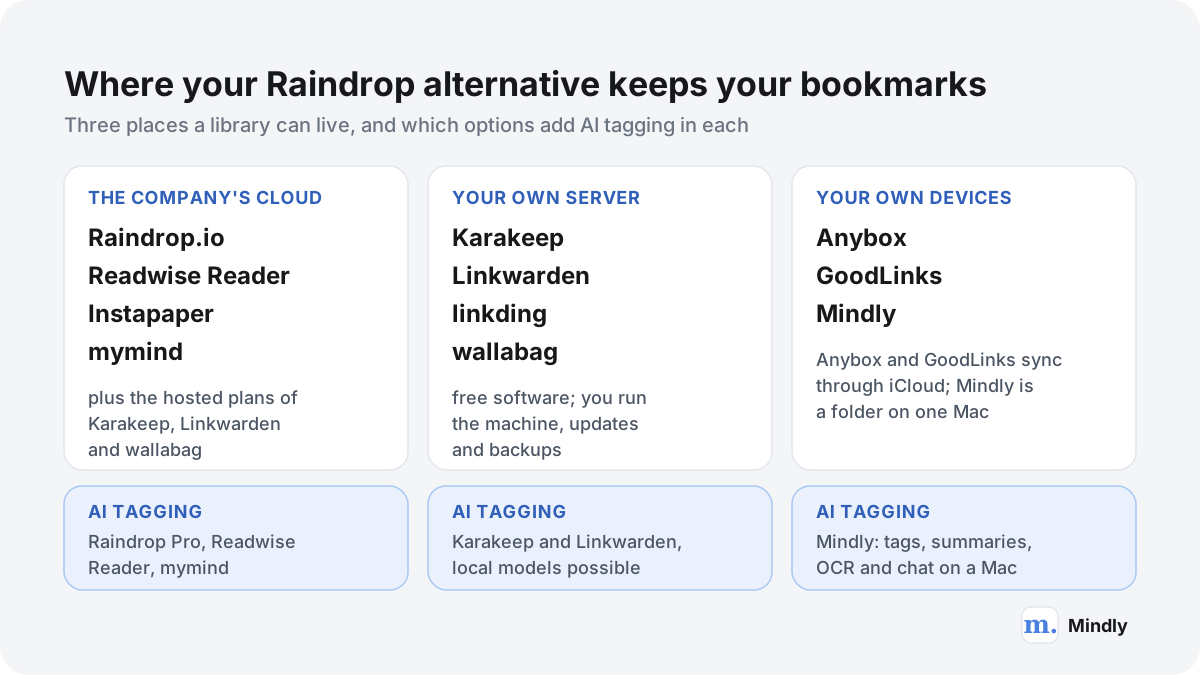
Open-source and self-hosted Raindrop alternatives: Karakeep, Linkwarden and linkding
If you searched for a Raindrop alternative that is open source or self-hosted, these three are the serious candidates. They differ mostly in how much they try to do.
Karakeep: the most complete open-source Raindrop alternative
Karakeep, which was called Hoarder until a rename, is a self-hostable app for saving links, notes, images and PDFs. Its README lists automatic fetching of titles and images, lists you can share for collaboration, full-text and semantic search, AI tagging and summaries through OpenAI or local models via Ollama, OCR for text in images, full-page archiving, video archiving, RSS feeds that save new posts automatically, a rule engine, highlights, bulk actions, SSO, a REST API, and a CLI with official agent skills. There are iOS and Android apps and extensions for Chrome, Firefox and Safari. It is licensed AGPL-3.0 and had around 30,000 GitHub stars in November 2026, which makes it the most widely followed project in this group.
Its pricing page offers three routes. Self-hosted is free with unlimited bookmarks and storage. The hosted cloud has a free tier of 50 bookmarks and 100 MB, and Pro at $4 a month or $40 a year with 50,000 bookmarks, 50 GB, AI tagging and full-text search, with a 7-day money-back guarantee and data kept for 30 days after cancelling. Where it beats Raindrop: AI tagging and OCR you can run without any cloud model, and Pro-level features (archives, full-text search) for free if you host it. Where it falls short: you run several Docker services, including the Meilisearch search engine, and you are the support team. There is no dedicated Raindrop importer, but Raindrop's HTML export works through its browser-bookmarks import, as described in the migration section.
Linkwarden: when a preserved copy of every page matters most
Linkwarden is built around preservation. Each saved page is kept automatically as a screenshot, a PDF and a single HTML file, with an optional snapshot sent to the Internet Archive's Wayback Machine, and a reader view where you can highlight and annotate. Its homepage adds collections you can share with other people or publish, RSS feeds inside collections, uploads of pages behind logins, advanced search operators, bulk actions, an API, official iOS and Android apps and extensions for Chrome, Safari and Firefox. Optional AI tagging sends the page text to a model of your choice: an Ollama model on your own server (the docs suggest a small one such as phi3:mini-4k) or any OpenAI-compatible API, and it can generate new tags, pick from tags you predefine, or reuse your 50 most-used tags.
On its pricing page, the cloud version has one plan at $3 a month per user billed yearly, with 30,000 links per user and a 14-day trial; self-hosting is free under AGPL-3.0. Where it beats Raindrop: three formats of every page kept on your own disk, which is stronger than Raindrop's single archive copy that disappears about a month after Pro ends. The "pick from my existing tags" AI mode also suits people who already have a Raindrop tag vocabulary. Where it falls short: storing three copies of everything uses disk, and its own export, a backup.json file, holds metadata only, not the preserved pages, so back up the server's data folder as well. It reads Raindrop's HTML export directly, and its import docs name Raindrop as a source.
linkding: the minimal self-hosted option
linkding is for people who want bookmarks and very little else to maintain. It runs as one Docker container with a SQLite database and automatic migrations, and its installation guide notes the image supports ARM, so a Raspberry Pi is enough. Features: tags, bulk editing, Markdown notes, a read-it-later flag, sharing with other users or guests, automatic titles and icons, archiving as local HTML snapshots or on the Internet Archive, Netscape HTML import and export, a REST API, OIDC sign-in, a progressive web app and extensions for Firefox and Chrome. It is MIT licensed.
There is no AI and no official mobile app (community apps exist), and local snapshots need the larger "plus" image, which the docs say uses more memory and disk. It organizes by tags only, with no collections, so test a small Raindrop export to see how your collections arrive before moving everything. Where it beats Raindrop: simplicity and longevity. A single SQLite file is easy to back up, and an app that does little has little to break. Best for people who mainly need a fast, private list of links with tags, and who would rather not run three services to get it.
What self-hosting a Raindrop alternative actually takes
Self-hosting is free in money and not free in time. Here is what the first evening and the next year look like, so you can decide with your eyes open.
Take Karakeep as the example, because it has the most moving parts. Its Docker guide has you create a folder, download its docker-compose.yml, and write a .env file with four values: the version to run, two random secrets (one for sign-in sessions and one for the Meilisearch search engine, generated with an openssl command the docs give), and the address you will reach it on. An OpenAI API key is optional but recommended for automatic tagging; if you would rather keep everything local, you point it at an Ollama model instead. Then one command starts it and you open it in a browser on port 3000. The walkthrough video from Tailscale on this page shows exactly that, plus a private network so you can reach it from your phone without exposing it to the internet.
- Pick the machine. A home server, a NAS that runs Docker, a spare mini PC, or a small rented server. linkding is happy on a Raspberry Pi; Karakeep and Linkwarden do more work per save, especially with archiving and AI turned on.
- Decide how you will reach it away from home. A private network such as Tailscale or NetBird (both shown in the videos above) avoids opening ports. A public domain with HTTPS is the alternative, and it means you are now running a website.
- Choose the AI route before you import. A cloud API is the easiest and costs per use; a local model through Ollama keeps text on your hardware but needs memory and is slower on small machines. Turn AI on before importing thousands of Raindrop bookmarks if you want them all tagged.
- Set up backups on day one. Back up the data folders, not just the app's own export. Linkwarden's export, for example, omits the preserved pages. A backup you have never restored is a guess.
- Schedule updates. Pull new images once a month and read the release notes first.
A worked example
6,000 Raindrop bookmarks moving to a home server
Say your Raindrop library has 6,000 bookmarks in 40 collections, about 300 highlights, and 2 GB of uploaded PDFs. You export the HTML file, the highlights and the ZIP of uploaded files. Into Linkwarden on a mini PC: the HTML import recreates the links, and archiving then fetches screenshot, PDF and HTML copies of every page that still loads, which for 6,000 links is a long background job and a meaningful amount of disk. If your tags come across in the import, AI tagging set to "existing tags" reuses that vocabulary instead of inventing a new one. The PDFs go back in as uploads. The highlights have no direct path, so they live in a Markdown file or in Readwise. Cost after the switch: no subscription, versus $27.99 a year for Raindrop Pro on the US App Store, in exchange for a weekend of setup and an hour a month of care.
If that list made you tired rather than curious, that is useful information. The managed cloud plans of Karakeep ($40 a year) and Linkwarden ($36 a year at $3 a month billed yearly) give you the same software without the server, and the open-source code means you can move to your own server later. For a broader view of keeping data on your own hardware, see our piece on local AI on your laptop, and before connecting any agent to a self-hosted library through MCP, read what can leak when agents connect to everything.
Mac-native Raindrop alternatives: Anybox and GoodLinks
If you use only Apple devices and Raindrop's cross-platform app feels slightly foreign, these two are built with Apple's own frameworks and sync through iCloud, with no separate account.
Anybox: a bookmark manager that behaves like a Mac app
Anybox describes itself as a replacement for your browser's bookmark manager, built in Swift for Mac, iPhone and iPad. It has Quick Find for searching offline, Quick Save for the current tab, and Anydock, a floating bookmarks bar or menu bar menu for the links you open every day. You organize with nested tags, folders and Smart Lists that filter by URL or date, and it can archive pages as PDF, Web Archive or screenshot. Automation is deep: Shortcuts, AppleScript, URL schemes, Spotlight on iPhone, widgets, a keyboard extension, deep links to Things and Obsidian, integrations with Raycast, Alfred and PopClip, and an MCP server. It saves images, files and notes as well as links, and syncs through iCloud; the site says it collects no personal data.
The free plan holds 50 links. Pro, in US dollars on the site (App Store prices vary by country), is $1.99 a month, $14.99 a year, or $49.99 once for a lifetime licence. Where it beats Raindrop: speed and fit on a Mac, a lifetime option, and the Anydock bar, which suits people whose bookmarks are mostly "the 30 tools I open daily". Where it falls short: Apple only, so a Windows work laptop or an Android phone is left out, there is no web app, and there is no AI tagging. The site mentions a migration assistant for browser bookmarks but documents no Raindrop importer, so the route in the migration section goes through your browser. Best for Mac users who want bookmarks as a fast, native launcher.
GoodLinks: read-later for Apple devices, bought once
GoodLinks is a reading app first: it extracts article text, strips ads, and gives you font, spacing and theme controls. You can colour-code highlights with notes, see all of them in a Notebook view and export them as Markdown; organize with tags, stars and a Focus filter; search by title, author, description or content; and get one-tap summaries. Shortcuts, widgets, AppleScript, custom actions and a URL scheme cover automation, and iCloud syncs links, highlights, tags and reading position. On the US App Store it costs $9.99 once and includes a year of feature upgrades, with an optional $4.99 Annual Feature Upgrade after that, and it runs on iPhone, iPad, Mac and Apple Vision.
Where it beats Raindrop: reading. If most of your Raindrop library is articles, GoodLinks is calmer to read in, and it costs less over three years than almost anything else here. Where it falls short: it is not built as a long-term reference library with nested collections, there is no web, Windows or Android version, and its homepage does not describe importing from other services. The migration section covers a converter that produces a GoodLinks file from a Raindrop CSV. Our read-it-later guide goes deeper on choosing between reading apps.
A note on Safari itself: if your needs are modest, macOS and iOS already sync bookmarks and a Reading List through iCloud for free. Our guide to the best web clipper for Mac covers what you can capture with no extra app at all, and when a dedicated tool earns its place.
Read-later Raindrop alternatives: Readwise Reader, Instapaper and wallabag
A bookmark manager keeps links; a read-later app helps you finish them. If your Raindrop "Read later" collection keeps growing, one of these is probably the real fix.
Readwise Reader: for people who read and highlight a lot
Reader takes articles, PDFs, EPUBs, RSS feeds, newsletters, YouTube videos and threads into one queue, with highlighting at the centre, keyboard-driven reading, text to speech, full-text search and Ghostreader, its AI for summarizing, explaining and translating. It also offers a CLI, an MCP server, an API and a ChatGPT connector. On the pricing page, Reader alone costs $7.99 a month billed yearly and the full Readwise bundle, which adds the Highlights service, costs $9.99 a month billed yearly, after a 30-day free trial. Its import docs name Raindrop directly: export a CSV and upload it.
It also has a quieter advantage for Raindrop users: Readwise has a native Raindrop highlights integration, in beta, that syncs your Raindrop highlights with tags and annotations several times a day (text only, not images). That means you can try Reader while keeping Raindrop, which is the safest way to switch. Where it falls short: it is a reading queue, not a reference library, and at $95.88 a year it is one of the pricier options here. If you already use Readwise, Mindly's Readwise integration can bring selected highlights into a Mindly library as well.
Instapaper: the simple free queue
Instapaper is the opposite of Reader in ambition. Free gives you unlimited saved articles and videos, sync across the web, iOS and Android, folders and API access for other apps, with notes limited to five a month. Premium, at $5.99 a month or $59.99 a year, adds full-text search across everything including archived articles, a permanent archive, a PDF reader, unlimited notes, Kindle sending, AI voices and text-to-speech playlists on mobile, and speed reading. Where it beats Raindrop: a clean reading queue on the free plan. Where it falls short: it is built around a queue and folders, not a reference library of 6,000 links. Best as a companion to a bookmark manager or a replacement for a reading-list habit.
wallabag: open-source read-later, self-hosted or cheap
wallabag has been open source since 2013 and is MIT licensed. It saves articles, extracts clean text, lets you tag and classify them, and exports in EPUB, PDF, MOBI, CSV, JSON, TXT and XML, which is the widest set of export formats in this guide. There are official Android and iOS apps and the wallabagger browser extension. You can self-host it, or use wallabag.it, where hosting costs €11 a year, €4 for three months, or €30 a year if you want to fund the project, after a 14-day trial with no card; saving by email, RSS feeds and importing are for paying subscribers there.
Its import list covers Pocket, Instapaper, Readability, Pinboard, elCurator and earlier wallabag versions, but not Raindrop or browser HTML files, so moving a Raindrop library in takes a detour, described in the migration section. Where it beats Raindrop: it is a fully open, self-hostable read-later app at a price that rounds to zero. Where it falls short: it is for articles, not for a big, structured link library, and it has no AI. Best for people who want an open-source Instapaper.
Whichever reading app you choose, the useful part is what happens after reading. Our guide on remembering what you read explains how to turn highlights into something you will actually find again.
AI-organized Raindrop alternatives: mymind and Mindly
If the trouble with Raindrop is that you never choose a collection, these two take the choice away. Before switching, check whether Raindrop's own AI already covers you.
Raindrop Pro now includes AI suggestions and the Stella assistant, and its search help says search matches by meaning, so "morning routine" can find a page titled "how I start my day". If your problem is finding things rather than filing them, a year of Pro at $27.99 on the US App Store may solve it more cheaply than any switch. What Raindrop does not do, per the same page, is read text inside images: there is no OCR. If your library is full of screenshots, that matters.
mymind: no folders at all
mymind is the purest version of the "never organize" idea: save links, images, notes, quotes and products, and its AI tags everything, recognizes text in images and groups related saves in Smart Spaces. On its pricing page as of November 2026, The Bookmarker costs $4.99 a month with no AI, Student of Life $7.99 a month or $79 a year, and Mastermind $12.99 a month or $129 a year; the free guest plan stops at 100 cards. It runs on the web, iOS, Android and macOS. It is also deliberately private, with no social layer. The catch for Raindrop users is moving in: mymind's help centre says it does not officially support mass import, and points to its beta API and MCP as the workaround. We compare the two apps head to head in mymind vs Raindrop, and list mymind's own rivals in our mymind alternatives guide.
Mindly: a private AI library on your Mac
Mindly is our product, so weigh this with that in mind. It is a native Mac app (macOS 14 or later) where one global shortcut, ⌘M, captures anything from any browser or app: links and articles, text notes, PDFs, Word documents, tables and datasets, screenshots and images, voice memos and YouTube clips. Every save is organized by AI: tagged by topic, summarized if it is long, read with OCR if it is a scanned PDF or an image, transcribed if it is audio, and linked to related saves through smart suggestions. You search in plain language across every format, and you can open any saved article or PDF and chat with it, with answers taken from your own material. A mind map view shows connections, and Spaces group work by project.
Where it differs from Raindrop: it is a library of everything you save, not only links, and the library sits in a Mindly folder on your Mac rather than in a cloud account; AI processing runs over encrypted channels and content is not retained on Mindly's servers after each request. Where it falls short, plainly: it is Mac only, with no iPhone, iPad, Windows or web app; there is no built-in sync between Macs (the workaround is keeping the Mindly folder in iCloud Drive); there is no browser extension, only the shortcut; there are no public collections, sharing links or collaborators; and there is no Raindrop importer. The free plan holds 25 items; Pro is €7.99 a month or €44.99 a year on the pricing page. If your Raindrop library is shared with a team or you save mostly from a phone, Mindly is the wrong pick today.
The decision guide: which Raindrop alternative should you choose?
Start from the single thing you most want to change. If you have three reasons, pick the app that fixes the one that annoys you every day.
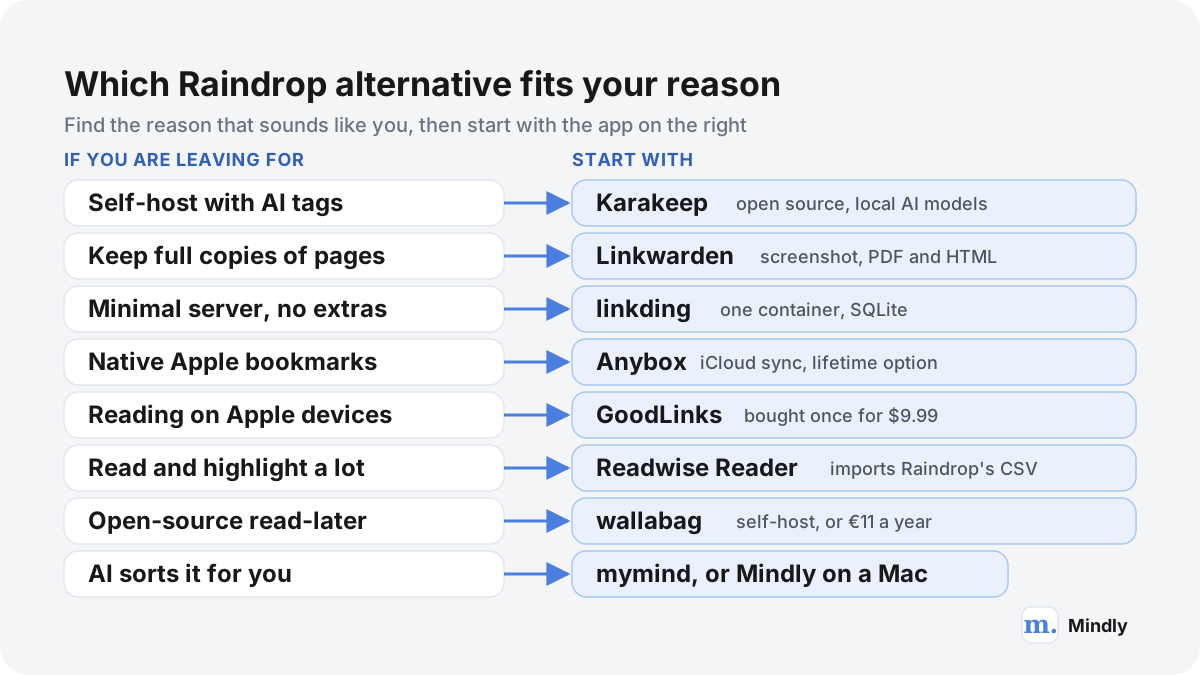
| If your main reason is | Look first at | What you give up |
|---|---|---|
| Open source, self-hosted, with AI | Karakeep | Raindrop's polish; you run the services and the backups |
| Never losing a page to link rot | Linkwarden | Disk space, and an export that omits the archived copies |
| As little maintenance as possible | linkding | AI, collections and an official mobile app |
| A native Apple experience | Anybox, or GoodLinks for reading | Windows, Android and the web |
| Actually reading what you save | Readwise Reader, Instapaper, wallabag | A big structured reference library |
| A free plan with no catch | Raindrop Free, Instapaper Free, any self-hosted app | Full-text search and archives (except self-hosted) |
| Never sorting anything | mymind, Mindly, or Raindrop Pro with Stella | Collections you control; mymind and Mindly cost more |
| Data on your own device | Mindly, Anybox, GoodLinks, or a home server | Access from every platform |
Three years of cost, side by side
Monthly prices hide the real difference between one-time licences, cheap subscriptions and expensive ones. Here is what each option costs over three years at its cheapest paid tier on yearly billing, using the prices on each official page in November 2026. Self-hosted options show zero for the software only; add whatever your server and electricity cost.
| Option | Year one | Three years | Notes |
|---|---|---|---|
| Raindrop Pro (US App Store) | $27.99 | $83.97 | Free plan is unlimited if you skip Pro |
| Karakeep cloud Pro | $40 | $120 | Self-hosted: $0 for the software |
| Linkwarden cloud | $36 | $108 | $3 a month per user billed yearly; self-hosted: $0 |
| linkding | $0 | $0 | Self-hosted only |
| wallabag.it | €11 | €33 | Self-hosted: €0 |
| Anybox Pro | $14.99, or $49.99 lifetime | $44.97, or $49.99 lifetime | Lifetime pays off in year four |
| GoodLinks | $9.99 | $9.99 to $19.97 | Two optional $4.99 feature upgrades after year one |
| Instapaper Premium | $59.99 | $179.97 | Free plan has unlimited saves |
| Readwise Reader | $95.88 | $287.64 | $7.99 a month billed yearly |
| mymind Student of Life | $79 | $237 | The cheapest mymind plan with AI |
| Mindly Pro | €44.99 | €134.97 | Free plan holds 25 items |
If you are a developer or run a home lab
Karakeep if you want the most features and an API and CLI to script against; Linkwarden if archiving is the point; linkding if you already run too many services. All three accept Raindrop's HTML export. The two videos on this page show the first two being set up.
If you are a researcher or student
Readwise Reader if your sources are articles and PDFs you highlight; Linkwarden if citations to web pages must survive the pages disappearing; Mindly if you work on a Mac with mixed material (Word files, scanned PDFs, datasets) and want to ask questions of each one. Raindrop Pro's full-text search inside PDFs and EPUBs is a strong reason to stay.
If you share collections with a team
Stay on Raindrop or move to Linkwarden or Karakeep, which both support shared collections or lists. Anybox, GoodLinks, Instapaper and Mindly are personal tools. Teams with a mostly visual library may also want our Are.na alternatives guide.
How to move your bookmarks out of Raindrop
Raindrop makes leaving easy, which is one of its better qualities. Export everything first, keep a copy that belongs to no app, and only then decide where it goes.
Raindrop's export guide offers four formats. HTML is a Netscape bookmarks file that, in Raindrop's words, works with all browsers and most other apps, and it is the one to use by default. CSV suits spreadsheets and the apps that ask for it. TXT is a plain list of URLs. ZIP is not a bookmark format: it holds the original files you uploaded (PDFs, images), which the full account backup leaves out. You can export the whole account from Settings, Backups, Create new, which emails you when the files are ready and includes bookmarks, collections, tags, highlights and notes; or export a single collection or a selection from the web and desktop apps. Highlights export separately, from a bookmark's Highlights panel, as text or CSV. On Android, collection and highlight export are not available yet, so use the web app.
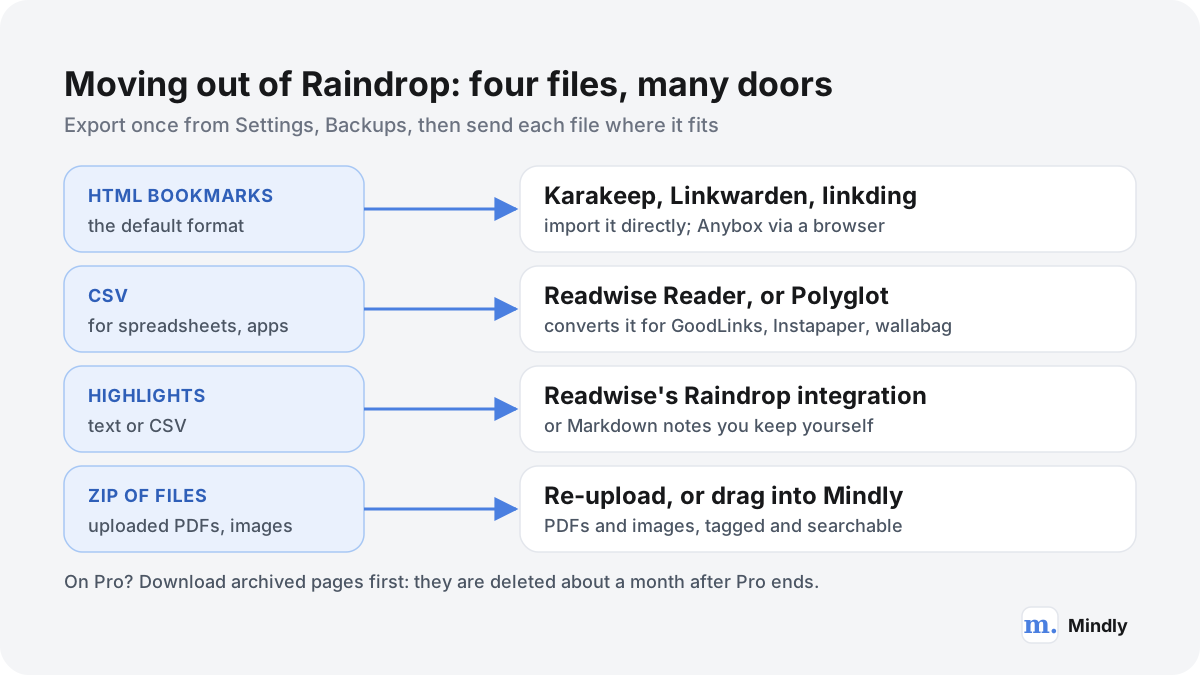
- If you are on Pro, download the archived pages you care about first. The web archive help says archived copies become inaccessible when Pro ends and are deleted about a month later; your bookmarks are not affected. On the web or desktop app, right-click a bookmark, open the web archive, and download it.
- Create a full backup. Settings, Backups, Create new. Download both the HTML and CSV versions when the email arrives.
- Export uploaded files as a ZIP. From All bookmarks, Export, ZIP. The backup does not include them.
- Export highlights you want to keep. Per bookmark, as text or CSV, or connect Readwise's Raindrop integration to collect them all at once.
- Open the files before you trust them. Open the HTML in a browser and the CSV in a spreadsheet, and count rows against the number Raindrop shows. Zip the lot and put it in your backup.
- Import into the new app, use it for a month, then cancel Pro. Raindrop offers a 30-day money-back guarantee on Pro, but there is no rush to cancel the free plan at all; it costs nothing to keep as a safety net.
Into each Raindrop alternative
- Karakeep. Its import docs accept a Netscape HTML bookmarks file, Pocket's CSV and Omnivore's JSON, and its CLI can add links from a text file with one URL per line. Raindrop's HTML export goes in as a browser bookmarks file. Turn on AI tagging first if you want imported links tagged.
- Linkwarden. Its import page takes browser HTML files, its own backup.json, Pocket CSV, wallabag JSON and Omnivore ZIP, and says most bookmark managers, Raindrop included, can export the HTML format it reads.
- linkding. Imports and exports Netscape HTML, so Raindrop's HTML file is the route in. linkding has tags but no collections, so check a sample before deleting anything.
- Anybox. Its site documents a migration assistant for browser bookmarks but no Raindrop importer. One route is to import Raindrop's HTML into Safari or Chrome first, then bring them into Anybox; we have not verified this end to end, so try it with one collection.
- Readwise Reader. Upload Raindrop's CSV; Reader needs a column called URL, and Raindrop is named on its import page. Connect the Raindrop highlights integration for your highlights.
- GoodLinks, Instapaper and wallabag. Polyglot, an open-source converter, turns a Raindrop CSV into a GoodLinks JSON file, an Instapaper CSV or a Readwise CSV, without highlights. For wallabag, which imports Instapaper but not Raindrop, the Instapaper CSV is the bridge; test a small file first, because that two-step path is not documented by either project.
- mymind. No official mass import; the help centre points to its beta API and MCP. Plan to re-save what you care about.
- Mindly. No Raindrop importer. Drag the ZIP's PDFs and images into Mindly, where they are tagged, summarized and searchable, and re-capture the links you still use with ⌘M. That suits a fresh start with the few hundred links that matter more than a move of 6,000. If part of your archive is in Evernote, Mindly imports .enex files directly, and our ENEX converter turns them into Markdown for any app. The switching guide covers the rest.
When to stay on Raindrop
For a lot of people the best Raindrop alternative is Raindrop with different habits. Here is when staying is the better call.
- You use Windows, Android or several browsers. Raindrop covers more platforms on its free plan than any app here except the self-hosted web apps. Anybox, GoodLinks and Mindly are Apple only.
- You share collections. Unlimited collaborators per collection, free, is rare. Linkwarden and Karakeep come closest, and they ask you to run or pay for a server.
- You want Pro features for very little. Full-text search inside pages, PDFs, EPUBs and video transcripts, a web archive, backups and an AI assistant for $27.99 a year on the US App Store is hard to undercut without self-hosting.
- Your real problem is a habit. If Unsorted has 2,000 items, a new app will have 2,000 unsorted items in six months. Try a weekly 15-minute sort, or let Stella propose collections, before moving. Our bookmark manager guide sets out a routine that works in any app.
- You do not want to be your own IT department. Self-hosting is a hobby for some people and a chore for others.
Five questions to ask any app before you move in
- Can I get everything out again, today? Try the export with ten items on day one.
- Where does my library live, and who can read it? Cloud, server or device, each with different risks.
- What happens to archived copies when I stop paying? Raindrop deletes them about a month after Pro ends; check the new app's rule.
- Will I use the AI, or is it a feature I am paying for? Automatic tags only help if you would not tag by hand.
- Will this exist in five years? Pocket and Omnivore did not make it. Open-source code and regular exports to a folder you control are the only insurance; our guide to apps that disappear explains the rules.
Give any new app a month of real saves before you move years of bookmarks; whether the habit sticks matters more than any feature table, including this one. For a wider frame, our page on building a personal search engine explains where a link library fits next to notes and files.
Where Mindly fits
Where Mindly fits among the Raindrop alternatives
Mindly is not a bookmark manager in Raindrop's sense, and for most people leaving Raindrop it is not the answer. It fits a narrower person: someone who saves on one Mac, keeps far more than links (PDFs, Word files, screenshots, voice memos, notes), never wants to pick a collection, and wants to ask questions of what they saved rather than only find it. One shortcut, ⌘M, captures from any browser or app; the AI tags, summarizes and connects every save; and the library stays in a folder on your Mac. It is the wrong choice if you need an iPhone app, sync between devices, a browser extension, shared or public collections, or a Raindrop importer, because Mindly has none of those today. The free plan holds 25 items, enough for a week of real saves; Pro is €7.99 a month or €44.99 a year.
Common questions
Raindrop alternatives, answered
What is the best Raindrop alternative?
It depends on why you are leaving. For an open-source, self-hosted app with AI tagging, Karakeep. For preserved copies of every page, Linkwarden. For the simplest server, linkding. For a native Apple app, Anybox, or GoodLinks for reading. For reading and highlighting, Readwise Reader, Instapaper or wallabag. For an app that organizes itself, mymind, or Mindly on a Mac.
Is there a free Raindrop.io alternative?
Yes. Karakeep, Linkwarden, linkding and wallabag are free to self-host. Instapaper's free plan has unlimited saves, and Anybox's free plan holds 50 links. But Raindrop's own free plan has unlimited bookmarks, collections and devices, so if you only need the basics, a free Raindrop io alternative may not beat Raindrop itself.
What is the best open-source Raindrop alternative?
Karakeep is the most complete: AGPL-3.0, AI tagging with OpenAI or local Ollama models, OCR, full-text and semantic search, archiving, mobile apps and extensions. Linkwarden (AGPL-3.0) is best for archiving pages in three formats. linkding (MIT) is the lightest. wallabag (MIT) is the open-source choice for read-later.
Which Raindrop alternative can I self-host most easily?
linkding: one Docker container with a SQLite database, and its image runs on ARM boards such as a Raspberry Pi. Karakeep and Linkwarden do more and need more: Karakeep's Docker setup includes a search engine and asks for two secrets and an address in a .env file. Both offer paid cloud versions if you would rather not host.
Can I import my Raindrop bookmarks into another app?
Yes. Raindrop exports HTML, CSV, TXT and a ZIP of uploaded files. Karakeep, Linkwarden and linkding import the HTML file. Readwise Reader imports the CSV and names Raindrop on its import page. The open-source Polyglot converter turns the CSV into files for GoodLinks and Instapaper. mymind and Mindly have no Raindrop importer.
Does Raindrop.io have end-to-end encryption?
Raindrop's security page describes encrypted connections, storage on AWS in Frankfurt and open-source apps, but it does not describe end-to-end encryption. If you need your bookmarks unreadable by any service provider, self-host an open-source app on hardware you control, or use an app that keeps the library on your device.
What happens to my Raindrop archive if I cancel Pro?
According to Raindrop's help, archived page copies become inaccessible when Pro ends and are deleted about a month later. Your bookmarks themselves are not affected. Download any archived copies you need before cancelling, from the web or desktop app.
What do Raindrop alternative threads on Reddit recommend?
The same few names recur in self-hosting and privacy discussions: Karakeep and Linkwarden for self-hosting, linkding for something minimal, Floccus for syncing plain browser bookmarks, and Anybox or GoodLinks for Apple users. The requests behind them are consistent too: free or one-time pricing, open source, end-to-end encryption, mobile capture and AI tagging without a cloud model.
Is there a Raindrop alternative for Mac only?
Anybox is a native bookmark manager for Mac, iPhone and iPad with iCloud sync, from $14.99 a year or $49.99 lifetime. GoodLinks is a read-later app for Apple devices at $9.99 once. Mindly is a Mac-only AI library that saves links alongside files, notes and voice memos, with no iPhone app yet.
How much does Raindrop Pro cost in 2026?
On the US App Store, Raindrop Pro is $2.99 a month or $27.99 a year as of November 2026. On the web, the pricing page shows the price in your local currency with tax, with yearly billing about 20% cheaper than monthly and a 30-day money-back guarantee.
Sources
What This Page Draws On
- LimitsRaindrop.io HelpFree versus Pro: unlimited bookmarks and collections, upload quotas, highlights, AI, archive, backups.
- PricingRaindrop.io · 2026Free and Pro features, platforms, local-currency prices, the yearly discount and the 30-day refund.
- Raindrop.io on the App Store (US)Apple · 2026US dollar in-app prices: Pro Monthly $2.99 and Pro Yearly $27.99.
- Export & backupRaindrop.io HelpHTML, CSV, TXT and ZIP exports, full backups, highlight export, daily Pro backups.
- Web archiveRaindrop.io HelpWhat the archive saves and its deletion about a month after Pro ends.
- PricingKarakeep · 2026Self-hosted free and unlimited; cloud Free at 50 bookmarks; Pro at $4 a month or $40 a year.
- Importing bookmarksKarakeep DocsNetscape HTML, Pocket CSV, Omnivore JSON and CLI import.
- PricingLinkwarden · 2026Cloud plan at $3 a month per user billed yearly, 30,000 links, 14-day trial, AGPLv3 self-hosting.
- Import and exportLinkwarden DocsSupported import sources including Raindrop's HTML, and what backup.json contains.
- linkding on GitHublinkdingFeatures, MIT licence, Netscape HTML import and export, archiving options.
- AnyboxAnybox Ltd. · 2026Platforms, features, iCloud sync, free limit and Pro subscription or lifetime prices.
- GoodLinks on the App Store (US)Apple · 2026One-time price of $9.99, the $4.99 Annual Feature Upgrade, supported devices.
- PricingReadwise · 2026Reader and full Readwise prices billed yearly, 30-day trial, Reader features.
- Instapaper PremiumInstapaper · 2026Free versus Premium features and the $5.99 monthly or $59.99 yearly price.
- wallabag.it pricingwallabag.it · 2026Hosted plans at €4 for three months, €11 a year or €30 a year, and the 14-day trial.
Keep reading
Related Guides
Try the Mac-only option with 25 free items.
Download Mindly, press ⌘M on the next thing you would have saved to Raindrop, and see whether AI tags, summaries and chat earn a place in your week. No iPhone app, sync or browser extension yet, so test it where you actually save.