Johnny DecimalJohnny Decimal: A Number for Everything You Keep.
Johnny Decimal is a way to organize files and information by giving everything a short, unique number such as 21.13: no more than ten areas, no more than ten categories in each, and the things themselves inside. Johnny Noble devised it in 2010 and documents it for free. It asks for some planning up front and repays it with things that stay where you put them.
Created by Johnny Noble, devised the system in 2010.
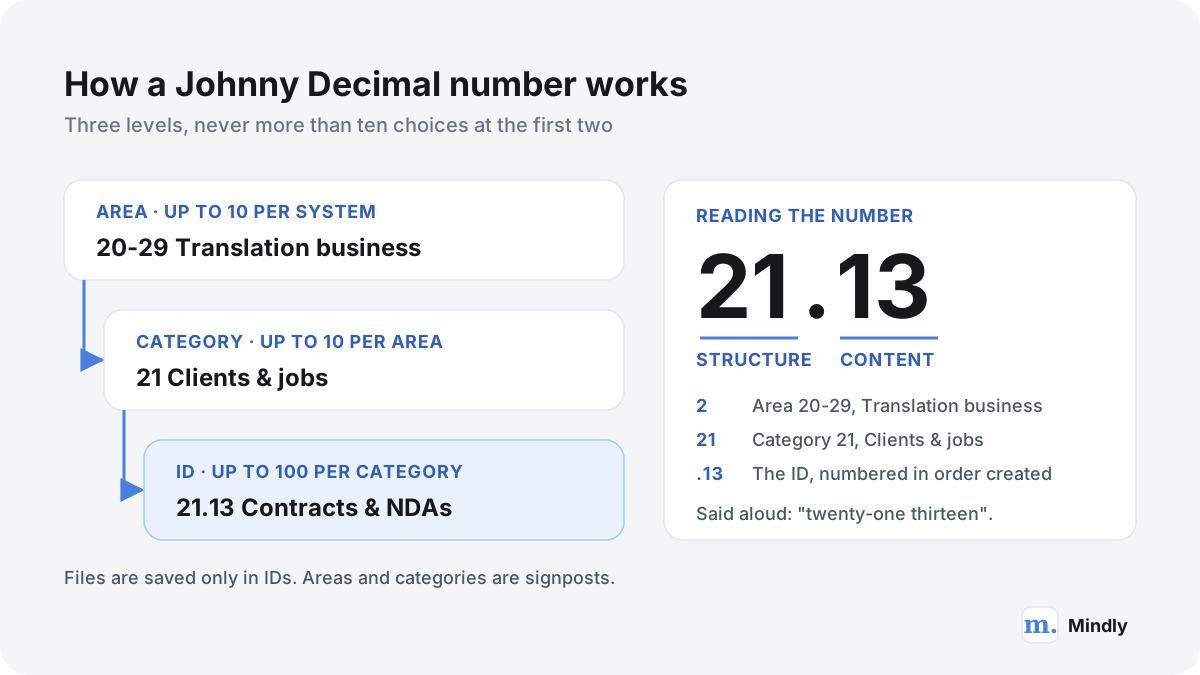
Johnny Decimal is a system for organizing files and information by giving everything a unique ID: two digits, a decimal point and two more digits, such as 15.22 or 21.13. The structure has three levels and no more. Areas are the broadest, numbered in blocks of ten such as 10-19 Life admin. Categories sit inside areas and get two digits, such as 15 Travel. IDs sit inside categories and are where things are actually kept, such as 15.22 Travel insurance. The creator's introduction uses a filing analogy: your computer is a room, areas are filing cabinets, categories are drawers, and IDs are the manila folders in the drawers. He styles the name Johnny.Decimal.
The rule that holds it together is "no more than ten". According to the creator's page on the numbers, a system has at most 10 areas, each area has at most 10 categories, and each category has at most 100 IDs. You never save anything in an area or a category, only in an ID, so the whole tree is three folders deep. Finding something means choosing from no more than ten areas, then from no more than ten categories, then scanning one list of IDs in which recent things have higher numbers. Three small choices replace one long scroll.
The numbers do more work than labels can. Folders named with words move around whenever a new one is added, because they sort alphabetically, so you never learn where anything sits. Numbered folders stay put: adding 16 Aardvark collection to the creator's example moves nothing else. An ID also tells you where it lives. 13.55 is in category 13, which is in area 10-19, and you can read that without opening anything. And the numbers can be said out loud. The creator's examples are a partner asking where the house insurance is and getting "twelve-twelve" as the answer. He is clear that there is no maths involved: the numbers are references, nothing more.
The part people are most tempted to skip is the one the creator calls the system itself: the index, which he calls the JDex. It is a master record of every ID, kept as one note per ID in a notes app. The note's title is the ID and its name; the body can record where the thing actually lives, because a contract might exist as a PDF, an email thread and a signed paper original. You create the note before you create a folder anywhere, which is how you avoid giving two things the same number. He says he considers the index more important than the folders.
The system began in 2010. According to the creator's About page, he and some friends were producing a contemporary dance performance, pinned the ticket price list to the office wall, and he realized there was no tidy way to show where that document was saved in their Dropbox. He used the idea for his own life and jobs for the next ten years, had a website for it by 2015, and in 2023 left his corporate job to work on it full-time with his partner, Lucy. The system's licence gives anyone a permanent right to use it, personally or commercially. Paid pre-built systems and courses exist, but the method is complete without them. It is an addressing scheme for the things you keep, not a task system and not a way of linking ideas. For those, see the other methods in our guide.
From the source
Watch It Explained by the Creator
Johnny Noble, who created the system, explains limited choices, ID numbers and the index. From the official Johnny.Decimal channel, 2026.
Who it is for
Who the Johnny Decimal system is for
People buried in life admin
Leases, insurance policies, tax returns and passport scans are needed rarely and urgently, and tend to be spread across email, Downloads and two cloud drives. Johnny Decimal gives each one a fixed address that does not depend on remembering a file name. The creator sells a pre-built Life Admin System of more than 140 IDs in a single area, but the free documentation is enough to build your own. If the mess is the bigger problem, decluttering your digital life first makes the move much easier.
Small businesses and shared drives
A shared drive with forty top-level folders is one nobody can navigate. A numbered structure gives a team a shared map, and an ID can be read out on a call ("it's in thirty-one seventeen") instead of described. The creator adds a role for this setting, the Librarian, who owns the index and settles disputes. From his own experience on an IT transformation project with a $10m budget, he estimates the Librarian should be funded for one day a week.
Anyone whose work is spread across many apps
One piece of work now leaves traces in files, email, chat and a task list. The ID ties them together. The creator's own example is a weekly timesheet email with the subject "Timesheets to approve [14.11]": his manager could search for the ID and find it in a pile of unread mail. The same number can name a folder, label an email, prefix a to-do and sit in the index note that records all of those locations at once.
People who find things by place, not by search
Some people never remember what a file was called, only roughly where it was. Johnny Decimal is built for them. Because numbers do not move, frequently used IDs become muscle memory, and the creator suggests you will be surprised how many category numbers you remember. It also works off the screen: a number written on a box of paper records or stuck to a machine that keeps breaking tells everyone where its documents are. Search still works on top of it; the structure just means you rarely need it.
The core principles
Why a few numbers work
Limits: never more than ten choices
Every level offers ten options at most, so finding something is three short decisions. The limit also works when you create things. In the creator's philosophy, a little friction at the area and category level is a feature: having to assign a number, and having only ten available, forces a moment of thought before you add a new category. Inside a category, by contrast, IDs are cheap and you create them as needed.
Stable addresses: numbers that stay put
An alphabetical folder list reshuffles every time something new arrives. A numbered one does not, so the place you found a thing last month is the place it is today. That stability is what makes a folder tree memorable, and it holds up when you change apps. A folder called 21.13 Contracts & NDAs means the same thing in any file browser or cloud drive, and in plain folders, which tend to outlive the apps that sit on top of them.
One index for every location
Files are only part of what you keep. The index records every ID you have assigned and, where it helps, where its pieces live: Finder, email, a cloud drive, a drawer. Without it, the classic failure is giving one number to two things, because an ID that only exists in email is invisible when you look in the file system. It also becomes the system's memory, where decisions like "anything that fits both home and business goes under home" are written down.
Shallow by design
Deep folder trees are what this system replaces: the "Final", "Final draft", "New folder" nesting the creator uses as his picture of chaos. Things are saved only in IDs, and inside an ID you allow one level of neatly named subfolders at most. Names that start with a year-month-day date, such as 2026-05-14 Porto weekend, sort themselves, which lets a single ID hold a lifetime of short trips or receipts. When an ID gets crowded anyway, you split it into two IDs instead of nesting deeper.
Common mistakes
Where Johnny Decimal goes wrong (and the fix)
Designing too many narrow categories
Separate categories for investments, budget and savings look precise, but every save now starts with a decision between three plausible homes. The creator's guidance on categories is to prefer fewer, broader ones: merge those three into Money and the ambiguity disappears. The fix is to design areas as broad as "areas of your life", keep categories as collections of similar things, and leave unused numbers for later.
Skipping the index
The index feels like admin on top of admin, so people skip it, and sooner or later two different things share an ID. The creator's example: a trip to New Zealand stored only in email takes 15.54, and when a trip to Japan needs a folder, the file system shows 15.54 as free. The fix is a rule with no exceptions: a new ID starts as a note in the index, and only then becomes a folder, an email label or anything else.
Rebuilding a deep tree inside each ID
It is tempting to nest projects, versions and drafts four levels deep inside an ID, which recreates the old chaos one level lower. The fix: one level of subfolders, named with a pattern (a date, a consistent name, or numbered blocks like 10 Planning and 20 Documents), and a new ID whenever an existing one gets too busy. The same goes for large collections of PDFs: a dated, flat list inside one ID beats a tree of subject folders.
Trying to file everything
A new system invites a heroic weekend of sorting every file and email. The creator calls filing every email unrealistic and almost certainly a waste of time: file what you may want to recall, such as bookings, policies and agreements, and archive the rest where search can find it. The same applies to old files. Anything you will never organize but cannot bring yourself to delete goes into an archive, and some of it should simply go in the bin.
The full guide
Building a Johnny Decimal System That Lasts
How the numbers work
Every Johnny Decimal ID answers two questions at once: where something lives, and which thing it is.
The creator's page on saving files splits the ID at the decimal point. The digits before it are structure: they tell you the area and the category. The digits after it are content: they identify the item. Take 21.13. The leading 2 tells you it is in area 20-29, the 21 is the category, and .13 is the ID within that category. IDs are a counter rather than a classification. The IDs page notes that recent things usually have higher numbers, and the introduction adds that things created together stick together.
Three levels, ten at a time. Files live only in the ID; areas and categories are signposts.
Why the numbers start at 11
New users notice that areas start at 10-19 rather than 00-09, categories at 11 rather than 10, and IDs at .11 rather than .01. The numbers in between are reserved for running the system, and the creator calls them the standard zeros. In every category, .00 holds the category's own index notes, .01 is an inbox, .02 is for tasks about the category, .03 holds templates, .04 holds links, .05 is a space for an AI agent (added in September 2026), .06 to .08 are reserved, and .09 is an archive. The same pattern repeats one level up: the category ending in 0, such as 10, manages its area, and area 00-09 manages the whole system. The very first ID, 00.00, records where the index itself is kept.
The creator calls the standard zeros an advanced concept and suggests trying just the inbox and the archive first. They do shape the arithmetic. Leaving out the management numbers, a system has nine usable areas (10-19 to 90-99), nine usable categories in each (x1 to x9), and IDs from .11 to .99, which is 89 per category. That is 81 categories and up to 7,209 IDs, far more than one life needs. The creator says that after several decades of travel he is nowhere near the 99th ID in his travel category, and that if you ever do run out, the category was too broad.
A worked example
Here is a complete scheme for one person: a freelance translator who also runs a household and is treasurer of a local running club. Three areas, nine categories, 21 IDs.
Number
Name
What lives there
00.00
Index for the system
One note saying where the index is kept (here, the notes app).
10-19
Life admin
Area. Holds no files itself.
11.11
Passport & ID documents
Scans of passport and residence permit. The index note says where the originals are.
11.12
Health insurance & claims
The policy, and one dated subfolder per claim.
12.11
Lease & landlord
Signed lease and deposit receipt; the landlord's phone number goes in the index note.
12.12
Electricity, gas & internet
Bills renamed 2026-01 Electricity.pdf and so on, so each year sorts itself.
13.11
Bank accounts
Monthly statements, named by year and month.
13.12
Personal tax returns
One subfolder per tax year.
14.11
All short trips
One dated subfolder per trip, such as 2026-05-14 Porto weekend.
14.12
Translators' conference 2026
Tickets, hotel and talk notes. A bigger trip, so it gets its own ID.
20-29
Translation business
Area.
21.11
Client list & contacts
A spreadsheet. No per-client folders here.
21.12
Rate card & quotes
Current rates, and each quote named by date and client.
21.13
Contracts & NDAs
Signed agreements, one subfolder per client, plus a Mail folder with the same name.
21.14
Jobs 2026
One dated subfolder per job, such as 2026-10-02 Agency A brochure DE-EN.
22.11
Invoices issued
Invoices named by date, client and invoice number.
22.12
Business expenses
Receipts named by date and supplier.
22.13
Quarterly tax filings
Subfolders 2026-q1 to 2026-q4.
23.11
Glossaries & termbases
Term lists, one file per subject field.
23.12
Software & licences
Invoices and renewal dates for the translation tools.
30-39
Running club
Area.
31.11
Membership fees 2026
The fee spreadsheet and bank exports.
31.12
Annual accounts
One subfolder per year, ready for the members' meeting.
32.11
Spring 10k race 2026
Permit, volunteer rota and results.
The nine categories are 11 Me & health, 12 Home, 13 Money, 14 Travel, 21 Clients & jobs, 22 Business money, 23 Tools & reference, 31 Club money and 32 Club events.
The categories are broad: utilities, rent and repairs all live under 12 Home, with an ID each. And every area leaves room: life admin uses four of its nine usable categories, the business three, the club two.
Jobs are the interesting decision. A translator might take 60 jobs a year. One ID per job would use up category 21's 89 IDs in about a year and a half, and the list would be unreadable long before that. So the jobs share one ID per year, 21.14 Jobs 2026, with a dated subfolder for each job, and next January starts 21.15 Jobs 2027. The dates keep each year's jobs in order. A translator with dozens of regular clients and years of work might outgrow even this, which is the case the creator's expand an area option is for.
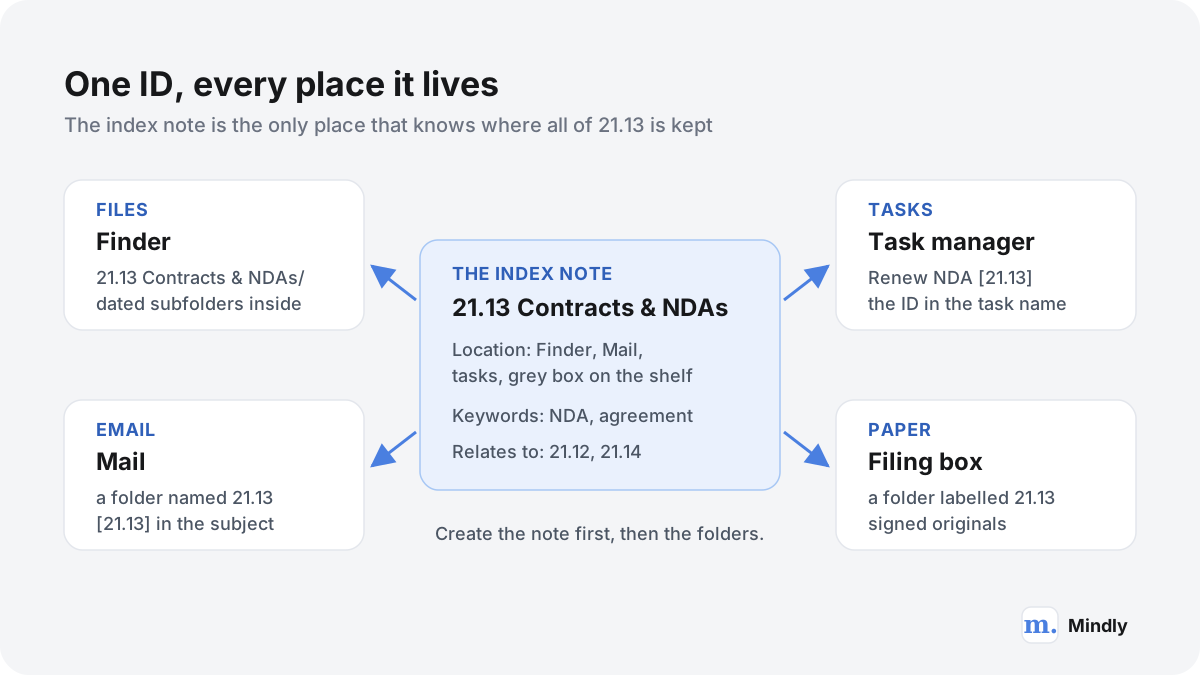
Not every ID has a folder: 11.11 points at a passport in a drawer. That is why the index matters. It is the one place that lists all 21 IDs, whether they exist as folders, emails, notes or paper. In daily use the Agency A agreement is simply "in twenty-one thirteen": in Finder, in Mail and in the box on the shelf.
Setting it up, step by step
The order matters more than the speed. Design on paper first, start the index second, and create folders last.
Decide the scope and the reason. One system for your personal life, one business, one club? When the creator started reorganizing his own life, his first move was to write down why he wanted to be organized and what he did not care about, such as keeping everything or being perfect (his post on starting). The answers decide how far you go.
List the kinds of things you keep. Not individual files: "tax returns", "client contracts", "club accounts". Your email folders, Downloads and cloud drive are good prompts.
Group the list into categories and areas. The creator describes two ways in: top-down, sorting everything into areas first and then dividing them, or bottom-up, sorting into categories and then grouping those into areas. If a structure question gets tangled, he suggests starting with a mindmap to see how the pieces connect.
Number them, leaving gaps. Areas get 10-19, 20-29 and so on. Categories start at x1. Use three or four areas, not nine, so there is room for the parts of life you have not met yet.
Start the index before any folder. Create one note per ID, titled with the number and name: "21.13 Contracts & NDAs". Add a location line when the thing lives somewhere other than the file system. From now on, a new ID always starts as a new note.
Create only the folders you need. Area and category folders first, then ID folders only for IDs that will hold files.
Move in through the inboxes. The creator's tip for moving in is to move existing material into each category's .01 inbox first, which takes you from chaos to "pretty good" quickly, and then sort each inbox into its proper IDs over the following days. Anything you will never organize but want to keep goes to .09 Archive.
Use the numbers everywhere else. Email folders, task names, labels on paper folders. The system pays off once a number means the same thing everywhere.
The design steps are the slow part. The creator says plainly that a system is not free in time and does not manage itself; his argument is that the time is repaid at every retrieval. If you are moving out of another app rather than out of a messy Documents folder, export first. An Evernote export arrives as .enex files, which the ENEX to Markdown converter turns into plain files you can drop into category inboxes; a Notion export carries long hashed IDs in every file name, which the Notion export cleaner strips.
A starter structure you can copy
A personal starting point using the translator's numbers. Rename freely, delete what you do not need, and keep the gaps.
00-09 System / 00 System / 00.00 Index for the system
10-19 Life admin / 11 Me & health / 11.01 Inbox for category 11
10-19 Life admin / 11 Me & health / 11.11 Passport & ID documents
10-19 Life admin / 12 Home / 12.11 Lease or mortgage
10-19 Life admin / 13 Money / 13.11 Bank accounts
10-19 Life admin / 13 Money / 13.12 Tax returns
10-19 Life admin / 14 Travel / 14.11 All short trips
20-29 Work / 21 Clients & jobs / 21.11 Client list & contacts
20-29 Work / 21 Clients & jobs / 21.13 Contracts & agreements
20-29 Work / 22 Work money / 22.11 Invoices issued
30-39 Interests / 31 First club or hobby / 31.11 Membership & fees
13 Money / 13.09 Archive for category 13
Name files inside IDs with the date first, year-month-day, as in 2026-10-31 Electricity.pdf. The creator's page on naming files is blunt that this ISO 8601 order is the only format that sorts by date, and that day-month-year produces chaos.
Decision rules and edge cases
Most hesitation is about where one awkward item goes. Five questions, asked in order, settle nearly all of it.
Why am I saving this? The creator's trick for vague items is to ask what the thing is for, because the purpose decides the place, not the topic (his post on the question).
Is there an ID it belongs in? Save it there. Most saves end here.
Is there a category, but no ID yet? Search the index for the category (the creator types the category number and a full stop, such as "21.", to filter his notes), take the next free number, create the note, then the folder.
Does no category fit? Put it in the nearest inbox and keep going. If the same kind of thing keeps arriving without a home, the system needs a new category or area, and that should feel like a decision rather than a reflex.
Could it go either way? Decide, then write the decision down. The creator's example is Insurance > Car against Car > Insurance: either is fine, as long as you pick one. Where something fits both his life admin and his business systems, he files it under life admin and records that rule in the index.
Edge cases the documentation covers
One ID that repeats, or more than 100 of something.Extend the end by adding a plus and a title. The creator's examples are a vet-care ID split per chicken, 11.63+ Belinda, 11.63+ Marie and 11.63+ Wendy, and cabling for 13 data centres as 72.02+ X01 and onwards. If you extend often, he says to question the design.
More than ten of everything. Students with more than ten classes and freelancers with many clients, products and jobs are his examples for expanding one area beyond the usual limits. He warns that the expanded area abandons the constraints, so it needs care.
Home and work.Multiple systems get a three-character prefix, so 11.11 becomes H01.11.11 at home and W01.11.11 at work. He advises avoiding extra systems where possible, and says most people can fit their whole personal life into one.
A crowded ID. Use one level of subfolders with a pattern: dates for anything dated, consistent names for anything named, or the fallback of numbered blocks such as 10 Planning, 20 Documents and 30 Transport, which leaves room to slot 15 in later (subfolder patterns).
Lots of separate jobs.Work packages are an optional area numbered W0011 upwards, where each job must link to a parent ID, as in W0011~11.13 Compliance audit.
Things that are not files. A phone number, a bank reference, a paper original: these live in the index note, with the location field saying "desk drawer" or "email".
Johnny Decimal in the tools you already use
The point of a number is that it means the same thing everywhere, so the system looks almost identical in every tool.
Tool
How Johnny Decimal usually maps
Watch out for
Finder
Area folders at the top of Documents, category folders inside, ID folders inside those. Names start with the number, so they always sort in order.
Desktop and Downloads becoming unofficial inboxes. The creator suggests saving to the right category's .01 inbox instead.
iCloud Drive, Google Drive or Dropbox
The same tree, synced. The system itself started with a file in a Dropbox folder.
Folders other people share with you follow their structure, not yours. Record where they are in the index note instead of copying files.
Email
A folder or label for each ID you actually need, and the ID in square brackets at the end of the subject, such as [21.13].
Filing every message. File what you may need to recall and archive the rest.
A notes app
The index: one note per ID, titled with the number and name. Typing a category number and a full stop in search usually filters to that category.
Turning the index into an inventory of every file. The creator notes it records IDs, not documents.
A task manager
Projects or tags named after the IDs they relate to, so a to-do points to where its material lives.
Keeping tasks far from their material. The creator prefers tasks stored close to the thing they relate to.
Paper
Physical folders and boxes labelled with the same numbers.
Paper and scanned copies drifting apart. Record both locations in the index note.
The labels change from tool to tool; the numbers do not.
One ID, many places. The index note is the only place that knows about all of them.
On the notes app, the creator is specific. Any app that searches notes quickly will work; he uses and recommends Bear on Apple platforms, calls Obsidian a crowd favourite, and his course shows an index being built in Apple Notes. He says that until he makes a dedicated app, a notes app is the simplest place for the index. His page on keeping notes suggests four fields per note: description, location, relates to, and keywords.
A sample index note
21.13 Contracts & NDAs
Signed client agreements and confidentiality terms. Location: Finder (21.13 folder, one subfolder per client), Mail folder 21.13, signed originals in the grey box on the shelf. Keywords: NDA, agreement, confidentiality, Agency A. 2026-03-02: Agency A NDA signed, valid for two years.
Relates to: 21.12 Rate card & quotes · 21.14 Jobs 2026
Keeping it alive: the review
A Johnny Decimal system decays in predictable ways: inboxes fill up, the desktop turns into a second inbox, and the index drifts away from the folders. A short routine catches all three.
Weekly, about ten minutes
Empty every .01 inbox into proper IDs. The creator is firm that nothing should sit in an inbox, because you will forget it is there.
Clear the desktop and Downloads into the right inboxes.
Check that every folder or email label created this week has a matching index note.
Quarterly, about half an hour
Read the list of categories. Any category you keep hesitating over is probably too narrow or overlaps another; merge it.
Open the .09 archives and delete what you are sure you will never need. The creator calls the archive one step away from the bin and says to throw things away sometimes.
Confirm that 00.00 still says where the index lives.
If you already run a quarterly review for your goals and projects, the half-hour system check fits at the end of it.
Signs the system is drifting
You find two different things with the same ID.
Files are being saved directly into category folders.
Subfolders inside IDs are three levels deep.
You search the file system to find a number instead of opening the index.
An inbox holds items older than a month.
In a shared system, the review belongs to one person, the creator's Librarian, who keeps the index current and helps people who drift. At work it takes real time: he warns that a project Librarian filing the team's email should expect it to take up to 20% of the week.
Johnny Decimal and PARA
The two are compared constantly because both promise you will find things again. They answer different questions.
PARA, developed by Tiago Forte, sorts by actionability. In his write-up, Projects are short-term efforts with a goal, Areas are parts of life that need ongoing attention, Resources are topics you are interested in, and Archives hold anything from the other three that is no longer active. Items move as their status changes: a finished project goes to Archives. Johnny Decimal sorts by what kind of thing something is and gives it a permanent address. When a job ends, nothing moves; its ID simply stops getting new files.
Question
Johnny Decimal
PARA
What decides where a thing goes?
What kind of thing it is
How actionable it is right now
Structure
Up to 10 areas of up to 10 categories, with IDs inside
Four fixed top-level folders
Does an item move?
No. Its number is permanent.
Yes. Finished projects move to Archives.
Can you refer to an item quickly?
Yes, by a short number you can say or write on things
By folder name
Is an index part of the method?
Yes, and the creator calls it the system itself
Not part of the core method
Effort to start
Higher: areas and categories are designed up front
Lower: four folders and a list of projects
Strongest at
Stable records: admin, money, contracts, clients
Active work with deadlines
Both are folder systems. The difference is whether location follows status or stays fixed.
A practical test: picture the document you most often fail to find. If it is a lease, a tax return or a contract you need years later at short notice, Johnny Decimal fits better. If it is the material for this month's deliverable, PARA does.
How the four PARA buckets work, with a setup guide and examples: The PARA Method →
Neither system is built for ideas. If what you want to organize is reading notes and thinking rather than documents, a Zettelkasten, in which short notes link to each other, does that job better, and it can sit happily in one ID of a Johnny Decimal system.
When Johnny Decimal is the wrong tool
Johnny Decimal is excellent at giving a manageable set of important things a permanent, findable home. It is weaker at jobs it was never designed for.
Huge volumes of similar items. Thousands of photos, research PDFs or emails are better found by search than filed by hand. Give the collection one ID and let search work inside it.
Ideas that grow over years. Numbers locate documents; they do not connect thoughts. A linked note system is the better tool for thinking.
Work that is mostly short projects. If almost everything you touch has a deadline and is then finished, a structure built on actionability will feel more natural.
Shared drives with no owner. In a team, the numbers are a shared agreement. Without an owner for the index, it decays like any other structure.
People who will not keep the index. Without it, duplicate numbers creep in and the system becomes a numbered version of the old mess.
There is also a cost the system never removes: every save involves a decision, and the design work comes before any benefit. If you know you never file anything, an honest alternative is to stop filing altogether and let software organize what you save, the argument made in why folders fail and what replaces them. The trade is real: you give up addresses you can say aloud and write on a box, and you gain zero effort at the moment of saving.
Can AI do this?
Partly. Software is now good at the part of Johnny Decimal that is classification, and still weak at the parts that are judgment and habit.
The creator has moved this way himself. In September 2026 he reserved .05 in every category for an AI agent: a space where the agent can keep information between sessions, and where you can leave it instructions for that system. His paid Pro membership includes software with a "move in" feature, in which an agent moves your existing files into his pre-built systems using his command-line tool, logs every move so it can be undone, deletes nothing, and records its progress in your index. On that page he calls AI "the greatest ever file classification program".
The same page carries the important caveat. Ask an AI where an insurance renewal belongs and you will probably get a sensible answer, but without the written system in front of it, the answer may be different next month. Consistency comes from the written rules, not from the model. More generally, an AI files consistently only against rules written down where it can read them, which is one more argument for the index.
What software can do well
Suggest which category a file belongs in, based on what is inside it.
Rename a folder of downloads to the year-month-day pattern.
Turn your brain-dumped list of "things I keep" into a first draft of areas and categories for you to edit.
Search an index in plain language, so "where is the agency contract" finds an entry that only says NDA.
What it cannot do for you
Decide what your areas are. The creator says that much of the system is a judgment call (one ID or two, a new category or not), and only you know which parts of your life deserve their own drawer.
Make the numbers stick in your head. The muscle memory that lets you say "twelve-twelve" comes from designing and using the structure, not from having it generated.
Keep the habit of creating the index note first when you make a folder by hand at eleven at night.
So there are two honest ways to bring AI in. One keeps Johnny Decimal and uses AI as a filing clerk: it proposes, you approve, and the numbers stay yours. The other drops the numbers and lets software do the organizing, with automatic tagging and summaries and search by meaning. The first keeps permanent addresses at the cost of upkeep; the second costs nothing when you save but gives you nothing to write on a box.
How Mindly fits
How to run Johnny Decimal with Mindly
The first honest thing to say is that Johnny Decimal does not need Mindly, or any product. It is free, it works in Finder and a cloud drive, and its folder tree should stay there. Mindly is not a replacement for those folders. Where it can help is the part of the system the creator calls the system itself: the index. He recommends keeping it in a notes app with fast search, and that is the job Mindly is built for. Press ⌘M from anywhere on your Mac and the capture window opens, so the rule "create the note before the folder" costs a few seconds: type "21.14 Jobs 2026", a line about where it lives, and you are back in Finder making the folder. Mindly captures links, files and voice as well as notes, so an entry can carry a policy PDF or a voice note saying which shelf the originals are on. Each entry is tagged and summarized by AI automatically, and search works in plain language, which covers the moment the system usually fails: you remember what something was but not its number. The mind map view shows how entries connect, a quick way to notice two IDs that keep turning up together and might belong in one category. One thing to check for yourself: the creator's trick of typing "21." to filter a category depends on how an app's search treats numbers, so try it with your own entries before you rely on it. The free tier covers 25 items with no account needed, which is enough for the whole index in the worked example above (21 IDs) and a real test of whether the index habit sticks.
Common questions
Johnny Decimal, answered
What is the Johnny Decimal system?
A way to organize files and information by giving everything a unique number of the form AC.ID, such as 21.13. Up to ten areas (10-19, 20-29 and so on) each hold up to ten categories, and each category holds up to 100 IDs, which are where things are actually stored. A central index records every ID and where its pieces live.
Who created Johnny Decimal, and is it free?
Johnny Noble devised it in 2010, while producing a dance performance with friends, and has had a website for it since at least 2015. The system is free to use. Its licence grants a permanent right to use it for any purpose, personal or commercial. Paid pre-built systems, courses and AI software exist, but none is required.
Why do categories start at 11 and IDs at .11?
The lower numbers are reserved for managing the system, a set the creator calls the standard zeros. In each category, .00 to .09 hold things like the category's inbox (.01), templates (.03), a space for an AI agent (.05) and an archive (.09). Categories ending in 0 manage their area, and area 00-09 manages the whole system. You can start with just the inbox and archive.
What is a JDex, and do I really need one?
The JDex is the Johnny Decimal index: one note per ID in a notes app, titled with the number and name, optionally recording where the thing lives. The creator considers it more important than the folders. It stops you giving two things the same number and records things that are not files at all.
Johnny Decimal or PARA: which should I use?
Use Johnny Decimal if what you lose is long-lived records, such as leases, tax returns, contracts and client files, because each gets a permanent address. Use PARA if what you lose is current project material, because PARA keeps active work at the top and moves finished work to an archive.
Is Johnny Decimal related to the Dewey Decimal System?
Only in spirit. The Dewey Decimal Classification is a library system with 10 main classes at its top level, used to organize library collections around the world. Johnny Decimal also has ten top-level divisions and numbers with a decimal point, but it organizes one person's or one organization's own material, and the number after its decimal point is a counter in order of creation, not a finer subject.
What if I need more than ten categories or 100 IDs?
First check whether your categories are too narrow or too broad. If the structure still does not fit, the documentation offers three extensions: extending the end of an ID with a plus (11.63+ Belinda), expanding one area to hold more than ten of something, and separate systems with a prefix such as H01 for home and W01 for work. The creator advises using them sparingly.
Can I use Johnny Decimal in Obsidian or Apple Notes?
Yes, as the home for the index. The creator says any notes app that searches quickly will work: he uses Bear, calls Obsidian a crowd favourite, and his course shows an index built in Apple Notes. Create one note per ID, titled with the number and name. With Obsidian, which stores notes as files, the creator puts the notes themselves at 00.00. Folders for files still live in Finder or your cloud drive.
Sources
What This Page Draws On
IntroductionJohnny Noble, Johnny.DecimalAreas, categories and IDs, the filing cabinet analogy, and the "no more than 10" rule.