Notion second brain template The best free and paid templates for 2026, and how to set one up
A Notion second brain template gives you a ready-made set of linked databases for notes, projects, areas, resources and tasks. Thomas Frank's Ultimate Brain is the most complete paid option, Forte Labs sells the official PARA template, and several free templates cover the same structure with less on top. This guide compares nine of them, walks through a setup, and is honest about where templates stall.
By the Mindly Team · Updated November 11, 2026
The short answer
The short answer: which Notion second brain template to use
If you want one Notion second brain template that runs your tasks, projects, notes and goals and you are happy to pay once, Ultimate Brain by Thomas Frank is the most complete option we found. It is listed at US$129 as a one-time purchase, combines Tiago Forte's PARA method with optional GTD-style task processing, and its own FAQ says it works on Notion's free plan. If you follow Tiago Forte's book closely, the Official Second Brain Notion Template from Forte Labs costs $65, adds a read-later list and a weekly review checklist, and is the only one built by the team behind PARA. It has no refunds, so watch the walkthrough first.
If you want a notion second brain template free of charge, start with Thomas Frank's free PARA Method template or Easlo's free PARA Dashboard, both small enough to understand in an evening. Zapier's free template comes with the clearest written walkthrough. Bigger free systems built around GTD or the CODE method suit people who already know those methods. The rule: the less you have used Notion databases, the smaller the template you should pick.
Whatever you choose, the template is not what makes a second brain work. Capture is. A template that takes six or seven clicks to file a link or a PDF tends to go quiet within weeks. If that has happened to you, the honest alternative is to skip the template: on a Mac, Mindly (our own app) saves anything with one shortcut, ⌘M, and its AI does the tagging and summarizing a template asks you to do by hand. It has no task manager, no databases and no iPhone app, so it replaces the notes half of a template, not the project half. This guide was compiled from each template's listing, Notion's documentation and each app's pricing page as of November 2026, not from hands-on tests.
At a glance
Notion second brain templates at a glance
| Template | Best for | Method basis | Price | What is inside | Setup effort | Needs Notion AI? |
|---|---|---|---|---|---|---|
| Ultimate Brain 3.0 (Thomas Frank) | One system for tasks, notes, projects and goals | PARA, with optional GTD processing | US$129 one time; a $50 discount code was advertised in November 2026 | Tasks, Projects, Notes, Tags (areas and resources), Goals, People; My Day, My Week, Books, Recipes, Archive; Quick Capture | High: its full tour video runs 100 minutes | No; its FAQ says everything works on the free plan |
| Official Second Brain Notion Template (Forte Labs) | Readers of Building a Second Brain | PARA, CODE, weekly review | $65 one time; no refunds | Inbox, tasks, notes, read-later, daily pages with habits and journaling, weekly review checklist, mobile capture view | Medium: 13 onboarding steps, "under an hour" per Forte Labs | No; works on free Notion |
| Second Brain (Easlo) | An all-in-one system with goals | PARA-style | US$79 on Notion Marketplace | Goals, projects, tasks and notes in one workspace | Medium | Not mentioned in the listing |
| PARA Dashboard (Easlo) | A free, minimal PARA setup | PARA | Free | Areas, Projects, Tasks, Resources, an Archive checkbox | Low | No |
| PARA Method template (Thomas Frank) | A free PARA skeleton to build on | PARA | Free | Projects, Areas, Resources and Archives as linked databases | Low | No |
| Zapier's second brain template | Beginners who want a written walkthrough | PARA-style | Free | Projects with Status and Progress, Tasks with due dates, Areas, Notes, an Archive view, quick actions | Low | No |
| Second Brain (Brainblocs) | Separate personal and business modes | PARA, CODE and GTD | Free | Central dashboard, pre-built areas, express capture, action sprints, projects, notes, goals | Medium | Not mentioned in the listing |
| Second Brain: PARA GTD & Life System (NotoMantra) | GTD users who also track money and health | PARA plus full GTD | Free | GTD hub with contexts and energy levels, PARA hub, finance, health, habits, notes | High | Not mentioned in the listing |
| CODE Method: Second Brain & Knowledge OS (heyismail.co) | Writers and researchers who publish | CODE (Capture, Organize, Distill, Express) | Free | Capture inbox, knowledge pipeline, projects, areas, today and next actions | Medium | Not mentioned in the listing |
| No template: Mindly (our product, a Mac app) | Mac users whose template died from capture friction | None needed; AI tags by topic | Free up to 25 items; Pro €7.99/month or €44.99/year | ⌘M capture of links, notes, files and voice; AI tags, summaries, search, chat, Spaces, mind map, reminders | Low | AI is built in; no tasks, databases, sync or iPhone app |
Watch
The Templates, Shown by Their Creators
The full guide
Choosing and Setting Up a Notion Second Brain Template
What a Notion second brain template actually contains
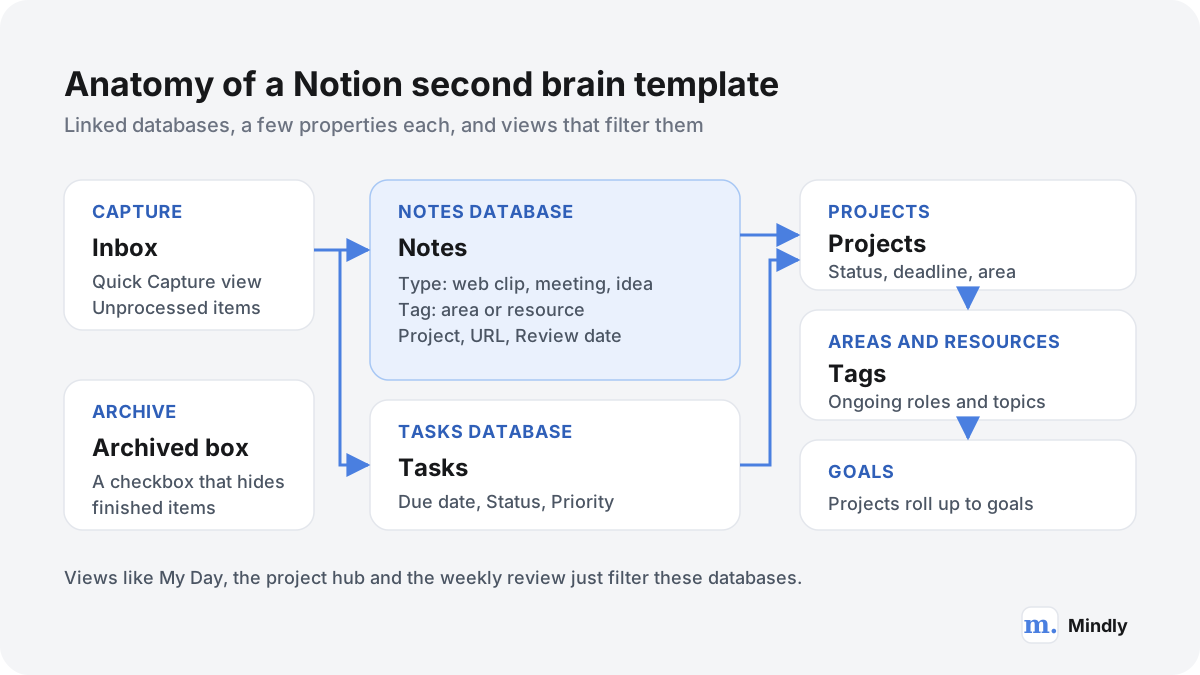
Strip away the cover images and icons, and almost every Notion second brain template is the same handful of linked databases. Knowing that anatomy makes it much easier to judge a template in five minutes, and to fix one later.
A "second brain" is Tiago Forte's name for a personal system that holds what you have learned and saved, so your head does not have to. His PARA method sorts everything into four groups: Projects, which he defines as short-term efforts with a goal in mind; Areas, the parts of your work and life that need ongoing attention; Resources, topics you are interested in and learning about; and Archives, anything from the first three that is no longer active. Notion is a natural home for that idea because it is built on databases, and a database can hold notes, tasks and projects as rows that link to each other. A Notion template is simply someone else's set of those databases, copied into your workspace. We explain the method itself, without any app, on our PARA method page and in the broader guide to second brain templates.
The databases
- Inbox. Not always a separate database. Usually it is a view of Notes and Tasks filtered to items with no project or tag yet, plus a "Quick Capture" page you pin to the sidebar or your phone's home screen. Ultimate Brain's sales page describes its Quick Capture view as the place to capture tasks and notes on the go.
- Notes. The heart of the second brain: web clips, meeting notes, book notes, ideas, journal entries. Every note is a database page, so it can carry properties and link to projects.
- Tasks. Actions with due dates, statuses, priorities and often recurrence. This is the part Notion does very well and note apps mostly do not.
- Projects. Outcomes with an end, such as "Launch the portfolio site" or "Finish chapter 3". A project page shows its own tasks and notes through filtered views.
- Areas and Resources. Often merged into one database. Ultimate Brain uses a single Tags database for both, and its sales page explains that in its setup "Areas become much more useful", because an area can contain projects and resources.
- Goals. Optional. Bigger templates let projects roll up into yearly or quarterly goals.
- Archive. Rarely a database. Usually it is a checkbox called Archived that hides an item from every active view without deleting it.
The properties, and why they matter
Properties are where a template's promise and its daily cost both live. A property is a field on every page: a select menu, a date, a URL, or a relation pointing to a row in another database. Ultimate Brain's Notes database reference lists 25 standard properties, most of them filled by formulas and rollups. The handful you set by hand are the ones that matter: a Type select (journal, meeting, web clip, recipe), a Tag relation for the area or resource, a Project relation, an optional URL, and a Review Date. Every template has its own version of those five, and each one is a decision at the moment of saving. Those decisions are the main reason templates go stale, as the section on where templates break down shows.
The views
A view is a saved filter and layout on a database: a table of notes tagged "Health", a board of projects by status, a calendar of tasks. Dashboards such as "My Day" are pages full of linked views. A template that feels overwhelming usually has too many views, not too many databases, and you can delete views you never open without losing anything.
The best Notion second brain templates in 2026
Nine templates you can open today, from the biggest paid system to small free starters. Each was checked on its own listing on 11 November 2026, and every price below is the one shown there.
A note on what is missing. Notion's second brain category in its template marketplace is full of community templates, and when we opened it, every listing we saw was made by a community creator; we did not find a second brain template made by Notion itself. Many listings are near-duplicates with different styling, so we picked templates that are either widely known, made by the people behind the method, or distinct in structure.
Ultimate Brain by Thomas Frank: the most complete paid option
When people search "ultimate brain notion" or "thomas frank second brain", this is the template they mean. Ultimate Brain is Thomas Frank's all-in-one productivity system for Notion, now on version 3.0. It includes Tasks, Projects, Notes, Tags and People databases, with dashboards for My Day, My Week, Notes, Projects, People (a small personal CRM), Recipes with meal planning, Books with a reading log, and an Archive. The task manager supports sub-tasks, priorities and recurring tasks, with an automation that processes recurring tasks for you, and an optional GTD-style processing view with smart lists for Do Next, Delegated, Snoozed and Someday. PARA is built in through the Tags database, and the sales page carries an endorsement from Tiago Forte.
The price is US$129 as a one-time purchase, both on his site and on its Notion Marketplace listing, and in November 2026 his site was advertising a $50 discount code. You get lifetime access to tutorials and a support community. Two FAQ details matter. Everything works on Notion's free plan, including the pre-made automations. And updates do not apply to your copy automatically: each new version comes with an upgrade or transfer guide, and big updates may mean moving your data into a fresh copy. Refunds are 14 days through the Notion Marketplace or 30 days through his own store. Best for people who want their whole life in Notion and enjoy learning the system; the full tour video runs 100 minutes.
The Official Second Brain Notion Template from Forte Labs
If you came to the idea through Tiago Forte's book, this is the "notion para template" made by his own company. The product page describes PARA structure, quick capture into an inbox for ideas, notes, links and tasks, task management linked to notes and projects, daily pages with startup and shutdown checklists, habit tracking and journaling, a weekly review checklist, a built-in read-later database, a decision tree for where to capture things, and a mobile view designed for quick capture in Notion's phone app. Onboarding comes as 13 short setup steps delivered as tasks in your inbox, which Forte Labs says takes under an hour.
It costs $65, with purchasing-power pricing in some countries, lifetime updates, and no refunds: the page says all sales are final. It works on Notion's free plan and is included with Forte Labs' membership and its Foundation course. The walkthrough video in this guide promises you can capture any thought in under 10 seconds and maintain the system with one 30-minute weekly review; those are Forte Labs' own claims, and they are a fair description of what the design aims for. Best for readers of the book who want the method exactly as its authors teach it, including the CODE method for turning notes into output.
Second Brain by Easlo
Easlo has 33 templates in Notion's marketplace. His paid Second Brain is "an all-in-one Notion system that centralizes tasks, projects, notes, and everything in between", in the listing's words, covering goals, projects and notes in one place. It is listed at US$79 on the Notion Marketplace. The listing says little about the exact database structure, so look at the preview before buying. Best for people who like Easlo's clean, minimal style and want goals included.
PARA Dashboard by Easlo: the best small free template
Easlo's free PARA Dashboard is the opposite of Ultimate Brain: a single dashboard inspired by PARA where you list long-term roles in Areas, manage initiatives in Projects, break projects into Tasks, and keep references such as articles and videos in Resources, linked to the projects they serve. Ticking an Archive checkbox moves an item to the Archive view. That is the whole template, and that is its strength. If you have never built a Notion relation, this is the one to learn on.
PARA Method template by Thomas Frank: free and minimal
Thomas Frank also gives away a PARA Method template that brings the four PARA lists into Notion as interconnected databases, with Areas able to contain both Projects and Resources. He calls it a simple, minimalist structure to build upon, and says Ultimate Brain uses the exact same PARA organization with tasks, notes, goals and dashboards added on top. That makes it a sensible free trial run: if you like how PARA feels in this skeleton, you will know whether paying for the full system is worth it.
Zapier's free second brain template
Zapier's blog publishes a free Notion second brain template with a long, plain-English walkthrough, first published in October 2022 and updated in September 2024. It has four databases: Projects, with a Status property (Not started, In progress, Completed, Abandoned) and a Progress bar that updates as tasks are done; Tasks with due dates; Areas tagged Work or Life; and Notes linked to areas and projects. An Archive view collects finished items, and Quick actions add a task, note or project in one click. The article is honest about one weak spot: pages saved with Notion's web clipper land under "No Areas" and you drag them into an area by hand. Best for beginners who learn by reading how something is built.
Second Brain by Brainblocs
Brainblocs' free Second Brain combines PARA, CODE and GTD in a hierarchy with pre-built areas, so you do not start from a blank page. Its listing describes a central dashboard that switches between personal and business modes, "express capture", action sprints and project timelines. Best for freelancers and founders who want work and life in one workspace but separated on screen.
Second Brain: PARA GTD & Life System by NotoMantra
NotoMantra's free PARA GTD & Life System is the most GTD-heavy option here. Its GTD hub follows David Allen's workflow: inbox capture, a clarification step, next actions filtered by context and energy level, waiting-for, scheduled, someday and maybe, and a done log. A PARA hub keeps projects, areas, resources and archive in one database, and on top it tracks income, expenses, subscriptions, workouts, medication, habits and time. That breadth is both the appeal and the risk: there is a lot to keep current each week. If GTD is your method, our page on Getting Things Done covers the parts that matter most.
CODE Method: Second Brain & Knowledge OS by heyismail.co
heyismail.co, which has the most listings on the first page of Notion's second brain category, offers a free CODE Method template built on Forte's Capture, Organize, Distill, Express framework. You save articles, quotes and ideas to a Capture Inbox, move them through a knowledge pipeline organized around projects and areas of responsibility, distill sources into the takeaways worth keeping, and turn them into output. A Today and Next Actions section connects insights to tasks. Best for writers, researchers and creators whose second brain exists to produce something, and who already use progressive summarization or want to.
| If you are | Start with | Why |
|---|---|---|
| New to Notion databases | Easlo's PARA Dashboard or Thomas Frank's PARA template | Small enough to understand, free, and easy to extend |
| A reader of Building a Second Brain | Forte Labs' official template | The method as its authors teach it, with a weekly review built in |
| Wanting one system for life and work | Ultimate Brain | A full task manager, plus long tutorials and docs |
| A GTD practitioner | NotoMantra's PARA GTD & Life System | Contexts, energy levels, waiting-for and someday lists |
| A writer or researcher | The CODE Method template, or Forte Labs' | A pipeline from captured source to finished output |
| Someone whose last template went stale | A smaller template, or no template at all | Capture friction, not missing features, is usually what killed it |
The Notion facts that decide how any template behaves
A template inherits Notion's plans, limits and features. These are the ones that change how a second brain feels in daily use, checked against Notion's own pages in November 2026.
| Notion plan | Price shown in the EU, billed yearly | Notion AI | Details that matter for a second brain |
|---|---|---|---|
| Free | €0 | Limited trial | Block limits apply only to workspaces with 2+ members; uploads up to 5 MB per file; 7 days of page history; pick pages for offline use |
| Plus | €9.50 per member per month | Limited trial | Uploads up to 5 GB per file; 30 days of history; recent and favorite pages download for offline use automatically |
| Business | €19.50 per member per month | Included: Notion Agent, AI Meeting Notes, Enterprise Search (beta) | 90 days of history; granular database permissions; AI search across connected apps |
| Enterprise | Custom pricing | Included, with zero data retention by the AI providers | Admin and security controls |
The most important line in that table for a second brain is the AI column. Notion's pricing page lists Notion AI (chat, generating and editing documents, autofilling databases) as a limited trial on the Free and Plus plans, and includes it from Business upward. So if you pick a template because you want AI to summarize your notes or fill in properties, budget for Business, not for the template. None of the templates in this guide needs Notion AI, which is a deliberate choice by their creators: they work on the free plan.
- Uploads. On the Free plan, files can be up to 5 MB each. A scanned book chapter or a lecture deck can be larger than that, so students and researchers on Free often keep PDFs elsewhere and link to them.
- Offline. Notion's help article on using pages offline says offline works in the desktop and mobile apps, not in a browser, on all plans. You mark pages as available offline; subpages are not downloaded automatically, and for a database only the first 50 rows of its first view are downloaded. A second brain with 2,000 notes is therefore only partly available on a plane unless you plan ahead.
- Web clipper. Notion's web clipper is a browser extension for Chrome and Safari, plus the share sheet on iOS and Android. It saves a whole page into a page or database you pick. Ultimate Brain's web clipping guide notes that it captures only the URL, title and content, and cannot set property values, which is why the guide recommends a third-party clipper, Flylighter, that works in Chromium browsers.
- Search. Notion's search help article says workspace search covers content inside database pages, that page titles weigh more than page contents, and that select and multi-select property values are not included in search results. The article does not say that search reads the text inside uploaded PDFs. Notion's Enterprise Search page says Notion AI will search uploaded PDFs, which puts that ability on the plans that include Notion AI.
- Export. Notion's export guide offers PDF, HTML, and Markdown and CSV. Pages export as Markdown and databases as CSV with a Markdown file per row; only the current or default view of a database is exported, and PDF export with subpages is a Business and Enterprise option. Your second brain is portable, but plan the export view by view.
None of these is a reason to avoid Notion; they explain why a template that looks perfect in a demo can feel different on day 40. For the wider choice, see our Notion comparison and Notion vs Mem.
How to build a second brain in Notion, step by step
A notion second brain setup that lasts is smaller than the one you will be tempted to build. These ten steps work with any of the templates above, or from a blank page.
- Decide what the second brain is for, in one sentence. "Notes and sources for my thesis and two side projects" works. "Everything in my life" does not, at least in week one. The sentence tells you which databases you need: most people need Notes and Projects, many need Tasks, few need Goals on day one.
- Pick the smallest template that covers that sentence. If you are unsure, start with a free PARA template. You can always move to Ultimate Brain or Forte Labs' template later, and you will understand them far better.
- Duplicate it and delete what you will not use this month. Recipes, books, habit trackers and finance pages can come back later. Fewer views mean fewer places to look.
- List your Areas before your Projects. Write five to eight ongoing responsibilities: Health, Home, Money, your job, a long-running side business, Learning. Areas change rarely and anchor everything else.
- Add only active Projects. A project has an outcome and an end. "Write the grant application by 15 January" qualifies; "Marketing" is an Area. Three to ten active projects is normal.
- Cut the Notes properties down to three you will really fill. Type, Tag and Project are enough for most people. Hide the rest. Any property you skip more than half the time is making your search worse, not better.
- Make capture one tap away. Pin the Quick Capture page to the sidebar and to your phone's home screen. Install the web clipper and send clips to your Notes database.
- Create a database template for your most common note. A database template pre-fills properties. A "Web clip" template that sets Type to Web Clip saves one decision on every link.
- Put the weekly review on your calendar. Thirty minutes to empty the inbox: give each new item a tag and a project or archive it, check each project, and look at notes whose Review Date has come. Forte Labs' template ships with a checklist for exactly this.
- Review the system itself after 30 days. Look at which properties you filled, which views you opened and which you never did. Delete the unused ones. A second brain should get simpler over its first months, not bigger.
An example note
Spacing your study beats rereading
Type: Web Clip. Tag: Learning (a Resource). Project: Exam prep, Cognitive Psychology (ends 20 December). URL: the article you clipped. Review Date: 5 December. Body: three bolded sentences you would want to remember, then one line in your own words: "Plan four short sessions on chapter 6 instead of one long reread." That last line is the part that makes the note useful later. Everything above it is filing.
How the properties pay off
With those three properties set, the note appears in three places without you copying it: on the Exam prep project page, on the Learning resource page, and in a "To review" view on 5 December. That is the real value of a Notion second brain, and it is why people put up with the filing. Relations and rollups let one note serve several contexts, and no plain notes app does that as well. The cost is the same as the benefit: the note only shows up in those places if you set the properties. A note with no tag and no project shows up nowhere except search.
Common setup mistakes
- Building before capturing. A weekend of icons and dashboards before a single real note. Capture into a plain inbox for two weeks first, then build the views your notes need.
- Using multi-select tags for everything. Notion's search help says select and multi-select values are not included in search results. A relation to an Areas or Tags database holds up better as the system grows.
- Copying someone else's life. A creator's template reflects their week. Rename and remove until it reflects yours. Our piece on why second brains stop working goes deeper into this failure.
If you would rather learn the method before the tool, our 2026 guide to building a second brain covers capture, organizing and review in any app, and the page on the second brain idea explains where notes, tasks and saved material each belong.
Notion second brain examples: three worked setups
Three realistic notion second brain examples, each with the template we would start from and what a normal week inside it looks like.
A student: second-year psychology
Template: Easlo's free PARA Dashboard, or Zapier's for the walkthrough. Areas: Degree, Health, Money, Part-time job. Projects: one per module this semester (Cognitive Psychology, Statistics II, Developmental Psychology) plus "Summer internship applications". Resources: Study techniques, Research methods, Career. Tasks carry due dates for essays and problem sets, and each lecture gets a note related to its module project.
A normal week: lecture notes typed into a new note from the module page, so the relation is set for them, a few articles clipped for an essay, and ten minutes on Sunday to clear the inbox. Where it strains: lecture slides and scanned readings. On the Free plan, uploads stop at 5 MB per file, and standard search does not say it reads inside PDFs, so the student keeps the slides in a cloud folder, links them, and types key points into the note. Asking questions of the readings themselves is a job for a tool that can chat with documents.
A freelancer: brand designer with six clients
Template: Ultimate Brain. Areas (as Tags): Clients, Studio finances, Marketing, Health. Projects: one per client job, such as "Rebrand for a bakery, due 30 January", each with tasks for the brief, moodboard, first concepts, revisions and delivery. The People database holds each client contact, and meeting notes are created from the person's page so they link to both the client and the project. Recurring tasks handle invoicing on the first of the month and the quarterly tax estimate.
A normal week: My Day each morning, GTD processing on Monday, a My Week review on Friday. This is Notion at its best: tasks, relations, rollups and a client CRM in one place, and sharing a project page with a client is a link away. Where it strains: inspiration. Screenshots, references and voice notes recorded while walking do not fit a database page neatly, and filing them by hand is the first habit to slip. Many designers keep a separate visual library for that; our guides to a mood board and a screenshot organizer cover how.
A researcher: doctoral student in ecology
Template: Forte Labs' official template, or the free CODE Method template if they want a pipeline from source to draft. Projects: "Chapter 2 literature review", "Field season 2027 plan", "Conference poster". Areas: Thesis, Teaching, Lab duties, Health. Resources: Soil microbiology, Statistics, Methods, Writing. Every paper gets a note with Type set to Paper, its DOI as the URL, a Tag and the project it serves, and the read-later database holds what has not been read yet.
A normal week: read three or four papers, write a note for each with highlights and a two-line summary in their own words, and on Friday move the best ideas into the chapter outline, which is where progressive summarization earns its place. Where it strains: the papers themselves. A PDF in Notion is an attachment, Notion's search article does not cover the text inside it, and asking "which of my papers measured fungal biomass?" needs Notion AI on a Business plan or a separate tool. Many researchers keep PDFs in a reference manager and let Notion hold the thinking; our page on research notes looks at that split.
Where Notion second brain templates break down
Templates rarely fail because they are badly designed. They fail because the work of feeding them adds up, a few clicks at a time, until saving something feels like a task.
1. Capture friction, counted
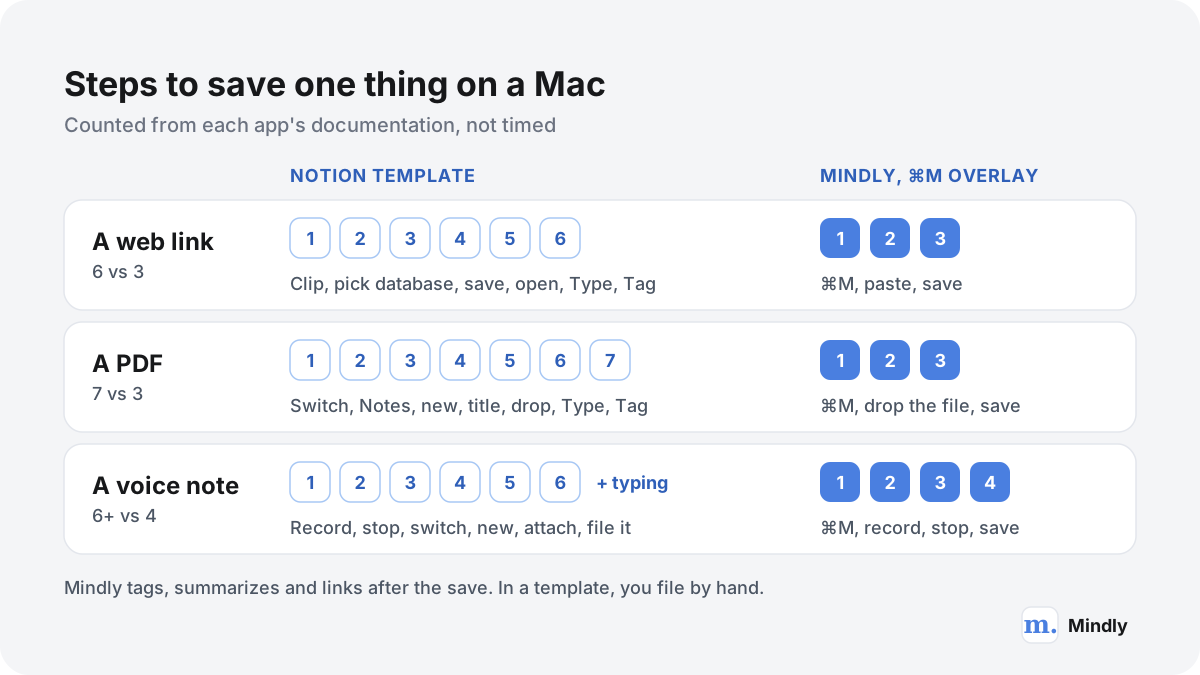
Here is what it takes to save three common things into a typical template on a Mac, counted from Notion's documentation and the template docs above. A web link through Notion's clipper: click the extension, pick the Notes database, save (three steps), then open the new page and set Type and Tag, because the clipper cannot set properties (three more). A PDF: switch to Notion, open Notes or Quick Capture, create a page, type a title, drag in the file, set Type, set Tag: seven steps, and the file must be under 5 MB on the Free plan. A voice thought: record it in another app, stop, switch to Notion, create a page, attach the audio, then file it, and if you want words rather than a sound file, type them yourself. Notion's own transcription is AI Meeting Notes, which is built for meetings and is a limited trial below the Business plan.
Voice is where the gap became wider this autumn. Ultimate Brain documented a free automation that sent voice memos from a cloud folder through Pipedream to be transcribed and summarized into the Notes database. Thomas Frank's own voice notes guide now carries a September 2026 update: Pipedream announced on 30 September 2026 that it is shutting down its Workflows product, which, in his words, renders the setup obsolete until he finds another solution. That is no criticism of the template. It shows how much a Notion second brain depends on add-ons for anything that is not text typed into a page.
2. Maintenance: properties and reviews
Every hand-filled property is a small debt. Skip it once and the note drops out of the views that depend on it; skip it often and the views become unreliable, so you stop opening them, so you stop filling the properties. The weekly review is the repayment plan, and Forte Labs budgets 30 minutes for it. Templates need upkeep too: Ultimate Brain's FAQ explains that updates never apply to your copy automatically, and the more you have customized, the harder they get.
3. Search inside files
A second brain is only as good as what you can find in it. Notion's search covers your pages and the content inside database pages well. Its help article does not say it reads uploaded PDFs, scans or audio, and select and multi-select values are left out of search results. Notion AI fills much of that gap, including searching uploaded PDFs, but it is a trial on Free and Plus and included from Business at €19.50 per member per month billed yearly. If most of your second brain is files rather than typed notes, check this before you commit.
4. Mobile and offline
Notion's phone apps and share-sheet clipper are a real strength, and Forte Labs' template has a mobile capture view built for them. The limits are at the edges: offline works only for pages you have marked, and a database downloads only the first 50 rows of its first view.
5. The cost of AI add-ons
The template is free or a one-time cost; AI on top is a subscription. For one person on Business that is €19.50 a month billed yearly, or €234 a year, as shown to EU visitors in November 2026, and Custom Agents draw on Notion credits beyond that. Reasonable for what Notion AI does across a workspace, but worth adding up if AI tagging and summaries are what you mainly wanted.
What people say in public: the "notion second brain reddit" question
Searches for "notion second brain reddit" lead mostly to r/Notion and similar subreddits. The same complaints show up in other public forums, and those we can cite directly. A January 2026 Ask HN thread about hoarding notes and links drew more than 200 comments, and its author's summary put on-demand retrieval first: people capture plenty but cannot resurface the right note at the right time. Privacy and low-friction capture came next. A February 2026 Hacker News comment recalled how popular second brain templates made some people wonder whether managing one complicated template would become a full-time job. The creators' own docs confirm the mechanics: properties the clipper cannot set, clips that land in "No Areas", updates applied by hand.
Where Notion is clearly better
- Tasks and projects. Due dates, statuses, priorities, recurring tasks, sub-tasks, dependencies and boards. No capture-first app comes close.
- Relations and rollups. One note on three project pages, progress bars that update themselves, goals that sum up their projects.
- Teams and sharing. Shared teamspaces, guests, public pages and sites, comments and permissions.
- Everywhere. Web, Mac, Windows, iPhone, iPad and Android, with your workspace synced across all of them.
The no-template route: Mindly as a Notion second brain alternative
If your template went quiet because saving and filing became a chore, a different tool may serve the notes half of your second brain better than a better template would. Mindly is our app, so read this part with that in mind.
Mindly is a native Mac app (macOS 14 or later) built around one idea: capture should cost a keystroke, and organizing should happen after you save, without you. Press ⌘M from any app and a small overlay opens on top of whatever you are doing, with no app switch. You paste a link, type a thought, drop a file or record a voice note, add a tag if you want (most people do not), and save. The overlay closes, your previous app keeps focus, and Mindly gets to work in the background, as the quick capture page describes. The same shortcut takes notes, links and web pages from any browser, PDFs, Word documents, tables and datasets, screenshots and images, voice memos and YouTube clips.
- AI tags instead of hand-filled properties. Every save is tagged by topic automatically, so there is no Type or Tag field to forget. Scanned PDFs and images are read with OCR, and voice memos are transcribed (transcription is a Pro feature).
- Summaries. Long articles, PDFs and documents get a summary, which does part of the "distill" step of the CODE method for you.
- Search by meaning across formats. Plain-language search runs across notes, links, PDFs, images and transcripts, so "that article about spacing study sessions" finds the article even if those words are not in its title.
- Chat with any document. Open a PDF or note and ask it questions, with answers grounded in your own material.
- Spaces for projects. Spaces group saves by project or area, the closest thing Mindly has to PARA's Projects and Areas.
- Connections and resurfacing. Smart suggestions surface related and forgotten saves, and the mind map shows AI-detected connections across the library. Reminders are built in too.
- Local library. Everything is stored in a Mindly folder on your Mac. AI processing runs over encrypted channels, and content is not retained on Mindly's servers after each request.
| Template part | What it does in Notion | Mindly equivalent | Honest gap |
|---|---|---|---|
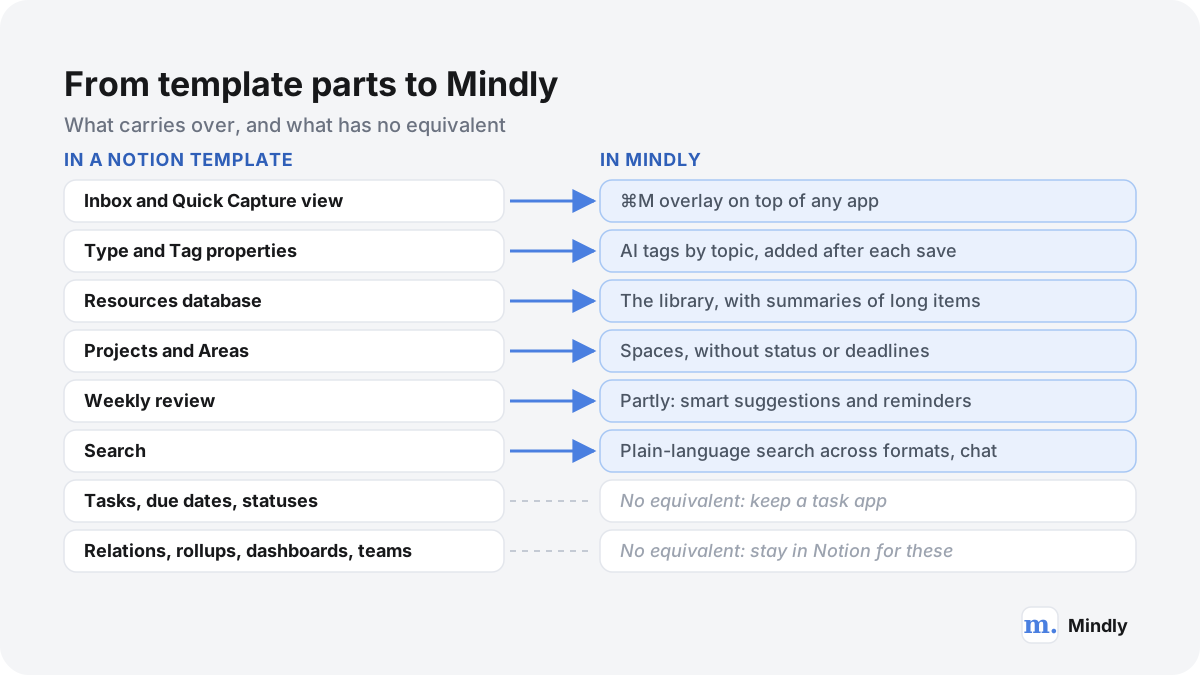
| Inbox and Quick Capture | Holds new items until you process them | ⌘M overlay; every save lands in the library ready to find | No separate "clarify" step, which GTD users may miss |
| Type and Tag properties | Categorize each note by hand | AI tags by topic on every save; optional manual tag | Tags are topics the AI finds, not your exact area names |
| Resources database | Reference material by topic | The library itself, with summaries and semantic search | No custom properties or database views |
| Projects and Areas | Pages that gather related tasks and notes | Spaces | No status, deadlines, progress bars or rollups |
| Weekly review | A checklist to tag, file and revisit | Smart suggestions resurface forgotten saves; reminders | No review dashboard or checklist |
| Search | Titles and page content; PDFs through Notion AI | Plain-language search across all formats, plus chat with a document | Search covers one Mac's library only |
| Tasks with due dates and statuses | Task manager with recurrence and priorities | None (reminders only) | Keep a task app, or keep Notion for tasks |
| Relations, rollups, dashboards | One note in many contexts; computed views | Mind map of AI-detected connections | No databases or formulas at all |
| Team sharing | Teamspaces, guests, public pages | None | Mindly is private and single-user |
| Mobile and web | Apps on every platform | None yet | Mac only; no sync between Macs (workaround: Mindly folder in iCloud Drive) |
What this adds up to: Mindly replaces the capture-and-recall half of a Notion second brain template (the inbox, the notes and resources, the tagging, the search) and does not replace the action half (tasks, projects with deadlines, dashboards, sharing). It also has no iPhone, iPad, Windows or web app, so if most of your saving happens on your phone, a Notion template with its mobile capture page will serve you better today. The free plan holds 25 items, enough to test the ⌘M habit for a week or two; Pro costs €7.99 a month or €44.99 a year on the pricing page. For the wider comparison, see our Notion alternative guide.
Using both, or moving over
You do not have to choose one or the other. Many people keep Notion for projects and tasks and put the capture and reference half somewhere faster.
Keep Notion for action, Mindly for capture
A split that works: tasks, projects, client pages and anything shared stay in your Notion template. Links, PDFs, screenshots, voice thoughts and reading go into Mindly with ⌘M, tagged and searchable without filing. When a project needs its sources, search or chat in Mindly and paste the two or three that matter into the project page. The template gets smaller and easier to maintain, because its Resources database no longer has to hold everything you ever saved.
Bring existing Notion pages into Mindly
Mindly's Notion integration connects from Settings, opens Notion in your browser, and asks which pages or databases Mindly may read. It is read-only: Mindly imports only the content you select, runs AI tagging and summaries on each page, and links them to related items in your library. Your Notion workspace is not changed. This is the gentlest route if your template still holds years of notes you want to search alongside new saves.
Leave Notion with a clean export
- Export from Notion. In the page menu, choose Export, then "Markdown & CSV", and include subpages. Databases come out as CSV files with one Markdown file per row; only the current view of each database is exported, so check its filters first.
- Clean the filenames. Notion names each exported file after its internal id. Our free Notion to Markdown cleaner strips those ids and repairs the internal links, entirely in your browser, so the files are readable in any editor.
- Keep the archive. Zip the cleaned folder and store it in your backup. Plain Markdown and CSV will open in twenty years, whatever happens to any app; our guide to apps that disappear explains why this step matters.
- Bring in what you use. Use the Notion integration for pages you want tagged and searchable in Mindly, and drag the PDFs and attachments from your export into Mindly, where each is read, tagged and summarized.
Keep your Notion template if...
Switching costs a weekend and some habits. For many people the right move is to simplify the template they already have, not to leave it.
- Your tasks and projects live there and work. If you open My Day every morning and trust it, the template is doing its main job. Fix the capture side instead: fewer properties, a database template for web clips, a clipper that sets properties.
- You share pages with a team or clients. Mindly is single-user with no sharing, so anything collaborative belongs in Notion.
- You save mostly from your phone. Notion's mobile apps and share sheet cover that; Mindly has no iPhone app yet.
- You use Windows, or several computers. Notion runs everywhere and syncs. Mindly is Mac only, without built-in sync.
- You enjoy building the system. For some people, shaping a Notion workspace is part of how they think. That is a perfectly good reason to stay.
- You already pay for Notion Business. Then you have Notion AI for summaries, autofill and searching uploaded PDFs, and much of the gap described above closes.
Consider the other route if your inbox holds more untagged notes than tagged ones, or if you have stopped saving PDFs and voice thoughts because filing them is a chore. That means capture, not structure, is the bottleneck; our guide to note-taking systems for ADHD explains why that matters more than features for many people.
Where Mindly fits
Where Mindly fits next to a Notion second brain template
Mindly is not a Notion template. It is a Mac app for the half of a second brain that templates find hardest: saving things the moment you meet them and finding them again later. ⌘M opens a small overlay over any app, you save, and the AI tags, summarizes and connects the item in the background, so there are no properties to fill; then you search by meaning or chat with any document. It has no tasks with due dates, no databases or dashboards, no sharing, no iPhone or web app and no sync, so keep Notion for those. Free holds 25 items; Pro is €7.99 a month or €44.99 a year. Many people use both, bringing selected pages over through the read-only Notion integration.
Common questions
Notion second brain templates, answered
What is the best Notion second brain template?
For one complete paid system, Thomas Frank's Ultimate Brain (US$129 one time, PARA plus optional GTD). For Tiago Forte's method as his team teaches it, the Official Second Brain Notion Template from Forte Labs ($65, no refunds). For a free start, Easlo's PARA Dashboard or Thomas Frank's free PARA template. The best template is usually the smallest one that covers what you actually do each week.
Is there a Notion second brain template free of charge?
Yes, several. Thomas Frank's PARA Method template, Easlo's PARA Dashboard and Zapier's second brain template are free and small. Brainblocs' Second Brain, NotoMantra's PARA GTD & Life System and heyismail.co's CODE Method template are free and larger. All of them run on Notion's free plan.
How much is Thomas Frank's Ultimate Brain, and is it worth it?
Ultimate Brain is listed at US$129 as a one-time purchase on Thomas Frank's site and on the Notion Marketplace, and in November 2026 his site advertised a $50 discount code. It is worth it if you want tasks, projects, notes, goals and a small CRM in one Notion workspace and will use the tutorials. If you mainly want a place for notes and saved links, a free template or a capture app is likely enough.
Is there an official Notion PARA template from Tiago Forte?
Yes. Forte Labs sells the Official Second Brain Notion Template for $65, built around PARA with an inbox, tasks linked to notes and projects, a read-later database, daily pages and a weekly review checklist, plus 13 onboarding steps. It works on Notion's free plan. Sales are final, so watch the 20-minute walkthrough on Tiago Forte's channel first. You can also read the PARA method on our site.
How do I build a second brain in Notion?
Write one sentence about what it is for, pick the smallest template that covers it, delete what you will not use this month, list five to eight Areas, add only active Projects, keep three properties on Notes (Type, Tag, Project), make capture one tap away, add a database template for web clips, and hold a 30-minute weekly review. After 30 days, delete the views and properties you never use.
Do Notion second brain templates need Notion AI or a paid plan?
No. Every template in this guide works on Notion's free plan, and Ultimate Brain's FAQ says even its pre-made automations do. Notion AI is a limited trial on Free and Plus and included from the Business plan, listed at €19.50 per member per month billed yearly for EU visitors in November 2026. You need it only if you want AI summaries, autofill or AI search inside the template.
Can Notion search inside the PDFs in my second brain?
Notion's search help article says workspace search covers page content and database pages, and does not say it reads the text of uploaded files. Notion's Enterprise Search page says Notion AI will search uploaded PDFs, which means a plan that includes Notion AI. On the Free plan, uploads are also limited to 5 MB per file. If your second brain is mostly PDFs, test this before committing.
Why do Notion second brains get abandoned, according to Reddit and other forums?
The same themes come up across public forums. In discussions we can cite, such as a January 2026 Ask HN thread with more than 200 replies, the recurring problems are retrieval (saving lots but not finding the right thing later), capture friction and upkeep. Template docs confirm the mechanics: Notion's web clipper cannot set properties, and template updates must be applied by hand.
What is a good Notion second brain alternative?
It depends on which half you want to replace. For notes in plain files you own, Obsidian. For the capture and recall half on a Mac, Mindly, which saves anything with ⌘M and tags, summarizes and searches it with AI, but has no tasks, databases or iPhone app. For tasks and projects, Notion is hard to beat, so many people keep it for that. Our Notion alternative guide compares more options.
Can I move my Notion second brain into Mindly?
Yes, in two ways. The read-only Notion integration imports the pages or databases you select and runs AI tags and summaries on each. Or export from Notion as Markdown and CSV, clean the filenames with our free Notion to Markdown tool, keep that archive, and drag PDFs and other files into Mindly. Tasks with due dates and statuses do not carry over, because Mindly has no task manager.
Is Mindly a Notion template?
No. Mindly is a separate macOS app (macOS 14 or later) with its own library stored in a folder on your Mac. It has no templates, databases, relations or task statuses. It covers the capture, organizing and search part of a second brain with AI, and works alongside Notion rather than inside it. It is also unrelated to the older mind-mapping app called Mindly by another developer.
Sources
What This Page Draws On
- Ultimate Brain for NotionThomas Frank · 2026Version 3.0 contents, databases and dashboards, PARA and GTD support, one-time price, free-plan compatibility, update and refund policy.
- Ultimate Brain (Notion Marketplace listing)Notion · 2026Marketplace price of US$129.
- Notes database referenceThomas FrankThe 25 standard properties of Ultimate Brain's Notes database and what each does.
- Web clips and highlightsThomas FrankNotion's web clipper saves URL, title and content but cannot set properties; Flylighter for Chromium browsers.
- How to transcribe audio to text with AI and NotionThomas Frank · 2026The voice notes workflow and its September 2026 update on Pipedream shutting down Workflows.
- PARA Method Template for NotionThomas FrankThe free PARA template and how it relates to Ultimate Brain.
- The Official Second Brain Notion TemplateForte Labs · 2026Contents, $65 price, 13 setup steps, mobile view, free-plan compatibility and no-refund policy.
- The PARA Method: The Simple System for Organizing Your Digital Life in SecondsForte Labs · 2026Tiago Forte's definitions of Projects, Areas, Resources and Archives; updated April 2026.
- Second Brain by Easlo (Notion Marketplace listing)Notion · 2026Description and US$79 price.
- Use this Notion second brain template to get (and stay) organizedZapier · 2024Free template, its four databases and properties, and how web clips land in "No Areas".
- Notion pricingNotion · 2026Free, Plus, Business and Enterprise prices, Notion AI by plan, upload limits, page history, offline and Notion credits.
- Use pages offlineNotion Help CenterOffline in the apps only, on all plans; first 50 rows of a database's first view.
- Web ClipperNotion Help CenterChrome and Safari extension, iOS and Android share sheet, saving to a database.
- Search in your workspaceNotion Help CenterWhat workspace and database search cover; select and multi-select values not included.
- Export your contentNotion Help CenterPDF, HTML, and Markdown and CSV export, and how databases export.
Keep reading
Related Guides
Try the no-template route with 25 free items.
Download Mindly, press ⌘M on the next link, PDF or thought you would have filed in your Notion template, and see whether automatic tags and search keep you saving. Mac only, no iPhone app or sync yet, so keep Notion for your tasks.