mindly
HomeDownloadPricingWhat's New
DownloadSign Up
HomeDownloadPricingWhat's New
DownloadSign Up

mindly

Your second brain powered by AI. Organize thoughts, connect ideas, and unlock your mind's potential.

Product

  • Home
  • Download
  • Pricing
  • Integrations
  • Methods
  • What's New
  • Contact
  • Account

For Your Needs

  • For Students
  • For Researchers
  • For PhD Students
  • For Writers
  • For Product Managers
  • For Knowledge Workers
  • For Designers
  • For Consultants

Comparisons

  • All comparisons
  • Mindly vs Notion
  • Mindly vs Obsidian
  • Mindly vs Logseq
  • Mindly vs Apple Notes
  • Mindly vs Evernote

Legal

  • Privacy Policy
  • Terms of Use

Connect

Product Hunt

Features

  • All Features
  • Capture
  • Chat With Your Documents
  • Auto-organize
  • Search
  • Explore
  • Suggestions
  • Voice

Popular Use Cases

  • All Use Cases
  • Second Brain
  • AI Second Brain
  • PDF Organizer
  • Meeting Notes
  • Bookmark Manager
  • Note Taking App for Mac
  • Research Notes App
  • Screenshot Organizer

Guides

  • All Guides
  • Build a Second Brain
  • Personal Search Engine
  • Why Your Second Brain Fails
  • Second Brain for Work
  • Declutter Your Digital Life
  • AI Note-Taking Apps

© 2026 mindly. All rights reserved.

Home/For Writers

For Writers

mindly for Writers

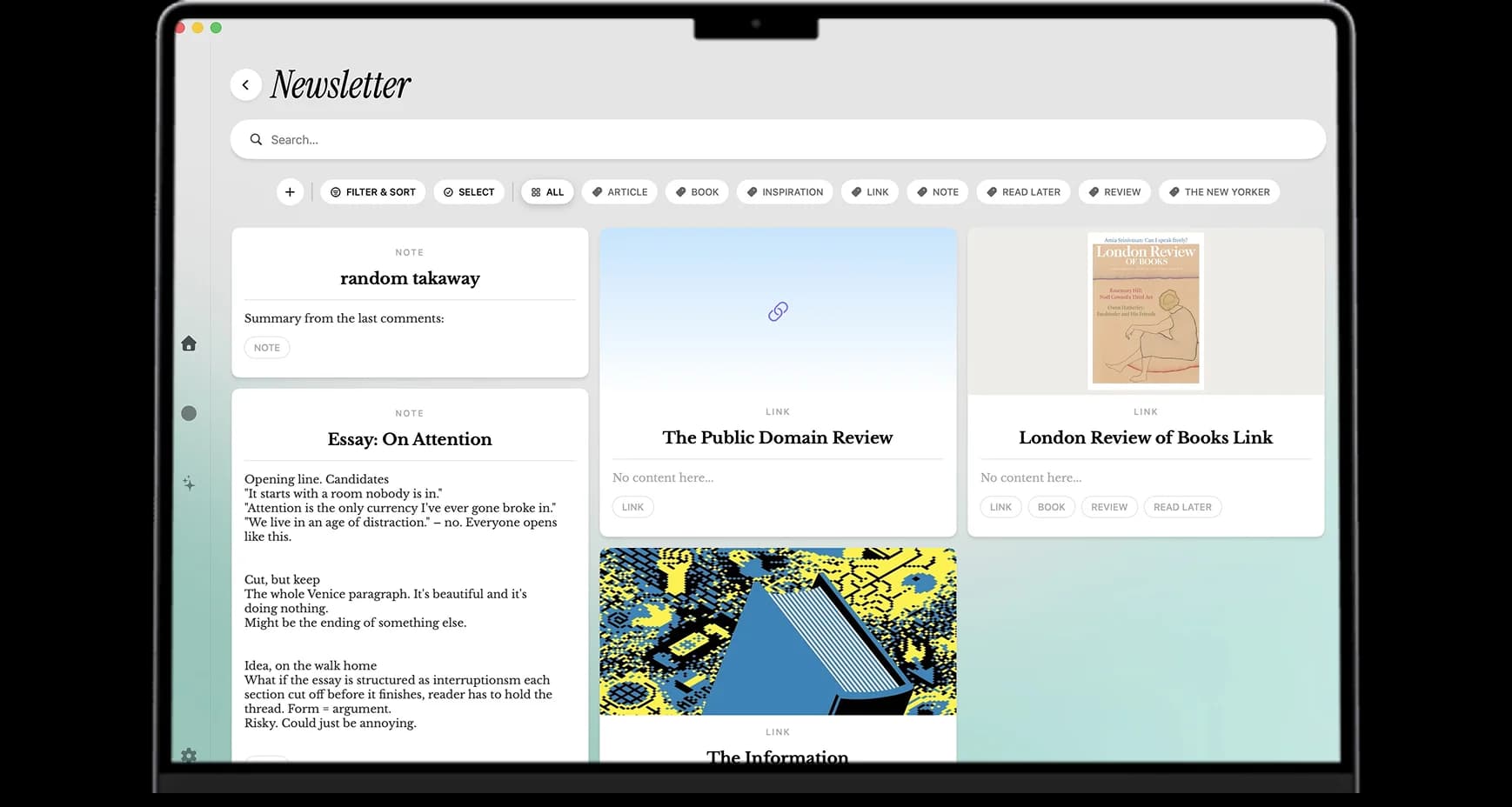
Quotes you want to use one day. Ideas that arrive at 6am. Research dossiers for the next essay. Half-titles, opening lines, scraps of overheard dialogue. Mindly keeps it all in one library and lets AI surface the connections that become a piece.


The short version

Why Mindly?

Writers have a specific note-taking problem that most productivity tools do not solve well. The raw material of writing is not tasks or projects; it is fragments. A line you overheard on a bus. A quote you read in a book six months ago. A counterargument that occurred to you in the shower. A factoid you cannot use yet but might. A morning page where the real argument finally landed. A draft paragraph you wrote in a notes app and then could not find again. Most note systems are built around projects or pages, and fragments do not fit cleanly into either shape.

Mindly is built around the fragment. The capture flow is one keyboard shortcut from anywhere on your Mac, and the save can be one line of text, a voice memo, a link, a screenshot of a page from a book, a long draft, or a single image. There is no "where should this go" decision because the AI handles the placement. Tags emerge automatically. The piece-level organization happens later, when you actually sit down to write something specific. The fragment stays a fragment until you need it; the library remembers it without you having to.

The second thing writers specifically benefit from is voice memos. The best lines tend to arrive when typing is impossible: while walking, while driving, while making coffee, while half-asleep. Most writing apps assume you will type at your desk, and most good lines die in that gap. Mindly turns voice into a first-class capture surface. Record a memo, the transcript arrives within seconds, and AI tags it the same way it would tag a typed scrap. The library becomes a record of everything you thought worth saying, not just what you happened to be at a keyboard for.

The third advantage is the quote library. Writers accumulate quotes for years. The right line at the right moment can carry an entire essay. The problem is retrieval: by the time you actually need a specific quote for a specific paragraph, you have forgotten the book, the author, sometimes even whether you have the quote at all. Mindly's semantic search across the whole library means a search for "quotes about starting over" finds the lines that fit the mood even if the word "starting" does not appear in any of them. The commonplace book that writers have kept for centuries finally works at speed.

The fourth thing worth saying is that the mind map is genuinely useful for the writing-specific question of "what is this piece really about". Most writers know the feeling of working on an essay or a chapter and slowly realizing that the connective tissue is not what you thought it was. Mindly's AI-detected similarity between items surfaces the themes that are actually emerging in your work, not the themes you intended to write about. Often the real piece is hiding inside a cluster of related fragments you did not connect on purpose. The mind map shows you the cluster.

The fifth point is privacy. Drafts, unpublished essays, journal entries, half-formed memoir material, and morning pages all live in the library. None of that should be on a vendor server you do not control. Mindly stores your library in a Mindly directory on your Mac. AI processing runs over encrypted channels and content is not retained on Mindly servers after the request. For writing that is private until you decide it is not, the on-device default plus no-retention AI is the right combination. The draft you wrote and then chose not to publish stays on your machine.

The honest summary: Mindly is the second brain for essayists, journalists, novelists, poets, and long-form writers who work with fragments more than with projects, and who want one Mac-native library that holds ideas, quotes, research, and drafts together with AI doing the connecting.


Why it fits the writing life

Why Mindly Works Through Every Stage of a Piece

  • One shortcut for quotes, screenshots, links, voice memos, and your own scraps. No separate writing inbox to maintain, no folder taxonomy to invent, no decision about which app handles the next save.
  • Voice memos turn 6am thoughts and walking-the-dog ideas into searchable text by the time you sit down at your desk. The good line that arrives between activities does not die in the gap.
  • AI tags and summaries let you recall the shape of an idea, not just its filename. The note you saved six months ago about doubt comes back when you search for the feeling, even if the word "doubt" appears nowhere in your search query.
  • The mind map shows the threads forming across pieces, often suggesting the next essay before you knew you wanted to write it. The cluster of fragments you did not connect on purpose is frequently the real shape of the piece you should be writing.
  • On-device library means private drafts stay private until you decide to send them anywhere. Morning pages, abandoned essays, journal entries, and unpublished memoir material live on your Mac, not on someone else's cloud.
  • Built for the long term. The fragments you save in your twenties are still indexed and findable in your forties. A writing life accumulates material across decades and Mindly is architected for that timescale.
  • Works alongside Scrivener, Ulysses, Word, Google Docs, or whatever drafting app you actually finish in. Mindly is the research and idea layer, not the publication formatter, so adopting it does not disrupt your existing finished-draft workflow.
  • No design tax. There are no databases to set up before you can save your first quote, no templates to choose, no plugins to install. You open Mindly, press the shortcut, save a line, and the library already works.

Writing setups

Six Concrete Ways Writers Actually Use Mindly

Idea inbox

Dump every spark without judging them: phrases, observations, half-titles, opening lines, dialogue scraps, image descriptions. Triage weekly into project notes when the time comes, or leave them in the inbox and let AI surface them when relevant. Most of the inbox never becomes a piece, and that is fine; the few that do tend to be the strongest pieces of the year.

Research dossiers per piece

One dossier per essay, chapter, or article in progress. Links, source material, transcripts, screenshots, your own draft paragraphs, and the AI summaries of the long reads. By the time you start drafting, the research is already organized; the writing session opens with material already in hand rather than thirty minutes of "where did I save that".

Quote vault with sources intact

Snippet quotes from books, articles, talks, and conversations with the source attached. Search by mood, theme, or idea rather than by author when you are drafting. The right line for a specific paragraph is one query away, and the source citation never gets separated from the quote.

Project boards for tracking pieces

One note per piece in progress, from idea to draft to submission. Status, deadline, where it is being pitched or published, feedback received, revisions to make. The board view of every piece you have in motion replaces the spreadsheet most writers maintain by hand and forget to update.

Voice memos for the morning thoughts

Record the line that arrives at 6am before it disappears. Record the argument that came together on the walk before it fades. Transcripts arrive in seconds and AI tags them so they surface when the relevant piece comes around. The writing life involves more time away from the desk than at it, and capture has to work for that reality.

Theme clusters and the next piece

Open the mind map every few weeks and look for clusters forming across your fragments. The recurring theme that surfaces from twenty unrelated saves is often the piece you should be writing next, even before you consciously knew you wanted to write it. Several established writers describe this as the single most useful feature for finding the next book.


What makes it different for writers

Four Mechanics That Change How Writing Actually Happens

  • Fragments stay findable for decades

    A writing life is the slow accumulation of fragments. The line you noted in your twenties might land in an essay in your forties. The quote you saved in graduate school might carry a book chapter twenty years later. Most note apps are built for short-term project work and degrade as the library scales into the years. Mindly is architected for the long arc. The fragment from 2018 is still indexed, still tagged, and still surfaces when relevant in 2026. The writing equivalent of compound interest finally has a tool that matches the timescale.

  • Voice capture for the thinking that happens away from the desk

    The hardest writing problem is not the blank page; it is the line that arrives when you are nowhere near a keyboard. Walks, showers, drives, meals, half-sleep. Mindly turns voice into a first-class capture surface. The line you would have lost in the gap between hearing it in your head and getting back to your desk lives in your library within seconds. Writers consistently describe this as one of the highest-leverage upgrades over a typing-only system.

  • Semantic search finds quotes by mood, not by keyword

    Traditional search requires you to remember the actual words. Writers do not remember actual words; they remember moods, shapes, feelings, the situation in which they encountered the line. Mindly's semantic search picks up on the meaning rather than the literal match, so "quotes about beginnings" finds the line about starting over even if neither word appears in the literal text. For drafting moments where the exact right line is what carries the paragraph, this is the feature that does the most work.

  • The mind map surfaces the piece you should be writing next

    Themes emerge from fragments before they emerge in your conscious planning. Mindly's mind map clusters items by AI-detected similarity, and the clusters often reveal the through-line of work that you have been accumulating without realizing it. The next essay, the next chapter, the next book often hides in plain sight inside a cluster you would never have grouped on purpose. The map turns the accumulated library into a generative tool, not just a storage system.


Common questions

Frequently Asked Questions

What is the best note app for writers on Mac?

For writers who work with fragments more than projects, want one library for ideas, quotes, research, and drafts, and need voice capture for the thinking that happens away from the desk, Mindly is the closest fit on Mac in 2026. The key advantages over Notion (too workspace-shaped), Obsidian (too configuration-heavy), Scrivener (too project-shaped for raw idea capture), and Apple Notes (too thin on organization for a serious writing life) are AI tagging on every save, semantic search across decades of fragments, voice memo transcription, and a mind map that surfaces themes you did not plan to write about.

Does Mindly replace Scrivener or Ulysses for writing books and long-form pieces?

No, and it does not try to. Scrivener and Ulysses are drafting apps with corkboards, manuscript-level views, and export pipelines for publication. Mindly is the layer underneath: ideas, research, quotes, fragments, voice memos, and the synthesis that happens before drafting. Most writers who switch keep their drafting app (Scrivener, Ulysses, Word, Google Docs) for the actual finished-manuscript work and use Mindly as the research-and-idea library that feeds into it. The two stack cleanly because they do different jobs.

How does Mindly compare to a commonplace book or a Zettelkasten?

A commonplace book is a writer's personal collection of quotes, observations, and excerpts, traditionally kept in a paper notebook. A Zettelkasten is a system of atomic notes with explicit links, popularized by Niklas Luhmann. Mindly does both jobs without the manual maintenance either traditionally requires. Quotes get tagged and made searchable automatically. Connections between notes are AI-detected, so the linking happens whether or not you remember to do it by hand. The commonplace book functionality works from the first save; the Zettelkasten functionality emerges as the library grows.

Is my draft material private if I use Mindly?

Yes. Your library lives on your Mac in a Mindly directory. AI processing runs over encrypted channels and content is not retained on Mindly servers after the request completes. Unpublished drafts, morning pages, journal entries, abandoned essays, and any other private writing stay on your device. For writers working on memoir, sensitive personal essays, journalism with confidential sources, or any material that should not be on a vendor cloud, the on-device default plus the no-retention AI policy is the right combination.

Can I import my old notes from Apple Notes, Bear, Notion, or Day One?

Yes. Mindly imports plain text, Markdown, HTML, and most standard export formats from competing apps. Apple Notes exports through the Notes app itself. Bear exports as a folder of Markdown files. Notion exports as Markdown plus HTML. Day One exports as JSON or Markdown. Drag the exported folder into Mindly and every note gets imported, gets a tagging pass from AI, and joins your library searchable. The fragments you have accumulated in other apps over the years come along.

Does the voice memo transcription handle non-English languages?

Yes. Mindly's voice transcription supports the major spoken languages including English, German, French, Spanish, Italian, Russian, Ukrainian, Mandarin, Japanese, Arabic, and others. Transcription quality varies somewhat by language, accent, and recording environment, but the major languages all work well enough for note-taking purposes. Multilingual writers who think in two or three languages can save voice memos in any of them and have them indexed together in the same library.

How is this different from just using Apple Notes for ideas and quotes?

Apple Notes works for typing text into pages with folders. It does not read PDFs at the passage level, does not AI-summarize long content, does not semantically search across formats, and does not transcribe voice memos automatically. For a writer whose work mostly consists of typed text in flat folders, Apple Notes is genuinely enough. For a writer whose work involves saved articles, PDFs, voice memos, quotes from books, screenshots, and the cross-format synthesis that long-form writing actually needs, Mindly handles all of that natively in one library.

What happens to my fragments if I stop using Mindly?

Your library lives on your Mac. The text, audio, and saved files are in standard formats on disk and survive any subscription change. Items beyond the free tier limit become read-only if you cancel Pro, but they do not disappear. Mindly exports the library to standard formats so the years of accumulated fragments come with you if you ever move on. For a writing life that has to span decades, the on-disk default is the right architectural choice; it would not be acceptable to lose your commonplace book because of a vendor change.

Get started

Show up to the page already prepared

Install Mindly free for Mac and capture the next ten ideas, five quotes, and four research links. When you sit down to write the next piece, the material will already be organized. The writers who switch tend to find their drafting sessions get visibly shorter and the time they spend hunting for the right fragment drops to nothing.

Download freeSee pricing