mindly
HomeDownloadPricingWhat's New
DownloadSign Up
HomeDownloadPricingWhat's New
DownloadSign Up

mindly

Your second brain powered by AI. Organize thoughts, connect ideas, and unlock your mind's potential.

Product

  • Home
  • Download
  • Pricing
  • Integrations
  • Methods
  • What's New
  • Contact
  • Account

For Your Needs

  • For Students
  • For Researchers
  • For PhD Students
  • For Writers
  • For Product Managers
  • For Knowledge Workers
  • For Designers
  • For Consultants

Comparisons

  • All comparisons
  • Mindly vs Notion
  • Mindly vs Obsidian
  • Mindly vs Logseq
  • Mindly vs Apple Notes
  • Mindly vs Evernote

Legal

  • Privacy Policy
  • Terms of Use

Connect

Product Hunt

Features

  • All Features
  • Capture
  • Chat With Your Documents
  • Auto-organize
  • Search
  • Explore
  • Suggestions
  • Voice

Popular Use Cases

  • All Use Cases
  • Second Brain
  • AI Second Brain
  • PDF Organizer
  • Meeting Notes
  • Bookmark Manager
  • Note Taking App for Mac
  • Research Notes App
  • Screenshot Organizer

Guides

  • All Guides
  • Build a Second Brain
  • Personal Search Engine
  • Why Your Second Brain Fails
  • Second Brain for Work
  • Declutter Your Digital Life
  • AI Note-Taking Apps

© 2026 mindly. All rights reserved.

Home/For Researchers

For Researchers

mindly for Researchers

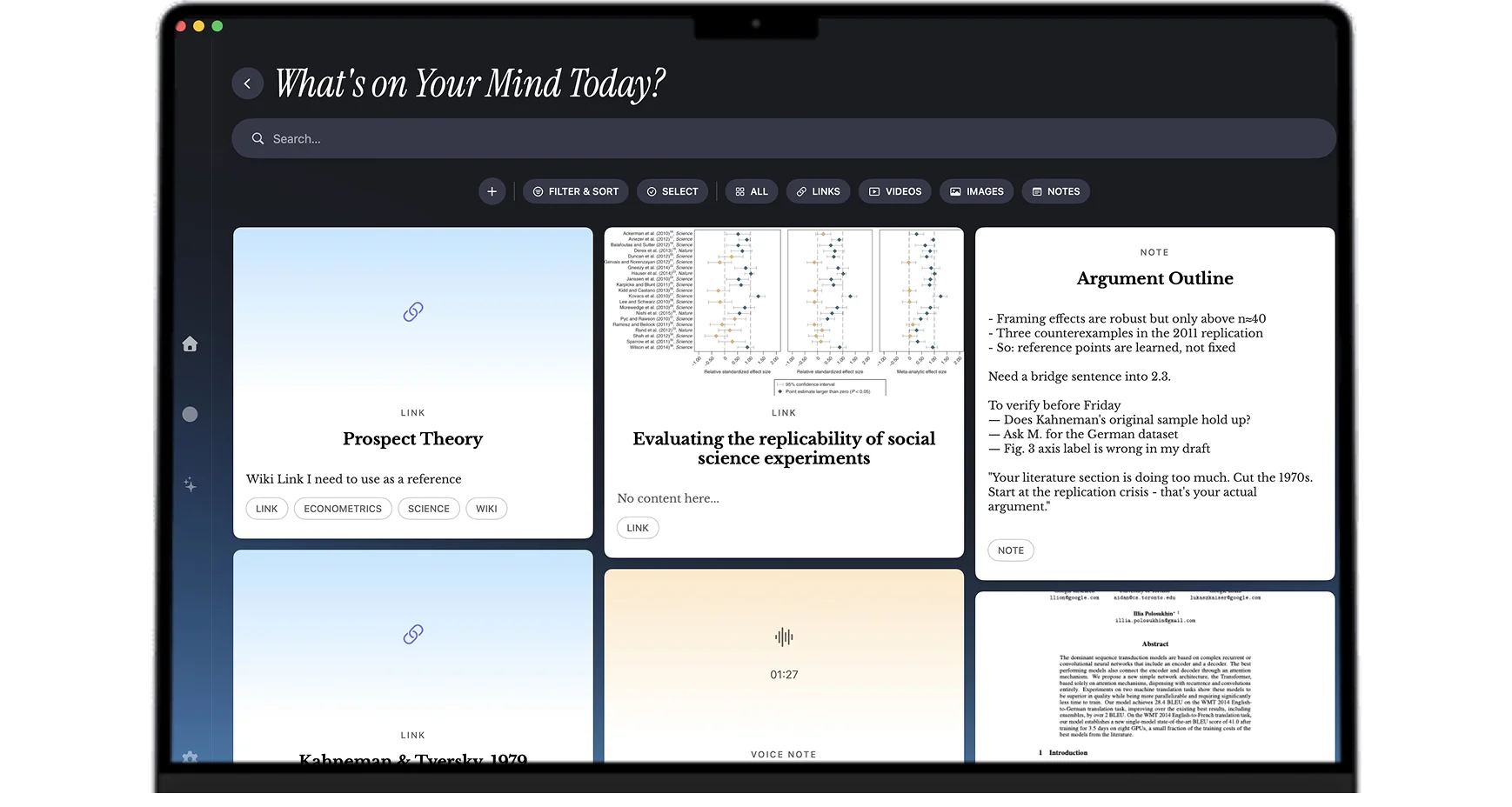
Papers, quotes, screenshots, datasets, interview transcripts, and half-formed ideas in one Mac library. Mindly captures them as you read and lets AI surface the connections that turn three years of notes into a working argument. On your machine, free to start.

The short version

Why Mindly?

Research is the work of accumulating evidence over years and then assembling a smaller piece of writing out of it. The accumulation half is well understood: you read papers, you save quotes, you record interviews, you screenshot figures, you collect datasets, you jot down half-formed ideas on long walks. The assembling half is where most researchers quietly suffer, because the tools designed for capture rarely make synthesis any easier. By year three the archive of saved work is enormous, the citations you actually need are hard to find, and the literature review you have to write is an excavation rather than a synthesis.

Mindly is built to flip that ratio. The capture flow is one keyboard shortcut from anywhere on your Mac. Papers, links, voice memos, screenshots, draft text, dataset snippets, the email from a co-author, the tweet that mentioned a relevant pre-print. All of it lands in one library. AI handles the tagging by topic and by method automatically, so the literature on dual-process theory all ends up tagged the same way regardless of which paper, which year, or which folder you saved it in.

The second thing Mindly does for research workflows is read your PDFs the way a careful colleague would. Every paper you save gets a short AI summary you can scan in one breath, plus semantic tagging by topic and method, plus full-text indexing including OCR for scanned PDFs. The result is that "find me everything I have on attention allocation in dual-process theory" returns a real answer in seconds, with summaries that let you triage which papers to actually reread before writing.

The third advantage is voice memos. Most of the best research thinking happens away from the screen: on walks, during commutes, in the shower, between meetings. Most research apps assume you will type your ideas at your desk, and most ideas die in that gap. Mindly turns voice into a first-class capture surface. Record a voice memo while walking, the transcript appears in your library within seconds, and AI tags it the same way it tags a saved paper. The library becomes a unified record of what you read and what you thought, not just what you typed.

The fourth thing worth saying is that the mind map is genuinely useful for research synthesis. Most graph views in note apps are decorative; they look impressive on a screenshot and add nothing to actual work. Mindly's mind map is built around AI-detected similarity between items, which means it surfaces connections you did not put in by hand. The interview from January clusters with the paper you read in March because they cover overlapping ground. The chapter draft from last fall connects to the recent pre-print without you having to remember to link them. For lit review and cross-source synthesis, this is the feature that pays back the most.

The fifth point matters for sensitive research: your library lives on your Mac, not on a vendor server. Embargoed drafts, confidential interview transcripts, grant proposals, peer review you are writing, sensitive fieldwork material. Mindly stores all of that on disk. AI processing runs over encrypted channels and content is not retained on Mindly servers after the request completes. For grant-funded work with IRB requirements or NDA-bound collaborations, the on-device library plus the no-retention AI is a structural privacy improvement over cloud-only research note tools.

The honest summary: Mindly is the research notes app for academics, scientists, qualitative researchers, and independent investigators who want a Mac-native library that handles PDFs, voice memos, quotes, and interview transcripts in one place, with AI doing the tagging and synthesis that researchers usually do by hand.


Why it fits research work

Why Mindly Works Through the Multi-year Research Arc

  • Save PDFs, links, snippets, screenshots, voice memos, and your own draft text through one capture shortcut. No clipper extension to keep alive across browsers, no separate app per format.
  • AI generates short summaries and semantic tags so you can recall papers by what they argue and how they argue it, not just by author and year. The summary lets you triage which paper to reread before writing.
  • Voice memos let you dictate reactions while reading on paper or screen, or while walking between meetings. Transcripts join your library next to the source material within seconds.
  • Full PDF text is indexed, including OCR for scanned documents. Plain-language search finds passages by what they discuss, so the citation you remember vaguely from "that paper on dual-process theory" comes back without an hour of grepping.
  • The mind map surfaces related work across projects, often surfacing prior reading that becomes relevant to a current question. Adjacencies you would never have searched for on purpose tend to be where novel contributions live.
  • Library lives on your Mac, which fits embargoed drafts, IRB-bound interviews, sensitive fieldwork material, and grant work with confidentiality requirements. AI processing is encrypted and not retained.
  • Works alongside Zotero, EndNote, or your existing citation manager. Mindly is the synthesis layer, not the citation generator, so adding it does not break the bibliographic infrastructure you already use.
  • Built for the long timescale. The library survives across Macs, across institutions, across project changes. A note you took in year two of a postdoc is still indexed and findable in year five of a faculty job.

Research setups

Six Concrete Ways Researchers Actually Use Mindly

Paper inbox

Drop every PDF and link into one inbox as you find them. New papers from RSS feeds, recommendations from colleagues, hits from a database search. Skim the AI summaries to triage what deserves a full read this week. The papers that get a full read get highlights and your own notes attached; the ones that do not still stay searchable in case they become relevant in eight months.

Quote library with sources intact

Snippet quotes and excerpts with the source paper attached. When writing, search by concept rather than by paper. The right citation for a specific argument comes back in seconds rather than the half-day archaeology of opening twelve PDFs and Cmd+F-ing through them. Sources stay linked, so the citation never gets separated from its evidence.

Topic clusters and the mind map

Let AI link related saves automatically. The mind map exposes adjacent literature you read months apart but did not connect at the time. Researchers consistently report this is where their best paper ideas come from, especially in interdisciplinary work where the contribution lives at the seam between two fields.

Interview transcripts and qualitative material

Record interviews directly into Mindly or upload existing audio. Transcription happens automatically. AI tags by themes that emerge across the corpus, which is the kind of thematic analysis that qualitative researchers usually do by hand over weeks. The library version is searchable across all transcripts at once, so finding every interview where a specific concept came up takes seconds.

Synthesis sessions

Block an afternoon to review one cluster end to end. Open the relevant tag in Mindly and walk through papers, your notes, transcripts, and voice memos in sequence. Capture conclusions as new notes that link back to the underlying sources. The synthesis writeup that used to require recovering scattered material now happens in the same session as the review.

Draft scratchpad next to the evidence

Draft sections of your paper or grant proposal inside Mindly, with the evidence you are citing one shortcut away. Pull quotes from your quote library, summaries from the papers you read, snippets from interview transcripts. The draft and the evidence live in the same library rather than across three apps, which removes the constant context-switching tax that slows most research writing.


What makes it different for research

Four Mechanics That Change How Research Synthesis Feels

  • Chat with any paper in your library

    Open any paper, transcript, or note and ask what it argues, pull the method, or question a specific section, with the AI answering in the context of that source rather than from generic knowledge. Because the chat is not boxed inside one project, you can interrogate any source in a library built across years, and context recognition surfaces the related work alongside the answer.

  • AI reads every PDF you save

    Saving a paper in Mindly is not just bookmarking the URL or storing the file. The app extracts the full text (OCR for scanned PDFs and image-only papers), generates a short summary, applies semantic tags by topic and by method, and indexes the content so it becomes searchable at the passage level. By the time the paper has been in your library for ten seconds, it has been read in the same operational sense a careful research assistant would have read it. Multiply that across hundreds of papers and the time savings compound into the kind of literature review that used to take weeks.

  • Plain-language search across every source type

    Most research note systems search a single format at a time: PDFs in one app, transcripts in another, your own notes in a third. Mindly indexes every format together. A query for "evidence about attention allocation in older adults" returns the relevant papers, your own notes on them, the interview where a participant mentioned the same concept, the voice memo where you reacted to it on a walk, and the draft paragraph you wrote about it last spring. The library behaves like a research assistant who has actually read every source.

  • The mind map surfaces unexpected adjacencies

    AI-detected similarity between items is the engine behind the mind map view. Papers cluster around topics and methods you did not deliberately group, so the literature that is relevant to your current question but lives in a different subfield surfaces without you having to remember it exists. For interdisciplinary work specifically, this is where genuinely novel contributions tend to come from. The mind map turns the accumulated reading from a static archive into a generative tool.

  • An on-device library that matches research privacy needs

    Embargoed drafts, IRB-bound transcripts, sensitive interview material, ongoing peer review, grant proposals in progress. Research work routinely involves content that should not sit on a vendor cloud, and most cloud-first note apps do not give a clean answer for that. Mindly stores your library in a Mindly directory on your Mac. AI processing happens over encrypted channels and content is not retained on Mindly servers after the request. The on-device default plus the no-retention AI is a structural privacy improvement that researchers tend to appreciate immediately.


Common questions

Frequently Asked Questions

What is the best note app for academic researchers on Mac?

For researchers who work across PDFs, voice memos, interview transcripts, and their own draft writing, Mindly is the closest fit on Mac in 2026. The key advantages over Notion, Obsidian, or DEVONthink for research use are that AI handles tagging and summarization automatically, the full text of every PDF (including scanned ones) is indexed, voice memos transcribe and join the library next to other sources, and the mind map surfaces cross-source adjacencies that researchers usually have to find by hand. For pure citation management Mindly is not a Zotero replacement; it sits next to Zotero as the synthesis and writing layer.

How does Mindly compare to Zotero, Mendeley, or EndNote?

Those are reference managers. They handle bibliographic data, citation insertion in Word or LaTeX, and metadata import from databases. Mindly is a different layer. It handles the actual content of your research: the full text of papers, the AI summaries, the voice memos, the interview transcripts, the synthesis writing. Most researchers who switch to Mindly keep Zotero or EndNote for citations and use Mindly as the day-to-day library where reading and thinking actually happen. The two stack cleanly because they do different jobs.

Does Mindly OCR scanned PDFs and old paper documents?

Yes. Scanned PDFs and image-only papers are OCR'd on save, so the text becomes searchable and gets the same AI tagging treatment as a native text PDF. For historical research that often involves photographed archives or scanned facsimiles, this is the feature that turns an unsearchable folder of images into a real searchable library. OCR runs in the background after the save, so the capture itself does not block on the processing time.

Is Mindly safe for embargoed drafts, IRB-bound transcripts, and confidential research?

Your library lives in a Mindly directory on your Mac, not on a vendor server. AI processing happens over encrypted channels and content is not retained on Mindly servers after the request completes. For most research privacy requirements (NDA-bound collaboration, IRB-approved interview material that must stay on a specific device, embargoed manuscripts, ongoing peer review) the on-device library plus no-retention AI is the right combination. For research subject to specific HIPAA or equivalent regulatory requirements, check the privacy policy and the institution's data handling rules before using cloud AI features on identifiable data.

Does AI tagging work for non-English papers and multilingual research?

Yes. Mindly's AI organization is multilingual. PDFs and notes in German, French, Spanish, Russian, Ukrainian, Chinese, Japanese, Arabic, and other major languages get tagged accurately, and semantic search works across languages, so a query in English can surface relevant material in another language. For researchers working with non-English source material (history, regional studies, ethnography, comparative politics) this tends to be a significant practical advantage over English-first note apps.

Can I use Mindly across multiple Macs (lab desktop and travel laptop)?

Yes. Mindly supports library sync across the Macs you own. The library lives locally on each machine and sync keeps them consistent. AI processing is the same on both. The originals stay on each device. For researchers who write at home and read in the lab, or who travel for fieldwork, the sync removes the "which Mac has the latest version" problem that plagues single-machine research workflows.

How does the mind map compare to citation networks in tools like Connected Papers or Inciteful?

Those tools build citation networks from public bibliographic data: paper A cites paper B, so they appear connected in the graph. Mindly's mind map is built from your own library and uses AI-detected similarity between items, not just explicit citation links. It surfaces papers that argue similar things, use similar methods, or address overlapping questions, regardless of whether they cite each other. Researchers commonly use both: Connected Papers for citation-network discovery of new literature, Mindly for synthesis across the literature they already have.

What happens to my research library if I stop using Mindly?

Your library is on your Mac. The originals (PDFs, voice recordings, notes) are in standard formats on disk and survive any subscription change. Items beyond the free tier limit become read-only if you cancel Pro, but the data does not disappear. Mindly can export your library to standard formats so a researcher can move a years-long archive elsewhere if needed. For research that has to survive decades, the on-disk default is the right architectural choice.

Does Mindly help with cross-discipline and interdisciplinary research?

Yes, this is one of the strongest fits. Interdisciplinary research is bottlenecked by the fact that the relevant literature lives in different subfields with different vocabularies, and traditional citation databases do not surface across those boundaries well. Mindly's AI tagging works at the semantic level rather than the keyword level, so a paper from cognitive psychology about attention and a paper from machine learning about attention cluster together in your library even though their citation networks barely overlap. The mind map exposes those cross-field adjacencies, which is exactly where most novel interdisciplinary contributions emerge.

Get started

Turn three years of reading into a working argument

Install Mindly free for Mac and start with one open project. Drop the next ten papers, two interviews, and your draft section in. The synthesis the literature review needs starts to surface from the saves within the first week.

Download freeSee pricing