Are.na alternatives The best Are.na alternatives for designers, artists and researchers in 2026
The right Are.na alternatives depend on what you want to change. For an ad-free visual feed with discovery, look at Cosmos or Savee; for a private image library on your own disk, Eagle or PureRef; for project boards, Milanote; for links, Raindrop.io; for notes and canvases in plain files, Obsidian; and for AI that reads and tags everything on a Mac, Mindly. This guide starts with what Are.na does that almost nothing else does, so you know what you would be giving up.
By the Mindly Team · Updated November 11, 2026
The short answer
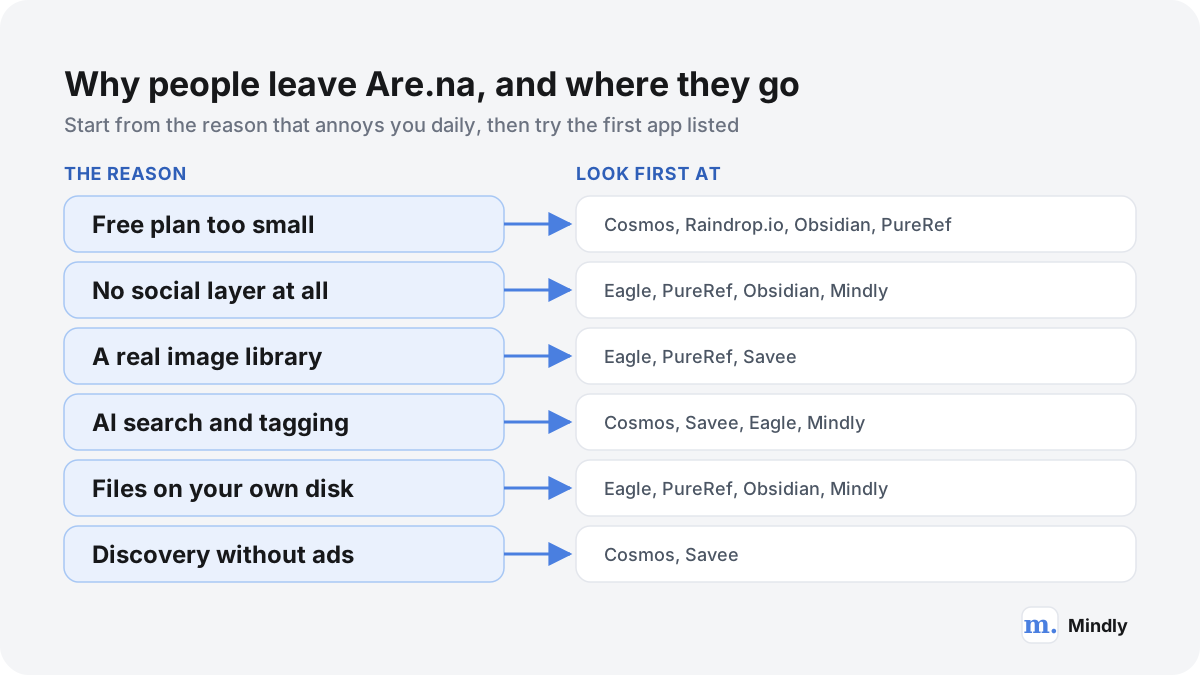
The short answer: which of the Are.na alternatives, by reason
Most people looking for Are.na alternatives want one of four things: a bigger free allowance, more privacy, a better tool for images, or some help from AI. If you like Are.na's calm, ad-free, partly social feel and mainly want more discovery, Cosmos is the closest match: collections that can be private, public or collaborative, an Explore feed, search by keyword, hex colour or visual similarity, and an importer for Are.na channels. Its core features are free and Premium is listed at $8 a month. Savee is the other ad-free, designer-focused option, with Pro at $9 a month billed yearly.
If what you want is privacy and speed with images, the strongest picks are not websites at all. Eagle is a desktop library for Mac and Windows with AI search, sold once for US$34.95 for two devices. PureRef is a tiny always-on-top reference board for Windows, Mac and Linux that saves boards as files on your computer, and its personal licence is pay what you want. If you plan projects on boards with text, tasks and images together, Milanote does that, with a free plan of 100 notes, images or links.
If your Are.na is mostly links and articles, Raindrop.io gives you unlimited bookmarks and collections for free. If you write as much as you collect, Obsidian with its free Canvas keeps notes and boards as files you own. And if you search Pinterest-style sites for an are na free alternative, Pinterest itself is free, but it is ad-supported and algorithmic, which is the opposite of the reason most people chose Are.na. The comparison below was written from each app's documentation, pricing page and changelog as of November 2026, not from hands-on tests.
Mindly, the app this site is about, is in the list for one kind of reader. It is a private Mac library: one shortcut saves images, screenshots, links, PDFs and notes, and the AI runs OCR, tags, summaries and plain-language search on all of it, with a mind map view of the connections. It has no public boards, no sharing, no community, no iPhone app and no sync between Macs. If you came to Are.na for the people, the channels you follow and the conversations around them, do not pick Mindly.
At a glance
Are.na alternatives at a glance
| App | Best for | Platforms | Free plan | Paid from | Public or private | AI features | Export |
|---|---|---|---|---|---|---|---|
| Are.na (reference) | Slow research, connected channels, community | Web, iOS, Android, extensions for Chrome, Firefox and Safari | Up to 200 blocks | $7/mo or $70/yr; Supporter $120/yr | Both: open, closed or private channels | None described | Download channel on every plan; open API |
| Cosmos | Ad-free visual discovery and mood boards | Web, iOS, Android, extensions for Chrome and Safari | Core features free | $8/mo Premium | Both: private, public or collaborative collections | AI captions, colour and similarity search, AI-image filter | Collection as .zip on Premium |
| Savee | Designers collecting inspiration | Web, iOS, Android, extensions for Chrome, Safari, Firefox and Edge, Figma plugin | Yes; limits not listed on the pricing page | $9/mo billed yearly | Social; private saves and boards on Pro | Search by colour or image; MCP | Right-click save; Dropbox backup listed |
| Huge free catalogue of ideas | Web, iOS, Android | Free, ad-supported | Free | Public by default; private boards | Visual search; AI content controls | Data request by email link | |
| Eagle | A private image and asset library | Mac and Windows desktop, browser extension | 30-day trial | US$34.95 one time, 2 devices | Private, on your disk | Visual, semantic and cross-source search; AI Action rules | Library is a local folder on your disk |
| PureRef | Reference boards while you draw or model | Windows, Mac, Linux | Pay what you want for personal use | $49 one time (small business) | Private, files on your computer | None described | .pur files; export images or scene |
| Milanote | Project boards mixing notes and images | Web, desktop, mobile, iPad, web clipper | 100 notes, images or links; 10 uploads | $9.99/mo billed yearly | Private boards you can share | None listed on the pricing page | PDF, PNG, Word, Markdown, text, ZIP |
| Raindrop.io | Links and articles, free and unlimited | Web, Mac, Windows, iOS, Android, extensions | Unlimited bookmarks; 100 MB uploads a month | Localized; see pricing page | Private collections, optional public pages | Stella assistant on Pro | HTML, CSV, TXT; files as ZIP |
| mymind | Private, automatic "save everything" | Web, iOS, Android, macOS, extensions | Up to 100 cards | $7.99/mo or $79/yr with AI | Private only, no social features | AI tags, image text recognition | Files plus cards.csv |
| Obsidian + Canvas | Notes and boards in plain files | Mac, Windows, Linux, iOS, Android | Free without limits | Sync $4/mo billed yearly (optional) | Private; Publish optional | None built in | Markdown and JSON Canvas files |
| Mindly | A private AI library on one Mac | macOS 14 or later only | Up to 25 items | €7.99/mo or €44.99/yr | Private only, no sharing | OCR, tags, summaries, semantic search, chat | Library is a folder on your Mac |
Watch
See It in Action
The full comparison
Choosing Among the Are.na Alternatives, Step by Step
What Are.na does that almost nothing else does
Before comparing Are.na alternatives, be precise about what Are.na is. Several of its strengths are rare, a few are unique, and most people who leave miss at least one of them.
On its about page, Are.na describes itself as a place to save content, create collections over time and connect ideas, privately or with other people. The building blocks are literally called blocks: an image, a link, a piece of text, a PDF, a video. Blocks live in channels, which the same page calls containers that are editable, arrangeable and searchable. The crucial detail is that one block can sit in any number of channels. The developer docs put it plainly: a block can appear in many channels, and removing it from one does not delete it. That is what Are.na means by a connection, and the help centre points out that there is no like or favourite button on the platform; connecting something to one of your channels is the only way to keep it.
That one design choice changes how the whole site feels. When you open a block, you can see every channel it appears in, owned by you or by strangers, and follow those channels sideways into other people's research. A photo of a brutalist staircase might live in your channel on stairs, in someone else's channel on concrete, and in a third person's channel on film locations, and each of those leads somewhere new. Most visual tools are built around a feed of more of what you liked; Are.na is built around paths people made by hand. The Are.na editorial essay On Connection is a good example of the culture that grows around this: a person guiding readers through one of their channels, item by item.
- No ads and no personalized recommendations. The about page says so directly, and adds that Are.na is the only social media company whose only customers are the people who use it. There is no engagement score pushing some channels up and others down.
- Member-funded, in public. Are.na says it is sustained entirely by members, with no external funding apart from a 2018 crowdfunding campaign in which 850 people invested. Its roadmap page publishes the numbers: 20,516 paying members, 41,828 monthly active members and $125,085 in monthly recurring revenue when we checked, a goal of $135,000 by 31 December 2026, and a breakdown of where the money goes (54% salaries for four full-time and two part-time people).
- Public, closed and private in one place. Every plan, including the free one, can make channels open to anyone, closed to collaborators or private, and can invite collaborators to specific channels. Groups exist for teams, classrooms and studios.
- An open API and real export. Every plan can download a channel's contents and use the public API, which covers channels, blocks and connections for reading and writing. The developer resources page also lists an Are.na MCP server and CLI, without much detail yet.
- Time. The about page counts the core community's age at more than 15 years. That is old for a web product, and it matters when you are choosing where to keep years of research. Our guide to apps that disappear explains why that matters.
| Are.na plan | Price (USD, November 2026) | What you get |
|---|---|---|
| Guest (free) | $0, forever | Up to 200 blocks; open, closed or private channels; collaborators; export; the API at limited rate |
| Premium | $7 a month or $70 a year | Unlimited blocks, table view, presentation mode, pinned blocks, full-text extraction and reader mode for links, advanced search filters, hiding from external search engines, priority support |
| Supporter | $120 a year | Everything in Premium plus importing from other services, bulk operations, a custom profile URL, early access and twice-yearly company reports |
One detail on the free limit is worth knowing before you count your blocks. The about page says that saving the same block to several channels counts once per channel, and the help centre's Premium features article describes the free cap as 200 connections. So a habit of connecting things widely, which is the whole point of Are.na, uses up the free plan faster than the number of distinct images suggests. Also notice what is missing from all three plans: the about page makes no mention of AI at all. For many members that is a feature, not a gap.
Why people look for Are.na alternatives
People rarely leave Are.na because it is bad. They leave because one of its deliberate choices stopped fitting how they work.
- The free plan fills up. Two hundred blocks (or connections) sounds like a lot until a single branding mood board takes 80 of them. Premium at $70 a year is fair for what it funds, but light users, or people collecting for one project, often look for an are na free alternative instead.
- It is partly social, and some work is not. Private channels exist on every plan, but the culture and the interface are built around sharing and following. Open channels can be found by search engines unless you pay for Premium and turn on hiding. Client work under NDA, unreleased product shots, or a personal archive of screenshots may feel safer in a tool that has no public layer at all.
- Images are blocks, not a library. Are.na treats an image like any other block. If your collection is thousands of references you need to sort by colour, scan at speed, drag into Photoshop or Figma, or keep beside a canvas while you draw, a dedicated asset tool such as Eagle or PureRef does that job better. Our mood board guide covers the difference between a research channel and a working board.
- No AI, by design. Are.na does not tag images, read text inside screenshots, or summarize the PDFs you save. If you want to type "the poster with the yellow grid" and find it, or search inside the text of a scanned article, you need a tool with OCR and semantic search. Cosmos, Savee, Eagle and Mindly each do part of this.
- Offline and ownership. Are.na is a web service with mobile apps. Neither its about page nor its help centre describes offline access. For references in a folder you control, look at Eagle, PureRef, Obsidian or Mindly.
- Wanting a Pinterest-style feed without the ads. Some people arrive at Are.na from Pinterest, love the calm, and then miss discovery. Are.na's discovery happens through people and connections rather than a recommendation engine, which takes effort. Cosmos and Savee offer a feed of curated inspiration with no ads, which is why "are na pinterest alternative" searches so often end there.
How we compared the alternatives
This is a comparison from documentation, not a lab test, and you should read it that way.
Every app here was compared from its own documentation, pricing page and changelog as of November 2026. We did not run hands-on tests, we did not time anything, and we did not invent ratings. Where an app states a number (a price, a block limit, an upload quota) we link the page that states it. Where a page leaves something out, such as Savee's free-plan limits or the file format of Are.na's channel download, we say it is not stated rather than guess. Prices change, so check them on the day you decide.
We judged each app against the jobs Are.na does: collecting many kinds of material, arranging it by hand, connecting it across projects, sharing some of it, finding it again, and letting you leave. No app here does all six. Most good choices do two or three of them better and the rest worse.
One disclosure: Mindly is our own product. It is included because it suits one specific kind of reader, it is grouped by use case like everything else, and its limits are stated as plainly as everyone else's. One app is missing on purpose. Kosmik, a visual canvas app that was often recommended alongside Are.na, announced on its homepage that it would sunset on 31 May 2026, and is gone.
Ad-free visual discovery: Cosmos and Savee
If you want sites like Are.na that keep the calm, skip the ads and add more discovery and visual search, these two are where most people land.
Cosmos: the closest sibling
Cosmos describes itself, in its summary for AI crawlers, as a visual inspiration platform for designers, photographers, architects, artists and creative teams, and as a distraction-free, ad-free Pinterest alternative. You save "elements" (images, links, videos, articles, text snippets) into collections that can be private, public or collaborative. Its AI writes captions that try to identify the artist, photographer, studio or source behind an image; search works by keyword, hex colour code or visual similarity; and a detector flags likely AI-generated images, which you can choose to show, blur or hide. It has no ads, no likes and no engagement metrics. It runs on the web, iOS and Android, with Chrome and Safari extensions, and it can import existing Pinterest boards, Are.na channels and Tumblr blogs.
Where it beats Are.na: images. Colour and similarity search, attribution captions and a polished grid are things Are.na does not attempt. Discovery is built in through an Explore feed of trending and editorially selected content, so you see new work without having to follow a trail of connections. The core of the app (saving, organizing, searching, discovering and collaborating) is free, and Premium is listed at $8 a month. According to the help article on Cosmos Premium, Premium adds a username of your choice, early features, adjustable grid sizes, inviting collaborators to collections, and downloading all images in a collection as a .zip file. Note that the two pages disagree slightly: the llms.txt says collaboration is free for all users, while the Premium article lists inviting collaborators as a Premium feature. Check in the app before you plan a shared board around it.
Where it falls short: Cosmos is image first. Long text blocks, PDFs and reading notes, which many Are.na researchers rely on, are a smaller part of the product. Export on the free plan is not described, and the .zip export covers images, not the structure around them. And the money is different: Cosmos's own page reports about $21M in venture funding, a different set of incentives from Are.na's member-funded model. Best for designers, art directors and photographers who want Are.na's calm with stronger image tools.
Cosmos vs Are.na, in short
The honest summary of cosmos vs are.na: Cosmos is the better image tool and Are.na is the better thinking tool. Cosmos wins on colour and similarity search, AI attribution, filtering AI-generated images, and an ad-free feed that shows you new things. Are.na wins on mixed media, especially text and PDFs, on blocks that live in many channels and show you every place they appear, on a long-running, member-funded community with no recommendation engine, and on export and an open API that every plan can use. If you mostly collect pictures, try Cosmos first and use its Are.na import. If your channels mix quotes, articles, PDFs and images into an argument, Cosmos will feel thin.
Savee: inspiration for working designers
Savee calls itself a platform for designers and creative thinkers to save, organize and share inspiration, and its pricing page repeats a promise Are.na members will recognize: no ads, no algorithms, and a membership that keeps it that way. You collect images, videos, book references, sketches and colour palettes, browse a library that is updated daily, and search your own saves by word, colour, image or tag. Apps exist for iOS and Android, with extensions for Chrome, Safari, Firefox and Edge and a Figma plugin, and Savee also offers API and MCP access for AI tools.
On price, Pro is $9 a month billed yearly (the page says yearly billing saves 25%), with unlimited saves and boards, private saves and boards, comments, right-click saving to the desktop and the Figma plugin. Portfolio ($15 a month billed yearly) adds a portfolio site, and Team costs $12 per seat a month billed yearly. There is a free account, but the pricing page does not list its limits, so check them when you sign up. Read the refund policy too: Savee offers no refunds, and its FAQ says that when a subscription expires you lose access to paid features and any data associated with them. Export your private boards before you let a plan lapse. Best for UI, brand and motion designers who want a daily feed of design inspiration and a fast way to file what they find.
Pinterest: the free option, compared honestly
Pinterest is the default answer to "where do I collect images", and many Are.na members arrived from it. Before you go back, it helps to know exactly what changes.
Pinterest is free, enormous and very good at one thing: showing you more images like the one you just looked at. Its newsroom post on Visual Search Ads, from September 2026, says people run more than 80 billion searches a month on Pinterest, most of them visual and more than half commercial. That is the business model in one sentence: Pinterest is funded by advertisers, and the same post describes new ads at the top of search results and inside Pin close-ups.
It has improved for people who dislike AI clutter. Its help article on how to refine your recommendations describes an AI content tab where you can turn down GenAI Pins overall or by topic, and an Activity tab to stop recommendations based on what you looked at. The same article notes that these settings do not change the ads in your home feed. Boards can be made private, visible only to you and people you invite. One setting matters for anyone saving their own work: according to the help article on GenAI settings, Pinterest may use content you save or upload to improve its Pinterest Canvas model unless you turn off "Use your data to train Pinterest Canvas" under Privacy and data. Users under 18 are opted out automatically.
Are.na vs Pinterest, in short
The question of are.na vs pinterest is really a question about what you want the tool to do for you. Pinterest recommends: it is built to show you more, and it is paid for by ads. Are.na lets you build: it shows you what other people connected by hand, and it is paid for by members. Pinterest's catalogue is far larger, and its visual search is excellent for finding a sofa or a colour scheme. Are.na is better for research that needs text alongside images, for following one person's thinking over years, and for knowing that nothing you see was placed there to sell you something. If you are leaving Are.na only because of the 200-block limit, Pinterest will solve the limit and bring back everything you joined Are.na to avoid.
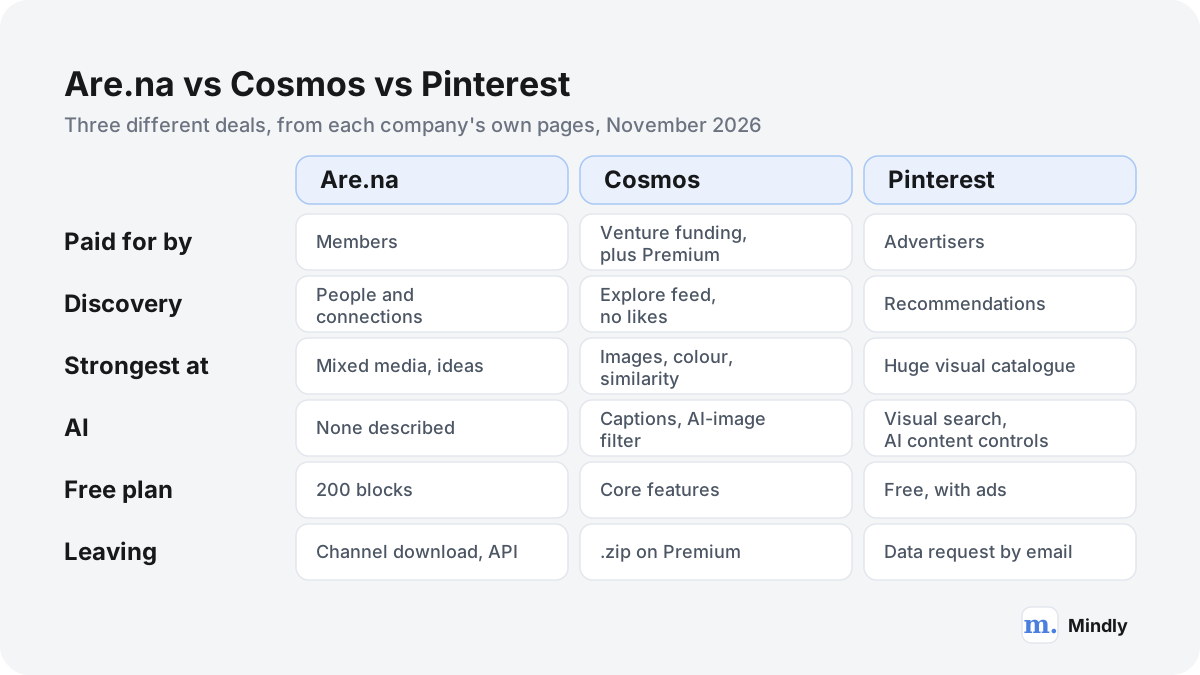
A common pattern is to browse Pinterest for scale and keep the best finds somewhere private: Eagle's browser extension can import a Pinterest board in one batch at original size. Getting your own data out is slower: Pinterest's download your data process emails a link that may take up to 48 hours.
Private libraries on your own disk: Eagle and PureRef
If the reason you are looking at Are.na alternatives is privacy, speed with images, or wanting files you can see, these two desktop tools are the strongest answers, and neither has a social layer at all.
Eagle: an asset library for designers
Eagle is a desktop app for collecting and organizing visual assets: images, screenshots, GIFs, video, audio, fonts and design files, with the homepage saying any file format can be imported. Version 4.0.0, released on 1 April 2026, runs on macOS 10.15 or later and Windows 10 or later, with a browser extension for saving from the web by drag and drop, batch save or Alt and right-click. The 2026 version adds three kinds of AI search (visual, semantic and cross-source), so you can find an image without remembering its name or tags, and AI Action, where you set naming, tagging and folder rules once and let the AI apply them. It also supports MCP for connecting AI agents.
Where it beats Are.na: everything that happens after you have saved an image. Eagle is built for scanning thousands of references at speed, filtering by colour, tag or folder, and dragging straight into your design tool. The store page sells a lifetime licence for US$34.95, usable on two devices with unlimited deactivations and all later updates, and the homepage offers a 30-day full-feature trial. Where it falls short: there is no phone app, no public sharing and no community. And it is a library, not a thinking space. You will not find Are.na's habit of one block living in many contexts, beyond tags and folders you define. Best for designers and illustrators whose Are.na is really a reference library. Our screenshot organizer page and the guide to organizing screenshots on a Mac cover the habits that keep a library like this usable.
PureRef: a reference board that stays on top
PureRef does one thing: it keeps a board of reference images floating above your work while you paint, sculpt, model or design. You drag or paste images in from anywhere, arrange, crop and group them, add notes and drawings, toggle desaturation to check values, and set the window to stay always on top with as little interface as you want. It runs on Windows, Mac and most Linux distributions; the download page lists version 2.1.3, with macOS 10.14 or later and Windows 10 or later.
Its pricing is unusual. For personal use, the download page works as pay what you want: it suggests $15, offers $7 or a custom amount, and says plainly that it understands if you want to try before you buy. A small-business licence costs $49 once (up to three seats, free updates for version 2.x), and larger studios pay $8 per seat a month billed annually, or $10 monthly. The handbook explains that a board is saved as a .pur file, which from version 2.0 keeps images in their original format, and that you can export the whole scene as one image or all images as separate files. Where it beats Are.na: privacy, speed and focus, with no account at all. Where it falls short: no library, no search across boards, no web or phone version, no sharing beyond sending the file. Best for illustrators, concept artists and 3D artists who need references beside the canvas, not a research archive.
Boards and canvases for projects: Milanote and Obsidian
Some people use Are.na less as a library and more as a place to think a project through. For that job, a board or canvas you arrange freely may fit better than channels.
Milanote: project boards for creatives
Milanote is a visual board tool aimed at creative work: mood boards, briefs, storyboards and plans, where images, notes, links and files sit side by side on boards you can share. It has web, desktop, mobile and iPad apps and a web clipper. According to its plans page, the free plan has no time limit and includes 100 notes, images or links, 10 file uploads and unlimited shared boards. The paid plan costs $9.99 a month billed annually or $12.50 billed monthly, with no limits on notes or uploads, and a team plan costs $49 a month billed annually for up to 10 people.
Where it beats Are.na: layout and planning, with the brief, references and copy on one surface. Its export options are generous: PDF, PNG, Word, Markdown and plain text, plus a ZIP of the original files emailed when ready. Where it falls short: the free plan is half the size of Are.na's, there is no public community to explore, and the pricing page lists no AI features. Best for designers and agencies who present ideas to clients and want the mood board and the plan in one view.
Obsidian with Canvas: boards in files you own
Obsidian is a notes app that stores everything as Markdown files in a folder on your device, with links between notes and a graph view. Its Canvas adds an infinite board where you place notes, images, PDFs, videos, audio and live web pages side by side and draw connections between them. Canvas files are stored locally in the open JSON Canvas format, which Obsidian designed so that other tools can read them, and Canvas comes free with the app. Obsidian itself is free without limits, needs no sign-up, and runs on Mac, Windows, Linux, iOS and Android. Optional Sync costs $4 a month billed annually ($5 monthly) with end-to-end encryption. The free Web Clipper saves pages into your vault.
Where it beats Are.na: ownership and writing. Every note and canvas is a file you can open in twenty years, and long-form notes sit right next to the images they discuss. A note can be embedded in many canvases, which is the nearest thing outside Are.na to a block living in many channels. Where it falls short: there is no community, no built-in AI, and images are files in a folder rather than a browsable visual grid. A vault rewards people who enjoy building a system. Best for researchers and writers whose Are.na channels were really the start of an essay. If that is you, the digital garden and commonplace book methods describe two ways to grow a public or private collection of notes over years, and our comparison of Mindly and Obsidian sets out where each tool is strong.
Links, text and AI: Raindrop.io, mymind and Mindly
If your Are.na is mostly links, articles and quotes, or you want an app to do some of the organizing, these three fit better than any mood-board tool.
Raindrop.io: links, free and unlimited
Raindrop.io is a bookmark manager with collections, tags and filters, and a free plan that is, per its limits page, unlimited for bookmarks, collections, tags, collaborators per collection and sync devices, plus 100 MB of file uploads a month. Pro raises uploads to 10 GB a month and adds full-text search, a permanent web archive of saved pages, reminders, annotations, broken-link and duplicate finders, automatic backups and unlimited use of the AI assistant. The Pro price is shown in your local currency on the pricing page. Apps cover the web, Mac, Windows, iOS and Android, with browser extensions.
Where it beats Are.na: volume and price for links. If your 200 blocks are mostly articles, Raindrop holds thousands for free and shares collections with collaborators for free. Its export gives you HTML, CSV or TXT any time, plus a ZIP of uploaded files. Where it falls short: it is a link tool, and images you upload count against the quota; there is no community to discover. Best for researchers and writers whose Are.na was a reading list. We cover it in more depth in our Raindrop alternatives guide, and the bookmark manager page covers habits that keep any link library searchable.
mymind: private, automatic, no social layer
mymind is close to the opposite of Are.na in philosophy, which is exactly why some people move to it. Nobody else can see what you save, there are no social features, and an AI tags every image, reads text inside screenshots and groups related saves into Smart Spaces without you arranging anything. Its pricing page lists Student of Life at $7.99 a month or $79 a year with the AI features, Mastermind at $12.99 a month or $129 a year (adding Reading Mode, article backup, video uploads, AI summaries, a PDF analyzer and Same Vibe, which collects saved images with a similar look), and The Bookmarker at $4.99 a month without AI. The free guest plan holds 100 cards.
Where it beats Are.na: zero effort and real privacy. Where it falls short: you give up arranging and connecting by hand, which for many Are.na members is the point; there are no shared spaces at all; and mymind has deliberately chosen not to offer a bulk import, so your channels do not come across in one step. Our mymind alternatives guide covers its strengths and limits in detail, and our mymind vs Raindrop comparison sets the automatic and the hand-built approaches side by side.
Mindly: a private AI library on your Mac
Mindly is our product, so weigh this with that in mind. It is a native Mac app (macOS 14 or later) built around one global shortcut, ⌘M, that captures anything: images and screenshots, links and articles from any browser, PDFs, Word documents, notes, voice memos and YouTube clips. Every save is organized by AI: tagged by topic, read with OCR if it is an image or a scanned PDF, summarized if it is long, transcribed if it is audio, and connected to related items. Search works in plain language across every format, so "the Swiss poster with the red circle" or "that interview about concrete" can find an image by the text inside it or an article by its meaning. You can open any document and chat with it, and a mind map view shows the connections the AI found, with Spaces for separate projects.
Where it differs from Are.na: everything is private. The library is stored in a Mindly folder on your Mac, and AI processing runs over encrypted channels with content not retained on Mindly's servers after each request. Where it falls short, plainly: there are no public boards, no channels to share, no sharing links, no collaborators, no community and no feed. It has no iPhone, iPad, Windows or web app, and no built-in sync between Macs (the workaround is putting the Mindly folder in iCloud Drive). There is no Are.na importer, and no board or canvas for arranging images by hand; its visual view is a mind map of connections the AI detected. The free plan holds 25 items; Pro is €7.99 a month or €44.99 a year, as shown on the pricing page. Best for a designer or researcher who works on one Mac, has a messy pile of screenshots, PDFs and links, and wants to find things by what is in them rather than where they were filed. If you came to Are.na for the people, this is not your app.
The decision guide: which of the Are.na alternatives fits you?
Start from the one thing you most want to change. The rest of the choice usually follows.
| If your main reason is | Look first at | Why | What you give up |
|---|---|---|---|
| The 200-block free limit | Cosmos (images), Raindrop.io (links), Obsidian (notes) | Generous or unlimited free plans | Are.na's connections and community |
| Privacy, no social layer at all | Eagle, PureRef, Obsidian, Mindly | Libraries on your own computer, no public profile | Sharing and discovery |
| Better tools for images | Eagle, Cosmos, Savee | Colour, similarity and visual search, fast browsing | Text-heavy research |
| Discovery without ads | Cosmos, Savee | Curated feeds, no ads, no likes | Are.na's slower, people-led discovery |
| AI search and tagging | Mindly, Eagle, Cosmos | OCR, semantic search, AI captions or rules | Hand-made connections; some calm |
| Planning projects on a board | Milanote, Obsidian Canvas | Notes, images and tasks on one surface | A library across projects |
| References beside your canvas | PureRef | Always-on-top board, files on disk | Any kind of library or search |
| A free Pinterest-style catalogue | The largest visual catalogue | No ads, no algorithm |
If you are a designer collecting references
Eagle if the references are for your own work and you want them on your disk, searchable by colour and meaning, for one payment. Cosmos if you want discovery and attribution as part of collecting, and Savee if you want a daily feed of design work and a Figma plugin. PureRef on top of any of them when you are actually drawing. Keep Are.na, even free, for channels you share. Our page for designers shows how a private library fits a design workflow, and the mood board guide explains how to turn a pile of references into a board someone else can read.
If you are a researcher or writer
Obsidian if the channels were the beginning of an essay and you want notes and sources side by side in files. Raindrop.io if your research is mostly links you mean to read. Mindly if you work on a Mac with many document types (PDFs, Word files, screenshots of pages) and want to ask questions of them rather than browse. Are.na remains unusually good for public research that you want others to find and build on. Our page for researchers and the research notes app guide cover a private setup.
If you are an artist or student on a budget
First check the student discount: Are.na offers 50% off any Premium plan for two years, which brings it to $35 a year. If that is still too much, the true free options are Cosmos for images, Raindrop.io for links, Obsidian for notes and canvases, and PureRef on a pay-what-you-want basis. Milanote's free plan is useful for one project at a time.
How to move your channels out of Are.na
Export first, test the new app second, and only then change your plan. Are.na makes leaving easier than most, but you still need to do it channel by channel or through the API.
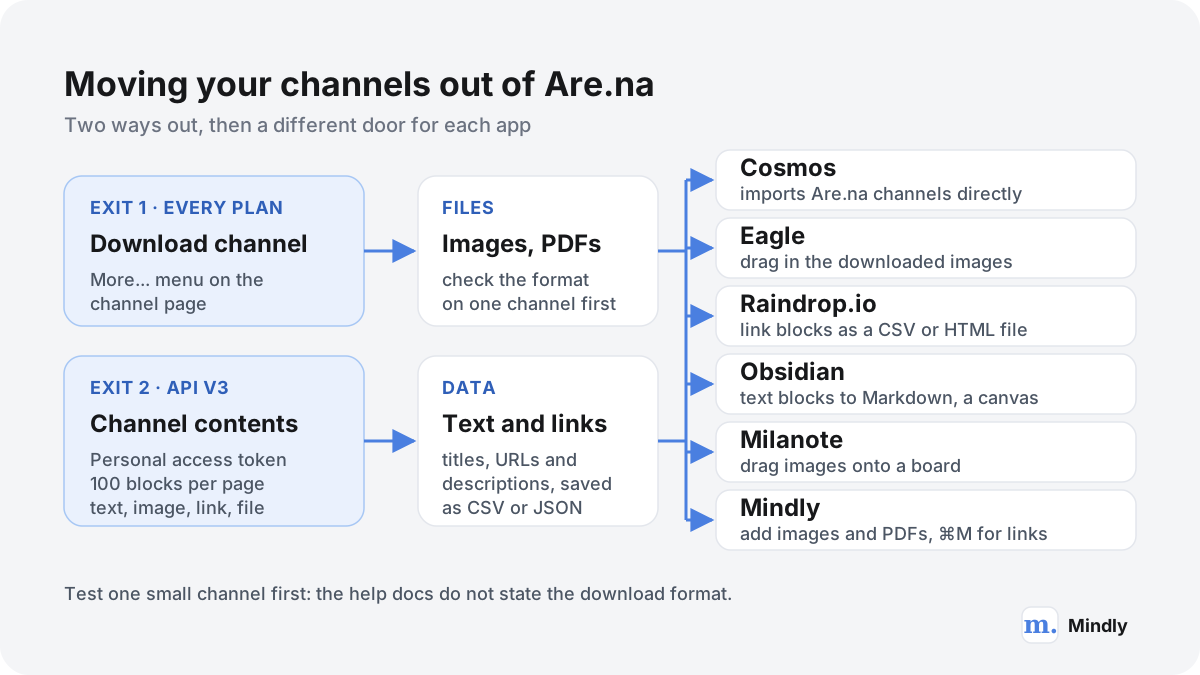
There are two routes out. The first is in the interface: the help article on settings and export says to open the "More..." dropdown on a channel and click "Download channel". The about page lists downloading channel contents among the features of every plan, including the free one, and the account FAQ tells you to download any channels you want to keep before deleting an account. The help article does not say what format the download uses, so try it on one small channel first and look at what you get before relying on it for hundreds.
The second route is the API, which is the right choice if you have many channels or want the text, titles, descriptions and source links as data. The channel contents endpoint is GET https://api.are.na/v3/channels/{id}/contents, where the id can be the channel's slug, with up to 100 items per page and a sort option that can keep the owner's manual order. Blocks come back typed as text, image, link, attachment (an uploaded file) or embed. You authenticate with a personal access token from the developer settings, and free accounts get 120 reads a minute, plenty for a personal library. Are.na forbids systematic harvesting of other people's content, so keep the script to your own channels.
- List your channels and decide what moves. Many channels turn out to be finished one-off projects. Leave those on Are.na and move the ones you still use.
- Download one small channel as a test. Open it, choose More... then Download channel, and check what arrives: whether images are full size, whether text blocks and link URLs are included, and how files are named.
- For the rest, choose interface or API. A dozen channels: download them one by one. Fifty or more, or anything where the text matters: use the API with a personal access token, and save each channel as a folder of files plus one CSV or JSON file of its blocks.
- Keep a copy that belongs to no app. Zip the export and put it in your backup before importing anywhere. Whatever you pick next, this is the safety net.
- Import into the new app, then review for a month. Keep your Are.na account as it is during that month. The free Guest plan lets you keep existing channels readable while you decide.
Into each kind of app
- Cosmos. The easiest route for images: Cosmos lists Are.na channels among the things it can import, alongside Pinterest boards and Tumblr blogs. Its pages do not describe the steps, so look for the import option in the app. Text-heavy blocks may not carry over as neatly as images.
- Eagle. Drag the downloaded folder of images into an Eagle library, then set tags and AI Action rules once so new imports are named and filed the same way. Eagle's help centre documents importing from Pinterest and ArtStation, not Are.na, so the folder route is the reliable one.
- Raindrop.io. Raindrop's import guide does not list Are.na, but it accepts HTML, CSV, JSON, TXT and ENEX files. Take the link blocks from your API export, put the URLs (and titles if you have them) into a CSV, and upload it on the import page. One CSV per channel can become one collection.
- Obsidian. Copy the image folders into your vault. Each text block can become a Markdown note, and each channel a note that links to them, or a canvas that places them side by side. A short script or an assistant you trust with the file can do the conversion. If you like the idea of an AI maintaining such a folder for you, see the LLM wiki method.
- Milanote and PureRef. Both take images by drag and drop. Drop a downloaded channel onto a Milanote board (remembering the free plan's 100 items) or into a PureRef scene and save it as a .pur file per project.
- Mindly. There is no Are.na importer. Drag the downloaded images and PDFs into Mindly, where each is read with OCR, tagged and made searchable, and re-capture the links you still care about with ⌘M. That suits a few hundred items better than ten thousand. If part of your archive lives in Evernote, Mindly imports .enex files directly. The switching guide covers the rest.
A worked example
A designer with 14 channels and 1,100 blocks
Say you have nine visual channels holding 820 images, three reading channels with 230 links, and two channels of 50 quotes and notes. A sensible split: import the nine visual channels into Cosmos if you want them public and discoverable, or download them into Eagle if they are for your eyes only. Export the 230 links through the API into one CSV and import it into Raindrop.io's free plan, one collection per channel. Turn the 50 quotes into Markdown notes in a folder you keep in your backup. Keep the two or three channels other people follow on Are.na's free plan. Cost: nothing, or US$34.95 once for Eagle, against $70 a year for Premium, in exchange for losing the connections that showed where each block also lived.
When to stay on Are.na
Switching costs a weekend and some habits. For a lot of people Are.na is still the right tool, and the honest version of this guide says so.
- You came for the people. Following someone's channels for years, finding your block in a stranger's channel: none of the alternatives here reproduces that. Cosmos and Savee have communities, but they are feeds, not trails. Private tools such as Eagle, PureRef, Obsidian and Mindly have no community at all.
- Your channels mix text and images into ideas. If a channel holds a quote, a PDF, three photographs and a link that only make sense together, Are.na handles that better than any image tool on this list.
- The price is the only problem. Compare a year, not a month. Premium is $70 a year, or $35 with the student discount, and it funds a company with no ads and no investors to answer to. If you would end up paying for two tools to replace it, the saving may be small.
- You value the business model. Are.na publishes its revenue, its members and its costs, and is funded only by members. If that is part of why you use it, no venture-funded or ad-funded alternative will feel the same, however good its tools are.
- Your work is public by nature. Teaching, curating, writing in public or keeping a digital garden of references all benefit from Are.na's open channels and its readers.
Five questions to ask any app before you move in
- Can I get everything out, today, in a format another app can read? Try the export on day one, with ten items, before you depend on it. Are.na passes this test; check that your next app does too.
- Where does my library live? On the company's servers, or on my disk? Each is a defensible choice with different risks.
- What happens when I stop paying? Some apps keep your data readable on a free plan; Savee's FAQ says you lose access to paid features and the data associated with them. Read this before you subscribe.
- Will this company be here in five years? Nobody can promise that. Kosmik's shutdown in May 2026 is the recent example in this exact category; a regular export to a folder you control is the only insurance that works.
A last practical point. Whichever app you choose, give it a month with real work before you move years of channels. If you are thinking about the bigger picture of where collected material should live next to your notes and projects, our guide to building a second brain puts the pieces together.
Where Mindly fits
Where Mindly fits among the Are.na alternatives
Among Are.na alternatives, Mindly fits a narrow group: people who collect on one Mac, want nobody else to see their library, and care more about finding things later than about arranging them now. It saves images, screenshots, links, PDFs and notes with ⌘M, reads text inside images with OCR, tags and summarizes everything, and lets you search in plain language or chat with a document, with a mind map of the connections it finds. It is the wrong choice if Are.na matters to you because of other people: Mindly has no public boards, no sharing, no collaborators and no community, and no iPhone app or sync between Macs. It is also not a board you arrange by hand. The free plan holds 25 items, enough to test it on one project; Pro is €7.99 a month or €44.99 a year.
Common questions
Are.na alternatives, answered
What are the best Are.na alternatives?
It depends on why you are leaving. Ad-free visual discovery: Cosmos or Savee. A private image library: Eagle. Reference boards while you work: PureRef. Project boards: Milanote. Links: Raindrop.io. Notes and canvases in files: Obsidian. Private, automatic saving: mymind, or Mindly on a Mac.
What are some sites like Are.na?
The sites like Are.na that share its ad-free, curated feel are Cosmos (cosmos.so) and Savee (savee.com). Both have collections you can keep private or share, no ads, and a feed of inspiration from other people. Cosmos can import Are.na channels. Neither reproduces Are.na's blocks that live in many channels at once, or its member-funded model.
Are there apps like Are.na for iPhone and desktop?
Yes, with a split. Apps like Are.na with phone apps include Cosmos, Savee, Pinterest, Raindrop.io and mymind, all on iOS and Android. Desktop-first apps like Are.na include Eagle (Mac and Windows), PureRef (Windows, Mac and Linux), Obsidian (everywhere, with Canvas) and Mindly (Mac only, no iPhone app).
Are there free Are.na alternatives?
Yes. As an are na free alternative, Cosmos's core features are free; Raindrop.io's free plan has unlimited bookmarks and collections; Obsidian and its Canvas are free without limits; PureRef is pay what you want for personal use; Milanote's free plan holds 100 notes, images or links; Pinterest is free with ads. Are.na itself is free up to 200 blocks, and students get 50% off Premium for two years.
Is Cosmos a good Pinterest alternative, or is Are.na better?
As an are na pinterest alternative, Cosmos is the closer match to Pinterest: image first, with an Explore feed and colour and similarity search, but no ads or likes. Are.na is further from Pinterest: no recommendations at all, more text and PDFs, and discovery through people's channels. If you want Pinterest without the ads, try Cosmos; if you want something slower and more thoughtful, Are.na.
Are.na vs Pinterest: what is the real difference?
Pinterest is free, enormous and funded by advertising, and it recommends images to you based on what you look at. Are.na is funded by members, shows no ads and makes no personalized recommendations; you find things through channels that people built by hand. Pinterest is better for finding products and ideas fast. Are.na is better for long research that mixes images with text.
Cosmos vs Are.na: which should I use?
Choose Cosmos if you mostly collect images and want colour and similarity search, AI attribution captions and a feed of new work. Choose Are.na if you collect mixed media (text, links, PDFs and images), want one block in many channels, and value its open API and member-funded model. Many people use Cosmos for visual boards and keep Are.na for research channels.
How much does Are.na cost in 2026?
As of November 2026, Are.na's about page lists the Guest plan as free up to 200 blocks, Premium at $7 a month or $70 a year with unlimited blocks, and Supporter at $120 a year, which adds importing from other services and bulk operations. Students can get 50% off any Premium plan for two years.
Can I export my Are.na channels?
Yes, on every plan. Open a channel, click the "More..." dropdown and choose "Download channel". The help docs do not state the file format, so test one channel first. For many channels, the API's channel contents endpoint returns every block (text, image, link, attachment or embed) as data, 100 at a time, using a personal access token.
Does Are.na have AI features?
Its about page does not mention AI at all, and the plans list no AI tagging or AI search; Premium adds full-text search of extracted link text and advanced search filters. Are.na's developer resources list an MCP server and CLI, without much detail yet. If you want AI help with a visual library, Cosmos, Savee, Eagle and Mindly each offer some of it.
Is Mindly a good choice instead of Are.na?
Only for private use on a Mac. Mindly captures images, links, PDFs and notes, runs OCR, tags and semantic search on them, and shows connections as a mind map. It has no public boards, no sharing, no community, no iPhone app and no sync between Macs, so if you value Are.na for its people and shared channels, Mindly is the wrong choice.
Sources
What This Page Draws On
- About Are.naAre.na · 2026What Are.na is, the Guest, Premium and Supporter plans and prices, features in all plans, the student discount and the member-funded model.
- RoadmapAre.na · 2026Paying and active members, monthly revenue, the 2026 goal, expenses and shipped features.
- Premium featuresAre.na HelpUnlimited connections, reader mode, full-text search, table view, custom thumbnails, pinned blocks.
- Settings and exportAre.na HelpHow to download a channel from the More dropdown.
- Get channel contentsAre.na DevelopersThe v3 endpoint for a channel's blocks, pagination up to 100 per page, block types.
- llms.txtCosmos · 2026Cosmos features, imports from Pinterest, Are.na and Tumblr, platforms, Premium price, funding.
- Cosmos PremiumCosmos HelpPremium features, including collaborators and downloading a collection as a .zip file.
- Plans and pricingSavee · 2026Pro, Portfolio and Team prices billed yearly, plan features, refund and expiry policy.
- Pinterest unveils Visual Search AdsPinterest Newsroom · 2026New ad formats in search results and Pin close-ups; more than 80 billion searches a month.
- Manage GenAI settingsPinterest HelpThe setting that lets Pinterest use saved content to improve Pinterest Canvas, and how to turn it off.
- Refine your recommendationsPinterest HelpThe AI content and Activity tabs, and the note that these settings do not change ads.
- Buy Eagle AppEagleOne-time licence at US$34.95 for two devices, Mac and Windows, lifetime updates.
- Download PureRefPureRef · 2026Version 2.1.3, pay-what-you-want personal licence, small business and per-seat business pricing.
- Plans and pricingMilanote · 2026Free plan limits, individual and team prices.
- LimitsRaindrop.io HelpFree versus Pro: unlimited bookmarks and collections, upload quotas, Pro-only features.
Keep reading
Related Guides
Try the private, Mac-only alternative with 25 free items.
Download Mindly, press ⌘M on the next reference you would have saved to a channel, and see whether OCR, tags and plain-language search earn a place in your week. No sharing, no iPhone app and no sync yet, so keep Are.na for the channels other people follow.