Cornell NotesCornell Notes: A Page That Turns Into a Quiz.
Cornell notes is a way of laying out a page so that it becomes a study tool: lecture notes on the right, questions about them on the left, and a short summary at the bottom. Walter Pauk, an education professor at Cornell University, set it out in How to Study in College, and Cornell still teaches it to its students.
Created by Walter Pauk, set out in How to Study in College (1962).
Cornell notes is a method for laying out a page of notes so that the same page can be studied later. The page is divided into three regions: a narrow cue column down the left, a wide note-taking column on the right, and a summary band across the bottom. During a lecture you write only in the right-hand column. Afterwards you turn what you wrote into questions or cue words in the left-hand column and sum the page up at the bottom. The finished page does two jobs. Read normally, it is a record of the lecture. With the right-hand column covered, it is a quiz on it.
The system comes from Walter Pauk, a professor in Cornell University's Department of Education who directed its Reading and Study Skills Center. Cornell's memorial statement for Pauk, who died in 2019 at 105, calls him the designer of the system and names How to Study in College, published in 1962, as the book in which he advocated it. The same statement repeats a story that he designed the first version as a teaching assistant, frustrated by students' test scores, and is careful to say only that this is what is said. The book itself is well documented: it went through many editions, and the 10th, written with Ross J. Q. Owens and cited by Cornell's Learning Strategies Center, gives the system a chapter of its own.
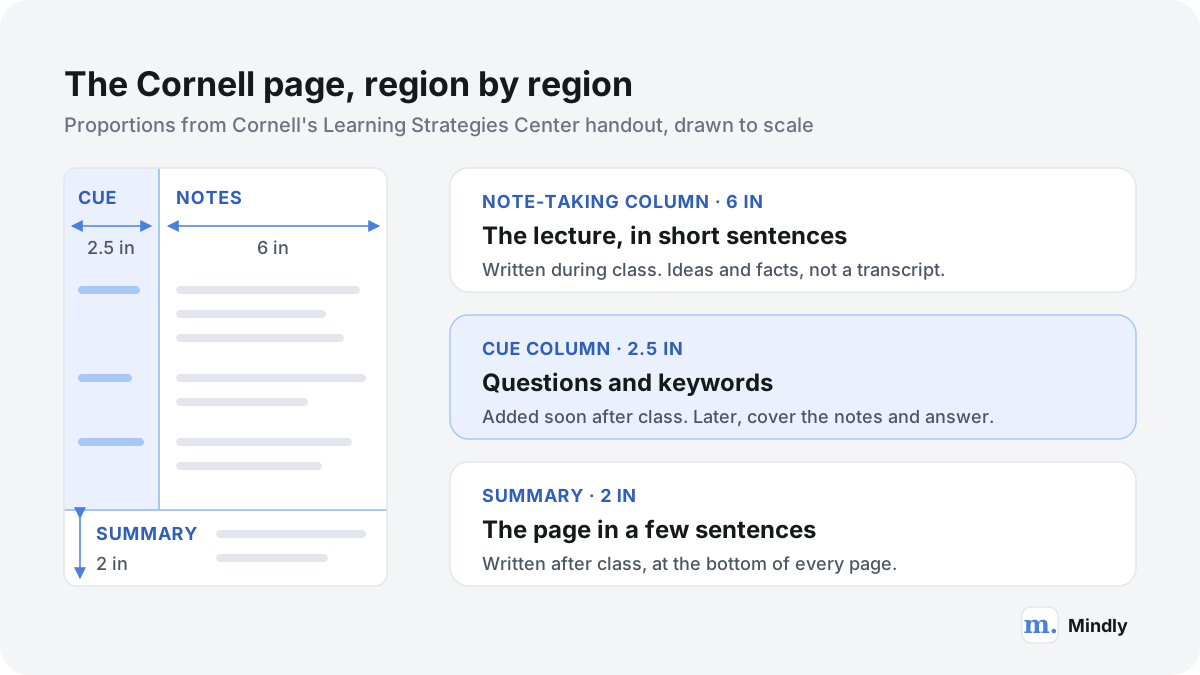
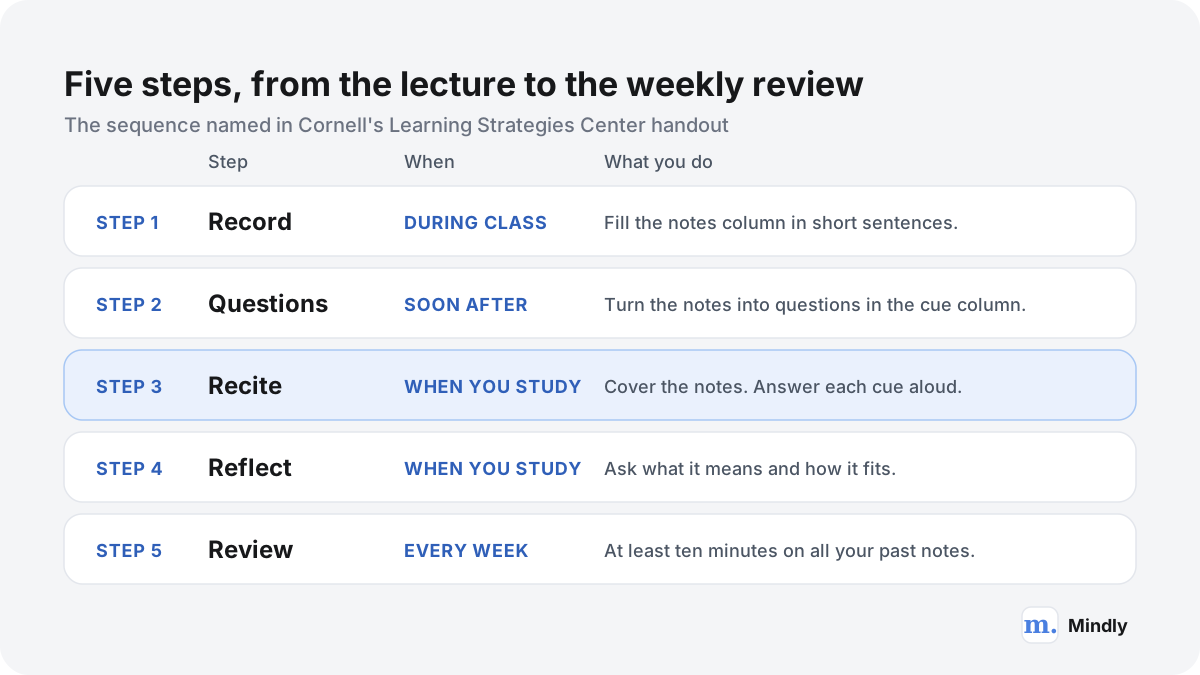
The proportions are specific. The handout from Cornell's Learning Strategies Center, adapted from the 2001 edition of Pauk's book, draws the cue column 2.5 inches wide, the note-taking column 6 inches wide, and the summary as a 2-inch band at the foot of each page. It names five steps: Record, Questions, Recite, Reflect and Review. You record the lecture in brief sentences, write questions from your notes as soon after class as you can, cover the notes and answer the questions aloud in your own words, think about what the material means and how it connects to what you know, and spend at least ten minutes every week reviewing all your earlier notes.
The layout is not decoration; each region belongs to a different moment. The note-taking column belongs to the lecture, when your only job is to keep up. The cue column stays empty during class on purpose, because it is reserved for work you can only do afterwards, once you know what mattered. The summary forces one more pass through the material in your own words. Split the work that way and a page of notes stops being something you reread and becomes something you can be tested on. That matters, because practice testing is one of the two study techniques a major 2013 review of the research rated most useful.
It is worth being clear about what Cornell notes are not. They are not a transcription method; the note-taking column is meant for condensed notes, and a verbatim transcript leaves nothing to turn into questions. They are not a filing system; each page stands alone, and nothing links a lecture in October to a related one in December. And they are not proven to beat every other structured way of taking notes; the studies that test the Cornell format itself are few and small. What the method reliably gives you is a built-in self-test, and that is also the step people most often skip. If you are comparing it with other approaches, the full list of note-taking methods is a good place to start.
From the source
Watch It Explained
How students use the Cornell note-taking system, from Cornell University's Learning Strategies Center, 2019.A one-minute overview from the same center. Both videos are embedded on Cornell's own page about the method.
Who it is for
Who Cornell notes are for
Students in lecture-heavy courses
The method was built for the lecture hall, and it fits best where a course is mostly someone talking through material in order: history, biology, psychology, economics. The note-taking column keeps up with the talk; the cue column turns a week of lectures into a stack of questions before the exam. If most of your term looks like that, Cornell notes are a sensible default, and they sit well inside a wider second brain for students that holds the readings, slides and recordings alongside the pages.
Anyone facing recall-heavy exams
Medicine, nursing, law and languages all reward being able to produce an answer from memory rather than recognize it on a page. That is exactly what the cue column trains. A pharmacology lecture becomes questions like "What does this drug class block, and what is the main side effect?", and covering the notes to answer them is rehearsal for the exam itself. On courses with a heavy lecture load, such as medicine or law, a format that builds its revision material while you take notes saves a separate round of making flashcards later.
Readers working through dense texts
Pauk designed the page for lectures, but nothing about it requires a speaker. Reading a textbook chapter or a long paper with a Cornell page open works the same way: condensed notes on the right as you finish each section, questions on the left when you finish the chapter, and a summary at the bottom. The questions are what make the reading stick, because they give you something to answer later instead of something to reread. Our guide to remembering what you read covers the same idea from the reading side.
Professionals in meetings and training
Outside education, the layout adapts to meetings, workshops and training sessions, where the problem is the same: notes taken in the moment that are never looked at again. The right column holds the discussion, the left column holds decisions, owners and open questions pulled out afterwards, and the summary says what changed. It is an adaptation rather than Pauk's design, and it works best for recurring meetings where you will actually return to the page. Our guide to taking meeting notes you will actually use goes further.
The core principles
Why a two-column page works
The split: one job per moment
Taking notes during a lecture is already hard: you are listening, deciding what matters and writing at the same time. The Cornell page does not ask you to do anything else in that moment. Everything that needs reflection, the questions, the summary, the connections, is moved to after class, when the pressure is off and you know how the lecture ended. Separating capture from processing is an idea behind most good note systems, and Pauk built it into the geometry of the page, so the empty left column reminds you that the work is not finished.
The cover: notes that test you
The cue column exists so that the notes can be hidden. Cornell's handout tells you to cover the note-taking column and answer the questions aloud, in your own words, from the cues alone. That turns review from recognition, where everything on the page looks familiar, into recall, where you find out what you can actually produce. Recall is harder and slower, and it is the form of studying with the strongest research behind it. A page without cues can only be reread; a page with cues can be answered.
The squeeze: a page in a few sentences
The summary band is small on purpose. Two inches is room for a few sentences, so you have to decide what the page was really about. That decision is a check on understanding: if you cannot write the summary, you did not follow the lecture as well as the notes suggest. Later, the summaries become an index. Leafing through a term of notes reading only the bottom of each page is a fast way to find the lecture you need, and a fast way to see which pages you no longer understand.
The schedule: ten minutes a week
The fifth step is the easiest to forget. Cornell's handout asks for at least ten minutes every week reviewing all of your previous notes, not just the latest lecture. Spread over a term, that is a small cost, and it means no page goes untouched for months before the exam. It is also what makes the cue column pay off: the questions are written once and answered many times, a little each week, instead of being discovered for the first time the night before.
Common mistakes
Where Cornell notes go wrong (and the fix)
Leaving the cue column for a later that never comes
The most common Cornell page is an ordinary page of notes with an empty strip down the left. The after-class steps are where the method does its work, and they are the first thing to go when the week gets busy. The fix: write the cues the same day, even badly. Three rough questions written tonight are worth more than ten good ones planned for the weekend, because the weekend version usually never happens.
Writing a transcript instead of notes
When the lecturer talks fast, the instinct is to get everything down. A verbatim transcript fills the right column, but it leaves you nothing to process and buries the main points in filler. The fix: write short sentences that keep the meaning, and leave gaps between ideas so there is room to add a detail afterwards. If you truly need every word, record the lecture where your course allows it, and keep the page for what matters.
Cues that name topics instead of asking questions
A cue column that reads "Mitochondria", "Krebs cycle", "ATP" is a table of contents, not a test. You can read it and feel prepared without retrieving anything. The fix: write cues as questions with an answer you can check. "Where does the Krebs cycle take place, and what does it produce?" cannot be answered by recognizing a word, which is exactly why it is worth asking.
Rereading the page instead of covering it
Many students fill in all three regions and then study by reading the page from top to bottom. That throws away the reason for the layout. Rereading feels productive, which is part of the problem: in Roediger and Karpicke's 2006 study, restudying made students more confident, yet the students who had tested themselves remembered substantially more days later. The fix: always cover the right column first. Read the cue, answer out loud, then check.
The full guide
Taking, Testing and Keeping Cornell Notes
The page, region by region
Everything in the method follows from the page, so it is worth getting the proportions right before the first lecture. The figures here come from the handout Cornell's Learning Strategies Center gives its students.
The lecture in brief sentences: main ideas, facts, examples, anything the lecturer stresses.
Cue column
2.5 inches wide, on the left
As soon after class as possible
Questions and cue words drawn from the notes beside them.
Summary
2 inches tall, across the bottom
After class
A summary of the notes on that page.
The three regions as the Learning Strategies Center handout describes them.
Two details matter more than they look. First, the two columns add up to 8.5 inches, the width of a US Letter sheet, so the cue column takes a little under a third of the page. That is wider than a margin and narrower than the notes, which is the point: enough room for a question, not enough to rewrite the lecture. Second, the summary is per page, not per lecture. The handout puts the space at the bottom of each page for the notes on that page, so a lecture that fills four pages gets four summaries.
Some printed templates add a strip across the top for the course, the date and the topic. The handout does not show one, but it costs nothing and makes a pile of loose pages much easier to sort. If you use A4 paper rather than US Letter, keep the proportions rather than the inches: roughly 30 percent of the width for the cues and the rest for the notes.
The five steps, as Cornell teaches them
Cornell's handout names five steps. Most explanations stop at the layout, but the steps are where the learning happens, and three of the five take place after the lecture is over.
Record, during the lecture. Write in the note-taking column only. The handout asks for "telegraphic sentences": short and stripped of filler words, but still sentences rather than single words, so that they make sense a week later.
Questions, as soon after class as you can. Read your notes and write questions about them in the cue column, level with the notes they refer to. The handout gives its reasons: writing questions makes you work out what the notes mean and how the ideas relate, keeps one lecture connected to the next, helps you remember, and leaves you with exam questions ready for later.
Recite, when you study. Lay a sheet of paper over the note-taking column. With only the cues in view, answer each one out loud and in your own words, then uncover the notes and check. This is the step that turns the page into a test.
Reflect. Ask yourself bigger questions about the material. The handout's examples include what the facts signify, what principle they rest on, how you could apply them and how they fit with what you already know.
Review, every week. Spend at least ten minutes each week going over all your previous notes, not just the newest page. The handout's promise is modest and specific: regular review keeps much of the material available both now and at exam time.
You will find other versions of the five steps online, with different names or a different order. This page follows Cornell's own handout, which says it is adapted from the 2001 edition of How to Study in College. Cornell's center also teaches the method in the two short videos above, and in a publicly available online module linked from its Cornell notes page.
A worked example: one lecture, start to finish
Here is one page for an introductory psychology lecture on memory and testing. The content is real: it comes from two studies this guide cites later, so the example doubles as a preview of why the method works.
Note-taking column, written in class
PSYC 101 · Week 6 · Memory and testing
Testing effect: taking a test improves later memory, not just measures it. · Roediger and Karpicke 2006: students read prose passages, then restudied them or took recall tests, no feedback. · Final test after 5 min: restudy group recalled more. · Final test after 2 days or 1 week: tested group retained substantially more. · Restudying made students more confident anyway. · Dunlosky et al. 2013: review of 10 study techniques. · High utility: practice testing, distributed practice. · Low utility includes rereading, highlighting, summarization.
That is what the right-hand column looks like at the end of the hour: short sentences, no paragraphs, a few numbers. The same evening, the cue column gets filled in, one question per cluster of notes, written level with the notes it refers to.
Cue column (after class)
Note-taking column (in class)
What is the testing effect?
Taking a test improves later memory, not just measures it.
What did Roediger and Karpicke compare?
Students read prose passages, then either restudied them or took free-recall tests without feedback.
Who did better after 5 minutes? After a week?
Restudy group recalled more at 5 minutes. Tested group retained substantially more after 2 days and after 1 week.
Why might students still prefer rereading?
Restudying made them more confident, even though it helped less on the delayed tests.
Which techniques were rated high utility, and which low?
High: practice testing, distributed practice. Low includes rereading, highlighting, summarization.
The same page with its cue column filled in. Every cue is a question; none of them can be answered by recognizing a word.
Summary, written after class
Bottom of the page
Testing yourself is a way of learning, not only a way of measuring it. Restudying wins on an immediate test, but retrieval wins after days, even though restudying feels more effective. Of ten common techniques, practice testing and spacing have the broadest support; rereading and highlighting are among the weakest.
Reflect, written when studying
Margin, a week later
Why does rereading feel better if it works worse? Is it because familiar text feels like knowledge? For Friday's quiz: cover and recite, do not reread. Does the summary I just wrote count as the low-utility kind of summarization? Ask in seminar.
Two things to notice. Every cue is a question with a checkable answer, so covering the right column and answering the left is a genuine test rather than a glance at a list of topics. And the reflection asks questions the lecture did not answer. That is the point of the fourth step: it pushes past what was said toward what it means for you, which here is a change in how to study for Friday.
A template you can copy
You do not need special paper or a special app. Here are three ways to set up the page, from a notebook to a plain text note.
On paper
Rule a vertical line 2.5 inches (about 6.4 cm) from the left edge, from the top of the page down to where the summary will start.
Rule a horizontal line 2 inches (about 5 cm) above the bottom edge, across the full width of the page.
If you like, add a line at the top for the course, the date and the topic.
Rule several pages before class. Drawing lines while the lecture starts is how people give up on the format in the second week.
In a document or a notes app with tables
Insert a two-column table with the left column at roughly 30 percent of the width, which matches the 2.5 to 6 ratio on the handout. Add one full-width row at the bottom for the summary. Copy this structure:
Cues (fill in after class)
Notes (fill in during class)
Question about the first block of notes?
Main idea in a short sentence. Supporting fact. The example the lecturer gave.
Question about the second block?
Next idea. A definition, in your own words. Anything said twice or written on the board.
Question about the third block?
Next idea. Leave a blank line between ideas so you can add detail later.
Summary
Two to four sentences about this page, written after class. What was it really about?
A copyable Cornell template. In a document, merge the last row across both columns.
As a plain text note
If your notes app has no tables, put the cues first and the notes below them. That order makes self-testing easy: you read the questions at the top without the answers in view, and scroll down to check.
Title: Course · Lecture topic · Date
Cues: one question per line, added after class
Notes: short sentences, one idea per line, written in class
Summary: two to four sentences, added after class
Reflect (optional): what this means, how it connects, what you will do differently
On a laptop, a tablet or in a notes app
Cornell notes were designed for paper, and Cornell's own center currently tells students that handwriting beats typing. The evidence for that is less settled than the advice suggests, and the method works on a screen if you keep its intent.
The handwriting question
The study usually cited is Mueller and Oppenheimer (2014). Across three studies, students who took notes on laptops did worse on conceptual questions than students who wrote by hand, and the authors traced the gap to laptop users transcribing lectures word for word instead of reframing them in their own words. A direct replication by Morehead, Dunlosky and Rawson (2019) saw some trends in the same direction, but performance did not consistently differ between the groups, including a group that took no notes at all, and a meta-analysis of the replications found small, non-significant effects favoring longhand. The authors concluded that it is premature to say which method is better.
The useful part of the first study is the mechanism it points to: verbatim transcription. Typing makes it easy, and the Cornell format pushes against it, because a note-taking column full of transcript leaves nothing to turn into questions. If you type, type in short sentences and paraphrase on purpose.
On a laptop
A two-column table in any document editor reproduces the page, but in a narrow window the cue column gets cramped. Two arrangements work better on screens. One alternates blocks: a question in bold, then the notes that answer it. The other, from the template above, puts all the questions at the top and the notes below. For self-testing the second is easier, because the answers stay out of view until you scroll.
On a tablet with a stylus
A tablet with a stylus is the closest thing to paper. You can use a ruled Cornell page as the background of a notebook and write by hand, and covering the notes is as simple as laying a sheet of paper, or your hand, over the right side of the screen. The trade-off is search: unless your app recognizes handwriting, the pages are harder to search than typed text, which matters when you are hunting for one idea across a term.
In a notes app
Most notes apps have no column layout, and that is fine. The method needs three things: a place for notes taken in the moment, a separate place for questions written later, and a summary. Headings do the job. What a notes app adds is reach across lectures: a search that finds every page where a concept came up, so you can study a topic rather than a date. That is the part paper cannot do, and it is the main reason to keep a study setup on your Mac even if the pages themselves start on paper.
Reviewing with the cue column
The cue column is a stack of flashcards that writes itself as you go. How you use it decides most of what the method is worth.
The research case for this step is the strongest in the whole method. In Roediger and Karpicke's 2006 study, students read prose passages and then either restudied them or took free-recall tests without feedback. On a final test five minutes later, restudying came out ahead. Two days or a week later, the students who had been tested retained substantially more, even though restudying had made students more confident. A 2013 review by Dunlosky and colleagues assessed ten common study techniques and gave its high utility rating to two: practice testing and distributed practice. Reciting from the cue column is a form of practice testing, and the weekly review spreads it out over time.
A recite session, step by step
Cover the note-taking column. A sheet of paper, a folded page or your hand. On a screen, scroll so that only the questions show.
Answer each cue out loud, in your own words. Saying a full answer is harder to fake than nodding at a page. A vague sense of knowing rarely survives being said aloud.
Uncover and check, one cue at a time. Mark the ones you missed or only half answered. A small dot next to the cue is enough.
Go round again on the marked cues only. The ones you answered well can wait until next week.
Finish by reading the summary. It puts the answers back into the shape of the lecture.
For the weekly review, start with the oldest pages. The handout asks you to review all your previous notes, and the old pages are the ones most at risk of being forgotten by the exam. If you only read cues and check answers, skipping anything you get right, ten minutes covers more pages than you might expect.
Variations for reading, meetings and video lectures
Pauk built the page for live lectures. The same split, notes now and questions later, carries over to other kinds of input with small changes.
Reading a textbook or a paper
Do not take notes on every paragraph as you read; that drifts into copying. Read a section, look away, and write what you remember in the note-taking column. Then look back and fill the gaps. That first attempt to write from memory is already a small act of recall. Write the questions when you finish the chapter, and a summary at the bottom of each page as usual. Page numbers next to each cue make it easy to go back to the source.
Meetings
In a meeting, the note-taking column holds the discussion. Afterwards, the cue column holds what you need to act on rather than study: decisions, owners, deadlines and open questions. The summary is the line you would send to someone who missed the meeting. This version changes the most from Pauk's design, because you rarely need to recall a meeting from memory; you need to find what was decided. If your meeting notes live in Mindly, the meeting notes workflow shows how they stay searchable.
Online and recorded lectures
Recorded lectures remove the pressure the method was built for: you can pause. That sounds like an advantage, and it becomes a trap when pausing turns into transcribing. A better rhythm is to watch a segment of a few minutes without writing, pause, and write the notes for that segment from memory. Put the timestamp in the cue column next to each block, so a question you cannot answer later points straight to the minute where the answer is. If the platform offers a transcript, treat it as a reference to check against, not as your notes.
What research says, and the honest limits
The research splits into two kinds: studies of the techniques the method is built from, which are strong, and studies of the Cornell format itself, which are fewer, smaller and mostly classroom-based.
The parts are well supported
Recite and Review line up with the two techniques Dunlosky and colleagues rated high utility, practice testing and distributed practice, which they found benefit learners of different ages and abilities across many kinds of test, including in real classrooms. The same review rated summarization low utility: it helped some students on some tasks, but only under limited conditions. That is a useful corrective for the summary band. It is worth writing, as an index and a check on your understanding, but it is the part of the page with the weakest evidence as a study technique on its own.
The whole system, less so
The studies we found that test the Cornell format directly mostly compare it with regular instruction or with taking no notes, and report gains. The more telling result is what happens against another structured method. In Ahmad (2019), three classes of first-year secondary school students learning English as a foreign language spent 12 weeks with regular instruction, with Cornell notes, or with a different note-taking strategy called REAP. Both note-taking groups scored significantly higher on critical reading than the control group, and there was no significant difference between the two. One study is not a verdict, but it fits the wider picture: structure and processing help, and the Cornell layout is one good way to get them, not the only one.
Handwriting versus typing
As covered above, the longhand advantage reported in 2014 did not hold up consistently in the 2019 replication. A reasonable reading of the two together: how you process the lecture matters more than the tool, and verbatim transcription is the habit to avoid on any device.
Where Cornell notes fall short
Problem-heavy subjects. In mathematics, physics or programming, much of a lecture is worked examples and derivations. They fit awkwardly into short sentences, and the useful cue is often "solve this" rather than a question. One workable adjustment is to keep the cues and the summary and give the notes column over to worked problems.
It costs time after class. Three of the five steps happen outside the lecture. The method assumes you will spend that time, and it gives little back if you do not.
Pages do not connect. Each page stands alone. A concept that comes up in week 2 and again in week 9 lives on two pages with nothing linking them. Methods built around small, linked notes, such as atomic notes, handle that better.
The geometry fights small screens. A fixed 2.5 to 6 split suits a sheet of paper. On a phone or in a narrow window it usually has to become a sequence of headings instead.
Fast, dense lectures. When the lecturer moves faster than you can condense, the notes column fills with fragments. The practical answer is to write less in the moment and fill the gaps from the slides or a classmate soon afterwards, while you still remember the lecture.
After the page: progressive summarization and AI
A Cornell page is built to get you through a course. Some of what it holds is worth keeping far longer, and that is where it meets other methods, and where the question of AI comes up.
How it connects to progressive summarization
Tiago Forte's progressive summarization compresses a note in layers each time you come back to it: bold the best passages, highlight the best of the bold, then summarize in your own words. A Cornell page already has two such layers built in. The note-taking column is a first compression of the lecture, and the summary band is a summary in your own words, written the same day. The difference is timing. Cornell does all of its distilling in the week of the lecture, with an exam in view; progressive summarization does it gradually, and only when a note proves useful again.
The two work well in sequence. Use Cornell notes while a course is running. When it ends, take the few pages you expect to need again, for a thesis, a later course or your job, and carry their summaries and best cues into your long-term notes, where progressive summarization can keep refining them. The rest can stay in the binder. If you are setting up that long-term system now, our page for students shows how the pieces fit.
Can AI do this?
Partly, and the part it can do is the part that matters least. An AI model given a lecture transcript can produce a tidy summary and a list of questions in seconds. What it cannot do is the remembering. The point of the cue column is not to own a list of questions; it is the moment you cover the notes and find out what you can produce on your own. In the retrieval research above, the benefit came from students doing the recall themselves. A list of questions you never answer from memory is just another document to reread.
Writing the questions is part of the learning too. Cornell's handout gives its reasons for the second step, that writing questions makes you work out meanings and relationships and strengthens memory, and an AI that writes them for you skips that work. The summary is a different case. It is the region with the weakest research support, so handing it to an AI costs the least. Even then, AI summaries leave things out, often the detail you will later need; our piece on what gets compressed away in AI summaries looks at how.
How Mindly fits
How to run Cornell notes with Mindly
The honest starting point is that Cornell notes need nothing but paper and a ruler, and Cornell's own center still recommends writing by hand. Mindly does not replace the page, and it should not try to; the recall practice the method exists for happens in your head, not in software. Where a tool can help is around the page, in the two places paper is weak: getting a course's material into one place, and finding it again across a whole term. On the capture side, ⌘M opens capture from anywhere on your Mac, so the slides, the reading, a link the lecturer mentioned and a voice note of a point you could not write fast enough all land in the same library during the week instead of in four different apps. Mindly's AI tags and summarizes each item automatically, so material on the same topic is grouped without you filing anything. Treat those summaries as an index, not as your Cornell summary; the bottom of the page is still yours to write. On the finding side, typing your cue questions and your summary into Mindly after class turns a binder into something you can search. Semantic search works in plain language, so asking about a concept surfaces every lecture where it came up, which is how you study a topic instead of a date. The mind map view shows how notes from different lectures connect, which is the cross-lecture link a Cornell page cannot make on its own. The free tier covers 25 items with no account needed, which is enough to try this with one course before deciding. And if you decide to stay entirely on paper, the method loses nothing that matters. Mindly's claim is narrower: the page does the learning, and Mindly keeps a term of pages findable.
Common questions
Cornell Notes, answered
What are Cornell notes?
A way of laying out a page of notes in three regions: a narrow cue column on the left, a wide note-taking column on the right and a summary band at the bottom. You take notes on the right during a lecture, write questions about them on the left afterwards, and summarize the page at the bottom. Covering the right column and answering the questions on the left turns the page into a self-test.
Who invented the Cornell note-taking system?
Walter Pauk, an education professor at Cornell University who directed its Reading and Study Skills Center. He set the system out in How to Study in College, first published in 1962, and Cornell's Learning Strategies Center still credits him with it. Pauk died in 2019 at the age of 105.
What are the five steps of Cornell notes?
Cornell's Learning Strategies Center names them Record, Questions, Recite, Reflect and Review. Record the lecture in brief sentences; write questions from your notes soon after class; cover the notes and answer the questions aloud; reflect on what the material means and how it fits with what you know; and review all your notes for at least ten minutes every week. Other versions online use different names, but these are Cornell's.
What are the dimensions of a Cornell notes page?
On Cornell's handout, the cue column is 2.5 inches wide, the note-taking column is 6 inches wide, and the summary is a 2-inch band across the bottom of each page. On A4 paper or in a document, keep the proportions instead: roughly 30 percent of the width for cues and the rest for notes.
Can you do Cornell notes on a laptop or iPad?
Yes. On a laptop, use a two-column table, or put the questions at the top of the note and the notes below them so you can test yourself without seeing the answers. On a tablet with a stylus, use a Cornell page as the notebook background. Cornell's center recommends handwriting, but a 2019 replication of the best-known study found no consistent advantage for longhand. The habit to avoid on any device is transcribing word for word.
Do Cornell notes actually work?
The parts with the strongest evidence are the ones people skip. Answering the cue questions from memory and reviewing every week match practice testing and distributed practice, the two techniques a major 2013 review rated high utility. Studies of the Cornell format itself are fewer and smaller. One 12-week classroom study found that Cornell notes and another structured method both beat regular instruction, with no significant difference between them.
How long should the Cornell summary be?
Short enough to fit the 2-inch band at the bottom of the page, which in practice means two to four sentences. It should say what the page was about, not list everything on it. If a lecture fills four pages, each page gets its own summary, because the handout ties the summary to the notes on that page.
Can AI write my Cornell notes for me?
It can write a summary and a list of questions from a transcript, but that skips the parts that do the learning. Writing the questions makes you work out what the notes mean, and answering them from memory is the retrieval practice the method exists for. A reasonable split is to write your own cues first, ask an AI for questions you missed, and answer all of them yourself.
Sources
What This Page Draws On
The Cornell Note Taking SystemLearning Strategies Center, Cornell UniversityCredits Walter Pauk with the system, cites the 10th edition of How to Study in College (chapter 10), embeds the two videos and links to the online module.
The Cornell Note-taking System (handout)Learning Strategies Center, Cornell UniversityThe page proportions and the five steps, adapted from the 7th edition (2001) of Pauk's book.
Pauk, Walter: memorial statementCornell University, Office of the Dean of the University Faculty · 2019Pauk's career at Cornell, the 1962 publication of How to Study in College, and the story of the system's first version.
Take your next lecture on a Cornell page. Then download Mindly, press ⌘M after class, and type in the cues and the summary. A few minutes now, and a term of questions you can search at exam time.