What Makes a Zettelkasten App Worth Using
Most comparisons rank these apps by features, but a Zettelkasten does not fail on features. It fails when the linking habit collapses. So the criteria that matter are the ones that decide whether the web of connections actually gets built, and whether it stays useful once it exists.
- Atomic capture How easily the app lets you write one idea as one note. A Zettelkasten wants small, self-contained notes that can be linked from many directions, and an app that nudges you toward long documents quietly works against the method before you have written a single link.
- Linking, and who does it Backlinks are table stakes in 2026. The real question is whether the connections get made at all, and every app on this list answers it differently, from pure manual discipline, where the friction is the point, to fully automatic, where the app reads your notes and draws the links itself.
- Emergence Whether old notes resurface when they are relevant. A slip box earns its keep the day a note you wrote in March changes what you are writing in November, so graph views, search that understands meaning, and connection suggestions matter more than storage ever will.
- Ownership and longevity A Zettelkasten is a decades-long project by design. Luhmann worked his for around forty years. Plain files on your own machine will outlive any company, which is why local-first storage matters more in this category than almost anywhere else in software.
One more honest note before the list. If you have never run a Zettelkasten, the manual practice genuinely teaches you something, because choosing where each note connects is a form of thinking, not just filing. The question this guide keeps returning to is whether that practice is one you will still be doing in six months, because a beautifully chosen app with an abandoned linking habit is just a folder of orphaned notes.
The Best Zettelkasten Apps in 2026, at a Glance
Here is the short version: the Zettelkasten apps worth considering in 2026, and the kind of person each one fits best.
- Obsidian The default digital Zettelkasten. A local Markdown vault with backlinks, a graph view, and a huge plugin ecosystem. Best for people who want full control over their slip box and are ready to build and maintain the linking practice themselves.
- Logseq A free, open-source outliner where every thought is a block and the daily journal is home base. Local files, backlinks between blocks. Best for people who think in outlines and want an open, privacy-friendly slip box.
- Zettlr Free, open-source, and built for academic writing, with Markdown and citation support through Zotero. Best for scholars and students whose Zettelkasten exists to produce papers.
- The Archive Mac-native, plain-text, and deliberately minimal, the closest in spirit to Luhmann's original discipline. Best for purists who want the method itself with nothing standing between them and it.
- Roam Research The app that popularized networked thought and bidirectional links. Cloud-based, subscription. Best for people who want the classic freeform networked-notes experience that started the whole wave.
- Capacities A modern, object-based take on connected notes, where everything you save has a type and lives in a network. Cloud-based and carefully designed. Best for people who want networked notes with more structure and polish than plain pages.
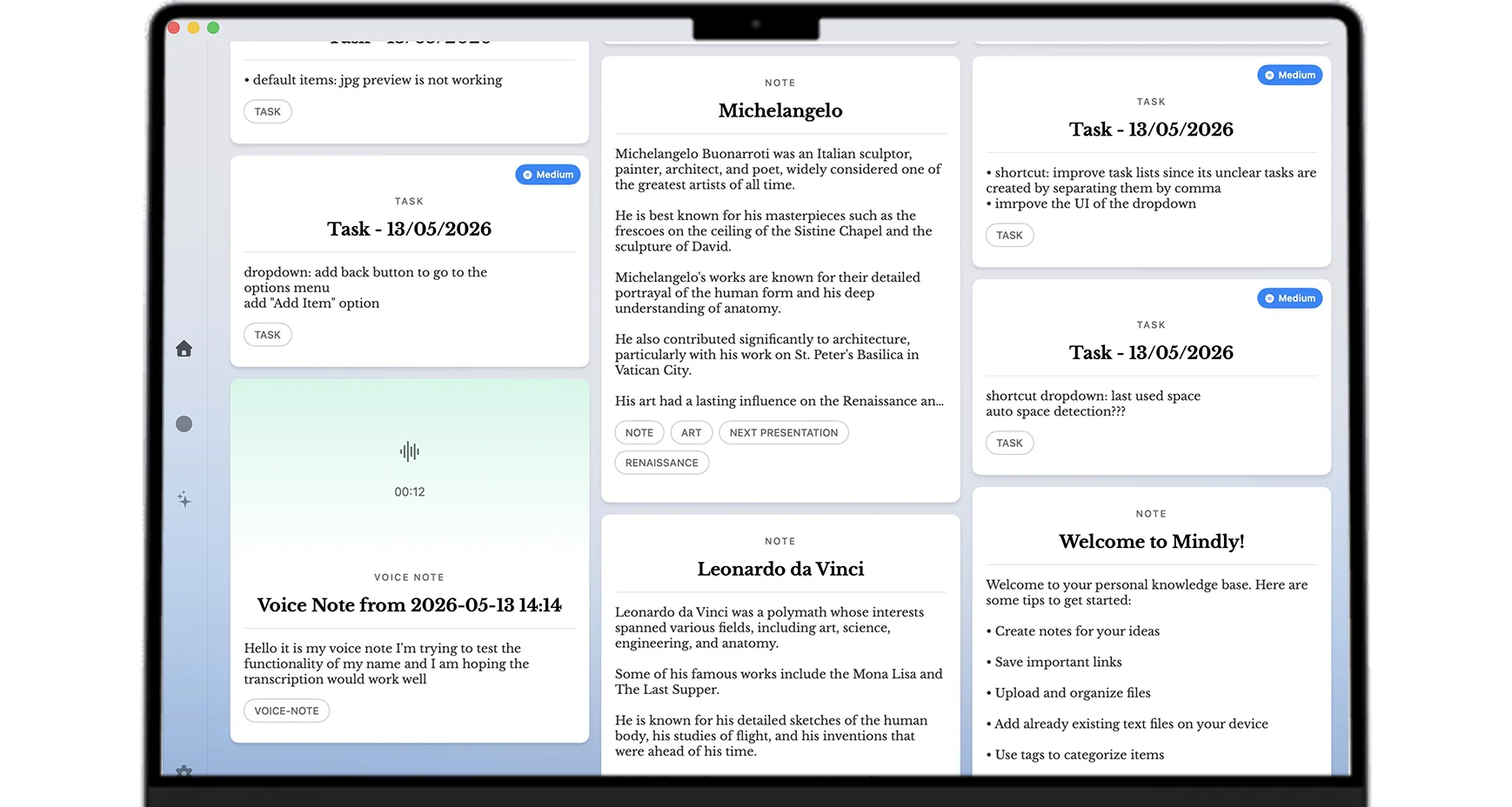
- Mindly The AI take on the slip box. One shortcut captures notes, links, PDFs, and voice memos, and the AI tags, summarizes, and links related items automatically into a navigable mind map with semantic search, with the library stored on your Mac. Best for people who want the connected web a Zettelkasten produces without the manual linking ritual.
| App | Linking | Upkeep | Platform | Price |
|---|---|---|---|---|
| Mindly | Automatic (AI draws the links) | Low | macOS | Free 25 items, Pro €7.99/mo |
| Obsidian | Manual backlinks, graph view | High | Mac, Windows, Linux, mobile | Free, paid sync |
| Logseq | Manual block links, journals | High | Cross-platform | Free, open source |
| Zettlr | Manual links, Zotero citations | High | Cross-platform | Free, open source |
| The Archive | Manual, plain text | High | macOS | One-time license |
| Roam Research | Manual bidirectional links | High | Web | Subscription |
| Capacities | Manual object links | Medium | Cross-platform | Free tier, paid plans |
A Closer Look at Each App
Obsidian
Obsidian is the answer most people get when they ask this question, and it earns the reputation. Your notes are plain Markdown files in a local vault, so they are portable and yours for good. Backlinks and unlinked mentions make connections visible from both ends, the graph view shows the shape of your web as it grows, and the plugin ecosystem is large enough that whole Zettelkasten workflows, unique IDs, structure notes, spaced resurfacing, exist as community plugins. If you want a digital slip box you control completely, this is the strongest option, and it is free for personal use. The cost is not money, it is that Obsidian hands you the tools and none of the practice. You decide the conventions, you make every link, and you keep making them after the novelty fades. For someone who wants the manual craft, that is precisely the appeal. But it is worth saying plainly that the world is full of forty-note Obsidian vaults whose owners watched the tutorials, set up the templates, and stalled, with the vault still there and the web never formed.
Logseq
Logseq is the outliner take on the same idea, free and open-source, with your notes kept in local files. Everything you write is a block in an outline, the daily journal is the default home for whatever arrives, and backlinks work at the block level, so a single bullet can be referenced from anywhere. For people who think in outlines this is a genuinely comfortable way to run a slip box: capture goes to today's page with almost no ceremony, and structure emerges from links rather than from deciding where a note lives. The honest cost is the same discipline the method always demands, since the links are still yours to make, plus a block-based model that takes some learning before references and embeds feel natural. If the outline is how your mind already works, Logseq will feel less like adopting a method and more like writing it down.
Zettlr
Zettlr is the academic's Zettelkasten, free and open-source, built by and for people who write scholarly work. It is a Markdown editor at heart, with the slip-box conventions supported and, crucially, real citation support through Zotero, so a note carrying a source can become a properly cited passage in a manuscript without retyping anything. That pipeline, from atomic reading notes to a referenced draft, is what Luhmann actually used his Zettelkasten for, and Zettlr is one of the few tools designed around that endpoint rather than around note-taking as its own hobby. It is less polished than the commercial options and the linking is entirely manual, but if your slip box exists to produce papers, a thesis, or a book with a bibliography, it is quietly one of the most practical choices on this list.
The Archive
The Archive is what you choose when you want the method, all of it, on purpose. It is Mac-native, plain-text, and minimal by conviction rather than by neglect, shaped by the community that has thought harder about Luhmann's actual practice than almost anyone else. There is no graph to admire and no automation to lean on, just fast search and links you type yourself, and that austerity is the point: the friction of writing each connection by hand is where the thinking happens, and The Archive refuses to take that away from you. It will never be the popular recommendation, and it does not try to be. For purists who believe the Zettelkasten is a discipline first and a database second, it is arguably the truest digital expression of the original, and everyone else should know themselves well enough to know whether that description is inspiring or exhausting.
Roam Research
Roam Research deserves credit that comparison lists sometimes forget: it is the app that made networked thought mainstream. Bidirectional links, daily notes as the front door, the graph as a first-class object, an entire generation of tools exists because Roam demonstrated that notes could be a web instead of a filing cabinet. The freeform, write-first, link-as-you-think experience is still distinct, and people who bonded with it tend to stay. The honest caveats are structural: it is cloud-based, it is a subscription, and much of what made it revolutionary has since been absorbed by free local-first alternatives, so you are paying for the original experience rather than for capabilities you cannot get elsewhere. If that experience is the one that makes you actually write and link, that is a fair trade, because the app you use is worth more than the app you admire.
Capacities
Capacities is the designed, modern take on connected notes. Instead of undifferentiated pages, everything you save is an object with a type, a person, a book, a meeting, an idea, and objects link into a network that stays visually calm and pleasant to live in. That structure is a real answer to a real Zettelkasten problem, the slip box that grows into an undifferentiated soup, because types give you a second axis of organization that plain links lack. It is cloud-based, and it is fair to say it is a networked-notes system inspired by these ideas rather than a strict Zettelkasten, since the method's conventions are yours to impose on top of the object model. For people who want connected notes with more guardrails and polish than a folder of Markdown, and who are comfortable with their library living in the cloud, it is one of the nicest options available.
Mindly
Mindly is the AI answer to the problem this whole article keeps circling: the links are the value, and the links are what people stop making. It is a native macOS app where one shortcut, ⌘M, captures whatever you are holding, a note, a link, a PDF, a file, a screenshot, a voice memo, and the AI does the slip-box work on arrival. It tags each item by topic, summarizes long content, transcribes audio, reads the text inside screenshots, and, most importantly here, links related items to each other automatically, so the connected web forms as a byproduct of capturing. You explore that web as an interactive mind map, search it in plain language by meaning rather than keywords, and can open any saved item and ask it questions in context. The library lives on your Mac, AI processing runs over encrypted channels and your content is not retained after the request, and there is no account to create. The honest caveat is that this is not the classical practice. Nobody is choosing where each note belongs, so the learning that manual linking forces does not happen, and a purist practicing Luhmann's method by hand should pick Obsidian or The Archive and be happy. Mindly is for the other group, the people who wanted the connected library, tried the ritual, and never sustained it, and would rather have the web built for them than have no web at all.
How to Choose the Right Zettelkasten App
Rather than crown one winner, be honest about the relationship you want with the method. A few if-then rules cover most people.
- If you want the manual practice and total control choose Obsidian. It is the most capable digital slip box there is, and the linking discipline it asks for is exactly the discipline the classical method is built on.
- If you think in outlines choose Logseq. The daily journal and block-level links make it the lowest-ceremony way to run a manual Zettelkasten, free and in local files you own.
- If your slip box exists to produce papers choose Zettlr. Citation support through Zotero turns reading notes into cited manuscripts, which is closer to Luhmann's actual use of the method than anything else here.
- If you want the purist experience choose The Archive. Plain text, Mac-native, and deliberately minimal, it keeps the friction that makes the method a thinking practice rather than a filing system.
- If you want the classic networked-notes feel, or more structure around it choose Roam Research for the original freeform experience, or Capacities for a designed, object-based network, accepting that both live in the cloud.
- If you tried manual linking and abandoned it choose Mindly. It builds the tags, summaries, and links automatically as you capture, so the connected web exists whether or not you ever feel like maintaining it.
The pattern underneath these is a single question: who builds the links. If the answer is you, and you mean it, the traditional tools reward that commitment with a slip box that also trained your thinking along the way. If the answer is you, but honestly it has not been, then the method has already told you what you need, and the right move is an app where the web forms anyway.
Where Mindly Fits
Every other app in this guide shares one assumption: that you will keep making the links. It is a reasonable assumption for the minority who treat the Zettelkasten as a craft, and a quietly fatal one for everyone else, because the method only compounds if the connections keep getting made, and week three is where most people stop making them. Mindly starts from that failure instead of pretending it does not happen. You capture with one shortcut and move on, and the AI tags, summarizes, and links related items into a web you can walk through as a mind map, search in plain language, and question directly. The organizing that kills most slip boxes simply never lands on you.
It is macOS only, and that focus is deliberate: a native Mac app with a library that lives on your machine rather than in a vendor cloud, AI processing over encrypted channels with content not retained after the request, and no account needed to start. The free tier holds 25 items, enough to capture a real week of thinking and watch the links appear, and Mindly Pro at €7.99 a month or €44.99 a year removes the limit. If you read the apps above and felt the pull of the practice, choose one of them and enjoy it. If you felt tired instead, this is the one that does the linking for you.
Free for macOS, no account needed. Capture ten ideas and watch the links draw themselves. Download Mindly →