How We Compared the Apps
Most comparisons rank these apps by features. Features are the wrong lens, because every app here can store a note. What separates a second brain you still use in a year from one you abandon in a month is four practical things.
- Capture friction How fast can you get something out of your head or off the web and into the app. If saving takes more than a moment, you stop doing it, and a second brain you do not feed is an empty app.
- Organizing effort Who does the filing. Some apps ask you to build folders, tags, links, or databases; a few do it for you. This is the single biggest predictor of whether a system lasts.
- Finding things again Whether search only matches the exact words you typed or can find something you half remember, across notes, documents, and media.
- Ownership Where the library lives: in files on your device, or in a company's cloud. This decides what happens to years of notes if the app changes its pricing or shuts down.
The list is not ranked by score. It runs roughly from the apps that do the most organizing for you to the ones that leave it entirely in your hands, and it ends with Apple Notes as the free baseline. Descriptions are based on each product's documented features and design as of October 2026. We have left out prices, apart from our own, because they change faster than articles do; the table gives each app's cost model instead.
The 12 Best Second Brain Apps at a Glance
The short version: twelve apps, what each is best for, who does the organizing, where your library lives, and how you pay.
| App | Best for | Organizing | Library lives | Cost model |
|---|---|---|---|---|
| Mindly | Automatic organization of mixed files on a Mac | Automatic: AI tags, summaries, links | On your Mac | Free up to 25 items, then subscription |
| Mem | Self-organizing notes with AI chat | Automatic: AI relates notes | Mem's cloud | Free tier, paid plans |
| NotebookLM | Studying a defined set of sources | AI answers from sources you upload | Google's cloud | Free tier, paid plan |
| Capacities | Structured, object-based notes | Manual: typed objects and links | Cloud | Free tier, paid plans |
| Tana | Power users who want to design a system | Manual: supertags and queries | Cloud | Subscription |
| Notion | Teams and databases | Manual: pages and databases | Notion's cloud | Free tier, per-member plans |
| Heptabase | Visual thinkers and researchers | Manual: cards on whiteboards | Your device, with sync | Subscription, free trial |
| Reflect | Fast daily notes with encryption | Manual: backlinks and daily notes | Encrypted cloud | Subscription |
| Anytype | Privacy-first structured notes | Manual: objects and relations | Your devices, encrypted sync | Free plan, paid tiers |
| Obsidian | Local Markdown and deep customization | Manual: links, folders, plugins | Local Markdown files | Free app, paid sync |
| Logseq | Outliners and open-source fans | Manual: blocks and journals | Local files | Free, open source |
| Apple Notes | A free, instant default | Manual: folders and tags | iCloud | Free |
Two columns do most of the deciding. If the organizing column says manual and you know you will not keep it up, the rest of the row does not matter. And if the library column says cloud, you are trusting that company with the archive for as long as you keep it.
The 12 Apps, One by One
1. Mindly
Mindly is a native macOS second brain built on one idea: capturing and organizing should not be your job. One shortcut saves whatever is in front of you, a note, a link, a PDF, a voice memo, a screenshot, a file, and AI does the rest as each item arrives. It tags by topic, writes a summary of anything long, transcribes audio, reads text inside images, and connects the new item to related things you saved earlier. You find things by searching in plain language, see how they relate on a mind map, and can open any item and ask questions about it. The library is a folder on your Mac rather than an account on someone else's servers, and it imports Evernote exports directly.
- Where it falls short It runs on macOS only, with no Windows or mobile app. It is built for one person, so there is no real-time collaboration, no shared workspace, and no databases. The AI features call cloud models, which means they need a connection, though content is sent over encrypted channels and is not kept on Mindly's servers afterwards. The free tier stops at 25 items.
- Choose it if you are on a Mac, you save many kinds of things rather than only text, and the part of every system you abandon is the filing.
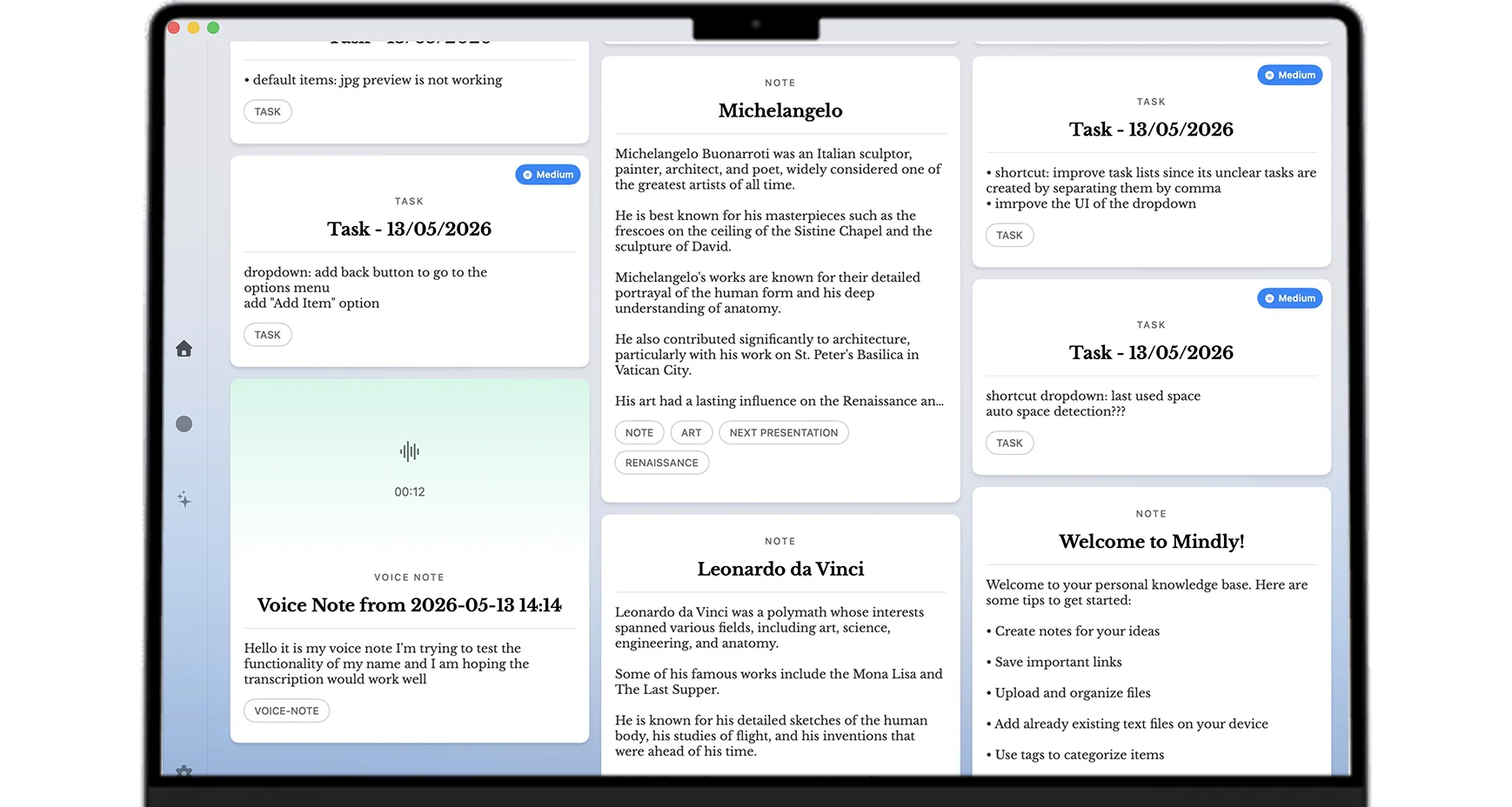
The full picture of how capture, organization, and recall fit together: Mindly, the second brain app for Mac →
2. Mem
Mem is the best-known AI-first notes app, and it shares Mindly's starting belief: you should not have to file things. There is no folder tree. You write notes, and AI relates them to each other and brings the relevant ones back when you need them, with collections available when you want a manual grouping. You can also ask questions across everything you have written. For someone who captures a lot of loose text and never keeps a filing system going, it removes the step that usually fails.
- Where it falls short Your notes live in Mem's cloud, so the archive depends on one company's service and pricing. It is built around notes more than around a general library of files and documents. And the design gives you few ways to impose your own structure, which is the point of the product and also its ceiling: when the AI's idea of what is related differs from yours, there is not much to adjust.
- Choose it if you want self-organizing notes on more than one platform and are comfortable keeping them in a cloud service.
How the self-organizing approach compares with a workspace you build yourself: Notion vs Mem →
3. NotebookLM
NotebookLM, from Google, is the strongest tool on this list for one specific job: understanding a set of sources. You upload documents, PDFs, links, or transcripts into a notebook, and it answers questions from those sources with citations back to the passage, writes summaries and study guides, and can turn the material into an audio overview. Because answers are grounded in what you uploaded, it is far more reliable for studying or research than a general chatbot.
- Where it falls short It is a research companion more than a second brain. Each notebook is its own island with limits on how many sources it holds, so nothing connects across projects. It is not built for quick everyday capture of a passing thought, a screenshot, or a link you might want in a year. And everything sits in Google's cloud.
- Choose it if you have a defined pile of sources to master, such as a course, a report, or a literature review, and want answers you can trace.
What it does brilliantly, and where it stops being a second brain: NotebookLM as a second brain →
4. Capacities
Capacities treats notes as typed objects. A person, a book, a meeting, and an idea are different kinds of thing, each with its own properties, and they link into a network. That makes it feel more like a personal database than a notebook, without Notion's team-workspace weight. Daily notes give you a place to start, and the design is calm and considered. If you like structure but find blank pages and raw folders too loose, the object model gives your notes a shape from the first day.
- Where it falls short The structure is still yours to maintain: someone has to decide the type and fill in the properties, and that someone is you. It is cloud-based, so your library lives on Capacities' servers. And the object model takes a little learning before it pays off, which is more setup than a simple notes app asks for.
- Choose it if you think in terms of people, books, projects, and meetings, and want notes that carry that structure.
5. Tana
Tana is the power tool of the category. It is an outliner in which any line can be given a supertag that turns it into a structured object with fields, and those objects can be filtered, queried, and rolled up into live views. A meeting note can become a task list, a people directory, and a project log at once. AI is woven through it. For people who want to design exactly how their information behaves, very little else comes close.
- Where it falls short It has the steepest learning curve on this list. The power arrives only after you have built the structure, and the structure needs upkeep as your work changes. It is cloud-based and subscription-priced. If you have ever abandoned a system because maintaining it became a hobby in itself, Tana will test that tendency.
- Choose it if you enjoy building systems and want your notes to behave like a database you designed.
6. Notion
Notion is less a notes app than a workspace, and that is its strength. Pages, databases, wikis, and project boards combine into almost any structure, and teams in particular rely on it: real-time editing, comments, permissions, and published pages are all first-class. For shared knowledge, project tracking, and anything with a clear schema, it is the standard, and the template ecosystem means you rarely start from nothing.
- Where it falls short For a personal second brain, much of that power is setup. You design the workspace before it helps you, and it stays tidy only while you keep tending it. Your content lives in Notion's cloud, the offline mode is limited, and quick capture is slower than in lighter tools because every note needs a place to go.
- Choose it if you work with a team, or your information is naturally a database: projects, clients, content, reading lists.
Using Notion alone and finding it heavy for personal notes? A Notion alternative for personal use →
7. Heptabase
Heptabase is built for people who think spatially. Notes are cards, and you arrange them on infinite whiteboards, group them, and draw connections, so a complex topic becomes something you can see. The same card can sit on several boards. It has a strong research workflow, with PDF annotation and AI chat that answers from your own cards and documents, and it is local-first: your data is on your device and syncs in the background, so it works offline. Apps are available across desktop and mobile.
- Where it falls short It is a paid subscription with a free trial rather than a free tier. The whiteboard is the product, so if you do not think visually the central feature will not help you. And arranging cards is still manual work: the map is only as good as the time you spend laying it out.
- Choose it if you are learning or researching something complex and understand it best by laying it out in space.
8. Reflect
Reflect is a fast, deliberately minimal networked notes app built around daily notes and backlinks. Notes are end-to-end encrypted, AI features are built in, and the interface stays out of the way. It does less than most tools here on purpose, which is why people who find Obsidian or Notion too much to configure often settle on it. Open it, type, link, move on.
- Where it falls short It is subscription-only. The minimalism that makes it pleasant also means few ways to add structure when you want some. It is centred on text notes rather than a wide library of files, and the linking that holds everything together is still something you do by hand.
- Choose it if you want quick, private, linked notes and no system to design.
9. Anytype
Anytype is the privacy-first answer to Notion. Like Capacities it is built on objects with types and relations, so it can act as a wiki, a reading tracker, or a project list. Unlike most tools here it is local-first and end-to-end encrypted: data is stored on your own devices and synced between them in encrypted form, so the company cannot read it. It works fully offline, the client apps are source-available, and there is a free plan.
- Where it falls short It is less polished than Notion, with some features that still feel unfinished. Collaboration is at an earlier stage than in cloud-first tools. And as with any object-based system, the structure is yours to design and keep up.
- Choose it if you want Notion-style structure with your data on your own devices and encrypted end to end.
10. Obsidian
Obsidian is the favourite of people who want control. Your notes are plain Markdown files in a folder on your device, so they are local, portable, and readable by any app for as long as text files exist. Backlinks, a graph view, a canvas, and database-style views over note properties come built in, and a very large community plugin library lets you shape it into nearly anything. The app is free, including for commercial use, with paid options for sync and publishing.
- Where it falls short The freedom is also the cost. Nothing is organized unless you organize it: you write the links, choose the folders, and maintain the plugin setup. It is text-first, so PDFs, links, and screenshots are attachments rather than first-class items. Many people enjoy the tending; many others stop after a few months.
- Choose it if you want to own your files, work offline, and build your own system.
The most common head-to-head in the category: Notion vs Obsidian →
11. Logseq
Logseq is an open-source, local-first outliner. Every line is a block that can be referenced, embedded, or queried, and the app opens on a daily journal, so you never have to decide where a note goes before writing it. PDF annotation, flashcards with spaced repetition, and whiteboards are built in, which makes it a natural fit for study. Notes are Markdown or Org-mode files on your own device, and the app is free.
- Where it falls short Everything is a bullet, which suits outlines and is awkward for long-form writing. The plugin ecosystem is smaller than Obsidian's. And like Obsidian, the organizing is manual: links, tags, and reviews are habits you have to keep.
- Choose it if you think in outlines, want a journal as your front door, and care that the software is open source.
Pages or outlines? The two local-first tools compared: Obsidian vs Logseq →
12. Apple Notes
Apple Notes is the free default on every Mac, iPhone, and iPad, and it is better than its reputation. It opens instantly, syncs through iCloud, handles scans, sketches, and attachments, and has folders, tags, smart folders, and shared notes. For quick notes and lists, nothing is faster, and for many people that is all a second brain needs to be at first.
- Where it falls short It does not organize for you, summarize what you save, or connect related notes. Search is by keyword, which is enough for a few hundred notes and strains at a few thousand. It is tied to Apple devices, and getting notes out in bulk has historically been awkward.
- Choose it if you want something free that is already on your devices, and your needs are light.
Which Second Brain App Should You Choose?
Rather than crown one winner, match the app to what you actually want. A few honest if-then rules cover most people.
- If you want zero setup and automatic organization on a Mac choose Mindly. It is built for people who want to capture and find things without designing or maintaining a system, with the library kept on their own machine.
- If you want self-organizing notes on several platforms choose Mem, and accept that the notes live in its cloud.
- If you work with a team choose Notion. Nothing else here matches it for shared docs, databases, and permissions.
- If you want to own plain files and build your own system choose Obsidian for documents or Logseq for outlines.
- If you want structure without a team workspace choose Capacities, or Anytype if you want the data on your own devices and encrypted.
- If you enjoy designing systems choose Tana and expect to spend time on it.
- If you think visually choose Heptabase.
- If you are studying a fixed set of sources use NotebookLM for that project, alongside whatever holds the rest of your notes.
- If you want fast, private notes and nothing else choose Reflect.
- If your needs are light and you use Apple devices stay with Apple Notes until it stops being enough.
The pattern underneath is simple. The more you want to control and build, the more Obsidian, Logseq, Tana, and Notion suit you. The more you want the app to do the organizing so you can capture and retrieve, the more Mindly and Mem suit you. Be honest about which person you are on an ordinary busy week, not on the Sunday you set the system up.
If upkeep is what always breaks your system
Many people searching for a second brain app have already tried two or three and watched each one fill up and go quiet. If that is you, including if you have ADHD and find that filing and reviewing are the steps that never happen, weight two things above everything else: the lowest possible capture friction, and the least organizing left to you. That points to the automatic end of this list, or to something as simple as Apple Notes, and away from tools whose value depends on a maintenance habit.
A longer look at systems that survive low-energy weeks: ADHD note-taking systems that actually work →
The Best Free Second Brain Apps
Several apps on this list cost nothing to start, and a few cost nothing at all. Free means different things, though.
- Free with no meaningful limit Obsidian (the app is free, sync is a paid extra), Logseq (free and open source), and Apple Notes (free with your device, within your iCloud storage).
- Free plan with paid tiers above it Notion (workable for one person), Anytype, Capacities, Mem, and NotebookLM.
- Free to try, then a limit Mindly is free for your first 25 items with every feature included and no account needed, so you can see the automatic organizing before paying. Heptabase offers a free trial rather than a free tier.
If free is the deciding factor and you are happy to do your own organizing, Obsidian and Logseq are the strongest choices, because the app, the files, and the format are all yours. If you want the organizing done for you, the question is less about price than about whether the free allowance is enough to tell if the approach works for you.
Where Mindly Fits
Most second brain apps ask you to be the librarian. You choose the folders, write the tags, build the links, and keep it all current, and the system works right up until the upkeep outpaces your willingness to do it. Mindly was built for the people who lost that fight, or who never wanted to start it. You capture with one shortcut, and the AI summarizes, tags, and connects everything automatically, so the organizing that breaks other systems never lands on you. You find things by searching in plain language across notes, PDFs, voice, and saved web pages together.
It is macOS only, and that focus is deliberate: a native Mac app with a library that lives in a folder on your machine rather than a vendor cloud. AI processing runs over encrypted channels and content is not retained on Mindly servers after the request. The free tier holds up to 25 items so you can feel the difference, and Mindly Pro removes the limit. If you need Windows, a phone app, or a shared team space, one of the other eleven will serve you better. If the apps above sound like work you do not want to do, Mindly is the one that does it for you.
Free for macOS, no account needed. Capture ten things and watch them organize themselves into a second brain. Download Mindly →